"best solution for remote teams"
"improves productivity!"
"so easy to use"
Monitask is a powerful automatic timesheet software for your team. No need to fill out and manage timesheets manually — employee timesheets sync to the web-based live dashboard in real time. Plus, they're 100% automated.
No credit card · Free 10 days · Cancel anytime
4.8 on G2
4.8 on Capterra
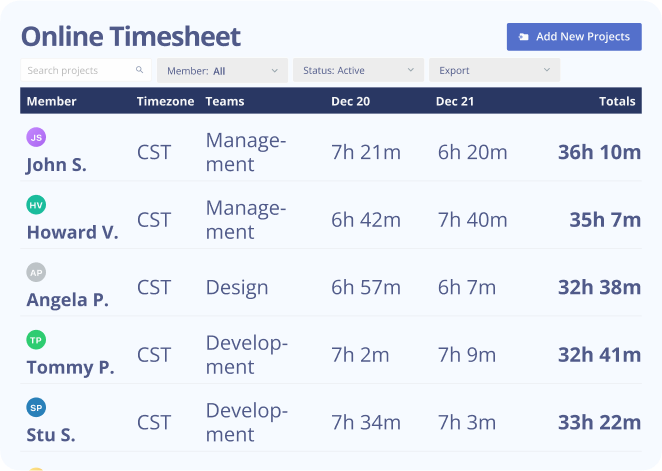
Generate accurate, payroll-ready online timesheets for your team without the end-of-week spreadsheet chase. Monitask captures hours automatically as work happens, rolls them up into clean timesheets, and exports straight to the payroll and accounting tools you already use.
1000+ clients worldwide increase workforce productivity with Monitask





Automatic tracking, manual entry, mobile clock-in and a live web dashboard — every way your team actually works.
The lightweight desktop app records hours in the background while your team works (Windows, Mac, Linux).
Add or edit time entries by hand when someone works offline or forgets to start the timer.
Clock in and out and check timesheets from the iOS and Android apps.
Managers see live hours and edit entries from any browser.
Every hour is stored against a task and project with a timestamp — payroll and client billing rest on real data, not estimates.
Every hour is stored against a task and project with a clear timestamp.
Optional screenshots and activity levels show what was actually happening during each tracked hour.
Approved timesheets convert straight into payroll and client invoices — no end-of-month spreadsheet chase.
The same timesheet data your manager sees is available to the employee, so nothing is hidden.
See how Monitask fits your industry.
Real results from teams that switched to transparent time tracking.
"As a Sales and Marketing Manager on FBA Prep 4U. I am using Monitask 5 days a week because I need not extend 40 hours of my weekly working hour. Monitask made it easy for me to monitor time and show my productivity thru their screenshot features. It helps me to gain the trust of my boss who is also checking my timeline. I would highly recommend this software to my colleagues who are looking for reliable employee timesheet monitoring."
"It is a must-have tool for companies allowing remote work. 80% of our employees work from remote locations, and tracking their work efficiency was a big challenge for us. we had at a point also decided to create a tool for time tracking, however, once we heard about monitask, and used it for 10 days with the free trail. it was an instant GO for us ad we have been using the same since then."
"As an entrepreneur, I often feel guilt that I'm not spending "enough" time working on various projects. Once I started using Monitask, everything became objective and my time has started to become more valuable. Things that get measured get improved. This objective feedback on how I'm spending my time has given me so much encouragement and motivation. I can see progress happen, and I'm able to feel better about the work I do."
From $6.49 / user / month
Free 10-day trial · No credit card required · Cancel anytime
See all plansMonitask is a powerful automatic timesheet software for your team.
No need to fill out and manage timesheets manually — employee timesheets
sync to the web-based live dashboard in real time.
Plus, they’re 100% automated.
With Monitask’s automatic timesheet feature, these issues are eliminated. Monthly and hourly employees no longer have to worry about remembering to fill out their timesheets or making mistakes when entering their time worked. Yet, Monitask is not just any employee timesheet app. It is efficient, intelligent time tracking software designed to simplify and streamline time management for businesses of all sizes also available as a mobile app.
The built-in automatic employee timesheet feature completely eradicates the need for manual entries of employee time, thereby reducing the potential for errors and misreporting. The software syncs all timesheet data in real time to a live dashboard or a mobile app, providing a comprehensive view of employee hours and productivity at any given moment.
Monitask’s user-friendly interface ensures a seamless experience for unlimited users. The employee timesheet app also prioritizes data security, employing robust encryption methods to safeguard sensitive information. These functionalities, coupled with insightful analytics, automatic reminders, and detailed reports, make Monitask a reliable choice for businesses looking to optimize their time tracking processes.
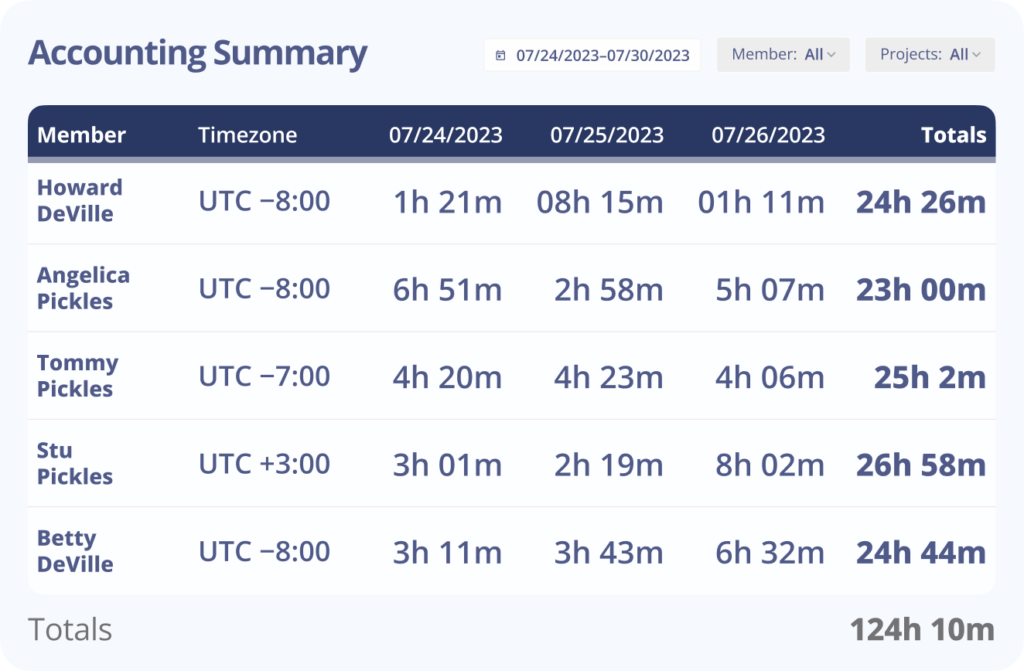
Online timesheets offer several advantages over manual timesheets. Monitask, as a robust time tracking solution, provides numerous benefits to its customers. An online timesheet app streamlines the time tracking process, eliminating the need for manual data entry, saving time but also minimizes the risk of errors associated with manual input just as easy as logging in a mobile app.
Online timesheets offer several advantages over manual timesheets. Monitask, as a robust time tracking solution, provides numerous benefits to its customers. An online timesheet app streamlines the time tracking process, eliminating the need for manual data entry, saving time but also minimizes the risk of errors associated with manual input just as easy as logging in a mobile app.
| Free | Paid | |
|---|---|---|
| Credit Card | Not required | Required |
| Budget Friendly |  |  |
| Upgrades | Not imposed | Mandatory |
| Features | Limited | Access to Premium Features |
| Mid to large teams | | |
| Customer Support | Limited | High-quality |
| Data Security | Limited | Improved |
| Personal Data | Not required to provide | May be required to provide |
Whether you’re a small startup or a large enterprise, Monitask offers both free and paid options to cater to your specific needs. With its user-friendly interface and robust features, you can effortlessly track and manage employee hours, monitor productivity, and streamline your business operations. Click here to start your free 10-day trial!
Many companies often collaborate with numerous clients and employees across multiple projects. Web timesheets serve as comprehensive records, detailing the time spent on each client or project, including the billable and non billable hours.
Web timesheets simplify time tracking and invoicing for project managers and business owners. Additionally, timesheet solutions are invaluable for human resource departments, as they aid in analyzing and reviewing employees’ activities within the organization. Moreover, they play a crucial role in planning future projects and managing client work within your business team.
Typically, your employees are expected to fill out the timesheets themselves, and after that, a designated manager can review them before payment is approved. However, depending on your company’s policy, the supervisor, manager, or owner could fill out the timesheets for employees.
Monitask online timesheets don’t stop at tracking hours — they connect to the tools you already use for accounting, HR and project work. Approved hours export in one click, so you pay your team and bill your clients from the same accurate data.
Monitask integrates with QuickBooks Online, BambooHR, Microsoft Teams, Asana, ClickUp, Jira and Basecamp, connects to 5,000+ apps through Zapier, and exports payroll-ready reports in CSV/Excel for any provider. API access is available for custom workflows.




Online timesheets replace end-of-week guesswork with a clear approval flow:
Approve — a manager checks the timesheet, approves or rejects it with a comment, and the approved hours are locked for payroll and billing.
Track — hours are captured automatically as employees work and sync to the live dashboard in real time.
Submit — employees review their own hours, add notes, and submit the timesheet for the pay period.
Automatic tracking — the lightweight desktop app records hours in the background while your team works (Windows, Mac, Linux).
Manual entry — add or edit time entries by hand when someone works offline or forgets to start the timer.
Mobile — clock in and out and check timesheets from the iOS and Android apps.
Web dashboard — managers see live hours and edit entries from any browser.
Monitask handles time off in the same place as worked hours. Employees submit vacation, sick, personal or holiday requests from the web or mobile app; managers approve or deny them with automated email notifications; and everyone can see PTO balances in a self-service portal, with a Google Calendar view of who’s off and when.
Every hour is stored against a task and project with a timestamp, and optional screenshots and activity levels give you proof of work behind each entry — so payroll and client billing rest on real data, not estimates.
Start free — Monitask has a free plan and a 10-day trial, no credit card needed. Paid plans with full monitoring, reports and integrations start at $6.49 per user/month (billed annually), with everything you need for team timesheets, reports and integrations. See full pricing →
Outlined below are three key tips that can assist you in developing and implementing a highly efficient and impactful timesheet system within your organization. By incorporating these strategies, you can streamline your time tracking processes, enhance productivity, and gain valuable insights into resource allocation and project management.
To accurately track time spent on a project, it is advisable to start tracking time at the “project level” without overwhelming the timesheet with unnecessary details. Even if it requires breaking projects into deliverables, initiating this practice is a valuable step toward obtaining more insightful information in the future.
Once you have carefully determined the appropriate level of detail, you are now able to choose the specific projects, activities, or deliverables that you would like to meticulously track your time for. This will enable you to have a comprehensive understanding and accurate record of the time spent on each task, ensuring efficient project management and resource allocation.
Before creating a timesheet, it is important to consider the underlying purpose and motivation. Are you looking to gain valuable insights into your staff’s workload, track project costs, or compare planned and actual efforts? By clarifying your objectives, you can ensure that the timesheet serves its intended purpose effectively.
Efficient time management empowers your team to meet deadlines, accomplish goals, and achieve success. Additionally, maintaining accurate records enables effective time optimization. Hence, proficient management of timesheets is indispensable for any thriving business.
An effective timesheet management system allows you to accurately track the tasks and projects your team members are working on either on mobile apps or web-based software. Moreover, it enables you to assess employee efficiency by comparing their working hours to their output. With a well-implemented system, you can gain valuable insights while ensuring productivity and accountability within your team.
This tool also allows you to spot underperforming employees that cost your business money. Hence you know the productive employees and unproductive ones. That way, you can make good decisions that could help save money for your business. Mentioned below are some benefits timesheets can bring to your business:
Set up your team in minutes. First 10 days free, no credit card.