Time Tracking Software for Consultants

Monitask is time tracking software for consultants and consulting firms: log every client hour, show clients what they paid for and turn tracked time into invoices.

10-day free trial · No credit card required

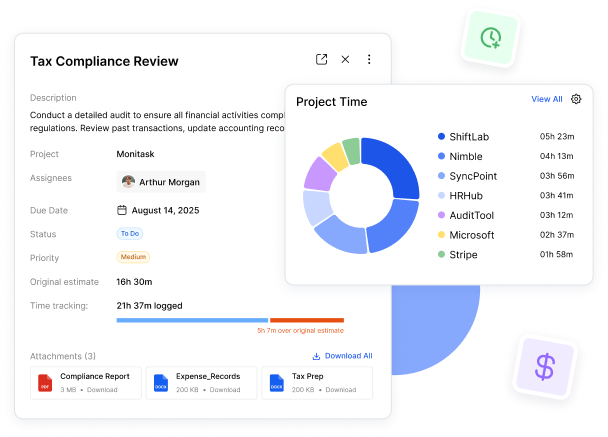
Monitask time tracking software for consultants: dashboard with hours by client

Trusted by thousands of users

Carrier Datalytics Global FIMA AXSource Legal Nodes Mack

Why time tracking for consultants is harder than it looks

Hours that never reach the invoice

Hours that never reach the invoice

Calls, emails and quick fixes between meetings add up to hours a week that nobody logs and no client pays for.

Scope creep on fixed-fee work

Scope creep on fixed-fee work

Extra requests feel small one by one. Without tracked hours you only see the overrun when the project is already unprofitable.

Clients who question the bill

Clients who question the bill

A line that says "12 hours, strategy" invites doubt. Clients want to see what the time was spent on.

No view of team utilization

No view of team utilization

Firm owners can't tell who is overbooked, who has capacity and which retainers cost more than they bring in.

Consultant time tracking built around client work

Monitask records time per client, project and task, adds proof of work to every hour and turns it into reports and invoices. It works for independent consultants and for consulting firms with distributed teams.

Track billable hours by client, project and task

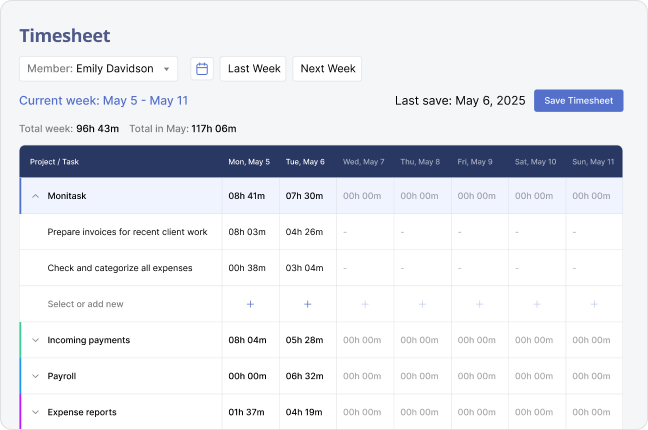
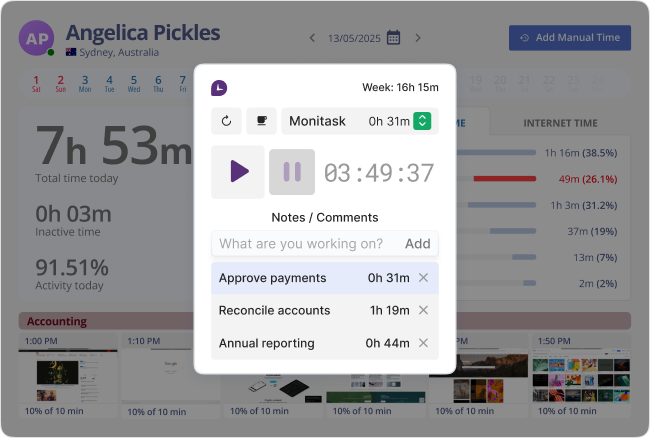
Start the timer when you join a client call and stop it when you're done. Every entry is tied to a client, a project and a task, so at the end of the week you know exactly how many hours went to each engagement. Forgot to start the timer during a workshop? Add the time manually and leave a note. The desktop app runs on Windows, Mac and Linux and keeps tracking offline, so time spent on a train or at a client site without Wi-Fi is not lost.
  • One-click timer on desktop and mobile
  • Manual entries with notes for meetings away from the computer
  • Separate projects and tasks for every client engagement
Learn more about time tracking
Timer tracking billable hours for a consulting client in Monitask

Catch scope creep before it eats your margin

Fixed-fee and retainer work only stays profitable if you know when hours start running past the estimate. Monitask shows tracked time for each project as your team works, so you can compare it with the hours you quoted while there is still room to act. When a client keeps adding "one more thing", you have the numbers to start a conversation about a change request instead of absorbing the work.
  • Hours per project and task, updated as your team works
  • Compare tracked time with the hours in your proposal
  • Spot retainers that consistently run over
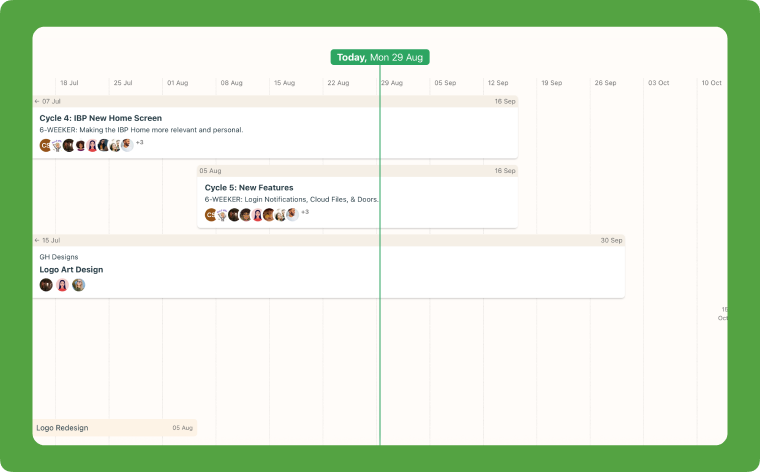
Consulting projects and tasks with tracked hours in Monitask

Show clients proof of work

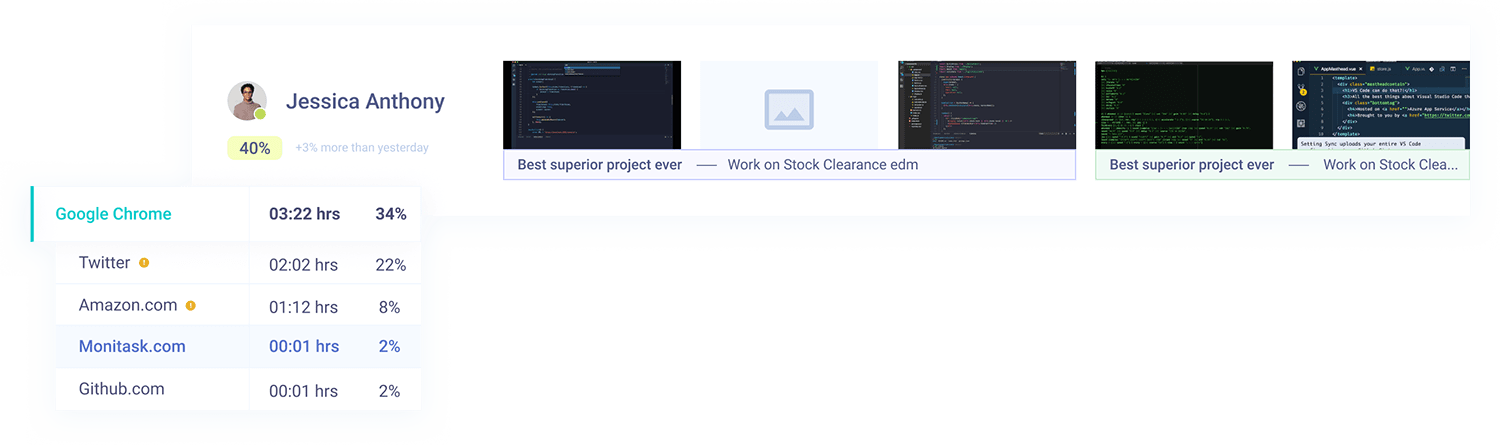
For consultants who work remotely, trust depends on visibility. Monitask can capture screenshots at random intervals, record activity levels and log which apps and websites were used during tracked time. Share this with clients who want to see what they are paying for, or keep it internal to review how an engagement is going. Smartblur blurs screenshots when you work with confidential client data.
  • Optional screenshots at random intervals
  • Activity levels and idle time for every entry
  • Apps and websites used on each project
Learn more about screen monitoring
Screenshots and activity levels as proof of consulting work in Monitask

Turn tracked hours into client invoices

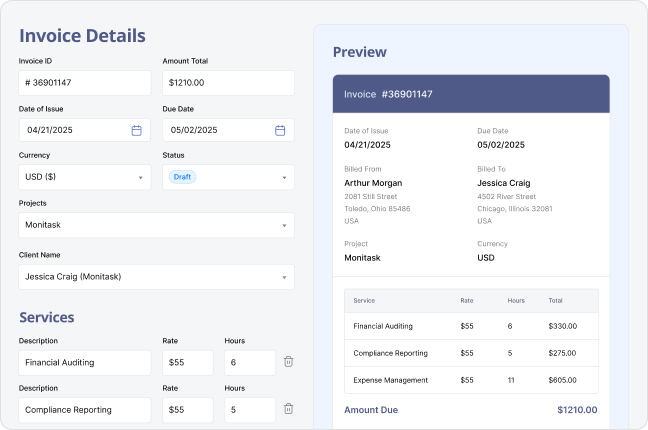
Set hourly rates and create invoices from the hours you have already tracked, with no copying between spreadsheets. Each invoice is backed by a detailed timesheet, so when a client asks what a line item covers, the answer is one click away. Independent consultants get paid faster, and firms spend less time on month-end billing.
  • Hourly rates per project or team member
  • Invoices built from tracked time
  • Timesheets as supporting detail for every invoice
Learn more about online timesheets
Invoice created from consultant billable hours in Monitask

Reports for clients and for your firm

Run reports by client, project, team member or date range and export them for client updates or internal reviews. For a consulting firm, the same data shows utilization: how much of each consultant's week is client work, who has capacity for the next engagement and which clients bring in less than the time they consume.
  • Hours by client, project and consultant
  • Exportable reports for client updates
  • Utilization and capacity across the team
See workforce analytics
Consulting firm utilization report by client and consultant in Monitask

For independent consultants and consulting firms

If you consult on your own, Monitask gives you a timer, timesheets and invoices in one place. If you run a firm, it adds team management: invite consultants, assign them to client projects, review their timesheets and see productivity across remote and on-site staff. Monitoring settings can differ per team member, so a partner and a junior analyst don't need the same level of monitoring. Working solo? See time tracking software for freelancers.
  • Independent consultants: track, report and invoice in one app
  • Firms: teams, client projects and timesheet review
  • Monitoring settings per team member
Learn more about remote workforce management
Consulting team timesheets and reports in Monitask

Without Monitask vs with Monitask

Without Monitask

  • Hours rebuilt from calendars at month end
  • Billable calls and emails go unrecorded
  • Clients dispute vague invoice lines
  • Scope creep found after the project closes

With Monitask

  • Every client hour logged as it happens
  • Manual entries for work away from the computer
  • Invoices backed by timesheets and screenshots
  • Project hours visible while there's time to act

Privacy and security

Working with confidential client data? Smartblur keeps screenshots unreadable while still proving the work was done.

What Monitask records

  • Time entries, timesheets and project or task assignments
  • Optional screenshots at random intervals
  • Activity levels, including keyboard and mouse activity
  • Apps and websites used during tracked time

What Monitask never records

  • Keystrokes, typed text or passwords
  • Private messages and personal files
  • Webcam, microphone or continuous screen recording
  • Data from devices outside the tracked work account

Smartblur blurs sensitive details on screenshots. Monitask is GDPR-ready and has an EU representative through prighter.com.

How to start consultant time tracking with Monitask

  1. Create your account

    Sign up for the 10-day free trial. No credit card needed.

  2. Add clients and projects

    Create a project for each engagement and invite your team.

  3. Track and review

    Track time with the desktop or mobile app and review hours as they come in.

  4. Report and invoice

    Export reports for clients and create invoices from tracked time.

Frequently asked questions about time tracking for consultants

What is the best time tracking software for consultants?

The best time tracking software for consultants records hours by client and project, keeps internal time separate from billable work, produces reports clients accept and turns hours into invoices. Monitask covers all four and adds proof of work: optional screenshots, activity levels and app usage, which helps when clients want to see what they are paying for.

How do consultants track billable hours?

Most consultants start a timer for each client task and add manual entries for meetings away from the computer. With Monitask, every entry belongs to a client project, so billable hours add up automatically. Internal work such as business development goes into its own project and never ends up on an invoice.

How do I track time for multiple clients?

Create one project per client or engagement, with tasks for each workstream. Switch the timer between projects as you move between clients. Reports then show hours per client for any period, which you can export or turn into an invoice.

Can I show clients proof of the hours I worked?

Yes. Alongside the timesheet you can share screenshots taken at random intervals, activity levels and the apps and websites used. Smartblur can blur screenshots when you handle confidential client data, so the record proves work was done without exposing details.

Does Monitask work for consulting firms with remote teams?

Yes. Firms invite consultants, assign them to client projects and see hours, timesheets and productivity for the whole team in one dashboard. Monitoring settings can differ by team member, and reports show utilization, so you know who has capacity for the next engagement.

Can I invoice clients from tracked time?

Yes. Set hourly rates, then create invoices from the hours already tracked for a client. The detailed timesheet behind each invoice answers most billing questions before the client asks.

Is there a free trial?

Monitask offers a 10-day free trial with no credit card required. You can track time, invite your team and test reports and invoices before choosing a plan on the pricing page.

Start tracking consulting hours today

10-day free trial. No credit card required.