Time Tracking Software for Lawyers

Monitask is time tracking software for lawyers, attorneys and law firms: track billable hours by client and matter, keep confidential data blurred and bill from a record clients can check.

10-day free trial · No credit card required

Monitask time tracking software for lawyers: billable hours by client and matter

Trusted by thousands of users

Legal Nodes Carrier Datalytics Global FIMA AXSource Mack

Why legal time tracking leaks billable hours

Calls and emails that never get billed

Calls and emails that never get billed

A ten-minute call with opposing counsel, three emails to a client. Logged from memory at week's end, most of it is lost.

Matters with no cost picture

Matters with no cost picture

Without hours per matter you can't tell whether a flat fee or retainer actually covers the work.

Remote paralegals you can't see

Remote paralegals you can't see

Partners sign off on hours from associates and paralegals working from home with no record behind them.

Privileged data on every screen

Privileged data on every screen

Standard screen monitoring would capture client names, filings and settlement figures. That is a confidentiality risk.

Attorney time tracking that respects client confidentiality

Monitask records time per client, matter and task, verifies work with optional screenshots that Smartblur keeps unreadable, and turns hours into reports and invoices. It works for solo practitioners and for law firms with attorneys, paralegals and remote staff.

Track billable hours by client and matter

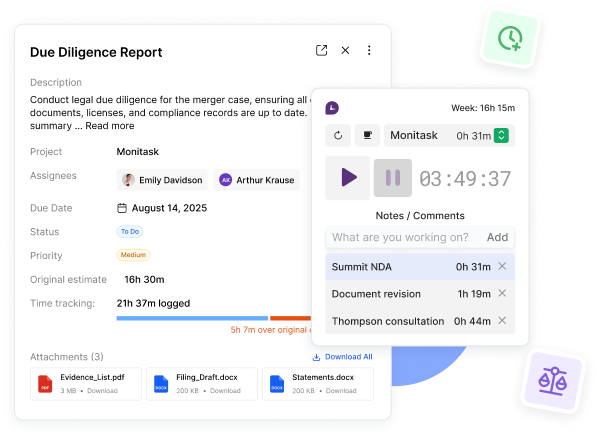
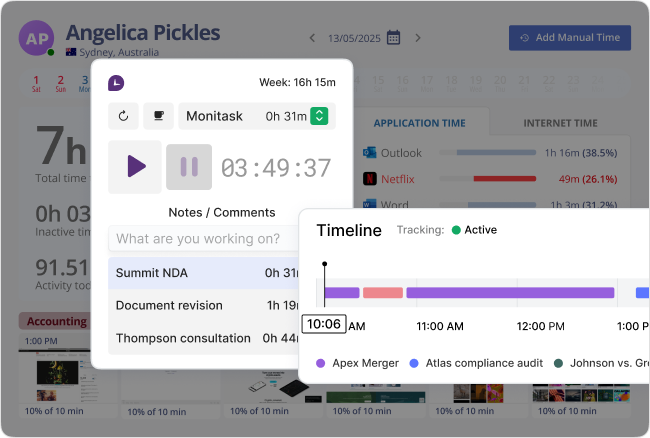
Open a matter, start the timer and every minute of drafting, research or review is recorded against the right client. A call from court or a client meeting can be logged from the mobile app or added manually afterwards with a note describing the work. At month end you have a contemporaneous record of billable hours for each matter, not a reconstruction from calendars and memory.
  • Timer on desktop and mobile
  • Manual entries with a description of the work
  • Every entry tied to a client, matter and task
Learn more about time tracking
Timer tracking billable hours for a legal matter in Monitask

See what each matter really costs

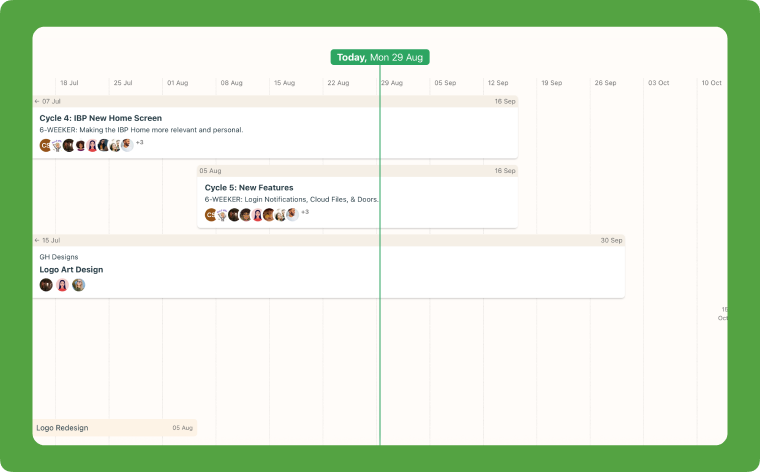
Set up each matter as a project with tasks for its stages: intake, discovery, drafting, filings, hearings. Reports show hours per matter and per stage, so you know whether a flat fee or retainer covers the work and can price the next similar case with real numbers instead of guesses.
  • A project per matter, tasks per stage
  • Hours per matter, client and attorney
  • Data for pricing flat-fee and retainer work
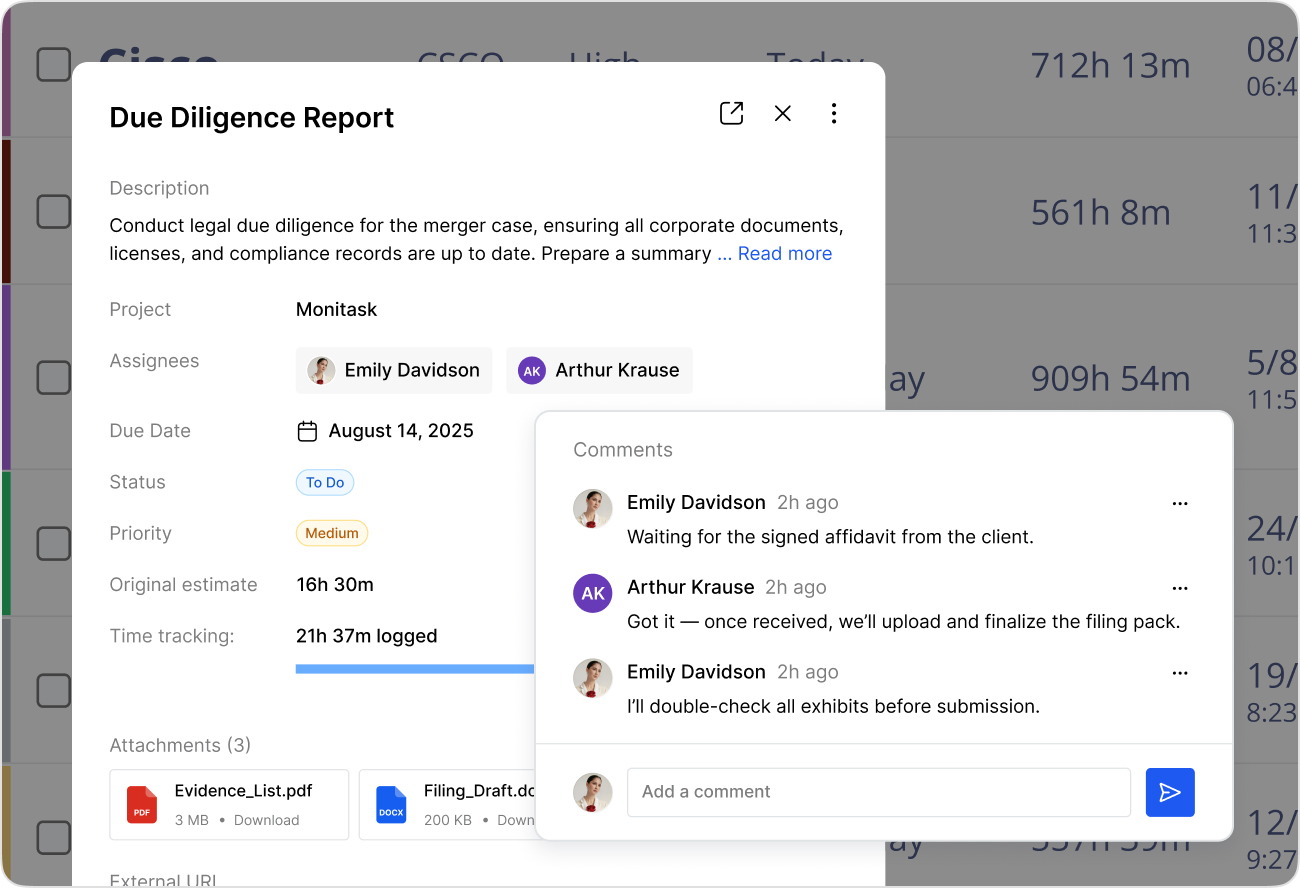
Legal matters and case stages organized as projects and tasks in Monitask

Verify work without exposing privileged information

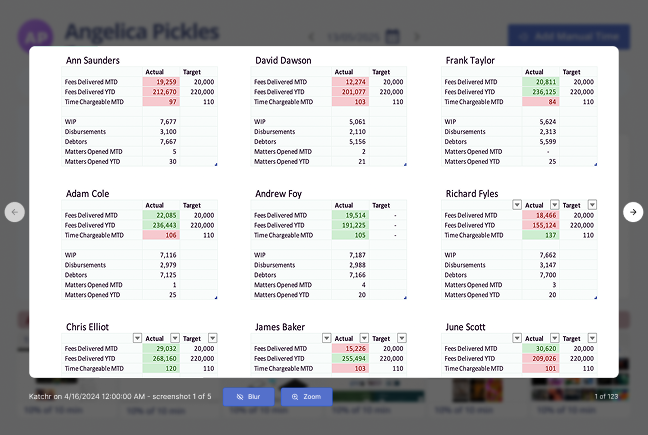
Screenshots at random intervals, activity levels and app usage show partners that billed hours from remote associates and paralegals were real work. Smartblur blurs screenshots, so client names, filings and figures can't be read, but the record still shows that work was done. Screenshots are optional and can be switched off for any team member.
  • Screenshots blurred with Smartblur
  • Activity levels and idle time for every entry
  • Screenshots switched on or off per person
Learn more about screen monitoring
Screenshots blurred by Smartblur verifying work of a remote paralegal in Monitask

Invoice from tracked time

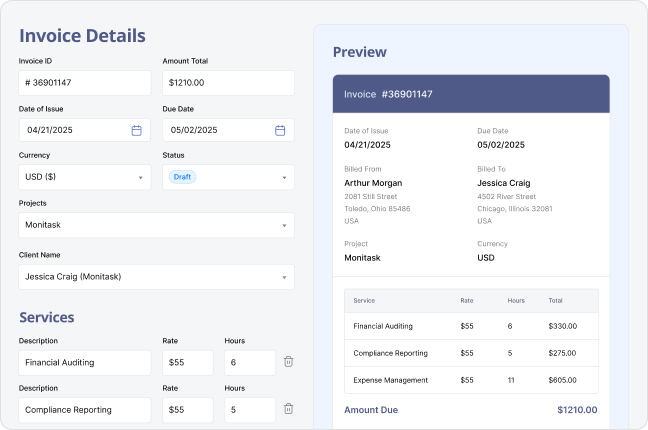
Set hourly rates for each attorney or matter and create invoices from the hours already recorded. Every line is backed by a timesheet entry with a description of the work, which makes it easier to answer a client's billing question and to keep billing records that hold up to review.
  • Hourly rates per attorney or matter
  • Invoices built from recorded time
  • Timesheet detail behind every line
Learn more about online timesheets
Invoice created from attorney billable hours in Monitask

Reports for partners and clients

Run reports by client, matter, attorney or date range and export them for client updates, partner reviews or year-end analysis. See which practice areas generate the most billable hours, how much of each person's week goes to non-billable work and where workload is uneven across the team.
  • Hours by client, matter and attorney
  • Exportable reports for client updates
  • Workload across attorneys and paralegals
See workforce analytics
Law firm report of billable hours by matter and attorney in Monitask

Law firm time tracking for remote and hybrid teams

Invite attorneys, paralegals and legal assistants, assign them to matters and review their timesheets in one dashboard. Monitoring settings can differ per person, so a partner can track time only while a remote paralegal also shares screenshots. On firm-owned computers you can also run Monitask in stealth mode, in line with your firm's policy and local law.
  • Teams of attorneys, paralegals and assistants
  • Monitoring settings per person
  • Stealth mode for firm-owned computers
Learn more about remote workforce management
Screen monitoring for a law firm team of attorneys and paralegals in Monitask

Privacy and security

Attorney-client confidentiality comes first: Smartblur keeps screenshots unreadable while still proving the work was done.

What Monitask records

  • Time entries, timesheets and project or task assignments
  • Optional screenshots at random intervals
  • Activity levels, including keyboard and mouse activity
  • Apps and websites used during tracked time

What Monitask never records

  • Keystrokes, typed text or passwords
  • Private messages and personal files
  • Webcam, microphone or continuous screen recording
  • Data from devices outside the tracked work account

Smartblur blurs sensitive details on screenshots. Monitask is GDPR-ready and has an EU representative through prighter.com.

Without Monitask vs with Monitask

Without Monitask

  • Hours reconstructed from calendars
  • Calls and emails never billed
  • Flat fees priced on guesswork
  • No record behind remote staff hours

With Monitask

  • Contemporaneous time records per matter
  • Calls logged from mobile or added right after
  • Hours per matter to price the next case
  • Blurred screenshots and activity as proof

Connect Monitask to your firm's tools

How to start legal time tracking with Monitask

  1. Create your account

    Start the 10-day free trial. No credit card needed.

  2. Add clients and matters

    Create a project for each matter, with tasks for its stages.

  3. Set privacy options

    Turn on Smartblur and choose screenshot settings for each person.

  4. Track, review and bill

    Review hours per matter, export reports and create invoices.

Frequently asked questions about time tracking for lawyers

What is the best time tracking software for lawyers?

The best time tracking software for lawyers records hours by client and matter as the work happens, keeps confidential information protected, produces billing records you can explain to clients and fits solo practices as well as firms. Monitask covers all of these and adds verified work for remote staff, with screenshots blurred by Smartblur.

How should lawyers track billable hours?

Record time contemporaneously, against a specific client and matter, with a short description of the work. Start a timer when you begin a task, log calls from your phone or add them right after, and review entries daily. Reconstructing hours at month end is where most billable time is lost.

Is screen monitoring compatible with attorney-client confidentiality?

It can be, if confidential content never becomes readable. Monitask's Smartblur blurs screenshots so client names, documents and figures can't be read, screenshots can be switched off entirely for any person, and all tracked data is stored encrypted with 256-bit AES. Firms should still adopt a written monitoring policy and inform staff, in line with local law.

Can paralegals and legal assistants track time in Monitask?

Yes. Paralegals and assistants get their own accounts, track time against the same clients and matters as attorneys and add notes describing their work. Partners see everyone's hours per matter in one report.

Does Monitask work for law firms with remote attorneys?

Yes. Law firms invite attorneys and staff, assign them to matters and review timesheets, activity and blurred screenshots for remote and hybrid teams. Monitoring settings can differ per person, and on firm-owned computers Monitask can also run in stealth mode.

Can I invoice clients from tracked time?

Yes. Set hourly rates per attorney or matter and create invoices from the hours already recorded, with timesheet detail behind every line.

Is there a free trial?

Yes. Monitask offers a 10-day free trial with no credit card required. Test time tracking, Smartblur and invoicing on your own matters before choosing a plan on the pricing page.

Start tracking billable hours for every matter

10-day free trial. No credit card required.