How to Monitor Remote Employees Without Losing the Team

In short:
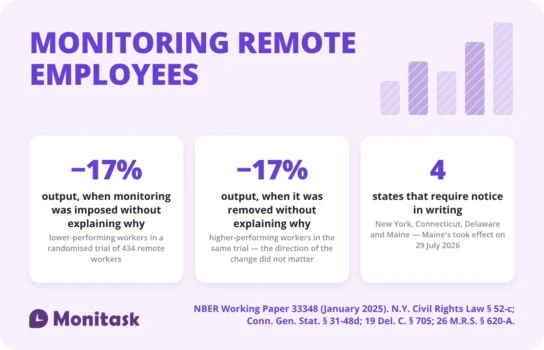
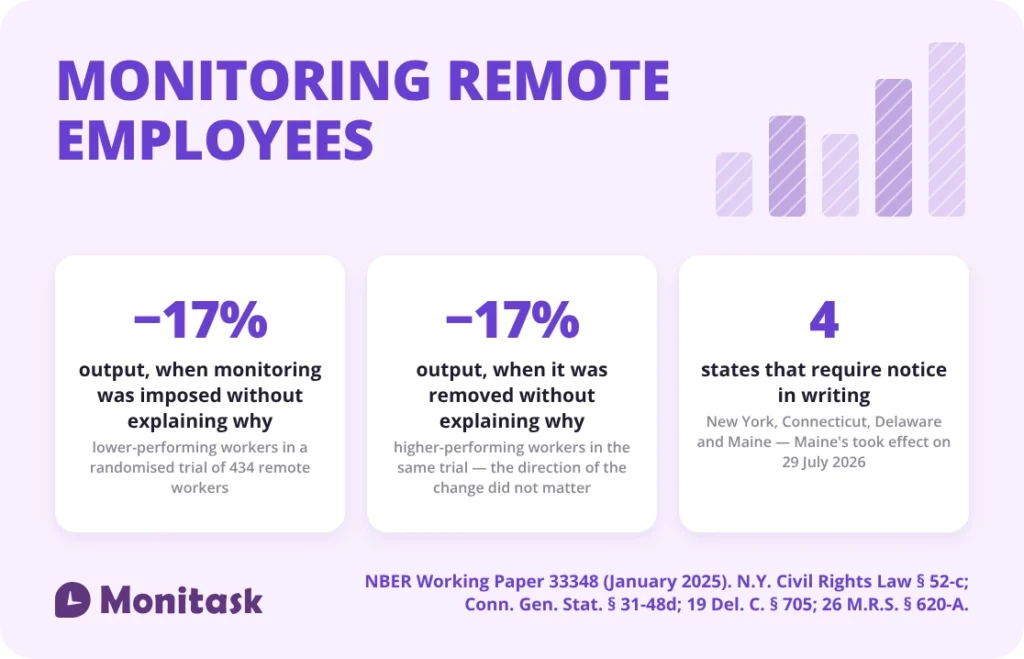
- The research points at the explanation, not the tool. In a 2025 randomised trial of 434 remote workers, digital surveillance on its own had no significant effect on output. The two conditions that did lose output — about 17% each — were the ones where the decision went unexplained.
- It cost the same in both directions. Switching monitoring off without explaining why was as expensive as leaving it on without explaining why.
- Some things should not be tracked remotely regardless of legality: personal devices, non-working hours, and the home behind the employee. In Maine, two of those are not a judgement call.
- The law follows the employee’s location, not your headquarters. Four states require notice in writing, and the newest of them took effect in July 2026.
Monitask publishes this article and sells time tracking and monitoring software. Where that is relevant, it is flagged.
Why monitoring a remote team is a different problem
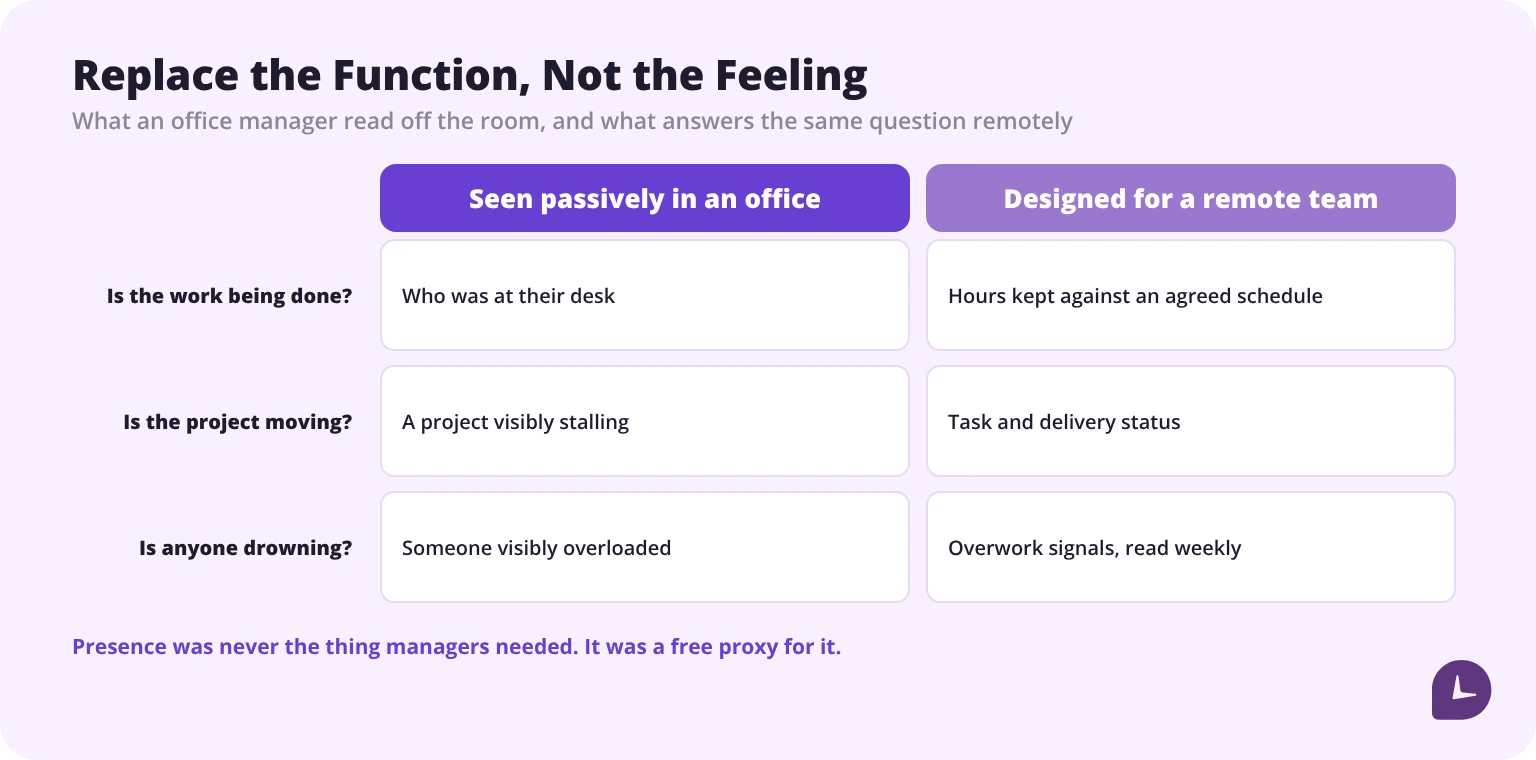
In an office a great deal of visibility happens without anyone trying. You see who is at their desk, notice a project stalling, spot someone overloaded by being in the room. None of that survives distribution — and distribution is now the normal case. Gallup puts 52% of remote-capable US employees on a hybrid arrangement and 26% working fully remotely as of May 2026.
The instinct is to replace passive visibility with active measurement, one for one. That is where most remote monitoring goes wrong: it recreates the feeling of the office rather than the function. Presence was never the thing managers needed — it was a proxy for it that happened to be free.
Three things change specifically:
- Presence stops being a signal. Someone logged in for nine hours may have done two hours of work, and someone logged in for four may have shipped the week’s most important thing.
- Problems surface later. A blocked or struggling employee is invisible until a deadline moves.
- Monitoring becomes visible. In an office, oversight is ambient. Remotely, it arrives as software installed on a device, and it announces itself.
If you are weighing this up against what people already believe about it, we have collected the employee monitoring myths worth retiring first.
Boost your business productivity
Track performance and streamline teamwork
What the research actually says
This is the part worth knowing before choosing any tool.
A 2025 working paper from MIT Sloan and UC San Diego (NBER Working Paper 33348) ran a randomised trial with 434 remote workers hired on Upwork, on an eight-hour data-entry job. Everyone was monitored for the first two hours. After that, some had the monitoring lifted and some kept it — and crucially, some were told why that decision had been made about them and some were not.
The headline is in the paper’s own abstract: “We find that digital surveillance does not have significant effects on worker performance on average”. Surveillance itself did not move the numbers.
What did move them was the unexplained change. Output fell about 17% in two conditions: workers who kept monitoring with no explanation, and workers who had it removed with no explanation. The direction did not matter. An unexplained decision cost roughly the same either way.
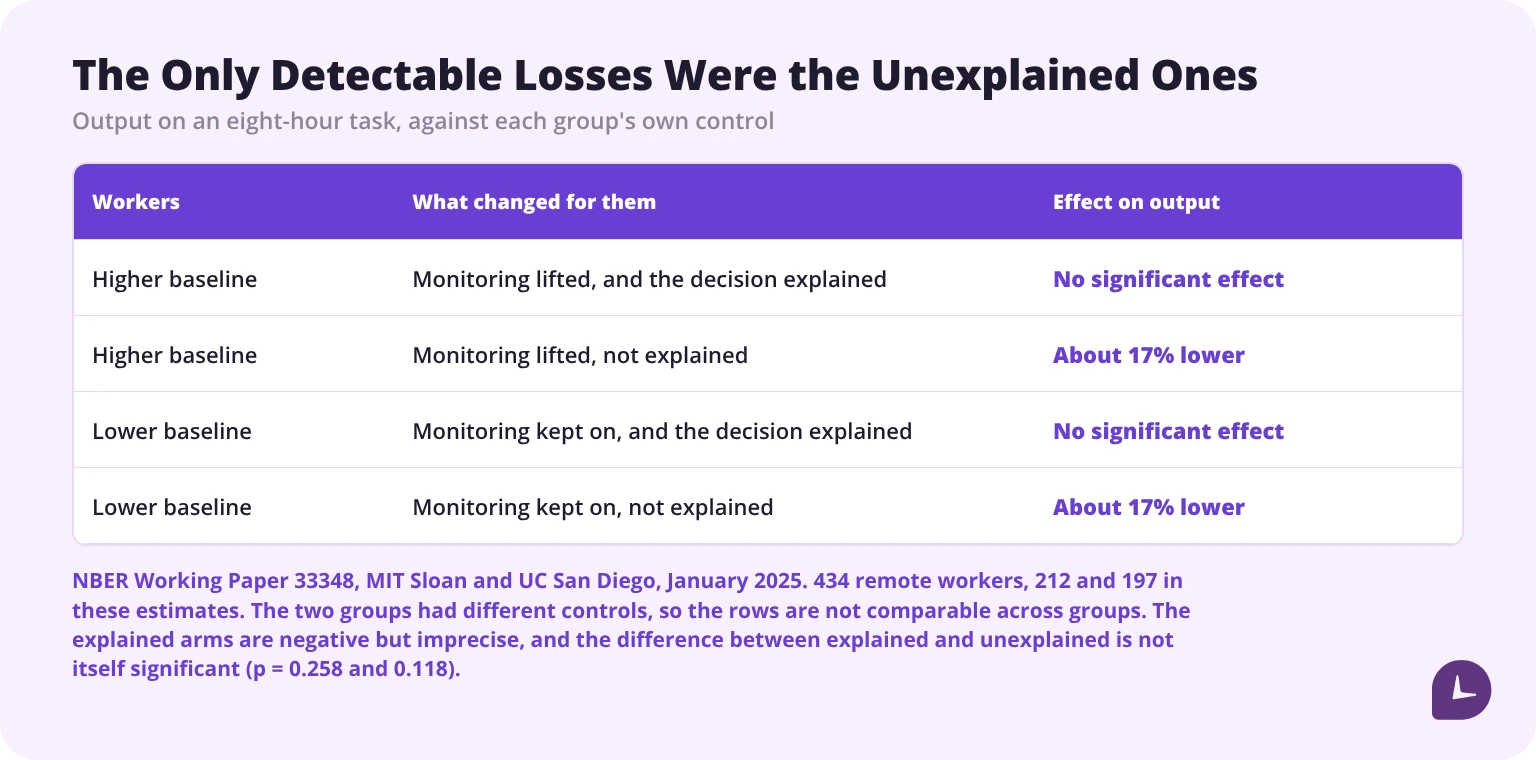
Two honest caveats, because this result gets overstated. The arms where the decision was explained showed no significant effect — but those estimates are negative and imprecise, not flat, and the difference between explained and unexplained is not itself statistically significant (p = 0.258 and 0.118). And this was an eight-hour task on a freelancing platform, not a year of salaried knowledge work. What it establishes is narrower than the headlines around it suggest: the only conditions that produced a measurable loss were the unexplained ones.
The authors’ own reading goes further than their measurements do, and it is worth quoting as interpretation rather than finding: they say their results “Broadly, our results seem most consistent with the interpretation that worker perceptions about managerial capabilities drive performance more than monitoring itself does.”
Attitude surveys point the same way, with the caveat that they are older and commissioned by vendors. A 2018 Harris Poll for Dtex Systems found 77% of employed Americans would be less concerned about monitoring “as long as they are transparent about it and let them know up front”.
And when monitoring is imposed without explanation, people route around it. A 2025 survey by ExpressVPN found 16% of employees keeping unnecessary apps or websites open to mimic productivity and 12% using tools like mouse jigglers to evade detection. ExpressVPN sells privacy software, so read the direction rather than the decimal. The practical point survives either way: heavy-handed monitoring does not just cost trust, it corrupts the data you installed it to collect.
That is also the retention argument. In the same survey, 49% said they would consider leaving if surveillance increased.
What to monitor, and what it tells you
Six categories, in descending order of how much they actually say.
| What you track | What it tells you | What it does not |
|---|---|---|
| Task completion and delivery | Whether work is getting done | Why it is slow when it is slow |
| Attendance and work hours | Whether agreed hours are being kept | Anything about output |
| Active versus idle time | Whether the machine was in use during logged hours | Whether thinking counts as idle. It does |
| Application and website categories | Where time goes across the team | What any individual was doing, without context |
| Overwork signals | Who is heading for burnout | — this is the most underused metric here |
| Keystroke and mouse counts | Almost nothing useful | Productivity. It measures activity theatre |
The pattern: the further down this list you go, the more data you collect and the less it means. Most teams need the top three and nothing else.
Invasive versus non-invasive: what changes
The distinction is simple: does the tool capture content, or only context?
Non-invasive records attendance, active time, application categories and productivity patterns. No screenshots, no keystroke content, no email or chat capture.
Invasive captures screen content through screenshots or recording, logs what is typed, and may access webcam or microphone.
Both are lawful in most US jurisdictions on company equipment — but the federal exception they rely on turns on consent, not notice. Under the Wiretap Act, interception is lawful where one party has given prior consent (18 U.S.C. § 2511(2)(d)); notice and a signed acknowledgement are simply how an employer establishes that consent. The difference matters when someone disputes it, because “we told them” and “they agreed” are not the same defence. The other exception employers reach for, the provider exception at 18 U.S.C. § 2511(2)(a)(i), is narrower than it is usually sold as: it covers activity necessary to running the service or protecting the provider’s rights and property, not a general licence to read everything on company kit.
In 12 states, that one-party consent rule does not apply to recorded conversations at all — California, Florida, Illinois, Maryland, Massachusetts, Michigan, Montana, Nevada, New Hampshire, Oregon, Pennsylvania and Washington require every party to consent. Oregon is the one to watch for distributed teams: its all-party rule expressly covers video conferencing, while ordinary phone calls sit under a one-party rule.
The difference beyond legality is what happens afterwards. Content capture creates a data set you now have to secure, retain, and explain — and in regulated industries, one that can inadvertently contain protected health information or client records.
What you should not track on a remote employee
This is the section missing from every comparable guide, and it is the one that matters most when the workplace is someone’s home.
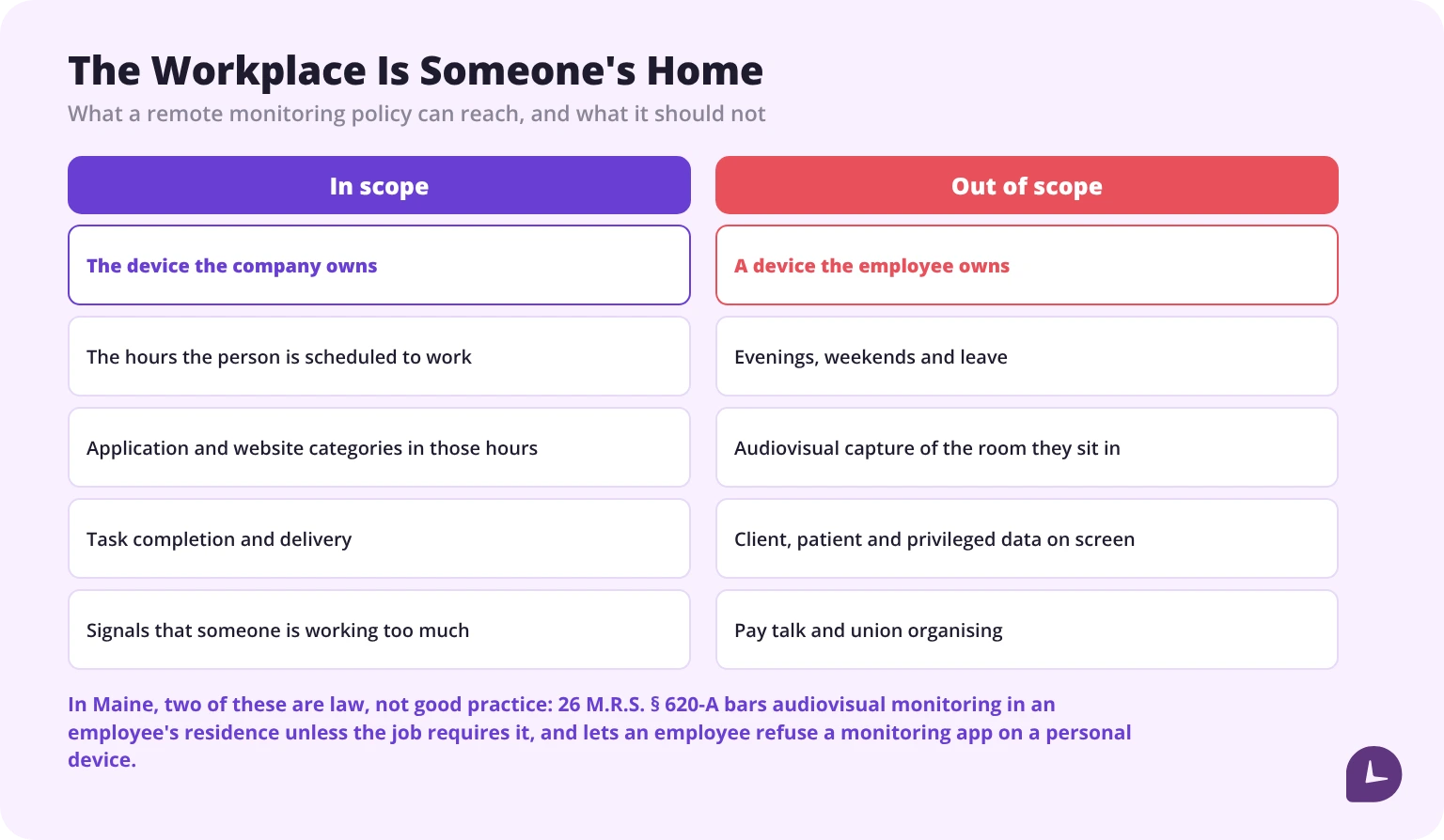
Personal devices. If the employee owns it, monitoring it needs explicit consent and carries substantially higher legal risk — not because there is a rule about BYOD, but because the exceptions an employer normally relies on fall away. On the employee’s own device and connection you are no longer the provider of the service, so consent is the only route left, and any access beyond what they authorised is exposure under the Stored Communications Act and the Computer Fraud and Abuse Act. Under a BYOD arrangement, monitor the work application, not the device. In Maine, this is not a judgement call: an employee may decline to install a monitoring application on a personal device, so a policy that makes the agent mandatory is non-compliant on its face.
Non-working hours. An agent that runs continuously collects evenings and weekends. Scope it to scheduled hours. This is both a legal reduction and the single change that most reduces resistance.
The room behind them. Webcam monitoring of a home captures a bedroom, a kitchen, a family member walking past. No US state writes a webcam rule specifically for remote workers — general all-party-consent recording law does the work instead — with one exception: Maine bars audiovisual monitoring in an employee’s residence unless the job itself requires it, and neither consent nor notice cures it (26 M.R.S. § 620-A). Outside the US the restrictions are more direct. Portugal goes further: it prohibits imposing a permanent connection by image or sound during the working day. And in 2022, a Dutch court held that requiring a home worker to keep his camera on breached his right to respect for private life, with no justified ground for it (ECLI:NL:RBZWB:2022:5656). No productivity question requires any of this.
Anything protected. Screen capture in healthcare can pull patient records into your monitoring store. In legal and financial work it pulls privileged and client data. Configure exclusions before deployment, not after an incident.
Pay talk and union organising. Discussion of wages and working conditions between colleagues, and union organising, are protected concerted activity under Section 7 of the National Labor Relations Act. Surveillance of protected activity is itself an unfair labour practice — though the test is useful rather than absolute: the agency’s own gloss is that spying means “doing something out of the ordinary to observe the activity”. Routine, disclosed, uniformly applied monitoring is a different thing from monitoring switched on or sharpened to watch organising.
One correction worth making, because the lists in this category get it wrong: an individual looking for another job is not engaged in protected activity. A private job hunt is neither concerted nor for the mutual aid or protection of employees as employees. Monitoring it is corrosive and it will cost you the person faster than the data is worth — but it is a trust problem, not a labour-law violation, and an employer who confuses the two will misjudge both.
Whose law applies when the team is distributed
The law of the state or country where the employee physically works, not where the company is registered.
A company headquartered in Texas with a remote employee in New York must satisfy New York’s notice requirement for that person. Add employees in the EU and GDPR requirements for employee monitoring apply to them regardless of where you sit.
Four states require notice in writing, and they do not require the same thing:
| State | What it turns on |
|---|---|
| New York | Notice on hiring, acknowledged by the employee, and a conspicuous posting. Both, not either. State and local government employers are excluded |
| Connecticut | Prior written notice stating the types of monitoring and the specific locations on the premises where it may occur. A posting discharges the duty |
| Delaware | Either a daily electronic notice, or a one-time written notice the employee acknowledges |
| Maine | Three separate duties: notice before monitoring starts, disclosure to candidates during the interview, and written notice to all current employees once per calendar year |
Two of those have teeth that catch distributed teams specifically. Connecticut’s statute reaches collection of information on the employer’s premises — which raises a question nobody has answered cleanly for a home worker, and its notice must name the locations where monitoring happens. And Maine’s annual notice is calendar-year, not anniversary: notify in December 2026 and again in January 2028 and you have missed 2027 entirely. Maine’s took effect on 29 July 2026 and is the newest of the four, which is why most published state lists still say three.
Two workable approaches:
- Highest common denominator. Apply the strictest applicable standard to everyone. Simpler to run, and the core requirements — written notice, acknowledgment, limited scope — are good practice anyway.
- Configuration by location. More precise, more to maintain, and only viable if your software supports per-employee configuration.
One warning about published guidance. Sources in this category disagree on basic facts, and the errors run in a consistent direction: lists name three notice states when there are four, and several put Delaware among the all-party-consent states when its interception statute is one-party. Check the statute, not the table — including this one.
Time zones and asynchronous work break most metrics
No guide in this category addresses this, and it affects every genuinely distributed team.
“Currently active” is meaningless across six time zones. A real-time dashboard showing who is online right now tells a manager in one zone almost nothing about a team spread across several. What it reliably produces is anxiety in whoever is awake.
Idle detection assumes a continuous day. Asynchronous work is not continuous. Someone who works two hours, collects their child, then works four more is not idle for two hours — they are working an agreed schedule. A tool that flags that as a gap is generating false positives you will spend management time explaining away.
Core hours are the fix, not more tracking. Agree an overlap window, measure against the schedule each person actually works, and read everything else weekly rather than live.
Practical configuration: scope tracking to each person’s scheduled hours rather than a company-wide window, turn off real-time presence for distributed teams, and set report cadence to weekly. If your tool cannot do per-employee schedules, it is not built for distributed work.
How to announce monitoring to an existing team
Rolling out to new hires is easy: it is a condition of the job from day one. Announcing to an existing team is where rollouts fail, and “be transparent” is not instructions.
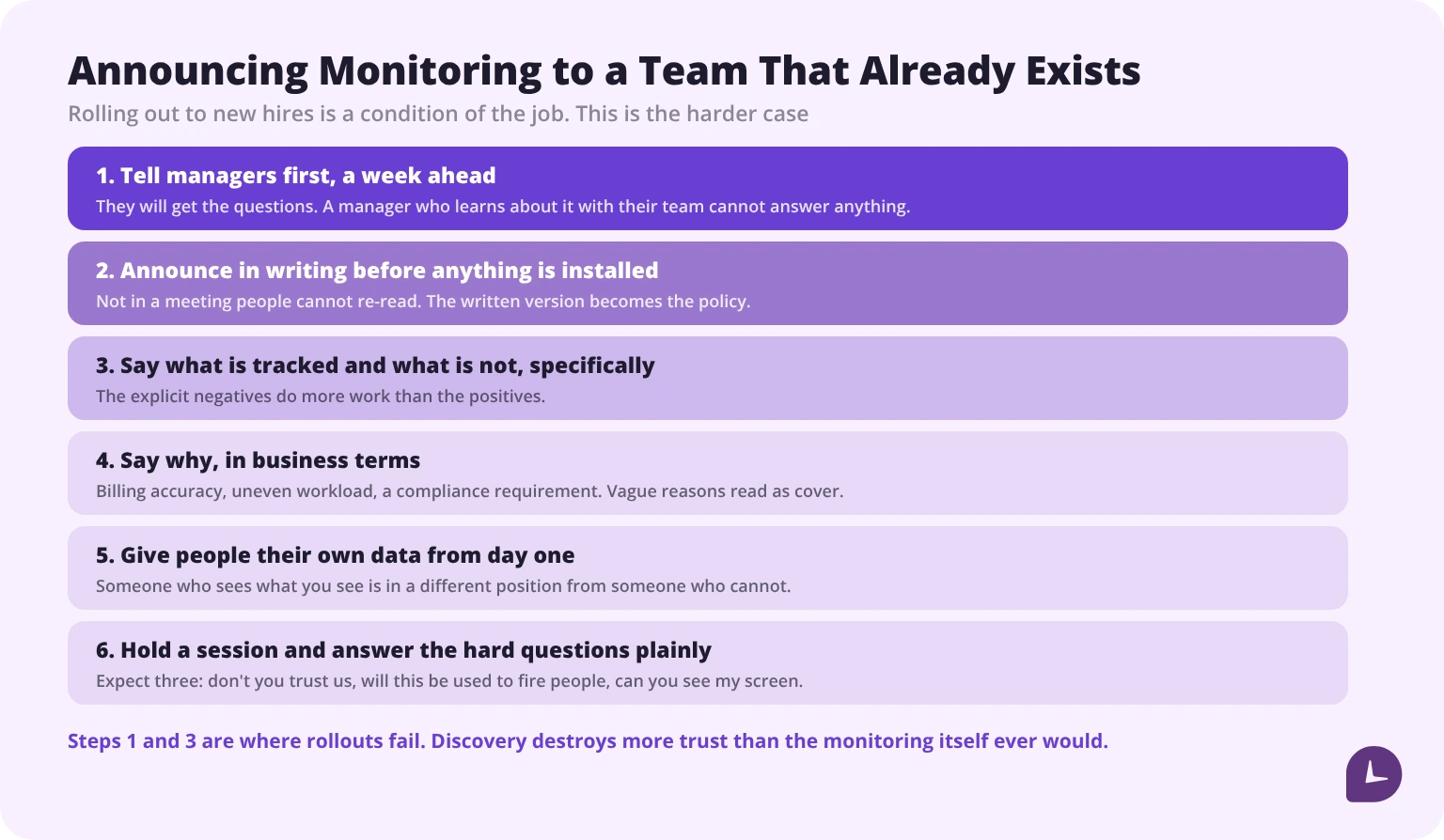
1. Tell managers first, a week ahead. They will get the questions. A manager who learns about it with their team cannot answer anything.
2. Announce in writing before anyone installs anything. Not in a meeting where people cannot re-read it. The written version becomes the policy, so write it as one — there are free company forms and policies to start from rather than drafting it cold.
3. Say what is tracked and what is not, specifically. “We track application categories and active time during your scheduled hours. We do not take screenshots, log what you type, or access your camera.” The explicit negatives do more work than the positives.
4. Say why, in business terms. Not “to improve productivity” — the actual reason. Client billing accuracy, uneven workload, a compliance requirement. Vague reasons read as cover.
5. Give people their own data from day one. An employee who can see what you see is in a completely different position from one who cannot. They will work out that they are being monitored regardless — there are plenty of guides on how employees can tell if they are being monitored — so the only question is whether they hear it from you.
6. Hold a session for questions and answer the hard ones plainly.
The three questions you will be asked, and the honest answers:
| Question | The answer that works |
|---|---|
| “Don’t you trust us?” | This is not about individual trust. Here is the specific business problem it solves. |
| “Will this be used to fire people?” | Say what is actually true. If the data can feed performance decisions, say so — discovering it later is far worse. |
| “Can you see my screen?” | Yes or no, plainly. If the answer is yes, reconsider whether you need that feature. |
Spotting overwork, not just underwork
The most useful thing remote monitoring does is also the least used.
In an office, overwork is visible: you see who is still there at eight. Remotely it is invisible until someone resigns or breaks. Activity outside scheduled hours, rising weekend work, and steadily lengthening days are all detectable, and all predictive.
What to watch: after-hours activity trending up over weeks, weekend work becoming routine rather than occasional, no full day off across a pay period, and declining output alongside rising hours — the clearest burnout signature there is. What to do about it once you see it is a separate problem, and mostly a scheduling one: our guide to how to avoid burnout while working remotely covers the individual side.
Read it at the team level first. One person’s heavy fortnight is noise. A department where after-hours activity rose sharply over a quarter is a staffing problem with a name.
This is also the framing that changes how a team receives monitoring: a tool that has twice caught someone heading for burnout is a different object from one that has only ever produced a productivity score.
Monitask reports hours against each person's own schedule, so after-hours drift shows up as a pattern rather than a number out of context.
See how Monitask tracks time without screenshots
Five mistakes that cost more than they catch
1. Using monitoring as a substitute for management. Data is not leadership. The trial above could not detect a productivity gain from surveillance at all; what it could detect was the cost of not explaining it.
2. Tracking inputs instead of outputs. Mouse movement measures activity, not work. It also teaches people to produce activity.
3. Installing first, announcing second. Discovery destroys more trust than the monitoring itself ever would, which is the practical half of the argument about whether is stealth monitoring ethical — the ethics and the outcome point the same way.
4. One policy for a multi-state team. Requirements follow each employee’s location, and they are not the same requirements.
5. Collecting everything because you can. Every field collected is a field to secure, retain, explain and eventually breach.
How to choose the software
Six criteria, in priority order for a distributed team:
- Per-employee schedules. Tracking scoped to when each person actually works. Non-negotiable across time zones.
- Employee-visible data. If people cannot see their own numbers, expect resistance.
- Granular feature control. The ability to switch off screenshots, keystroke capture and camera entirely — and prove it.
- Configuration by team or location. For multi-jurisdiction compliance.
- Lightweight agent. Heavy agents slow machines and destroy adoption faster than any policy argument.
- Compliance modes where you operate in healthcare, finance or the EU.
Where Monitask fits. Monitask tracks time, activity levels and optional screenshots, with per-employee configuration and employee-visible data — our remote employee monitoring software page covers what it does and does not do. It is one option among several, and the honest position from the research above is that the tool matters less than how you introduce it.
Sources
- Kala and Lyons, “The Effects of Digital Surveillance and Managerial Clarity on Performance”, NBER Working Paper 33348, January 2025 — the randomised trial of 434 remote workers. A working paper, not yet peer reviewed
- The Harris Poll for Dtex Systems, 2018 — employee attitudes to monitoring transparency
- ExpressVPN with Pollfish, 6 February 2025 — surveillance-evasion behaviour and quit intention
- Gallup, Hybrid Work indicator, May 2026 — share of remote-capable US employees working hybrid and fully remotely
- N.Y. Civil Rights Law § 52-c; Conn. Gen. Stat. § 31-48d; 19 Del. C. § 705; 26 M.R.S. § 620-A — the four state notice statutes
- 18 U.S.C. § 2511; 18 U.S.C. § 2701; 18 U.S.C. § 1030 — the federal interception, stored-communications and computer-access statutes
- National Labor Relations Act § 7, 29 U.S.C. § 157 — protected concerted activity
- Código do Trabalho (Portugal), arts. 169.º-A and 170.º; Rechtbank Zeeland-West-Brabant, 28 September 2022, ECLI:NL:RBZWB:2022:5656
Monitask gives every employee the same view of their own data that their manager has.
Start a free Monitask trial
FAQ: How to Monitor Remote Employees
Is it legal to monitor remote employees?
Generally yes on company equipment for legitimate business purposes, with conditions that vary by the employee’s location. Four US states require notice in writing — New York, Connecticut, Delaware and Maine — 12 require all parties to consent before a conversation is recorded, and EU-based employees are covered by GDPR regardless of where the employer sits.
Can I monitor an employee's personal laptop?
Only with explicit consent, and the legal risk is substantially higher, because the exceptions that cover company equipment do not apply to a device you do not provide. Under BYOD, monitor the work application rather than the device. In Maine an employee can refuse to install a monitoring app on a personal device outright.
Should I tell my team they are being monitored?
Yes, in every jurisdiction and regardless of whether it is required. Undisclosed monitoring produces the worst outcomes in every study of the question, and it is discovered eventually.
What should I track for a remote team?
Task completion, attendance against agreed hours, and overwork signals. Everything below that produces more data and less meaning.
Does monitoring increase productivity?
Not on its own. The 2025 trial found surveillance alone had no significant effect on output. What it did detect was a drop of about 17% when a monitoring decision was made without explaining it — in either direction.
Can I make remote employees keep a webcam on?
In most US states no rule addresses it directly and general recording law applies, but Maine bars audiovisual monitoring in an employee’s residence unless the job requires it. Portugal prohibits requiring a permanent camera or microphone connection during the working day, and a Dutch court has held a camera-on requirement unlawful. There is also no productivity case for it.
How do I handle monitoring across time zones?
Scope tracking to each person’s scheduled hours rather than a company-wide window, turn off real-time presence, and read reports weekly. Tools without per-employee schedules are not suited to distributed teams.
Which state's law applies to a remote employee?
The state where they physically work. Most multi-state employers apply the strictest applicable standard across the whole workforce.
Can monitoring detect burnout?
It is the most useful thing it does. Rising after-hours activity, routine weekend work and lengthening days are visible in the data and predictive of turnover.
What if employees push back?
Expect three questions: don’t you trust us, will this be used to fire people, and can you see my screen. Answer all three plainly. A feature you cannot defend in that conversation is a feature to switch off.