What Employee Monitoring Software Actually Tracks (and What It Cannot)

Reliable employee tracking software. Clear visibility and insights into how employees work. Even remotely.
Try Monitask free for 10 days
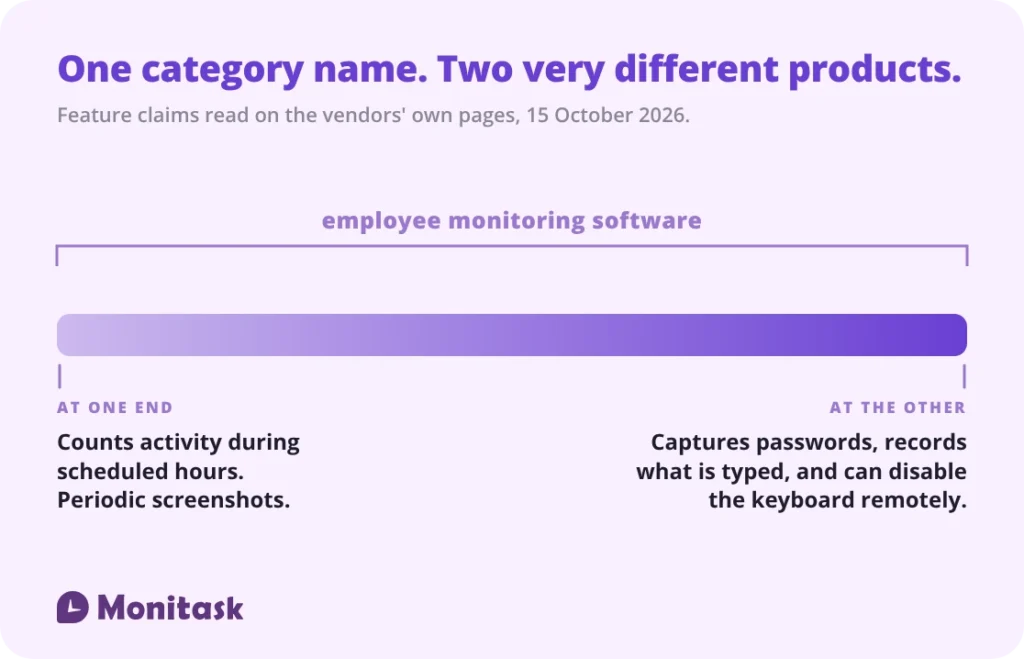
The category name covers two very different products. At one end, software that counts keyboard and mouse activity during scheduled hours and takes periodic screenshots. At the other, software that logs the content of what is typed — including passwords and card numbers — records the screen continuously, and can remotely block an employee’s keyboard. Both are sold as employee monitoring software. Decide which one you are buying before comparing prices.
Most of what gets written about this category is either a feature list or a warning. This is neither: it is what four products say they do, read on their own pages, and what none of them can do whatever they collect. If you want the myths handled separately, we have those in employee monitoring myths.
The range within one category
Four products were read end to end on 15 October 2026: Monitask (our own — see the disclosure below), ActivTrak, Teramind and Kickidler. They were picked to span the category rather than to be a shortlist. Every row below is something a vendor publishes about its own product.
| What it does | In the four checked | What it means in practice |
|---|---|---|
| Counts keyboard and mouse activity | All four | A number, not content |
| Application and website logging | All four | Names and durations |
| Periodic screenshots | All four | Whatever is on screen at that moment |
| Active versus idle time | All four | Whether the machine was in use |
| Attendance from clock-in and clock-out | One of the four | Start and end of a shift |
| Continuous screen recording | Two of the four | Video of the working day |
| OCR across screen captures | One of the four | Makes screen content searchable |
| Logging the content of keystrokes | Two of the four | Everything typed, credentials included |
| Capturing passwords entered into applications | One of the four | You store employee credentials |
| Chat and email content logging | Two of the four | Message content, not just the fact of a message |
| Remote control of the device | Two of the four | One of the two can block the keyboard and mouse |
| Stealth mode with no visible indicator | Two of the four | The employee is not told by the software |
| Published refusal to log keystroke content | Two of the four | A limit the vendor puts in writing |
Read on the vendors’ own product and documentation pages on 15 October 2026, with the quotations below. A product absent from a row was not found to publish that feature, which is not the same as publishing that it has none. Feature descriptions change; check before you buy. The screenshot row is the one most people mean by the category — our own take on it is on the employee screen monitoring software page.
The category covers two very different products
There is no agreed definition of what employee monitoring software is, and the gap between the ends of the category is wider than the gap between most software categories.
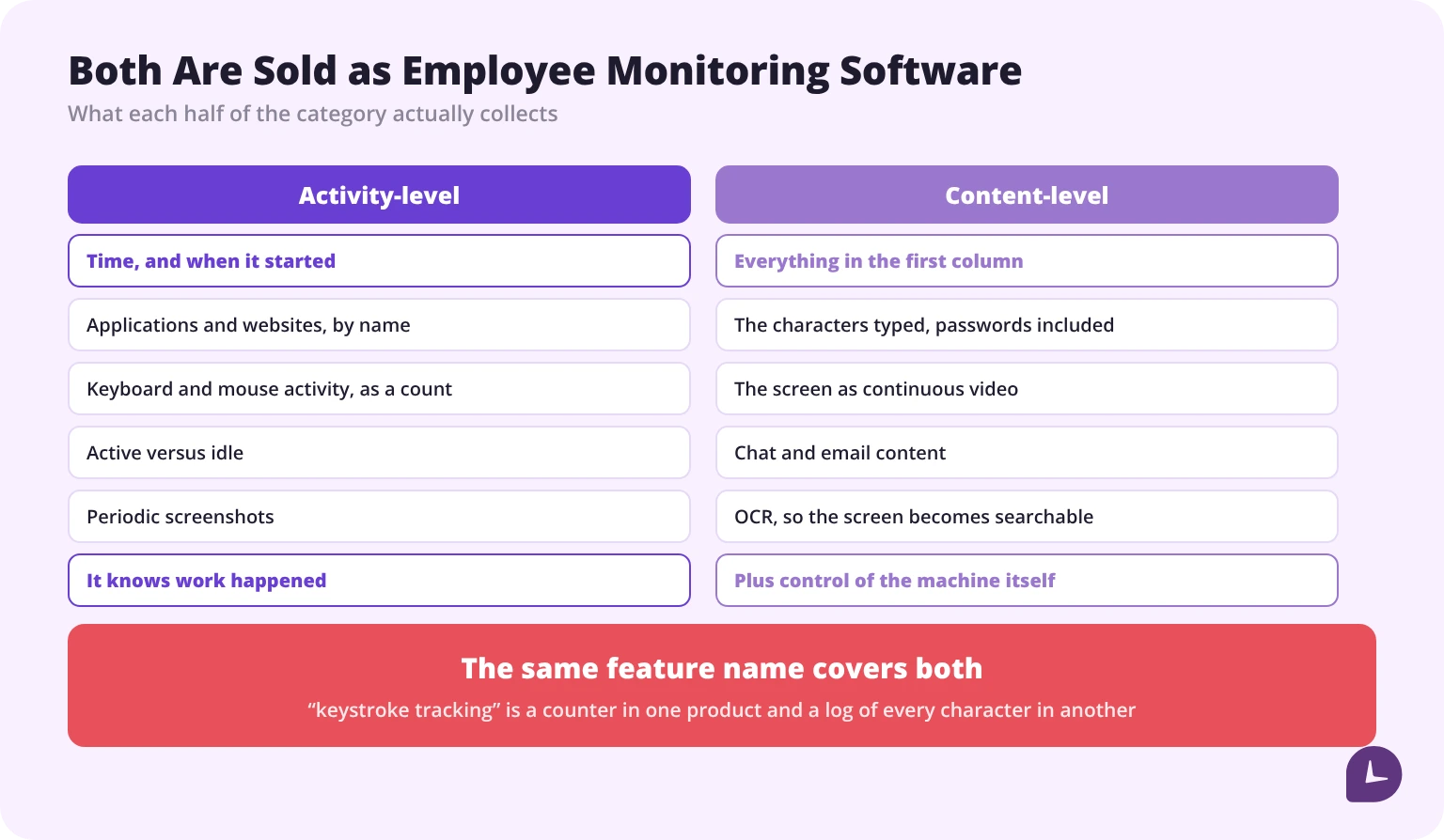
At one end: a tool that records when someone clocked in, which applications they used, how much keyboard and mouse activity occurred, and takes a screenshot every few minutes. It knows that work happened and roughly where the time went. It does not know what was typed.
At the other end: a tool that logs every character entered, records the screen as video, runs optical character recognition so the contents are searchable, logs chats and emails, and can take control of the machine.
Those are not characterisations. ActivTrak’s privacy page states plainly that “ActivTrak does not provide a keystroke-logging feature”, and gives the reason: protecting “sensitive personal data, such as banking information and passwords”. Kickidler, writing about the same technology, says keyloggers “record absolutely everything, be it passwords, or credit card numbers”. Two vendors in one category, describing the same feature, one as a line it will not cross and one as the point.
Both appear for the same search. That is the single most useful thing to know before comparing anything else.
Counting versus capturing
This distinction runs through every feature and is the one most often blurred in marketing copy.
Counting produces a number. Two hundred keystrokes in ten minutes. Forty-two mouse movements. Six minutes idle. The number says activity occurred; it says nothing about content.
Capturing produces the content itself. The characters typed. The image on screen. The text of a message.
The same feature name covers both. “Keystroke tracking” in one product means a counter; in another it means a log of every character. The word to look for on a vendor’s page is whether content is captured or only measured — and if the page does not say plainly, that is an answer.
Note what travels with content capture. Of the four products checked, the two that log keystroke content are also the two that offer remote control of the employee’s machine — and one of them documents, in its own administrator manual, a control that “blocks the employee’s keyboard on the remote computer” and another that “blocks the employee’s mouse on the remote computer”. Capturing content and controlling the device are sold as parts of the same product, because they are built for the same job: not measuring work, but investigating a person. If that is genuinely your requirement, it belongs in a different category again — insider threat detection tools covers it.
Why it matters beyond privacy: counting produces data you can defend in a conversation with an employee. Capturing produces data you now have to secure, retain, justify and eventually explain.
The feature nobody frames as a liability
Teramind’s keystroke-logger page says the software “captures passwords entered into business applications” and “tracks login credentials usage”. Kickidler’s write-up of keystroke recording puts it more broadly: keyloggers “record absolutely everything, be it passwords, or credit card numbers”, and its own product, it says, “collects data on all clicks in all of the programs” — a list that runs through Gmail and the major messengers.
Read as a capability, that is comprehensive visibility. Read as an obligation, it is something else entirely.
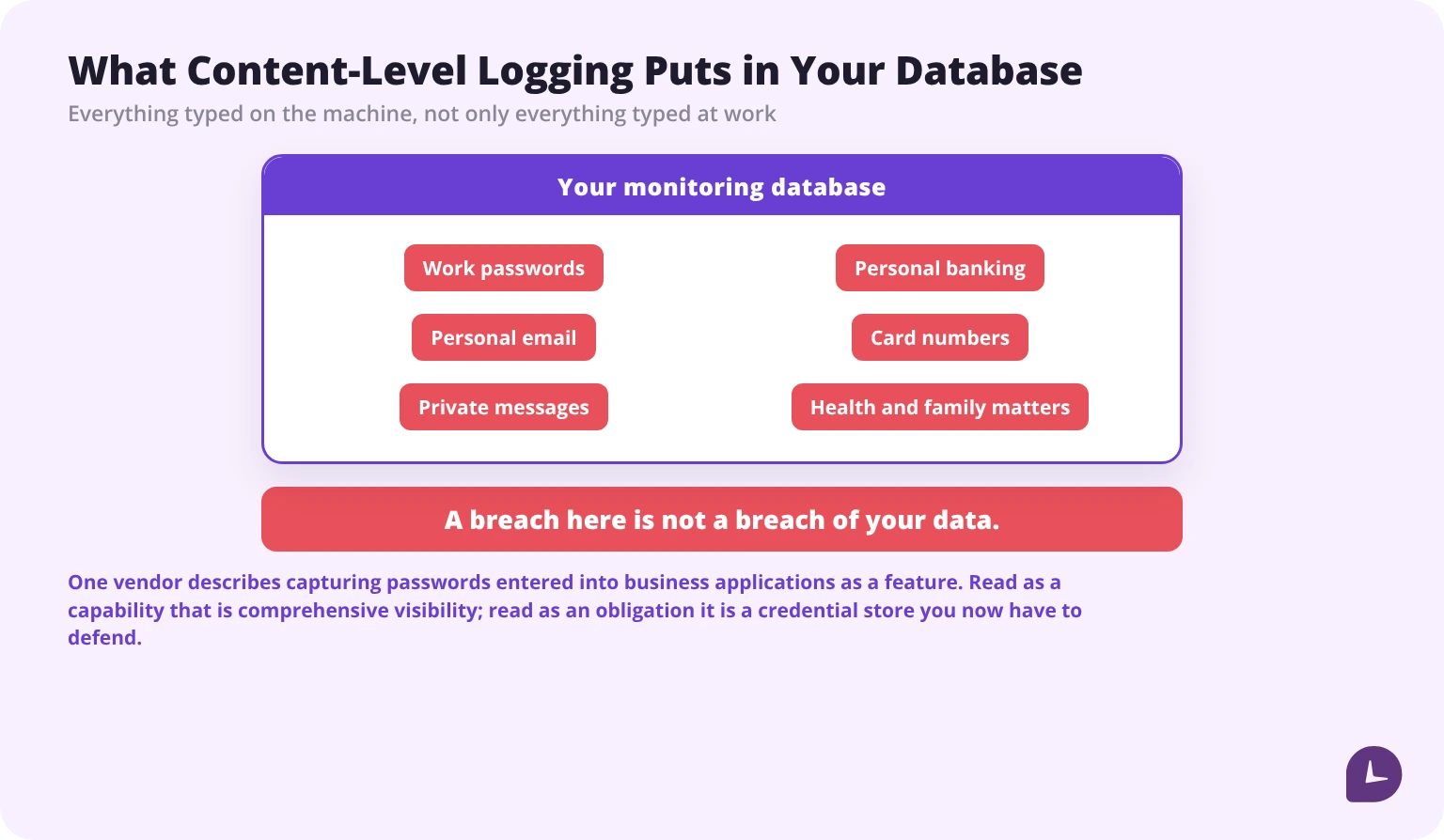
If your monitoring software logs the content of keystrokes, you are now storing your employees’ credentials. Not only their work credentials — everything typed on that machine, which in practice includes personal banking, personal email and anything else entered during a break.
Three consequences follow, and no vendor page states them:
1. A breach of your monitoring database is a breach of your employees’ personal accounts. The blast radius is not your company data. It is your people’s lives.
2. You have created a target. A credential store is worth more to an attacker than productivity reports are.
3. Your obligations expand. Storing that category of data changes what security, retention and notification duties apply to you — and in regulated industries it can pull protected information into a system never designed to hold it.
The vendor that declines to build the feature says the same thing from the other side: ActivTrak gives protecting “sensitive personal data, such as banking information and passwords” as its reason for not offering keystroke logging at all. The risk is not disputed between vendors. Only whether to take it on.
The practical question for a buyer: does this feature solve a problem you actually have? If the problem is “I do not know where the team’s time goes”, content capture is not the tool. If the problem is an active investigation into a specific incident, that is a different exercise with its own rules, its own authorisation and its own end date.
What it cannot do, no matter what it collects
Every page in this category describes what monitoring software can see. This is the other half, and it is the half that determines whether the purchase pays for itself.
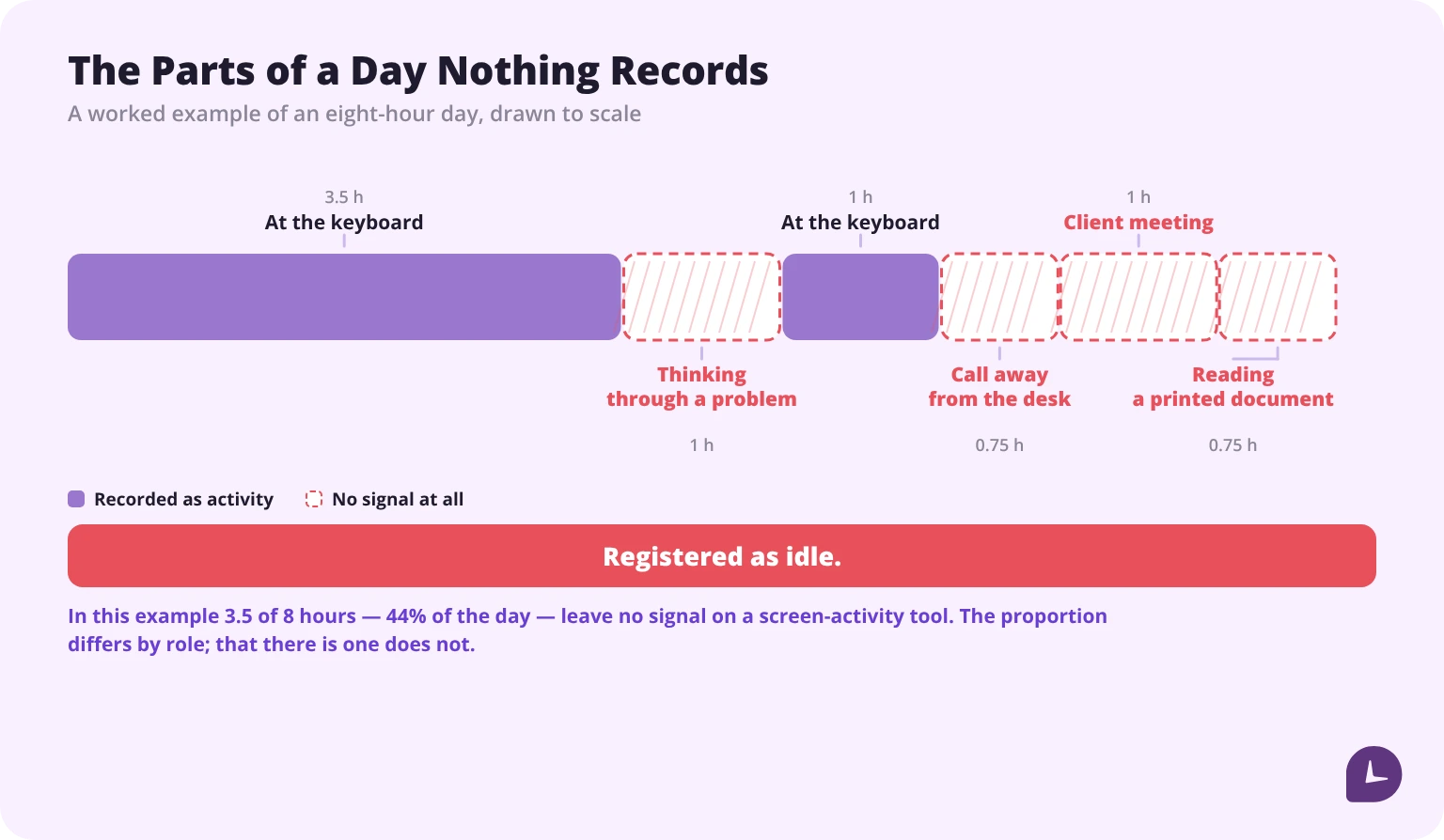
It cannot measure output. It measures activity. A developer thinking through an architecture problem registers as idle. A designer staring at a layout registers as idle. The single most valuable hour of the week frequently looks like the least productive one.
It cannot distinguish thinking from not working. There is no signal that separates them, because on a keyboard they look identical.
It cannot see work that happens away from the screen. A site visit, a call taken while walking, a conversation with a client, reading a printed document. For many roles that is a substantial share of the job, and all of it registers as absence.
It cannot tell you why. A drop in activity has many causes: a blocked dependency, an unclear brief, a sick child, burnout, disengagement. The data shows the drop. The cause requires a conversation.
It cannot replace management. This is the finding from the research rather than an opinion. In a randomised controlled trial of 434 remote workers, Elizabeth Lyons of UC San Diego and Namrata Kala of MIT Sloan found that “simply applying surveillance is not enough to improve productivity” — and, more pointedly, that unexplained changes in either direction cost about 17% of output. Low performers told to keep being monitored without an explanation dropped roughly 17%. High performers whose monitoring was removed without an explanation dropped by about the same. What moved performance was the explanation, not the software. The authors’ own conclusion: “Investing in managerial capital is probably a better use of resources than investing in monitoring technology.”
Stealth mode and where it stops being an option
Several vendors offer a mode that runs with no system tray icon and no notification, and describe it as a way to get authentic data without alerting employees. Teramind’s hidden-monitoring page says its software “operates silently and invisibly, ensuring employees remain unaware of its presence” and “tracks employee activity without their knowledge”, with a “tamper-proof installation that prevents detection or removal by standard users”.
Three things a buyer needs alongside that description.
It is restricted in some places. Four US states require written notice before electronic monitoring begins. Across the EU and UK, covert monitoring is permitted only in narrow circumstances such as an active investigation into suspected criminal conduct, with limited scope and duration.
It is discovered. Employees notice agents, check running processes, and compare notes — we have a whole piece on how employees can tell if they are being monitored, and none of it is difficult. The question is not whether it comes out but under what circumstances, and undisclosed monitoring discovered accidentally does more damage than disclosed monitoring ever would.
Even the vendors say to disclose it. The same Teramind page that sells undetectable monitoring also advises: “Be transparent with employees about the monitoring activities, even if the monitoring system itself is hidden.” That is worth sitting with. The category’s own marketing pages recommend telling people about the thing they are selling you the ability to hide — which suggests the vendors know where the real risk sits, and it is not technical.
There is a narrow legitimate case: a specific, documented investigation with a defined scope and an end date, run with legal advice. That is not the same as running stealth mode as a default configuration.
What happens to the data after it is collected
The question nobody asks during a demo, and the one that determines your exposure.
Where is it stored? Vendor cloud, your region, your own servers. For EU employees, data residency is a live question, and the rest of what the regulation asks of you is in our GDPR requirements for employee monitoring guide.
How long is it kept? Default retention is often far longer than any legitimate purpose requires. Ask for the number and ask whether you can change it.
Who can see it? Role-based access, or everyone with an admin login. A monitoring system where any manager can read any employee’s data is a different risk profile from one scoped to direct reports.
Is access logged? An audit trail of who looked at what is the difference between a system you can defend and one you cannot.
What can an employee see? Self-service access to one’s own data is the single feature that most changes how monitoring is received.
What happens when you cancel? Deletion timeline, export format, and what remains in backups.
If the security of the store itself is the part you are being asked about internally, we set out how we think about it in why employee monitoring software is secure to use.
How much is enough: three configurations
| Time and attendance | Activity-level | Content-level | |
|---|---|---|---|
| Collects | Clock in and out, hours | The above plus apps, websites, activity counts, periodic screenshots | The above plus keystroke content, screen recording, chats and email |
| Answers | Were the hours worked? | Where did the time go? | What exactly was done? |
| Employee reaction | Minimal | Manageable with disclosure | Significant |
| Data liability | Low | Moderate | High |
| Fits | Hourly payroll, billing | Most teams | Investigations, specific regulated cases |
Most teams need the middle column. The left is insufficient if you bill clients by project. The right solves problems most companies do not have, while creating obligations all of them would rather avoid.
Where Monitask sits. Activity-level: time, application and website usage, an activity percentage, and periodic screenshots that can be switched off, blurred or rate-limited per team. It does not log the content of keystrokes and does not access the webcam. Those two limits are published on our own product pages — and the more useful habit for a buyer is not to take our word for them, but to ask every vendor on the shortlist for their equivalent list. Our employee monitoring software page is where ours sits.
Disclosure: Monitask published this article and sells activity-level monitoring software. Monitask is one of the four products whose pages were read for the table above. The feature descriptions and quotations throughout come from vendors’ own product and documentation pages, including our own.
Questions to ask a vendor before you buy
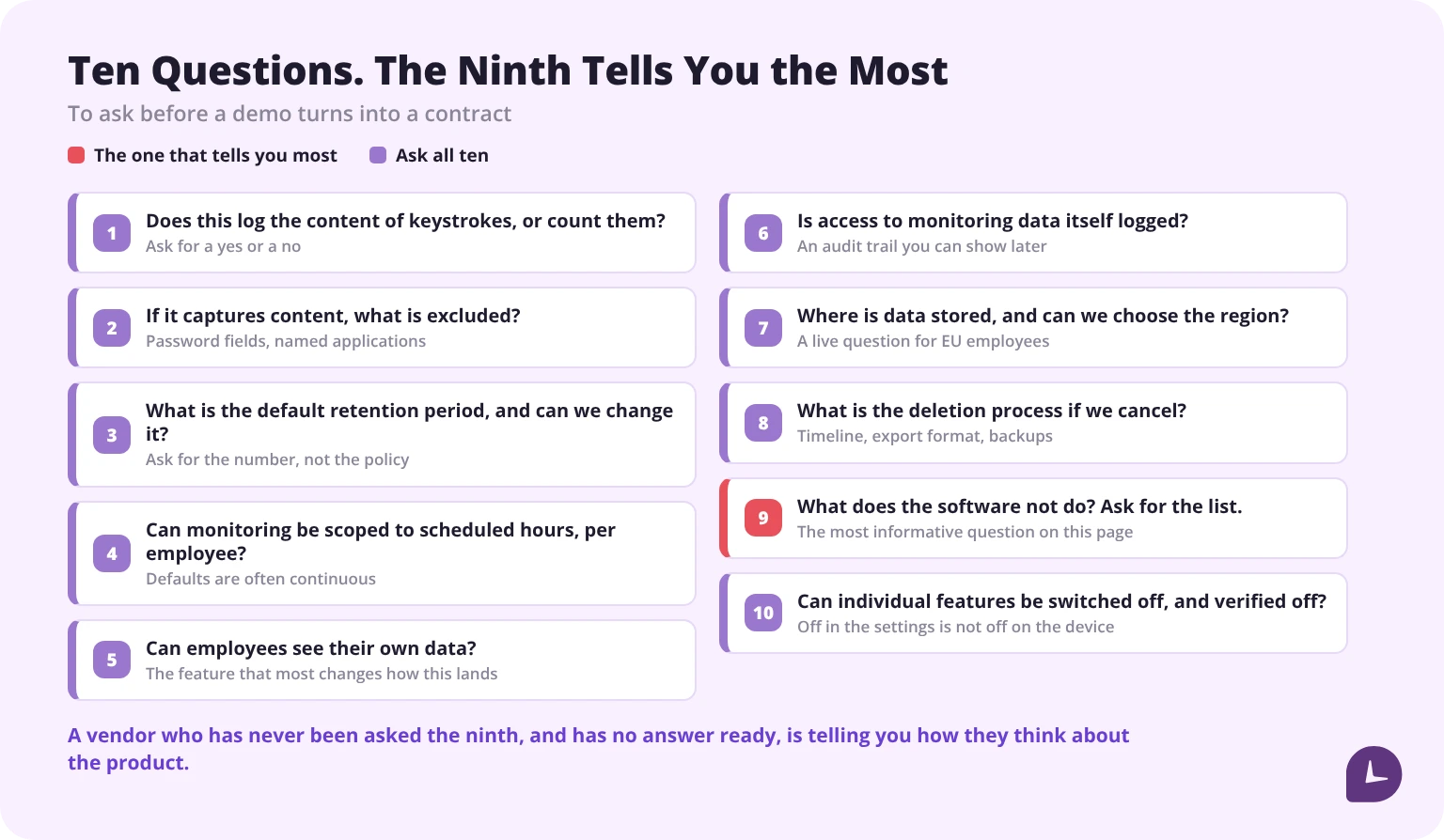
- Does this log the content of keystrokes, or count them? Ask for a yes or a no.
- If it captures content, what is excluded — password fields, specific applications?
- What is the default retention period, and can we change it?
- Can monitoring be scoped to scheduled hours, per employee?
- Can employees see their own data?
- Is access to monitoring data itself logged?
- Where is data stored, and can we choose the region?
- What is the deletion process if we cancel?
- What does the software not do? Ask for the list.
- Can individual features be switched off, and verified off?
The ninth is the most informative. A vendor who has never been asked it, and has no answer ready, is telling you how they think about the product.
Reliable employee tracking software. Clear visibility and insights into how employees work. Even remotely.
Try Monitask free for 10 days
FAQ
Does employee monitoring software record keystrokes?
Some does, some counts them without recording content, and the same feature name covers both. Of the four checked, two publish that they log keystroke content and two publish that they refuse to. Ask the vendor directly whether content is captured.
Can monitoring software see my passwords?
If it logs keystroke content, yes. One vendor describes capturing “passwords entered into business applications” as a feature. That also means the employer is storing those credentials, which is a security obligation rather than a benefit.
Can employee monitoring software see my personal accounts?
On a work device with content-level logging, anything typed is captured, including personal email and banking entered during a break. This is the strongest practical argument for keeping personal activity off work equipment.
Does monitoring software take screenshots?
All four products checked do, usually at configurable intervals, and in two of them screenshots are optional or off by default. Some capture continuous video, and one runs OCR so the contents become searchable.
Can employers monitor without telling employees?
Some products offer stealth mode and describe employees as remaining unaware. Four US states require written notice before electronic monitoring begins, and covert monitoring is restricted across the EU and UK to narrow circumstances. Notably, vendors selling hidden monitoring still advise disclosing that monitoring happens.
Can monitoring software measure productivity?
It measures activity, which is not the same thing. It cannot distinguish thinking from idleness, see work away from the screen, or explain why a number changed. A randomised trial of 434 remote workers found that applying surveillance on its own did not improve output.
Can it track me after work hours?
It depends on configuration. Some products can be scoped to scheduled hours; some run continuously by default. Ask specifically, because the default is often continuous.
What is the difference between activity monitoring and content monitoring?
Activity monitoring records that work happened and roughly where the time went. Content monitoring records what was actually typed, shown and said. The data liability is entirely different.
How long is monitoring data kept?
Whatever the vendor’s default is, unless you change it — and defaults are frequently longer than any purpose requires. Ask for the number before you buy.