Free Employee Monitoring Software: What You Actually Get for $0

Reliable employee tracking software. Clear visibility and insights into how employees work. Even remotely.
Try Monitask free for 10 days
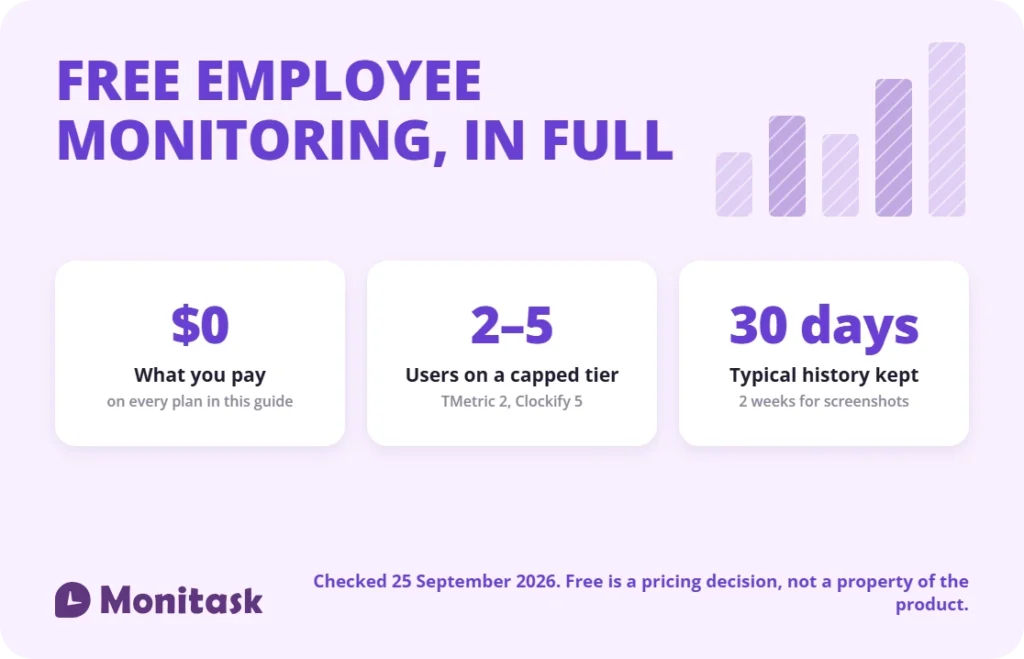
Free employee monitoring software exists, but almost every plan is capped somewhere: at 2 to 5 users, at 30 days of data, or at the features that make monitoring useful. Only a few tools are genuinely unlimited, and those trade the user cap for self-hosting or a narrower feature set. Check the cap, the retention window and the export path before you install anything.
Key takeaways
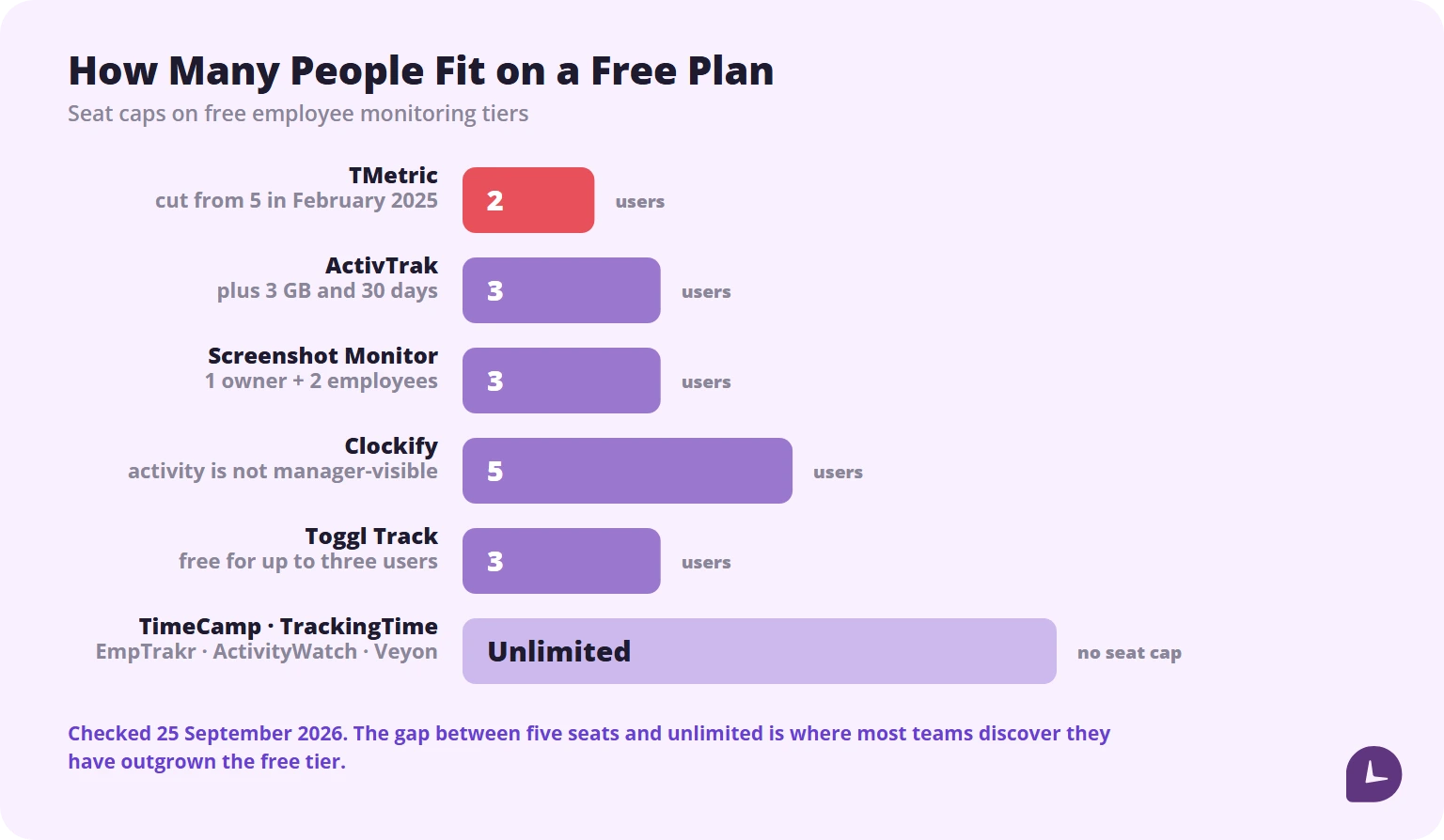
- Most free plans cap at 2 to 5 users. ActivTrak allows 3, Clockify 5 and Toggl Track 3. TMetric cut its free tier from 5 users to 2 in February 2025.
- Screenshots are the feature most often paywalled. Free plans that include them usually limit retention to two weeks.
- Free is not a property of the product. It is a pricing decision, and it gets revised.
- The real cost of a free tool is the migration when you outgrow it, not the subscription you avoided.
- Open source tools have no user cap and no vendor. That is the whole trade.
Free employee monitoring software compared
| Tool | Free plan cap | Screenshots on free | Data retention | Open source |
|---|---|---|---|---|
| Clockify | 5 users | No, Pro only | Reports limited to 1 month | No |
| Toggl Track | 3 users | No | Not published | No |
| TimeCamp | Unlimited users and projects | No | Not published | No |
| TrackingTime | Unlimited users | No | Not published | No |
| TMetric | 2 users | No | Not published | No |
| ActivTrak | 3 users, 3 GB storage | No, paid add-on only | 30 days | No |
| Screenshot Monitor | 1 owner + 2 employees | Yes, 3 per hour | 2 weeks | No |
| EmpTrakr | Unlimited employees | Yes, configurable | Not published | No |
| ActivityWatch | Unlimited, local only | No | Local, unlimited | Yes |
| Veyon | Unlimited, self-hosted | Live screen view | Self-managed | Yes |
Every figure in this table was checked against the vendor’s own pricing or product page on 25 September 2026. Free tiers change without notice: TMetric cut its free plan from five seats to two in February 2025, and Clockify moved CSV and Excel report export behind payment in April 2026.
Is employee monitoring software ever really free?
Yes, but the word covers three different offers, and confusing them is the most common mistake in this category.
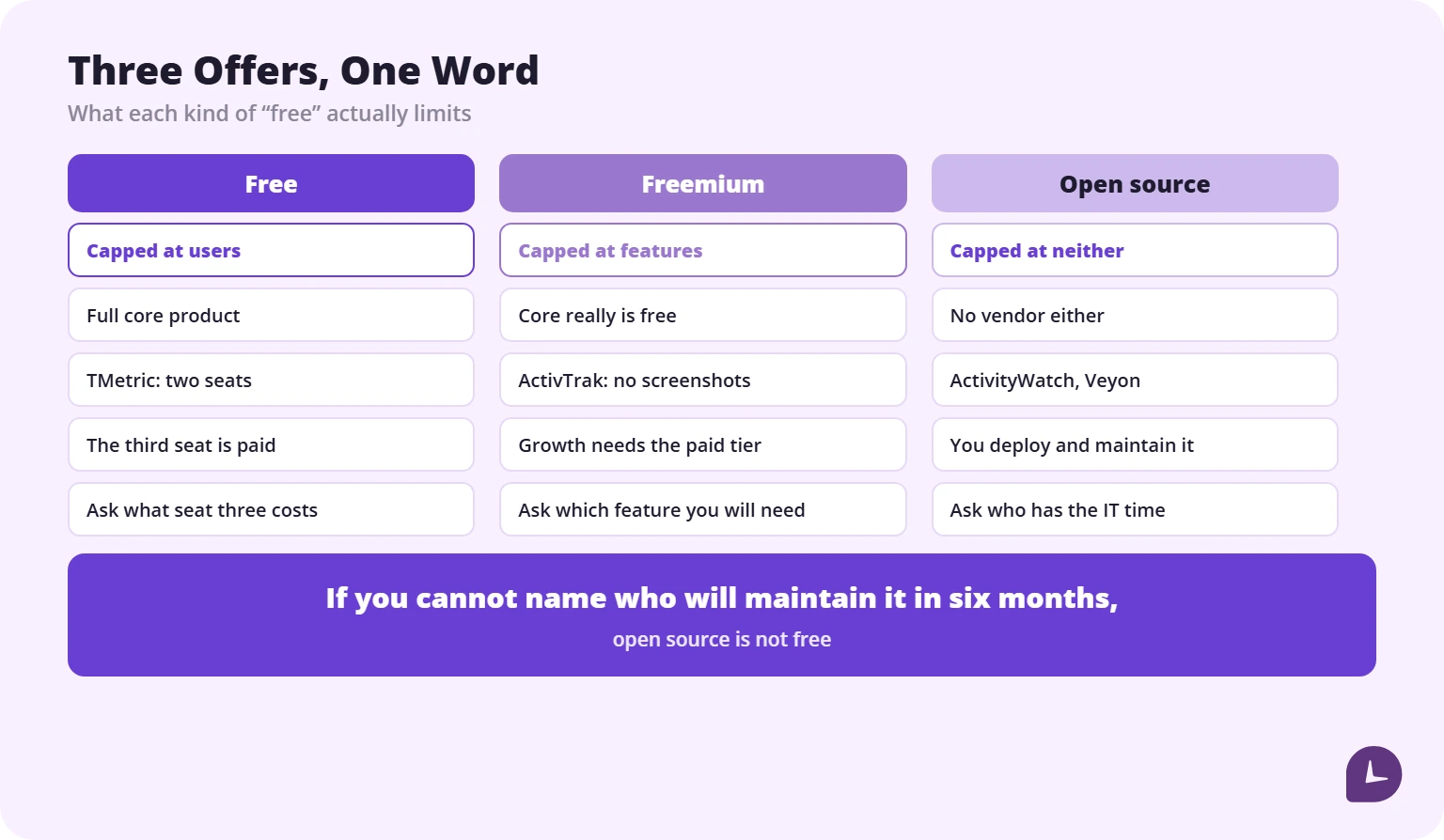
One framing used elsewhere in the category is worth borrowing, because it changes which questions you ask: most free plans cap scale, freemium plans cap features, and open source caps neither but hands you the operating burden.
Free vs freemium vs open source
Free plans limit how many people can use the product, not what the product does. You get the full core experience up to a fixed seat count. TMetric is the clean example: two users get time tracking and unlimited projects at no cost, and the third seat requires payment. TimeCamp is the exception: unlimited users, but a narrower feature set.
Freemium plans limit what the product does. Core functionality is genuinely free, but the capabilities a growing team will need sit behind a paywall. ActivTrak is the clearest case: the free edition covers 3 employees with up to 3 GB of storage, collects activity data, classifies apps and websites, and includes activity alarms and logs — while screenshots require the Screen Details add-on, which can only be bought with a paid plan.
Open source tools have no cap of either kind, and no vendor. ActivityWatch tracks apps and window titles locally on Windows, macOS, Linux and Android, stores everything on the device and uploads nothing. Veyon offers live screen viewing and remote control across Windows and Linux with no user limit. Both require you to deploy and maintain them.
One sentence decides which category you need: if you cannot name who will maintain the tool in six months, open source is not free.
How we checked these free plans
Every limit in this article was read from the vendor’s own pricing or product page on 25 September 2026, not from a review aggregator. Where a vendor does not publish a figure, this article says so rather than guessing.
That sounds like a small thing. It is not. One of the top-ranking guides to free monitoring software currently states in one paragraph that a tool’s free plan includes screenshots and, three lines later, that the same tool has no free plan at all. Contradictions like that appear when nobody re-checks.
Monitask publishes this article and sells team monitoring software. We do not have a free plan, so we are not in the ranking below. There is a section at the end explaining where we do fit.
The best free employee monitoring software in 2026
Best free plan for time tracking: Clockify
Free cap: 5 users · Screenshots: no
Clockify’s free tier covers unlimited projects, tasks, clients and time tracking for up to five people, with a timer, timesheet, calendar view, idle detection and browser extensions for Chrome, Firefox and Edge, across Windows, macOS, Linux, iOS and Android. Reports on the free plan are limited to a one-month date range.
The important limitation is not the seat count. Clockify’s auto tracker records app and website activity visible to the individual user only — a manager cannot see it. Screenshots, GPS and activity monitoring require the Pro plan. As free monitoring, it is really free time tracking.
Best for teams that do not want monitoring: Toggl Track
Free cap: 3 users · Screenshots: no
Toggl Track gives up to three people manual and real-time timers, calendar integrations, tasks, boards and simple planning at no cost. Reports cover each person’s own time; team-level reports, billable rates and time rounding require Starter.
Toggl is an anti-surveillance product by design: no screenshots, no keystroke logging, no browsing history. If your definition of monitoring includes oversight of other people’s activity, this is time tracking with a clear boundary, not monitoring software.
Best for unlimited users: TimeCamp
Free cap: unlimited users and projects · Screenshots: no
TimeCamp gives unlimited users automatic time tracking, attendance and unlimited projects at no cost, which is the most generous seat policy on this list. Projects cannot be split into tasks or subtasks on the free plan, there is no app or website tracking, and most integrations require a paid plan from $3.99/user/month.
Best for unlimited users with client work: TrackingTime
Free cap: unlimited users · Screenshots: no
TrackingTime’s free plan covers time tracking and timesheets for an unlimited number of people. It is a straightforward way to collect hours without a seat limit.
The free tier stops before the features that make client work easier: billable versus non-billable time, automatic tracking and reporting require a paid plan. There is no screenshot capture at any tier.
Best for a two-person team: TMetric
Free cap: 2 users · Screenshots: no
TMetric’s free plan covers time tracking and unlimited projects for two people, with no card required. For a two-person business that only needs hours and project totals, it is enough.
The third seat requires payment, and screenshots are not part of the product. It is a deliberately small free tier rather than a cut-down monitoring tool.
Best free analytics: ActivTrak
Free cap: 3 users, 3 GB storage, 30 days of history · Screenshots: no
ActivTrak’s free edition is the strongest free analytics option here. It collects and classifies user activity automatically, shows most-used apps and websites, reports total and productive work time, and includes activity alarms and detailed activity logs. New accounts also get the full Professional plan for 14 days.
Three users is a hard ceiling, and 30 days of history makes trend analysis impossible. Real-time visibility, website blocking and app usage reporting need the paid Essentials plan.
Best for screenshots on a free plan: Screenshot Monitor
Free cap: 1 owner + 2 employees · Screenshots: 3 per hour, 2-week retention
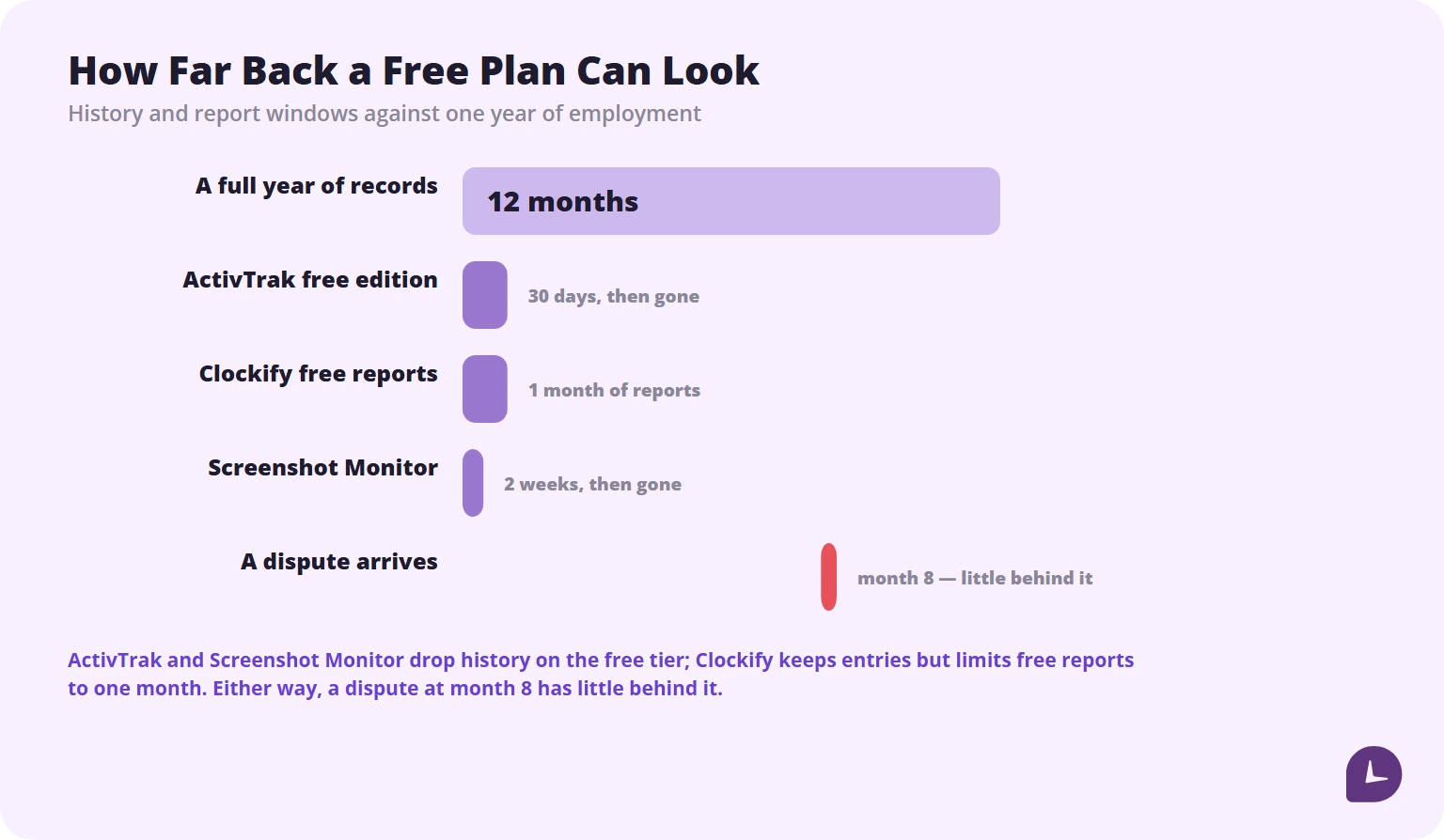
Screenshots on a free plan are rare. Screenshot Monitor provides them along with activity tracking, work session summaries and offline functionality. The two-week retention window means a dispute about a shift from three weeks ago has no evidence behind it.
Best unlimited free monitoring: EmpTrakr
Free cap: unlimited employees · Screenshots: yes, configurable
EmpTrakr offers app and website usage, idle detection, attendance and configurable screenshots on a free core plan with no seat limit and no credit card, with Windows and macOS agents.
Two things are worth noting. Retention and storage limits are not published, so ask before you rely on them. And EmpTrakr lets you route screenshots to your own Google Drive or OneDrive — the only tool here that keeps the most sensitive data under your ownership rather than the vendor’s. That design choice matters more than any feature in this list.
Best open source option: ActivityWatch
Free cap: none · Screenshots: no
ActivityWatch automatically tracks apps and window titles with usage categories, browser extensions for Chrome and Firefox, and editor plugins, on Windows, macOS, Linux and Android. All data stays on the device and is never uploaded.
It is built for individual self-tracking, not for managers. There are no team dashboards and no manager-level visibility, and device sync is not yet supported. If you need oversight of other people, this is the wrong tool.
Best for supervised environments: Veyon
Free cap: none, self-hosted · Screenshots: live screen viewing
Veyon is fully open source with no user cap: real-time screen viewing, remote desktop control, screen broadcasting and login monitoring on Windows and Linux, with LDAP and Active Directory for user management. macOS is not supported.
It was built for computer labs and classrooms, not commercial workforce monitoring, and it needs a dedicated IT resource to deploy.
Boost your business productivity
Track performance and streamline teamwork
What free plans actually remove
| Capability | Usually free | Usually paid |
|---|---|---|
| Clock-in and clock-out | Yes | — |
| Project and task time | Yes | Subtasks, budgets |
| App and website logging | Sometimes, often user-visible only | Manager-level visibility |
| Screenshots | Rare | Standard |
| Idle detection | Sometimes | — |
| Productivity scoring | Rare | Standard |
| Real-time dashboards | No | Standard |
| Data history beyond 30 days | No | Standard |
| Integrations | Limited | Standard |
| Approval workflows | No | Standard |
| Role-based access | Sometimes | Standard |
| Compliance certifications | Rare | Varies |
| Support | Community | Standard |
Checked 25 September 2026.
What happens to your data when the free plan ends
Nobody asks this until it matters, and no review of free monitoring software answers it. Four questions to ask before you install:
1. Is there an export, and what comes out? Time entries usually export cleanly as CSV. Screenshots frequently do not export at all. If your monitoring rationale is evidence, an evidence store you cannot download is not evidence.
2. What is the retention window? ActivTrak’s free edition keeps 30 days. Screenshot Monitor keeps screenshots for 2 weeks. Clockify keeps entries but limits free reports to a one-month range. A year-old dispute has little behind it in any of them.
3. What happens when you hit the cap mid-month? Some tools stop recording. Some lock the dashboard but keep collecting. Some keep working and bill you. The three outcomes are very different for payroll.
4. Does downgrading delete history? If you upgrade, run for six months and then downgrade, most vendors do not publish what happens to the data outside the free retention window. Ask in writing before you upgrade, not after.
Is a free monitoring agent safe to install?
A monitoring agent runs with high privileges on every machine in the company, reads window titles, and on some tools captures the screen. You are installing a trusted process across your fleet. Three checks before you do:
Who holds the screenshots. In most tools, the vendor does. EmpTrakr is the exception on this list, routing screenshot storage to your own Google Drive or OneDrive.
Whether the project is maintained. One tool that appears on several “best free monitoring” lists has a developer site that has not been updated since 2017. An unmaintained agent with screen capture rights is a security liability, not a saving.
What compliance the free tier carries. ActivTrak includes HIPAA, GDPR, CCPA and SOC 2 Type 2 compliance on its free plan, which is unusual. Most free tools carry none, and that exposure is not theoretical — the higher tier of GDPR fines reaches up to €20 million or 4% of total worldwide annual turnover for the preceding financial year, whichever is higher.
Before you decide the agent is the risk, it is worth reading what people get wrong about the practice itself: we have collected the employee monitoring myths that drive most of the objections.
What the law requires before you install anything
Free software does not come with a free compliance posture. Whatever you install, the obligations are yours.
Notify before you monitor. Several US states require advance written notice to employees before electronic monitoring begins, and many jurisdictions outside the US require it universally. The tool will not do this for you.
Write the policy first. It should state what is tracked, why, how long data is kept, who can see it and how it is deleted. Employees should acknowledge it, ideally at onboarding or before rollout.
Limit scope to work. Company devices, work hours, work activity. Monitoring off-hours activity or personal devices is where most legal exposure begins.
Check whether a works council or union agreement applies. In parts of the EU, deployment requires consultation before, not after.
Free tools rarely include consent workflows, data anonymisation or audit trails, which means those steps fall to you manually. The European side of this is the most demanding, and our guide to GDPR requirements for employee monitoring covers it in detail. If you are weighing whether to tell employees at all, we have set out the argument in is stealth monitoring ethical. Rules vary by country and state; this is general information, not legal advice.
What free monitoring costs you in hours
| Cost | Free cloud tool | Open source | Paid tool |
|---|---|---|---|
| Setup | 1–2 hours | 1–3 days | 1–2 hours |
| Ongoing maintenance | None | Ongoing, internal | None |
| Policy and consent documentation | Yours | Yours | Often templated by vendor |
| Support when something breaks | Community | Yours | Included |
| Migration when you outgrow it | Full platform move | N/A | Plan upgrade |
| Compliance certification | Usually none | None | Varies |
The line that costs the most is the last-but-one. Growing past a free tier’s cap usually means a full platform migration rather than a simple upgrade, because the data does not travel between vendors.
When to stop using free employee monitoring software
Four signals, and one is enough:
- You have hit the seat cap and are managing a workaround. The workaround is the cost.
- You need history beyond the retention window for payroll, billing or a dispute.
- You have a compliance obligation — SOC 2, HIPAA or GDPR — that the free tier does not carry. ActivTrak’s free edition is the exception on this list, but confirm the certification applies to the plan you are on.
- Managers cannot see what they need. If activity data is visible only to the individual employee, you have transparency without oversight, which may be exactly right — or may be the reason the tool is not working.
How to choose
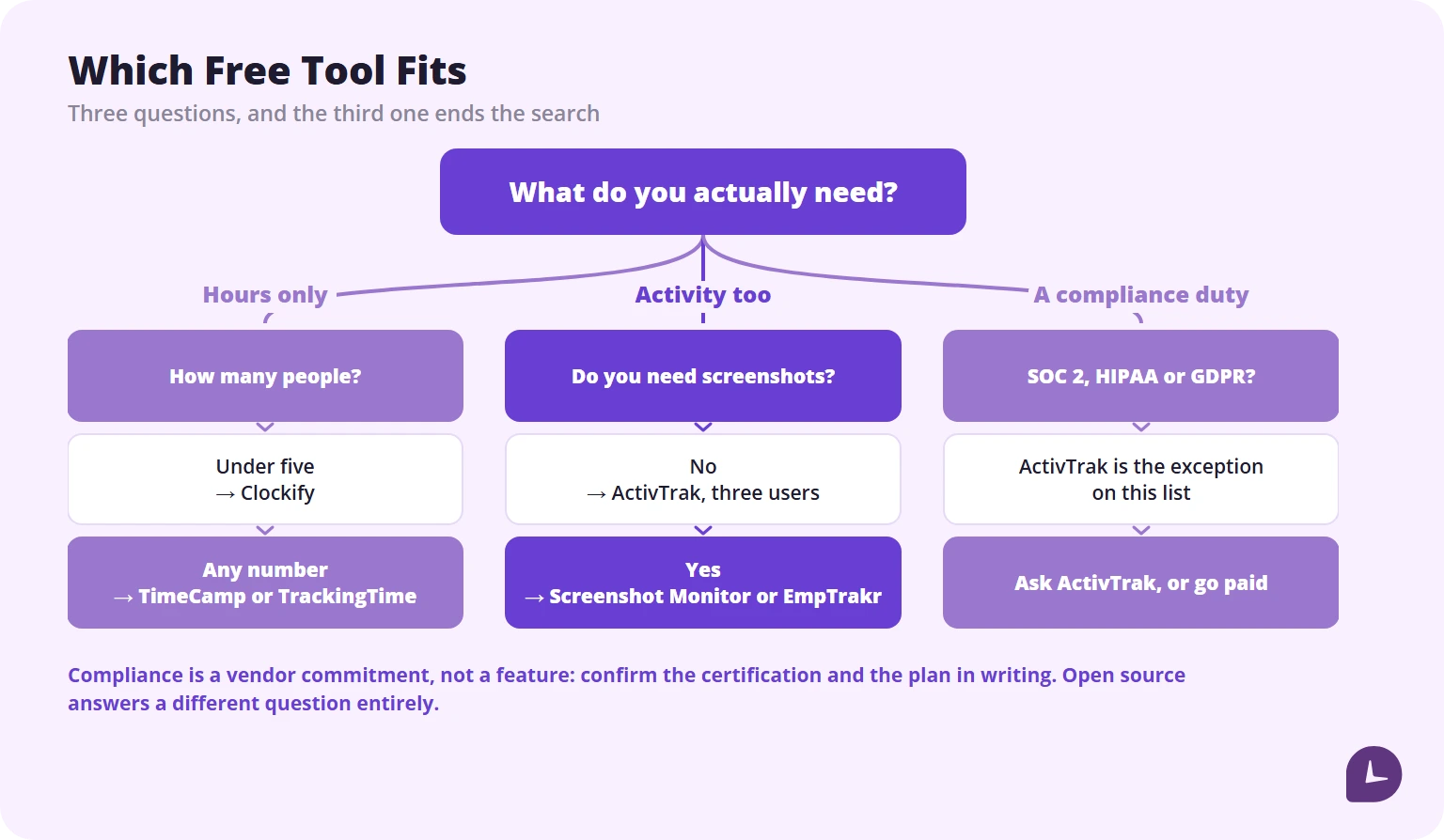
| If this is true | Start with |
|---|---|
| Fewer than 5 people, you only need hours | Clockify |
| Any number of people, you only need hours | TimeCamp or TrackingTime |
| Fewer than 3 people, you need real activity analytics | ActivTrak free edition |
| You need screenshots at no cost | Screenshot Monitor or EmpTrakr |
| You need screenshots stored under your own account | EmpTrakr |
| You have IT resource and want no vendor at all | ActivityWatch or Veyon |
| You have a compliance requirement | ActivTrak is the exception on this list; otherwise go paid |
Tools that did not make the list
Homebase — genuinely free for up to 10 employees and 1 location with time tracking and scheduling, but no screen monitoring, app usage tracking or productivity analytics. It is scheduling software, not monitoring software.
RescueTime Lite — free with app and website tracking and weekly reports, but history is limited to 2 weeks and there are no workforce dashboards or team reporting. Built for self-awareness, not oversight.
DeskTime, Time Champ, Insightful, Jibble — all appear on “free monitoring” lists. DeskTime offers a 14-day trial with no free-forever plan. Time Champ does not advertise a free-forever plan. Insightful offers a 7-day trial. Jibble’s free tier is real but is time and attendance rather than activity monitoring.
AeroAdmin — free remote desktop access with session limits. Useful for support, not a monitoring system.
SXR Software and PC Screen Watcher — Windows-only, free, and effectively unmaintained. See the maintenance point above.
Where Monitask fits — and where it does not
Monitask has no free plan. It has a 10-day trial with no credit card, and paid plans after that. If your requirement is a permanently free tool, this article’s ranking is your answer and Monitask is not in it.
Monitask becomes relevant at the point where free stops working: when you need more seats than a free cap allows, history beyond 30 days, screenshots that survive longer than two weeks, and timesheets an approver signs before payroll. It runs on Windows, macOS, Linux, Chromebook, iOS and Android, blurs sensitive content before a screenshot leaves the machine, and only records while an employee is clocked in. That blurring is part of our screen monitoring software, and it is the feature no free tool on this list offers.
One correction while we are here, because this article is about accuracy: a widely-cited roundup lists Monitask’s free plan as including screenshot monitoring and, further down the same page, states that Monitask has no free plan. The second statement is the correct one.
If you want to see the paid side of this comparison, our employee monitoring software page covers it. If you do not, the tools above are a legitimate place to start.
Disclosure: Monitask published this article and sells employee monitoring software. No tool in the ranking paid for placement, and we have no affiliate arrangements with any of them.
Reliable employee tracking software. Clear visibility and insights into how employees work. Even remotely.
Try Monitask free for 10 days
FAQ
What is the catch with free employee monitoring software?
Usually one of three: a seat cap of 2 to 5 users, a retention window of 14 to 30 days, or manager-level visibility withheld so activity data is visible only to the employee who generated it.
Can I get screenshots on a free plan?
Rarely. Screenshot Monitor includes 3 screenshots per hour with 2-week retention on its free tier, and EmpTrakr includes configurable screenshots on its free core plan. ActivTrak requires a paid add-on for screenshots.
How many users do free employee monitoring plans allow?
Typically 2 to 5. ActivTrak allows 3, Toggl Track 3, Clockify 5 and TMetric 2, cut from 5 in February 2025. TimeCamp, TrackingTime and EmpTrakr allow unlimited users with a narrower feature set.
Is free employee monitoring software GDPR compliant?
The software is one part of compliance; your process is the rest. ActivTrak includes GDPR, HIPAA, CCPA and SOC 2 Type 2 on its free plan, which is unusual. Most free tools carry no certifications, and the notification, consent and retention obligations remain yours regardless.
Is employee monitoring legal?
In many jurisdictions it is legal when employees are informed in advance, on company devices, during work hours. Several US states require written notice before electronic monitoring begins, and parts of the EU require works council consultation before deployment. Rules vary; confirm with counsel for your locations. If you are on the other side of this question, we also explain [how to detect employee monitoring software](/blog/how-to-detect-employee-monitoring-software/).
What is the difference between employee monitoring and time tracking?
Time tracking records how long. Employee monitoring records what happened during that time — apps, websites, idle periods and optional screenshots. Several tools marketed as free monitoring are free time tracking.
Can free monitoring software work for remote teams?
Partly. Free tiers rarely include location reporting or real-time dashboards, which distributed teams usually need. What free tiers do cover well is basic hours and attendance.
Is open source employee monitoring free?
Free of licence cost, not of labour. ActivityWatch and Veyon have no user cap, but both need deployment and maintenance, and neither carries compliance certification.
How long do free plans keep my data?
ActivTrak’s free edition keeps 30 days. Screenshot Monitor keeps screenshots 2 weeks. Clockify limits free reports to a one-month range. Several vendors do not publish a figure at all, which is worth asking about before you depend on the tool.