GPS Time Clock for Employees: Accuracy, Geofencing, and the Law

A GPS time clock records a location alongside each clock-in and clock-out, so a timesheet carries where the work started as well as when. It answers the attendance question for field crews that a desk time clock cannot. It does not provide continuous proof of presence: the accuracy figures in circulation measure the satellite signal rather than a phone, and a geofence confirms position at the moment of a fix rather than detecting the moment someone leaves.
> This is not legal advice. Location tracking of employees is governed by state law that varies widely, and one of the strictest provisions carries criminal classification. Have counsel review your configuration and your policy before deployment. Sources were checked on 22 October 2026.
Key takeaways
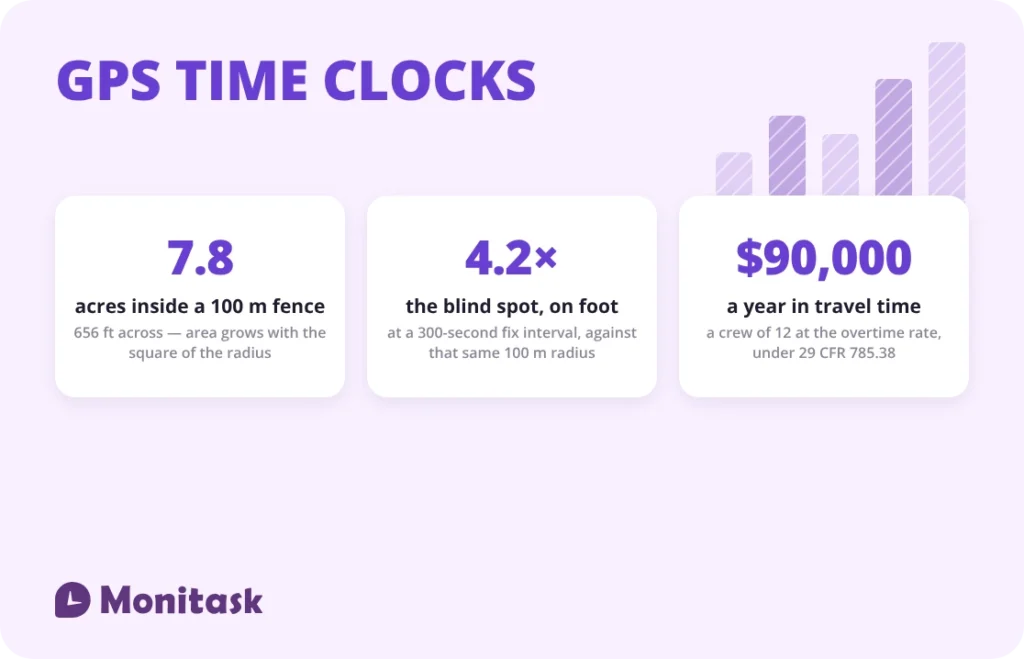
- A 100 m geofence radius is a circle 656 feet across and 7.8 acres in area. Area grows with the square of the radius, so doubling it quadruples the ground a clock-in is accepted from.
- A geofence cannot reliably detect departure. At a 300-second fix interval the walking blind spot is 420 m — 4.2 times a 100 m radius.
- The widely quoted 7.8 m figure describes the satellite signal, not a receiver, and the page carrying it says a new version is coming. The one smartphone figure the government has published is third-party-sourced and conditioned on open sky.
- The first thing GPS data documents is often the employer’s own unpaid travel time: $90,000 a year for a crew of 12 at the overtime rate.
- Two states regulate this directly and they do it in opposite ways: one by criminal prohibition, one by a notice duty on employers.
What is a GPS time clock?
A GPS time clock is a time clock that attaches a location to a time entry. An employee starts the timer on a phone, the app reads the device’s position, and the entry stores both. Where a geofence is configured, the app compares that position against a boundary drawn around a job site and either accepts the clock-in or flags it.
| What it captures | When |
|---|---|
| Coordinates at clock-in | At the moment the timer starts |
| Coordinates at clock-out | At the moment the timer stops |
| Coordinates during the shift | Only if the product samples periodically, and only while tracking is active |
| Inside or outside a geofence | At each fix, by comparing position to the boundary |
| Nothing at all | While the timer is off |
The distinction that matters for every claim further down: a time clock with GPS records discrete fixes. It is not a continuous location feed, and a product that samples only at clock-in and clock-out holds two data points for an 8-hour shift.
How accurate is a GPS time clock?
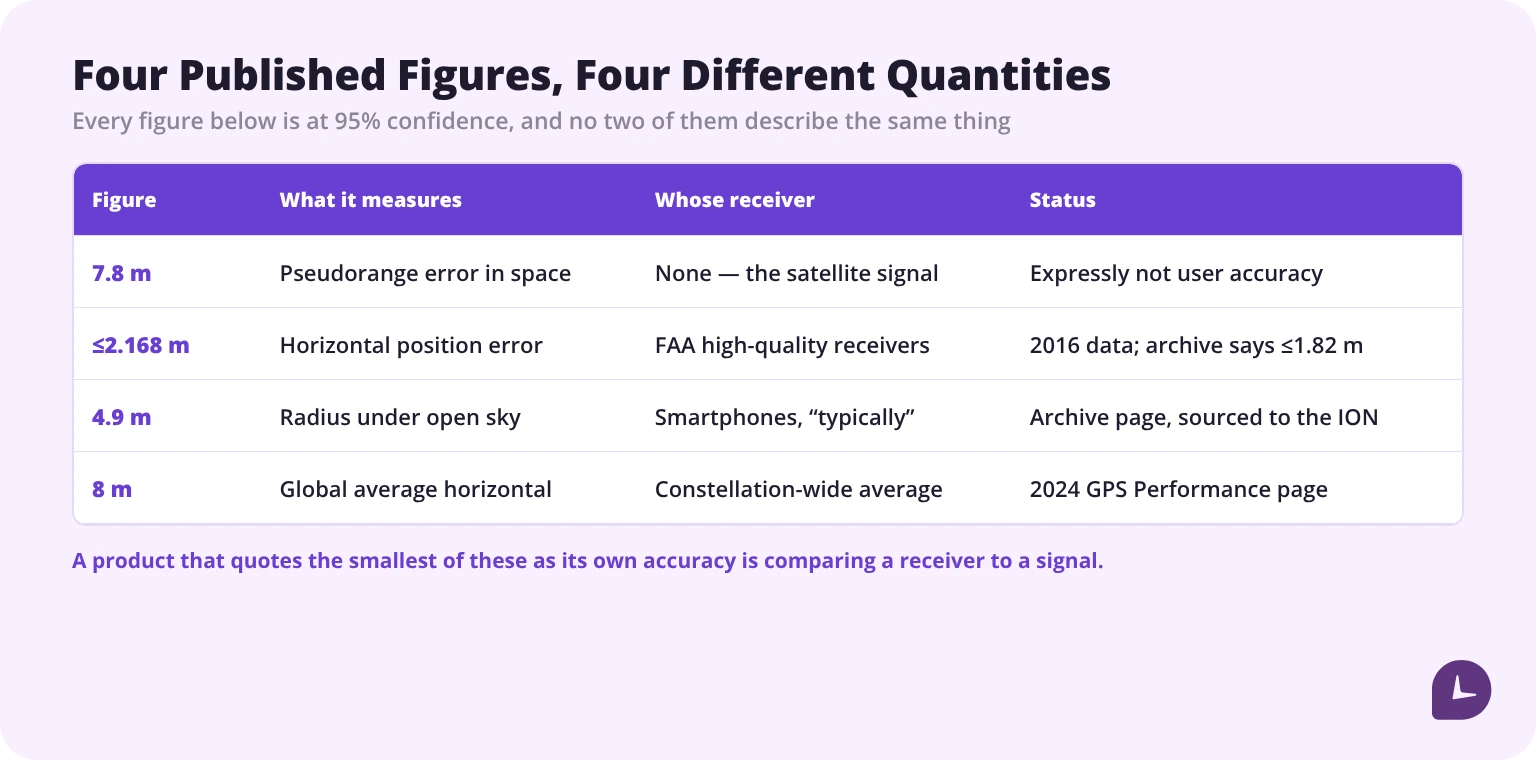
Less precisely than commonly claimed, and the figures in circulation do not measure the same thing as each other. Before comparing them, note that gps.gov currently serves two accuracy pages that disagree.
| Figure | What it measures | Source | The catch |
|---|---|---|---|
| 7.8 m | Pseudorange error in the signal in space, 95% | GPS SPS Performance Standard, quoted on the live gps.gov accuracy page | Not user accuracy, and not a position error — the page says so in the next sentence |
| ≤2.168 m | Horizontal position error, 95% | FAA data for high-quality single-frequency receivers, 1 April – 30 June 2016 | Survey-class receivers, not phones; the archive page replaces it with ≤1.82 m |
| 4.9 m | Radius under open sky, “typically” | archive.gps.gov, attributed to the Institute of Navigation | The only smartphone figure gps.gov has published, on a page last modified March 2022, and not a government measurement |
| 8 m | Global average horizontal position error, 95% | gps.gov GPS Performance page, 2024 | A constellation-wide average across monitoring sites, not a figure for any one device |
The 8 m figure is the current one; the 7.8 m figure is the one everyone quotes. The live gps.gov accuracy page carries 7.8 m and ≤2.168 m and carries, at the bottom, the sentence “We are working on a new version of this page.”. The newer text — last modified March 2022 and now held on the government’s archive site — replaces them with a daily global average user range error of ≤2.0 m and an FAA figure of ≤1.82 m. A separate live performance page reports a 2024 global average horizontal position error within 8 m. All three are official. None of them is a phone.
The 7.8 m figure is not user accuracy, and the source says so in the next sentence. The commitment is that “the GPS signal in space will provide a “worst case” pseudorange accuracy of 7.8 meters at a 95% confidence level”, immediately followed by: “This is not the same as user accuracy; pseudorange is the distance from a GPS satellite to a receiver.” A pseudorange is a one-dimensional ranging error, not a position error, so a product claiming accuracy “within 5 metres” on the strength of 7.8 m is quoting the wrong class of measurement entirely. The archive page states the principle flatly: “The accuracy commitments do not apply to GPS devices, but rather to the signals transmitted in space.”
The 2.168 m figure describes aviation receivers, and the underlying data is from 1 April to 30 June 2016. The page says: “Recent FAA data shows their high quality, single-frequency GPS receivers attaining horizontal accuracy of ≤2.168 m, 95% of the time.” Those are high-quality single-frequency units in aircraft with an unobstructed view of the sky, not handsets in a pocket beside a building.
A smartphone figure does exist, and it is weaker than it looks. The current gps.gov accuracy page publishes none. The archive version does: “GPS-enabled smartphones are typically accurate to within a 4.9 m (16 ft.) radius under open sky” — attributed to the Institute of Navigation rather than measured by the government, hedged with “typically”, qualified by “under open sky”, and followed immediately by “However, their accuracy worsens near buildings, bridges, and trees.” So the honest statement is not that no figure exists, but that the only one that exists is third-party, approximate, and expressly conditioned on the circumstances a job site rarely provides.
What gps.gov lists as degrading a fix is exactly a description of a working site:
- Satellite signal blockage due to buildings, bridges, trees, etc.
- Indoor or underground use
- Signals reflected off buildings or walls (“multipath”)
And one more that matters in a dispute about where someone “was”: the mapping layer can be wrong independently of the fix. The archive page notes that users are misled by incorrectly drawn maps, mislabelled businesses and incorrectly estimated street addresses, and that “The U.S. government cannot correct mapping errors in consumer devices.” A geofence drawn around a mis-geocoded address will reject correct clock-ins indefinitely, and nothing in the accuracy figures predicts it.
The practical consequence: do not configure a geofence against a published accuracy number. Set a radius, watch which sites generate rejected clock-ins, and widen those. Error at a given site is a property of that site.
What geofence radius should you set?
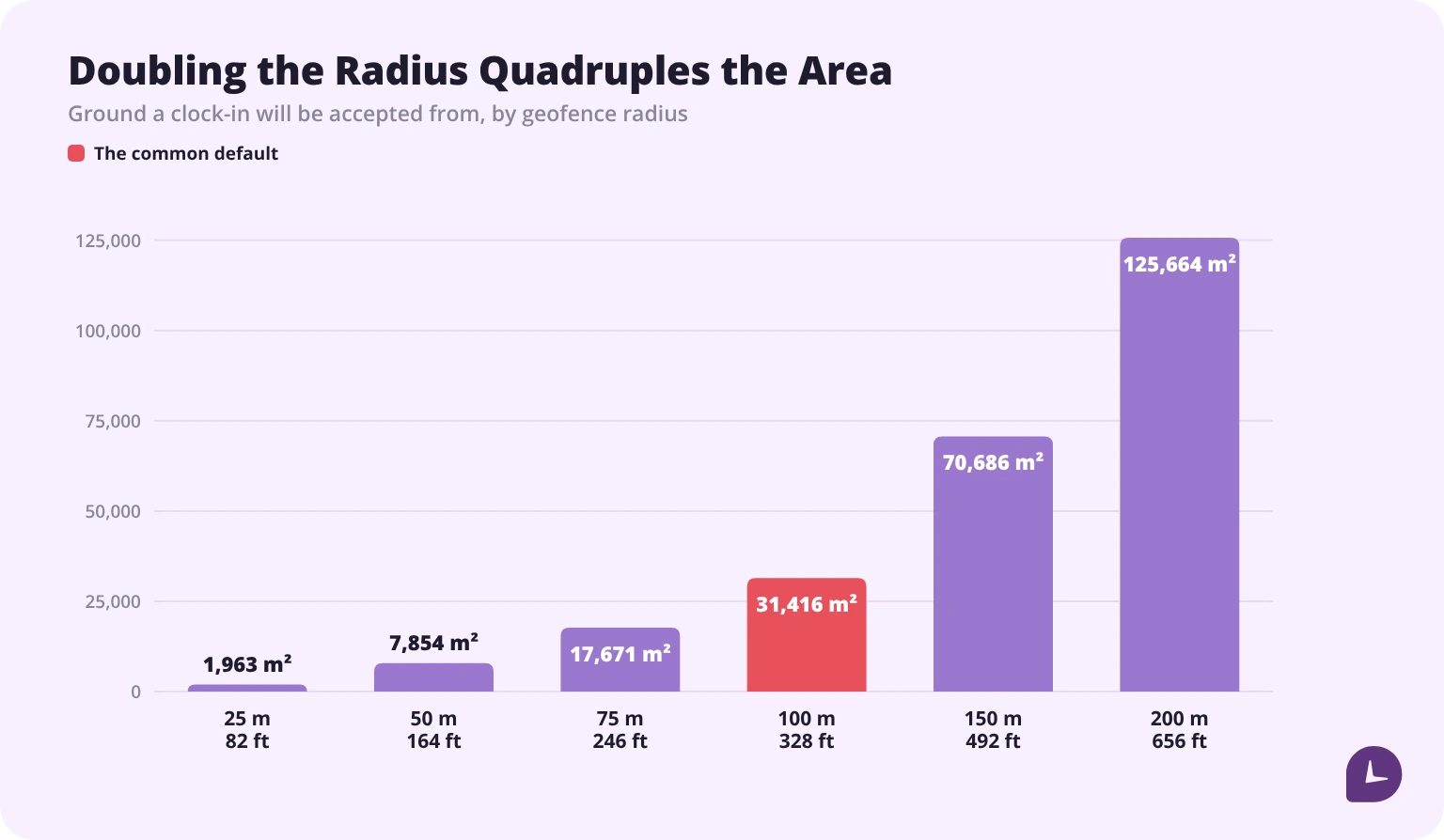
Larger than the expected error, and smaller than the next building. The trade-off is unforgiving because area grows with the square of the radius.
| Radius | In feet | Area | Across | Relative to 50 m |
|---|---|---|---|---|
| 25 m | 82 ft | 1,963 m² | 50 m / 164 ft | 0.25× |
| 50 m | 164 ft | 7,854 m² | 100 m / 328 ft | 1× |
| 75 m | 246 ft | 17,671 m² | 150 m / 492 ft | 2.25× |
| 100 m | 328 ft | 31,416 m² | 200 m / 656 ft | 4× |
| 150 m | 492 ft | 70,686 m² | 300 m / 984 ft | 9× |
| 200 m | 656 ft | 125,664 m² | 400 m / 1312 ft | 16× |
Doubling the radius quadruples the area in which a clock-in is accepted. A 100 m radius is a circle 656 feet across and 7.8 acres in area — roughly two city blocks, which in a dense area includes the parking lot opposite and the café round the corner.
Set it too tight and the failures land on the employee: a legitimate clock-in is rejected because the fix drifted, and the crew learns to work around the app. Set it too loose and the geofence stops distinguishing the site from its neighbourhood. Neither failure is visible in a report, which is why the radius belongs in a site record alongside the address, reviewed per site rather than set once as a global default.
Can a geofence detect when someone leaves?
Not reliably, and this is arithmetic rather than a product limitation. Until the next fix arrives, a departure is invisible. The blind spot is the sampling interval multiplied by the speed of travel.
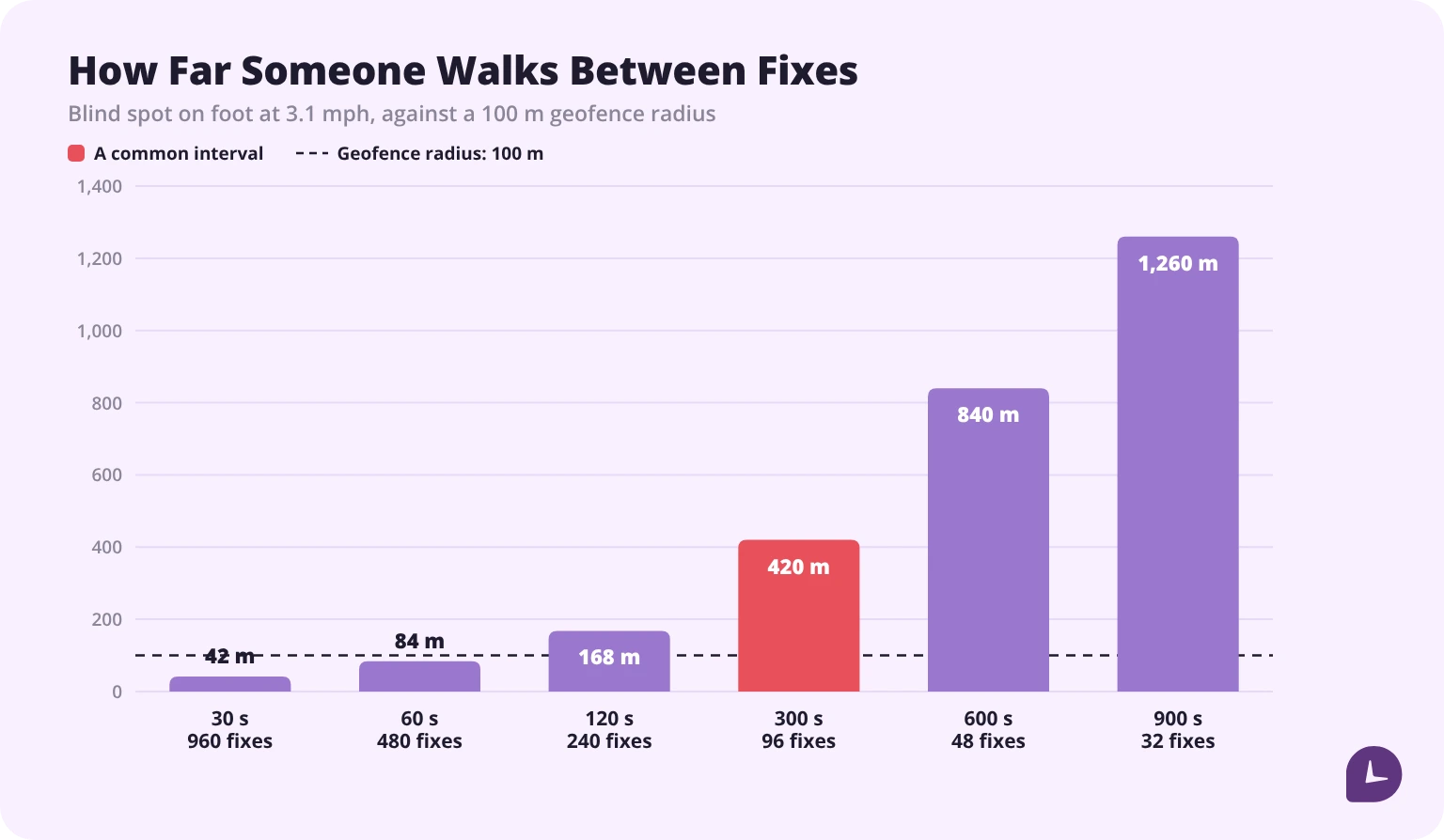
| Sampling interval | Fixes per 8-hour shift | On foot (3.1 mph) | By vehicle (31 mph) |
|---|---|---|---|
| 30 s | 960 | 42 m / 138 ft | 417 m / 1,368 ft |
| 60 s | 480 | 84 m / 276 ft | 834 m / 2,736 ft |
| 120 s | 240 | 168 m / 551 ft | 1,668 m / 5,472 ft |
| 300 s | 96 | 420 m / 1,378 ft | 4,170 m / 13,681 ft |
| 600 s | 48 | 840 m / 2,756 ft | 8,340 m / 27,362 ft |
| 900 s | 32 | 1,260 m / 4,134 ft | 12,510 m / 41,043 ft |
At a 300-second interval the walking blind spot is 420 m — 4.2 times a 100 m geofence radius. An employee can leave the boundary and return without a single fix recording it. By vehicle the same interval is 4,170 m, which is most of a town.
Running the calculation backwards gives the interval each radius would need for the blind spot to stay inside it:
| Radius | Maximum interval, on foot | Maximum interval, by vehicle |
|---|---|---|
| 50 m / 164 ft | 36 s | 4 s |
| 100 m / 328 ft | 71 s | 7 s |
| 150 m / 492 ft | 107 s | 11 s |
| 200 m / 656 ft | 143 s | 14 s |
A 7-second poll is not a battery proposition on any phone. So the honest statement about the technology is this: a geofence confirms presence at the moment of a fix, and is not a reliable detector of departure. It is good evidence that someone was at a site when they said they were, and weak evidence about what happened in between.
That matters for how the data is used. A clock-in outside a boundary is a fact worth a conversation. An absence of out-of-boundary events is not proof that nobody left, and treating it as proof will eventually be contradicted by something as ordinary as a lunch run.
How often should location be sampled?
Frequently enough to be useful, rarely enough that the phone lasts the shift and the data stays proportionate to the purpose.
| Interval | Fixes per shift | What it supports | Cost |
|---|---|---|---|
| 30–60 s | 480–960 | Near-continuous route reconstruction | Heaviest battery and data use; the most intrusive record |
| 2–5 min | 96–240 | Site presence sampling, rough route | Moderate; the blind spot already exceeds most geofences |
| 15 min | 32 | Confirmation that the employee stayed in the area | Light; no meaningful boundary detection |
| Clock-in and clock-out only | 2 | Verifying where the shift started and ended | Lightest; no in-shift visibility at all |
Two rules keep the choice defensible. Sample at the rate the stated purpose requires and no faster, because every additional fix is additional personal data collected for a purpose that has to be named. And stop sampling when the timer stops — tracking that continues after clock-out collects location outside working hours, which is the configuration most likely to become a legal problem.
What does GPS data prove about travel time?
This is the part that surprises employers. GPS is usually installed to test whether recorded hours were really worked. The first thing it documents is often travel between job sites — which is compensable hours worked.
| Rule | Title | What it does |
|---|---|---|
| § 785.35 | Home to work; ordinary situation | Not hours worked — and expressly so “whether he works at a fixed location or at different job sites” |
| § 785.38 | Travel that is all in the day’s work | Hours worked: site to site during the workday, and from a mandatory muster point onward, “regardless of contract, custom, or practice” |
| § 785.36 | Home to work in emergency situations | Hours worked when the employee has gone home, is called out at night, and travels a substantial distance to a customer emergency |
| § 785.37 | Home to work on special one-day assignment in another city | Hours worked, less the home-to-depot leg and the usual meal time |
| § 785.39 | Travel away from home community | Hours worked where overnight travel cuts across the workday, including the same hours on a non-working day |
| § 785.41 | Work performed while traveling | The driver is working; a passenger only if required to ride as an assistant or helper |
The load-bearing sentence is in § 785.38: “Time spent by an employee in travel as part of his principal activity, such as travel from job site to job site during the workday, must be counted as hours worked.” And the one that catches employers running a morning muster: where an employee is required to report to a meeting place to receive instructions or pick up tools, travel from there to the work place “must be counted as hours worked regardless of contract, custom, or practice”. A long-standing practice of not paying for the drive from the yard does not make it non-compensable.
Two places the regulation is routinely over-read. First, § 785.34 does say that ordinary home-to-work travel need not be counted “even if the employer agrees to pay for it” — but that is an exception to the sentence immediately before it, which says the opposite for other commencement and cessation travel: if compensable by express contract or by custom or practice, “If compensable by express contract or by custom or practice not inconsistent with an express contract, such traveltime must be counted in computing hours worked.” Contract and custom can add compensable time; they cannot subtract it. Second, § 785.38’s “travel after 8 p.m.” is a clock time inside a worked example, not a cut-off. The principle is that travel home from the final job site is home-to-work travel, whatever the hour.
And § 785.36 is narrower than its best-known sentence suggests. “All time spent on such travel is working time” applies where the employee has gone home after completing the day’s work, is called out at night, and travels a substantial distance to an emergency job for a customer. Where the call-out is to the employee’s own regular place of business, the section says expressly: “The Divisions are taking no position on whether travel to the job and back home by an employee who receives an emergency call outside of his regular hours to report back to his regular place of business to do a job is working time.” For an employer running an after-hours rotation, that disclaimer is the most important sentence in the section, and most summaries drop it.
Put numbers on the ordinary case. A technician covering 3 sites a day makes 2 inter-site trips, and the drive between them averages 25 minutes. At $24 an hour:
| Compensable travel per day | 50 min = 0.83 h |
| Per week | 4.17 h — so 40 hours of on-site work becomes 44.17 h |
| Per year, over 250 working days | 208.33 h |
| At the regular rate | $5,000.00 |
| For a crew of 12 | $60,000.00 |
| Where those hours push the week past 40, at time and a half | $36/h |
| Per person at the overtime rate | $7,500.00 |
| For a crew of 12 at the overtime rate | $90,000.00 |
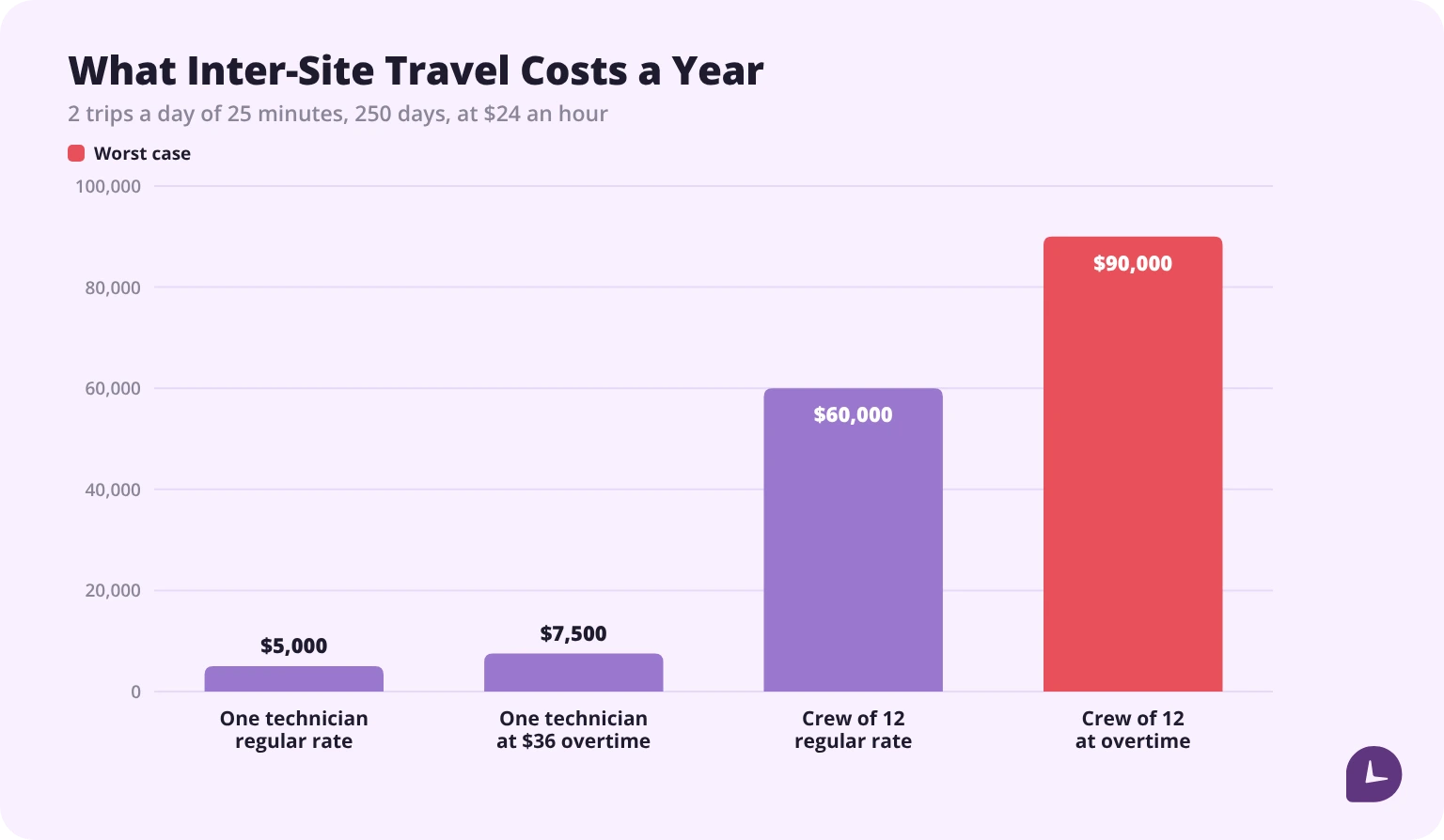
One arithmetic note, because it is the sort of thing that turns up in a dispute: 0.83 hours a day is a rounded figure. Multiply the rounded number through the chain and the year comes to $4,999.92; compute from 50 minutes and it is $5,000.00. The $0.08 gap is immaterial on one technician and is not immaterial once it is multiplied by a crew and a few years. Round at the end, not in the middle.
The part that inverts the business case
Two sections of the same regulation that vendor pages rarely cite decide how a GPS deployment actually lands. Under § 785.12, “If the employer knows or has reason to believe that the work is being performed, he must count the time as hours worked.” And under § 785.13, “The mere promulgation of a rule against such work is not enough. Management has the power to enforce the rule and must make every effort to do so.”
Read those against a location log. A geofence system manufactures reason to believe. If the breadcrumb trail shows a technician on site at 6:40 and the timesheet starts at 7:00, the employer now holds record evidence that it knew. Before the system was installed, that evidence did not exist. A policy forbidding unauthorised pre-shift work does not answer it, because § 785.13 says in terms that a rule on its own is not enough.
So the exposure exists whether or not GPS is deployed, but the evidence of it does not. Installing a GPS time clock without reconciling location data against time records raises off-the-clock exposure rather than reducing it. The sequence matters: settle how inter-site travel and early arrivals are recorded and paid before the location data starts accumulating, not after someone reads the timestamps back.
Is GPS tracking of employees legal?
It depends on the state, and the two states that address employer tracking most directly do it in opposite ways — one by criminal prohibition with no employer exception, one by a notice duty with no criminal exposure at all.
California: a misdemeanour with no employee-consent exception
California Penal Code § 637.7 has 6 subdivisions and has not been amended since it took effect in 1999.
| Subdivision | What it provides |
|---|---|
| (a) | “No person or entity in this state shall use an electronic tracking device to determine the location or movement of a person.” |
| (b) | The prohibition does not apply where “the registered owner, lessor, or lessee of a vehicle has consented to the use of the electronic tracking device with respect to that vehicle” |
| (c) | It does not reach the lawful use of an electronic tracking device by a law enforcement agency |
| (d) | An electronic tracking device is “any device attached to a vehicle or other movable thing that reveals its location or movement by the transmission of electronic signals” |
| (e) | “A violation of this section is a misdemeanor.” |
| (f) | For a person or business licensed under Division 3 of the Business and Professions Code, a violation is grounds for revocation of that licence |
Read subdivision (b) closely. The only consent exception is built around a vehicle, and the consent comes from its registered owner, lessor or lessee. The consent of the person being tracked is not a basis anywhere in the section — subdivision (a) carries no “without consent” qualifier at all. So the common formulation, that GPS tracking is lawful provided the employee is informed and agrees, does not match this statute’s text.
Whether (a) reaches an app on a phone is a genuine open question, and the best evidence is the Legislature’s own. Twice it tried to close the gap and twice failed: AB 452 in 2011 would have read “a vehicle, wireless telephone, or other movable thing”, and SB 690 in 2015 would have replaced the definition with the broader one in Penal Code § 1534. The committee analysis of the first said the definition “arguably does not embrace, for example, the widespread of GPS in mobile phones”. Neither bill was enacted, so the 1998 definition stands.
Subdivision (f) is also narrower than it is usually quoted. Division 3 of the Business and Professions Code is the licensed-professions division that covers private investigators — which is who the 1998 bill was aimed at. A typical employer is not licensed under Division 3, so (f) is a sanction on investigators and similar licensees, not a general threat to any business.
> Not settled law. No California state court or Attorney General opinion has decided whether § 637.7 reaches a phone app. Three federal district courts in the Northern District of California have held that it does not, on the ground that an app is not “attached” to anything, and the Ninth Circuit affirmed the most recent of them in an unpublished, non-precedential memorandum that turned on factory-installed hardware rather than software. The employer-facing question — a tracking app plus a company-issued phone or vehicle — has not been reached by any reported decision.
New Jersey: the only state that regulates employer vehicle tracking
N.J.S.A. 34:6B-22, enacted as P.L. 2021, c. 449 and effective 18 April 2022, is the only standalone statute in the country whose subject is an employer’s use of vehicle tracking on employees. It is three subsections and roughly 240 words — considerably thinner than most coverage of it implies.
The duty: “An employer who knowingly makes use of a tracking device in a vehicle used by an employee without providing written notice to the employee shall be subject to a civil penalty in an amount not to exceed $1,000 for the first violation and not to exceed $2,500 for each subsequent violation, collectible by the Commissioner of Labor and Workforce Development in a summary proceeding pursuant to the ‘Penalty Enforcement Law of 1999,’ P.L.1999, c.274 (C.2A:58-10 et seq.).”
| Question | What the enacted text says |
|---|---|
| Who must be notified? | The individual employee who uses the vehicle. Not a posting, not a union, not a works council |
| In what form? | Written. Oral notice does not satisfy it |
| Is consent required? | No. The word “consent” appears nowhere in the act. Notice only, and a refusal does not bar tracking |
| When? | The enacted text specifies no timing. “Before use” is a sensible inference from the structure, not a quotation |
| Whose vehicle? | “a vehicle used by an employee” — no ownership qualifier, so a technician’s own truck is covered |
| How much? | Civil penalty not to exceed $1,000 for a first violation and not to exceed $2,500 for each subsequent one — ceilings, not fixed amounts |
| Who enforces it? | The Commissioner of Labor and Workforce Development, in a summary proceeding. The statute creates no private right of action |
| What state of mind? | “Knowingly.” There is no strict-liability tier |
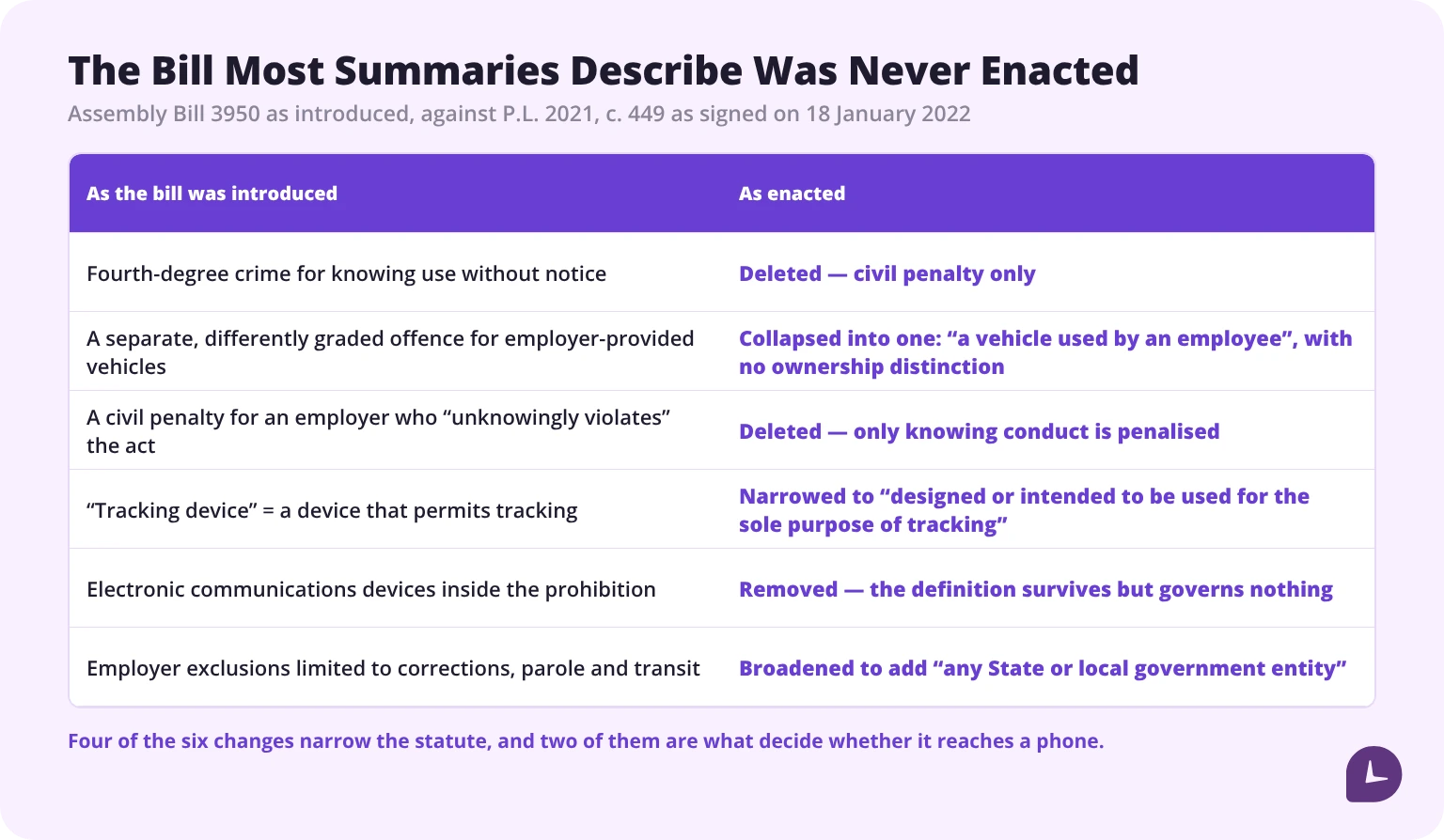
Does it reach a phone app? On the enacted text, probably not. “Tracking device” means a device “designed or intended to be used for the sole purpose of tracking the movement of a vehicle, person, or device” — and a smartphone is a general-purpose computer. The act separately defines “electronic communications device” to include a telephone, which shows the drafters knew how to name phones; that term does not appear in the prohibition at all. And the prohibition reaches use of a device “in a vehicle”, which a phone in a pocket fits poorly.
Every one of those narrowings arrived in the Governor’s conditional veto, which is why describing this statute from the bill as introduced describes law that was never enacted:
> Not settled law either. No New Jersey court, Attorney General opinion or Department of Labor guidance has construed § 34:6B-22, and the statute has no implementing regulations. A dedicated single-function tracking app is a harder case than a field service app that also does scheduling and invoicing. Since written notice costs almost nothing, give it regardless of which side of the definition a vendor’s product falls on — that is the position that survives a court reading the statute more broadly.
Three exclusions sit in the act, two of them buried inside definitions: devices used to document employee expense reimbursement; public-sector and transit employers, including privately operated charter bus companies; and a savings clause for FMCSA requirements. Note what is not there — New Jersey has no exception for dashcams, collision avoidance or other vehicle-safety systems, though several other states do. And the FMCSA provision is a rule of construction, not an exemption: it does not by its terms excuse the written-notice duty for a carrier running electronic logging devices.
The distinction most summaries miss
Statutes that oblige the employer and statutes that protect it get listed together as “GPS laws”. They are opposites.
| State | What kind of law | What it actually does |
|---|---|---|
| New Jersey | Notice duty on the employer | Written notice to the employee before using a tracking device in a vehicle the employee uses. Civil penalty, Commissioner of Labor. |
| Illinois | Safe harbour for the employer | 720 ILCS 5/21-2.5(c)(3) exempts a business tracking vehicles it owns or leases and its employees drive. No notice duty. |
| Virginia | Safe harbour for the employer | § 18.2-60.5(B)(4) exempts “The owner of fleet vehicles, when tracking such vehicles”. No notice duty. |
| Louisiana | Safe harbour, for phones rather than vehicles | R.S. 14:323(C)(8) exempts an employer that provides a cellular device for use in the course and scope of employment. No notice duty. |
| California | Neither | Penal Code § 637.7 is a misdemeanour with no employer exception at all — but it reaches only a device “attached to a vehicle or other movable thing”. |
| Connecticut, Delaware, New York | Notice duty, but not for location | All three require notice of electronic monitoring, and all three are confined to communications — none names GPS, geolocation or vehicle location. |
Connecticut, Delaware and New York are the ones most often cited as GPS-notice states. All three require notice of electronic monitoring, and all three define it in terms of communications — telephone, email, internet use. None of them names GPS, geolocation or vehicle location, and Connecticut’s is additionally confined to monitoring “on an employer’s premises”, which a job site across town is not. Citing them as location-tracking laws is the most common error in this area.
Two points apply whatever the state. Tracking that continues after clock-out is the single configuration most likely to create liability, because the business purpose that justifies collection ends when the shift does. And a company vehicle with a hardware tracker and an employee’s personal phone running an app are different legal questions with different answers — in New Jersey the hardware is squarely covered and the app probably is not, while in California the text points the same way. A policy written for one does not cover the other.
What should a GPS time clock policy cover?
Written notice is the whole of New Jersey’s duty and good practice everywhere else. A policy that answers the following leaves nothing for an employee to be surprised by.
| Section | What it has to answer |
|---|---|
| What is collected | Coordinates at which events, and at what interval during a shift |
| When collection stops | Explicitly: at clock-out, with no tracking outside working hours |
| Purpose | The specific business purposes, with no others added later without notice |
| Geofence configuration | Which sites have boundaries and what radius, recorded per site |
| Who can see it | Named roles, not individuals |
| Retention | A stated period, matched to what the system is configured to delete |
| Personal devices | Whether the app runs on employee-owned phones, and what it can and cannot access on them |
| What is not collected | Location off shift, personal destinations, anything beyond the stated purpose |
| Accuracy and disputes | That fixes carry error, and the route for an employee to contest a flagged entry |
| Travel time | How inter-site travel and early arrivals are recorded and paid |
| Acknowledgement | Signature and date, retained |
The travel-time row is the one most policies omit and the one §§ 785.12 and 785.13 make expensive to omit. If the system will record an arrival before the shift starts, the policy has to say what happens to that time — before the first such record exists.
How does GPS compare with other clock-in methods?
Each method verifies one thing well. Choosing between them starts with which fact is actually in dispute.
| Method | What it verifies | What it does not |
|---|---|---|
| GPS and geofence | Where the clock-in happened | Who performed it; what happened between fixes |
| Biometric clock | Who performed the clock-in | Where it happened, unless the terminal is fixed |
| Fixed terminal or kiosk | Where, by physical location of the device | Who, unless combined with a credential |
| PIN or badge | Which credential was used | Who held it; where they were |
| Web or desktop timer | That a session started | Where; whether the person was present |
| Manual timesheet | Nothing independently | Everything — it records a claim, not an event |
GPS and a biometric clock answer different questions, and on a field crew the usual gap is location rather than identity. Where both matter, they combine rather than substitute.
Which teams actually need one?
| Team | What the location proves | Typical configuration |
|---|---|---|
| Construction crews | Arrival at the right site on a multi-site job | Per-site geofence, clock-in and clock-out fixes |
| HVAC, plumbing, electrical | Time on each customer job for billing | Fix per job, inter-site travel recorded separately |
| Cleaning and janitorial | Attendance at scheduled sites across a shift | Tight geofence per site, no in-shift sampling |
| Home care and visiting services | Visit times and locations for billing records | Fix at visit start and end |
| Delivery and logistics | Shift start location and route coverage | Periodic sampling while on shift |
| Field service teams | Site attendance across dispersed locations | Per-site geofence with generous radius |
| Desk-based teams | Nothing — location adds no information | No GPS; a standard timer is the correct tool |
The last row is the one worth saying out loud. For a team working at computers, location data answers no open question, and collecting it adds obligations without adding information.
Monitask records time as it happens and assigns every entry to a project, with an edit history showing who changed what and why.
See how time tracking works in Monitask
Sources
- “GPS Accuracy.” National Coordination Office for Space-Based Positioning, Navigation, and Timing. https://www.gps.gov/systems/gps/performance/accuracy/
- “GPS Accuracy” (archived version, last modified 3 March 2022). https://archive.gps.gov/systems/gps/performance/accuracy/
- “GPS Performance.” National Coordination Office. https://www.gps.gov/node/200
- 29 CFR Part 785, Subpart C — Application of Principles. Electronic Code of Federal Regulations. https://www.ecfr.gov/current/title-29/subtitle-B/chapter-V/subchapter-B/part-785/subpart-C?toc=1
- California Penal Code § 637.7. https://leginfo.legislature.ca.gov/faces/codes_displaySection.xhtml?lawCode=PEN§ionNum=637.7
- Assembly Bill No. 452 (2011), Assembly Committee on Public Safety analysis. California Legislature. https://www.leginfo.ca.gov/pub/11-12/bill/asm/ab_0451-0500/ab_452_cfa_20110425_094106_asm_comm.html
- P.L. 2021, c. 449 (Assembly Bill No. 3950), chapter law. New Jersey Legislature. https://pub.njleg.state.nj.us/Bills/2020/AL21/449_.PDF
- 720 ILCS 5/21-2.5, Illinois Compiled Statutes. https://www.ilga.gov/ftp/legislation/101/HB/10100HB2694.htm
- Va. Code § 18.2-60.5. https://law.lis.virginia.gov/vacode/title18.2/chapter4/section18.2-60.5/
- La. R.S. 14:323. https://legis.la.gov/legis/LawPrint.aspx?d=150072
All sources checked 22 October 2026.
FAQ
How accurate is a GPS time clock?
Less precisely than commonly claimed, and the published figures measure different quantities. The 7.8 m commitment is a pseudorange accuracy for the signal in space, which gps.gov states in the next sentence is not user accuracy. FAA data gives ≤2.168 m horizontal for high-quality receivers, from 2016 measurements. The only smartphone figure the government has published is 4.9 m under open sky, on its archive site, attributed to the Institute of Navigation rather than measured by the government, and followed by the warning that accuracy worsens near buildings, bridges and trees. Treat any precise claim about phone accuracy at a given site as an extrapolation.
What geofence radius should I use?
Larger than the expected error at that site, smaller than the next building, and recorded per site rather than set as a global default. A 100 m radius is a circle 656 feet across and 7.8 acres in area; doubling the radius quadruples the ground a clock-in is accepted from.
Can a geofence tell when an employee leaves the site?
Not reliably. The blind spot is the sampling interval times the speed of travel, so at a 300-second interval someone on foot covers 420 m between fixes — 4.2 times a 100 m radius. Closing that gap would need a fix every 71 seconds on foot and every 7 seconds by vehicle, which no phone battery sustains. A geofence confirms presence at the moment of a fix; it is not a departure detector.
Does a GPS time clock drain the battery?
In proportion to how often it samples. Two fixes a shift costs almost nothing; a fix every 30 seconds is 960 position requests over an 8-hour day and is the heaviest configuration most products offer. Sample at the rate the stated purpose requires and no faster — which is also the answer that keeps the data proportionate.
Is GPS tracking of employees legal?
It depends on the state. New Jersey (N.J.S.A. 34:6B-22) requires written notice to the employee before using a tracking device in a vehicle they use, enforced by civil penalties of up to $1,000 and $2,500. California Penal Code § 637.7 makes using an electronic tracking device to determine a person’s location a misdemeanour, with a consent exception that runs through the vehicle’s owner rather than the tracked employee. Illinois, Virginia and Louisiana have the opposite kind of provision — exceptions that permit employer tracking without imposing any duty. Have counsel review your configuration in the states you operate in.
Can I track employees outside working hours?
Tracking that continues after clock-out is the single configuration most likely to create liability, because the business purpose that justifies collection ends when the shift does. Stop sampling when the timer stops, and say so in the policy.
Does GPS data affect what I owe for travel time?
It does not change what is owed; it documents it. Travel from job site to job site during the workday “must be counted as hours worked” under 29 CFR § 785.38, and so does travel from a required muster point onward, “regardless of contract, custom, or practice”. For a technician making 2 inter-site trips of 25 minutes at $24 an hour, that is 208.33 hours and $5,000.00 a year, or $90,000.00 for a crew of 12 where the hours fall into overtime.
Does installing GPS reduce off-the-clock exposure?
Not by itself, and it can increase it. Under 29 CFR § 785.12 an employer must count time it “knows or has reason to believe” was worked, and a location log creates exactly that reason to believe — a breadcrumb showing a technician on site twenty minutes before the timer started is record evidence the employer held. Section 785.13 forecloses the usual answer: “The mere promulgation of a rule against such work is not enough.” The data only helps if someone reconciles it against the time records.
Can employees fake a GPS clock-in?
A location fix proves where a device was, not who held it, and mock location tools exist. That is why GPS and identity verification are complementary rather than alternative: on a field crew the usual gap is location, but where identity is also in dispute, a geofence does not close it.
Do desk-based teams need a GPS time clock?
No. For a team working at computers, location answers no open question, and collecting it creates notice duties, retention obligations and a dispute channel without adding information. A standard timer is the correct tool.