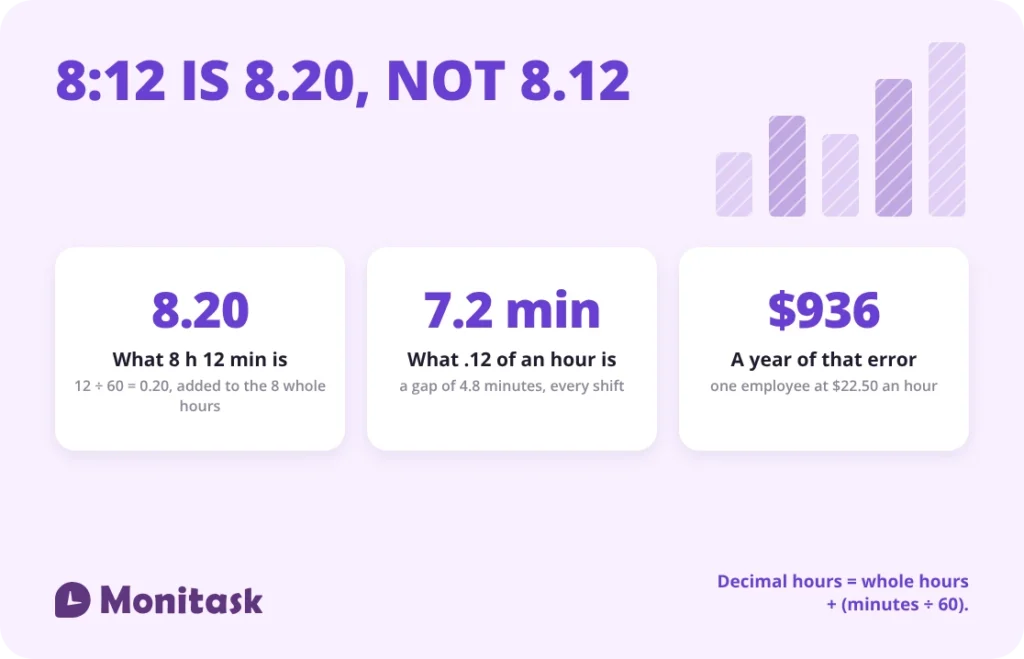
Decimal hours express minutes as a fraction of an hour: 8 hours 12 minutes becomes 8.20, not 8.12. Divide the minutes by 60 and add the result to the whole hours. Payroll systems need decimal hours because pay is hours multiplied by a rate, and 8:12 cannot be multiplied. Entering 8:12 as 8.12 shorts the employee by 4.8 minutes of pay every shift.
Key takeaways
- Decimal hours = whole hours + (minutes ÷ 60). 8 hours 12 minutes = 8 + 0.20 = 8.20.
- A clock time is not a duration. 8:30 AM is a moment; 8.50 decimal hours is eight and a half hours of work.
- Typing 8:12 as 8.12 across a five-shift week costs an employee $18.00 at a $22.50 rate — $936.00 a year.
- Payroll normally carries two decimal places. 20 minutes is 0.33, not 0.3.
- Rounding worked time is permitted under 29 CFR § 785.48(b) only if it is neutral and pays for all time actually worked over the period.
Hours to decimal converter
Enter hours and minutes to get decimal hours, or switch the direction to turn decimal hours back into hours and minutes. Seconds are optional. Everything runs in the browser — nothing is sent anywhere.
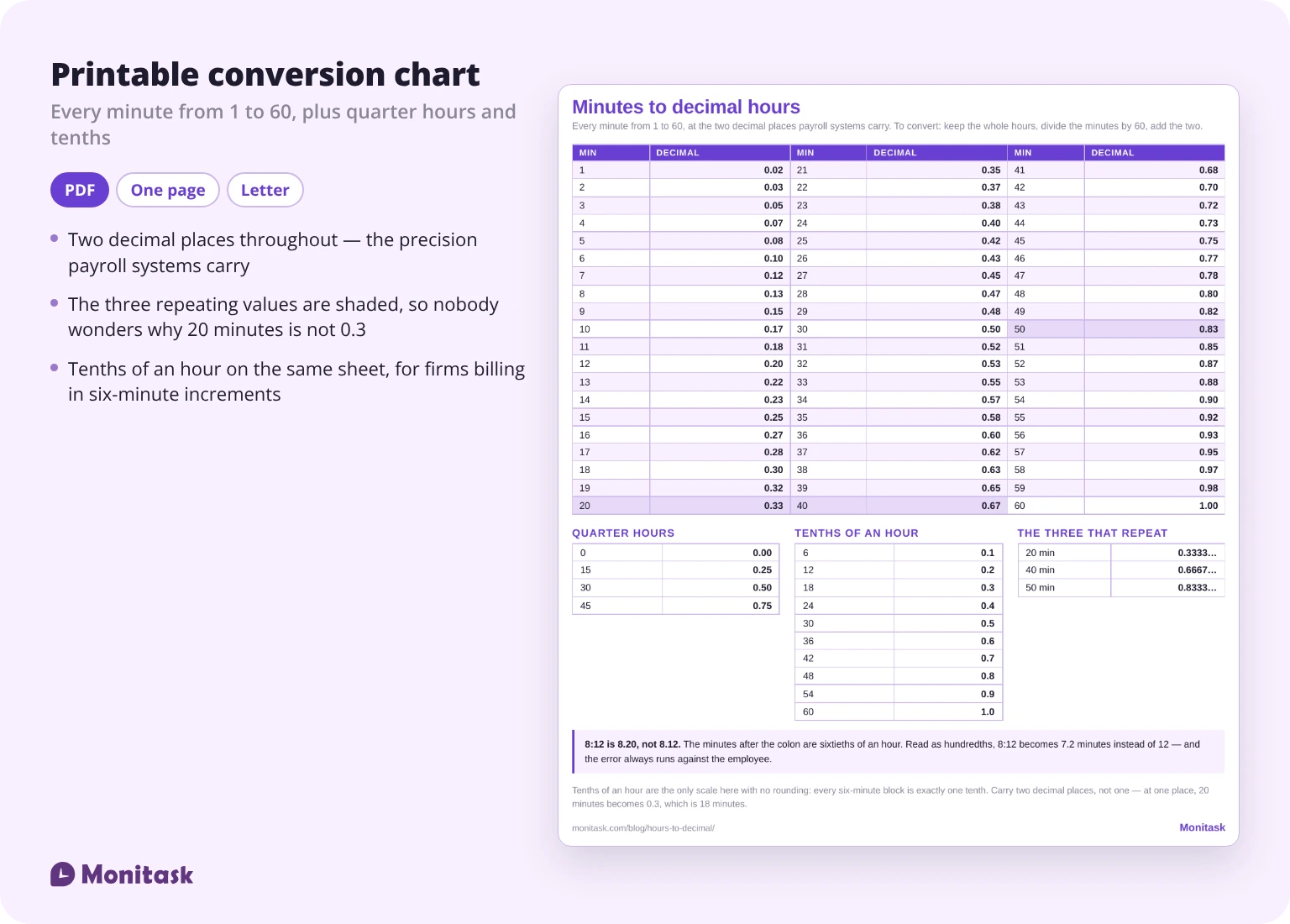
Minutes to decimal hours chart
Every minute from 1 to 60, rounded to two decimal places — the precision payroll systems use.
| Min | Decimal | Min | Decimal | Min | Decimal |
|---|---|---|---|---|---|
| 1 | 0.02 | 21 | 0.35 | 41 | 0.68 |
| 2 | 0.03 | 22 | 0.37 | 42 | 0.70 |
| 3 | 0.05 | 23 | 0.38 | 43 | 0.72 |
| 4 | 0.07 | 24 | 0.40 | 44 | 0.73 |
| 5 | 0.08 | 25 | 0.42 | 45 | 0.75 |
| 6 | 0.10 | 26 | 0.43 | 46 | 0.77 |
| 7 | 0.12 | 27 | 0.45 | 47 | 0.78 |
| 8 | 0.13 | 28 | 0.47 | 48 | 0.80 |
| 9 | 0.15 | 29 | 0.48 | 49 | 0.82 |
| 10 | 0.17 | 30 | 0.50 | 50 | 0.83 |
| 11 | 0.18 | 31 | 0.52 | 51 | 0.85 |
| 12 | 0.20 | 32 | 0.53 | 52 | 0.87 |
| 13 | 0.22 | 33 | 0.55 | 53 | 0.88 |
| 14 | 0.23 | 34 | 0.57 | 54 | 0.90 |
| 15 | 0.25 | 35 | 0.58 | 55 | 0.92 |
| 16 | 0.27 | 36 | 0.60 | 56 | 0.93 |
| 17 | 0.28 | 37 | 0.62 | 57 | 0.95 |
| 18 | 0.30 | 38 | 0.63 | 58 | 0.97 |
| 19 | 0.32 | 39 | 0.65 | 59 | 0.98 |
| 20 | 0.33 | 40 | 0.67 | 60 | 1.00 |
Three values in that chart are repeating decimals that payroll rounds: 20 minutes is 0.3333, carried as 0.33; 40 minutes is 0.6667, carried as 0.67; 50 minutes is 0.8333, carried as 0.83.
How do you convert hours and minutes to decimal?
Decimal hours = whole hours + (minutes ÷ 60)
Three steps:
- Keep the whole hours as they are. In 8:12, that is 8.
- Divide the minutes by 60. 12 ÷ 60 = 0.20.
- Add them. 8 + 0.20 = 8.20.
With seconds included, the formula extends:
Decimal hours = hours + (minutes ÷ 60) + (seconds ÷ 3600)
For 2 hours 30 minutes 35 seconds: 2 + 0.5 + 0.009722 = 2.5097 hours. The same duration is 150.58 minutes or 9,035 seconds.
Two more conversions worth having:
Total minutes = (hours × 60) + minutes
Total seconds = (hours × 3600) + (minutes × 60) + seconds
Why is 8:12 not 8.12?
This is the error the conversion exists to prevent, and it is easy to make because 8:12 and 8.12 look almost identical.
In 8:12 the 12 means twelve minutes, which is twelve sixtieths of an hour — 0.20. In 8.12 the .12 means twelve hundredths of an hour, which is 7.2 minutes. The gap is 4.8 minutes on a single shift, and it always runs against the employee.
A five-shift week makes the size of it clear.
| Day | Worked | Decimal hours | Entered as written |
|---|---|---|---|
| Monday | 8:12 | 8.20 | 8.12 |
| Tuesday | 7:48 | 7.80 | 7.48 |
| Wednesday | 8:30 | 8.50 | 8.30 |
| Thursday | 8:06 | 8.10 | 8.06 |
| Friday | 7:24 | 7.40 | 7.24 |
| Total | 40:00 | 40.00 | 39.20 |
At $22.50 per hour:
| Correct pay, 40.00 hours | $900.00 |
| Pay from the right-hand column, 39.20 hours | $882.00 |
| Shortfall per week | $18.00 |
| Shortfall per year, one employee | $936.00 |
The week was exactly forty hours. Transcribed without conversion it reads as 39.20, so no overtime threshold is crossed and nothing looks wrong on the timesheet. That is what makes the error durable: it produces a plausible number, not an obviously broken one, so it survives every review that only looks for outliers. If you are calculating time cards by hand, this is the step to check first.
A clock time is not a duration
A related mix-up appears in several published conversion guides: treating 8:30 AM as 8.50 decimal hours, or 2:30 PM as 14.5.
A clock time marks a moment. A duration measures elapsed work. Converting a clock time to a decimal produces a number with no meaning for payroll — what payroll needs is the duration between clock-in and clock-out, and only that duration gets converted.
A shift from 8:30 AM to 5:00 PM with a 30-minute unpaid lunch is 8 hours 0 minutes of worked time, which is 8.00 decimal hours. Neither 8.50 nor 17.00 enters the calculation.
Converting between the 12-hour and 24-hour clock is a different operation again, and one that never produces a decimal — our military time converter covers that side.
Quarter-hour and tenth-hour charts
Many employers round to a quarter hour, and professional services usually bill in tenths of an hour.
Quarter-hour increments
| Minutes | Decimal |
|---|---|
| 0 | 0.00 |
| 15 | 0.25 |
| 30 | 0.50 |
| 45 | 0.75 |
Tenth-of-an-hour increments, used in legal and accounting billing
| Minutes | Decimal |
|---|---|
| 6 | 0.1 |
| 12 | 0.2 |
| 18 | 0.3 |
| 24 | 0.4 |
| 30 | 0.5 |
| 36 | 0.6 |
| 42 | 0.7 |
| 48 | 0.8 |
| 54 | 0.9 |
| 60 | 1.0 |
The tenth-hour scale is the only one where the decimals are exact. Every six-minute block is exactly one tenth of an hour, which is why firms billing by the hour prefer it.
How do you convert decimal hours back to time?
Minutes = (decimal hours − whole hours) × 60
| Decimal hours | Hours and minutes |
|---|---|
| 0.25 | 0 h 15 min |
| 0.42 | 0 h 25.2 min |
| 0.50 | 0 h 30 min |
| 0.75 | 0 h 45 min |
| 7.75 | 7 h 45 min |
| 8.33 | 8 h 19.8 min |
The last two rows show why rounding is not symmetrical. 8 hours 20 minutes converts to 8.3333, which payroll carries as 8.33 — and 8.33 converted back is 8 hours 19.8 minutes. The 0.2 of a minute is lost to the two-decimal convention, not to an error.
That asymmetry is harmless at two decimals and matters at one. Carry 8 hours 20 minutes as 8.3 and you have dropped two minutes.
How many decimal places should payroll use?
Two. It is the convention in US payroll systems, and it holds the worst case on any single entry to 18 seconds.
| Decimal places | 20 minutes carried as | Error |
|---|---|---|
| 1 | 0.3 | −2 minutes |
| 2 | 0.33 | −12 seconds |
| 3 | 0.333 | −1.2 seconds |
| 4 | 0.3333 | −0.12 seconds |
Those figures are for 20 minutes specifically, which is the least convenient case at the top of the table. The general bound is simpler: at two decimal places the furthest any entry can sit from the truth is half a hundredth of an hour, which is 18 seconds.
One decimal place is not enough: it moves 20 minutes to 0.3, which is 18 minutes. Across a week of such entries the loss is visible in the paycheck.
Four decimal places are not wrong, but they create a different problem — totals that no longer reconcile cleanly with the hours-and-minutes records a dispute would be argued from.
Two rules keep this clean. Round once, at the end, on the total rather than on each entry, because rounding each line and then summing compounds the error. And round half up consistently; mixing rounding directions across a pay period is what produces totals that are a cent off and cannot be traced.
What does the FLSA allow when rounding time?
Rounding worked time is permitted in the United States, with conditions. The provision is 29 CFR § 785.48(b).
The Department of Labor’s Wage and Hour Division addressed it directly in opinion letter FLSA2019-9, issued 1 July 2019. It approved the employer’s practice on two grounds, in its own words. First: “Its rounding practice is neutral on its face.” Second: “The practice also appears to average out so that it fully pays its employees for all of the time that they actually work.”
Two conditions follow from that, and both have to hold:
- Neutrality. The method must round both up and down, not only down. A practice that always rounds against the employee fails regardless of the increment.
- Averaging out. Over several pay periods the rounding must produce full payment for time worked. If it systematically under-pays, it fails even when each individual rounding looks small.
The letter is worth reading for a second reason, which most summaries of it skip. The practice the Department approved is the one described on this page. Its payroll software converts each work period “into a numerical figure in decimal form extended out to six decimal points”, totals those figures for the period, and only then “rounds that number to two decimal points” — rounding up when the third decimal is “.005 or greater”. That is precision carried high, rounded once, on the total, half up. The Department looked at exactly that method and found nothing in it to object to.
The Department has long accepted rounding “to the nearest five minutes, one-tenth of an hour, one-quarter of an hour, or one-half hour”. The familiar 7-minute rule is the quarter-hour version: minutes 1 through 7 round down, minutes 8 through 14 round up.
Two practical cautions. State law can be stricter than federal law, and some states have moved against rounding where exact time records exist — so a practice that satisfies the FLSA is not automatically safe everywhere. And rounding is a separate decision from conversion: convert first, round second. Rounding the clock times before converting changes the result and makes the arithmetic impossible to audit.
How do you convert time to decimal in Excel?
If the cell holds a real time value, multiplying by 24 gives decimal hours.
=A1*24Format the result as Number, not Time, or Excel displays it as a time again.
If hours and minutes sit in separate columns:
=A1+(B1/60)To extract from a single time cell:
=HOUR(A1)+MINUTE(A1)/60For elapsed time between a start and an end, including a shift crossing midnight:
=MOD(B1-A1,1)*24And for a weekly total that exceeds 24 hours, format the cell as [h]:mm — the square brackets are what stop Excel resetting the count at 24.
To go back from decimal to a time value:
=A1/24formatted as Time.
Payroll example: one week, five shifts
Putting the whole sequence together for one employee at $22.50 an hour.
| Day | In | Out | Unpaid break | Worked | Decimal |
|---|---|---|---|---|---|
| Monday | 8:00 AM | 4:42 PM | 30 min | 8:12 | 8.20 |
| Tuesday | 8:00 AM | 4:18 PM | 30 min | 7:48 | 7.80 |
| Wednesday | 8:00 AM | 5:00 PM | 30 min | 8:30 | 8.50 |
| Thursday | 8:00 AM | 4:36 PM | 30 min | 8:06 | 8.10 |
| Friday | 8:00 AM | 3:54 PM | 30 min | 7:24 | 7.40 |
| Total | 40:00 | 40.00 |
Gross pay = 40.00 × $22.50 = $900.00
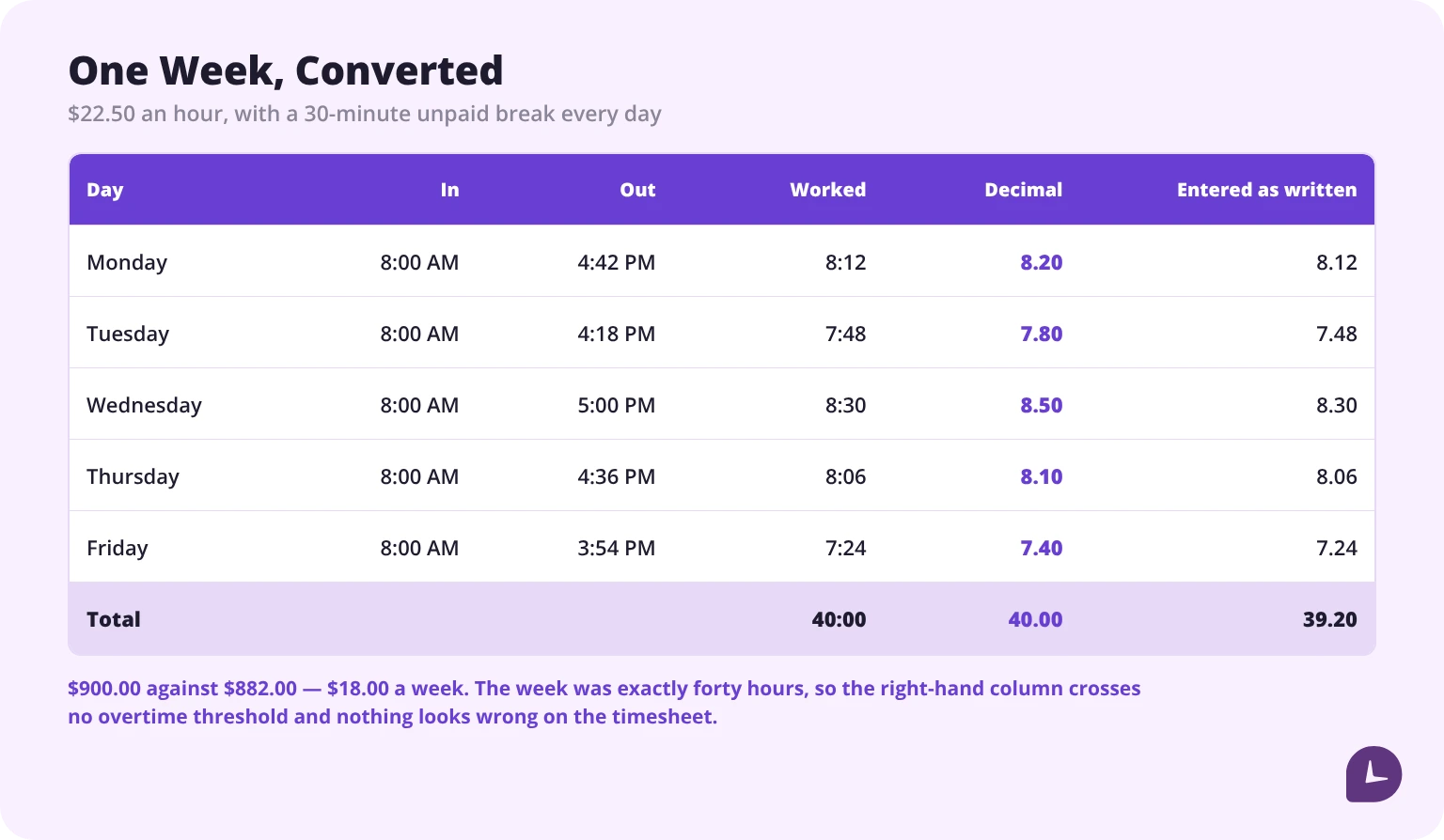
The week landed exactly on forty hours, so no overtime premium applies. Had Wednesday run an hour longer, the total would be 41.00 decimal hours, with 1.00 hour at the overtime rate — which is the other reason decimal hours matter: the overtime threshold is a number, and 41:00 cannot be compared to 40 without converting it first. The premium itself is a separate calculation, covered in our guide to calculating overtime pay.
To run the same sequence on your own week without the arithmetic, use the free time card calculator.
Monitask records worked time to the minute and exports it in decimal hours, so nothing is converted by hand.
Start a free Monitask trial
Sources
- 29 CFR § 785.48(b), Rounding practices
- US Department of Labor, Wage and Hour Division, opinion letter FLSA2019-9, 1 July 2019 — https://www.dol.gov/sites/dolgov/files/WHD/legacy/files/2019_07_01_09_FLSA.pdf
FAQ
How do you convert minutes to decimal hours?
Divide the minutes by 60 and round to two decimal places. 15 minutes is 0.25, 20 minutes is 0.33, 45 minutes is 0.75. The division is the whole operation — minutes are sixtieths of an hour, and a decimal expresses them as hundredths.
What is 20 minutes in decimal hours?
20 minutes is 0.33 decimal hours. The exact value is 0.3333, which payroll carries as 0.33 at the standard two decimal places. Writing 0.3 instead would represent 18 minutes and lose two minutes of paid time.
How do you convert decimal hours back to hours and minutes?
Subtract the whole hours, then multiply the remainder by 60. For 7.75, the remainder 0.75 multiplied by 60 is 45, giving 7 hours 45 minutes. For 8.33 the result is 8 hours 19.8 minutes, because 8.33 is a rounded form of 8.3333.
How many decimal places should payroll use?
Two. One decimal place carries 20 minutes as 0.3, an error of two minutes per entry. Two places hold the worst case on any entry to 18 seconds — for 20 minutes specifically, 12 seconds. Round once on the total rather than on each line, since rounding each entry and then summing compounds the error.
Is it legal to round employee hours?
Yes, under 29 CFR § 785.48(b), provided the rounding is neutral and pays employees for all time actually worked when averaged over the period. Department of Labor opinion letter FLSA2019-9 confirmed this. State law can be stricter, and rounding that always favours the employer fails the test.
What is the 7-minute rule?
The 7-minute rule is quarter-hour rounding: minutes 1 through 7 round down to the previous quarter hour, and minutes 8 through 14 round up to the next one. It is one of the increments the Department of Labor accepts, alongside five minutes, a tenth of an hour and a half hour.
How do you convert time to decimal in Excel?
Multiply a time cell by 24 and format the result as Number: `=A1*24`. From separate columns, use `=A1+(B1/60)`. For elapsed time across midnight, use `=MOD(B1-A1,1)*24`. Format weekly totals over 24 hours as `[h]:mm`, with the square brackets.
Is 8:30 AM the same as 8.50 decimal hours?
No. 8:30 AM is a point in time; 8.50 decimal hours is a duration of eight and a half hours. Only durations are converted for payroll. A shift from 8:30 AM to 5:00 PM with a 30-minute unpaid break is 8 hours of worked time, or 8.00 decimal hours.
Why do payroll systems use decimal hours at all?
Because pay is hours multiplied by a rate, and 8:12 cannot be multiplied. Decimal hours turn a duration into a number arithmetic works on, which is also what makes overtime thresholds comparable: 41:00 has to become 41.00 before it can be measured against 40. The same applies to annual figures — [work hours in a year](/blog/how-many-work-hours-are-in-a-year-of-full-time-work/) is a decimal total, never a clock time.