How to Hire Freelancers on Upwork: A Guide for Employers

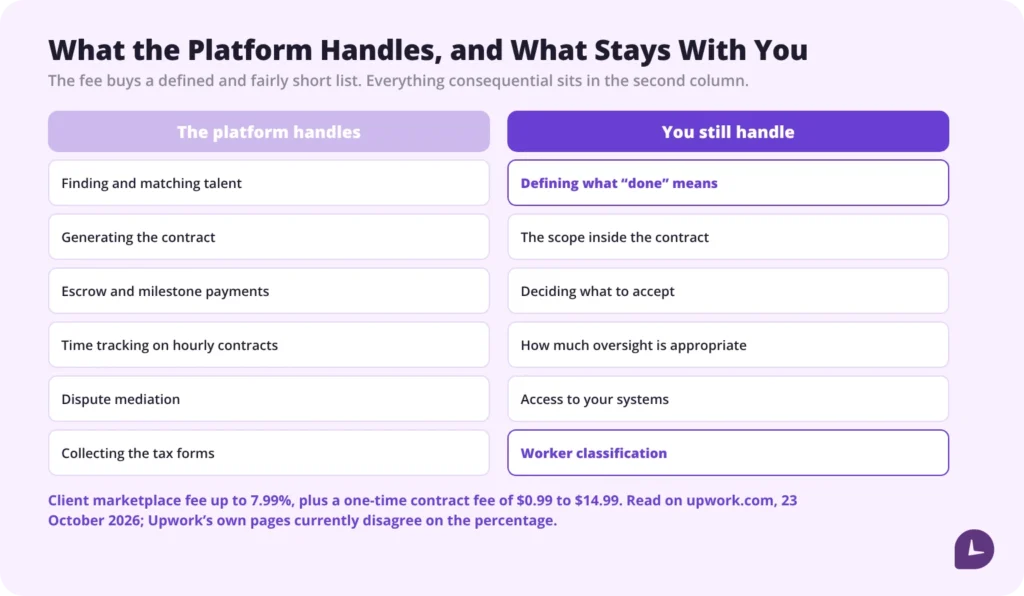
Hiring on Upwork takes five steps: post a job or search talent, review proposals, interview a shortlist, send an offer, and start the contract. The platform handles matching, contracts, escrow and time tracking on hourly work. What it does not handle is what costs you money when it goes wrong — defining the work, controlling access to your systems, and the fact that hiring through a freelance platform does not by itself settle whether the person is a contractor or an employee.
What does the platform handle, and what stays with you?
| The platform handles | You still handle |
|---|---|
| Finding and matching talent | Defining what “done” looks like |
| Generating the contract | The scope inside it |
| Escrow and milestone payments | Deciding what to accept |
| Time tracking on hourly contracts | How much oversight is appropriate |
| Dispute mediation | Access control to your systems |
| Collecting the tax forms | Worker classification |
The left column is what the fee buys. It is a real service and it is worth paying for. But every item in the right column is one you own whether you notice it or not, and the last one has consequences that outlast the contract by years.
Boost your business productivity
Track performance and streamline teamwork
How does hiring on Upwork actually work?
Five steps. Upwork’s own guide covers the interface in detail and is updated far more often than any third-party article, including this one, so go there for the current screens: Upwork’s own hiring guide.
- Create a client account and add a billing method.
- Post a job, or search talent directly. A public post brings volume; searching and inviting brings fit.
- Review proposals. Upwork says proposals start arriving within hours of a post going live. It publishes no figure for how many, so treat any number you read elsewhere with suspicion.
- Interview a shortlist. Messages first, then a call for anything beyond a small task.
- Send an offer. The platform generates the contract and work starts when the freelancer accepts.
Should you post publicly or invite people directly?
A public post brings more applicants and more screening. It is right when the skill is common and you want price competition.
Inviting directly means you search, shortlist and invite specific people. It is right when the skill is specialised, or when you already know what good looks like and do not want to sort through fifty proposals to find it.
The middle ground is usually better than either. Post publicly, and also invite five people you found by searching. The invited candidates set the quality bar you then judge the rest against, which is worth more than either route on its own.
How do you write a job post that gets good applicants?
This is the single biggest lever on who applies, and it costs twenty minutes.
Include:
- The role, or the specific outcome you need
- The timescale, or the volume of work
- Hard requirements: language, time zone overlap, specific tools, domain experience
- Your budget or rate range. Leaving it out wastes everyone’s time, including yours
- How you will judge the work
- A short, specific question applicants must answer
That last one does more than the rest combined. A question that cannot be answered without reading the post — “which of these two approaches would you take here, and why?” — filters out mass applications in a single step, because answering it costs more than sending a template.
Keep the title short and searchable. Freelancers find work by searching, and “Need help with some stuff” appears in no search. If you are not sure what the role is usually called, the most in-demand skills on Upwork is a reasonable place to check the vocabulary before you post.
How should you shortlist and interview?
On the profile, look at:
- Work history in the same category, not just any work history
- Client reviews in full, not the score
- Whether the portfolio matches the kind of work you need, not just the skill
- The answer to your screening question
In the interview, ask:
- How they would approach your project, in outline
- What they would need from you to start
- What has gone wrong on similar projects, and what they did
- Their availability and time zone overlap, explicitly
- Whether they are working on other contracts at the same time
That last question is not a trap and the answer is usually yes. A freelancer with several clients is a freelancer with a business, which is also what keeps the relationship on the right side of the classification question. What you are listening for is whether they have a way of handling it — how to handle multiple clients is the problem from their side, and someone who has thought about it will say so.
Before a large engagement, buy a small paid task. It costs a fraction of the project and tells you more than any interview: how they ask questions, how they handle an unclear instruction, and whether the thing arrives when they said it would.
Should you hire an agency instead of an individual?
Upwork lists agencies as well as individuals, and the contract works much the same way: you hire the agency rather than a named person, and payment goes to the agency.
| Individual | Agency | |
|---|---|---|
| Cost | Lower | Higher |
| Capacity | One person | A team, and can scale |
| Cover if they are unavailable | None | Covered |
| Consistency of style | High | Varies with who does the work |
| Who you actually talk to | The person doing the work | Often an account manager |
On fees there is less difference than people assume. Agencies carry the same 0% to 15% per contract freelancer service fee band as individuals; what differs is the membership tier they pay for, not the rate Upwork takes. Upwork documents no different client-side fee for agency contracts.
Ask an agency one question before hiring: who specifically will do the work, and can you see their profile. An agency that will not answer that is selling you availability rather than skill.
What does it actually cost?
Three costs you pay and one you absorb. Most guides mention one of the four.
The freelancer’s rate. What you agree, and the only number most people look at.
Upwork’s client fee. A client marketplace fee charged to you on top of the contract. Upwork’s help centre currently puts it at up to 7.99%, reduced to 3% for qualifying U.S. clients paying by bank account. It is not refundable even if a payment is later reversed. Read this number on the platform before you budget, because Upwork’s own pages do not currently agree with each other — the pricing page and the help centre give different figures, and the Business Plus rate is higher again. The figures here were read on 23 October 2026.
A one-time contract initiation fee, from $0.99 to $14.99, which varies by contract type and your hiring history. On hourly contracts it is charged with your first payment; on fixed-price contracts when you fund the contract or the first milestone. It comes back only if the milestone is never released. Almost no guide mentions it.
And one cost you do not pay but do absorb. The freelancer’s own service fee is 0% to 15% per contract, set per contract and shown to them before they bid. You never see it, but they price to net what they need, so it is inside the rate you are quoted. It is worth knowing it is no longer a single flat rate: two freelancers quoting you the same number may be keeping noticeably different amounts of it.
A fuller breakdown of both sides lives in Upwork fees.
Is a freelancer cheaper than an employee? Upwork’s own material says a full-time employee costs around 1.25 times their salary once benefits, payroll taxes, training and workspace are counted. Two things are worth knowing before you lean on that.
It is the bottom of someone else’s range. The estimate traces to an MIT-hosted piece by Joseph Hadzima, which puts the figure at 1.25 to 1.4 times base salary — not at 1.25. And that page is old: it carries a 1994 to 2005 copyright and computes on a $90,000 Social Security wage cap, which was roughly the 2005 level. Benefit loads and payroll caps have moved a long way since.
So use it as a reminder that salary is not the cost of an employee, not as a multiplier you can put in a spreadsheet. The comparison that actually decides it is simpler: for genuinely project-shaped work a freelance rate that looks high per hour frequently is not. For continuous work the comparison reverses, because you are paying a premium rate indefinitely for something an employee would do more cheaply.
What a contract actually costs you only becomes clear once you can see where the hours went.
See how Monitask tracks time across projects
How do escrow and milestones work?
Fixed-price contracts fund a milestone into escrow before work starts. The freelancer submits that milestone and the money releases on approval — that milestone’s money, not the whole budget, and not at the end of the project. Releasing everything at the end is the thing a milestone structure exists to avoid.
The number to know is 14. On a fixed-price contract you have 14 days to review submitted work before payment releases automatically. Upwork is explicit that not acting within that window counts as approval. If the freelancer resubmits after you request a change, a fresh 14-day clock starts. Put a reminder somewhere, because the failure mode here is a quiet one: nothing happens, and that is the approval.
Hourly contracts run on a weekly cycle instead, and the dates are fixed rather than rolling. The work week runs Monday to Sunday. Hours are invoiced to you at noon UTC the following Monday, and your review period runs until Friday 23:59 UTC — so a dispute has to be raised before the Friday of the week the invoice arrives. Funds reach the freelancer the following Wednesday. Those times are UTC and do not shift for daylight saving, so the deadline moves by an hour in your local time twice a year.
Make the first milestone small. A project split into three equal milestones puts a third of the budget at risk before you have seen anything at all. A small first milestone is a paid trial with the contract structure already around it.
If you also pay contractors outside the platform, how to pay independent contractors covers the methods and the paperwork.
What has to be agreed before work starts?
This is the part the platform does not do for you, and where most freelance engagements actually fail. None of it takes long; all of it is painful to retrofit.
| What | Why it matters |
|---|---|
| Deliverables, specifically | “A website” and “five pages built to this spec” are different contracts |
| Acceptance criteria | What “done” means, decided before rather than after |
| How many revision rounds are included | The single most common dispute |
| Response time expectations, both ways | Yours as well as theirs |
| Where updates happen | One channel, agreed |
| Who approves | One person |
On cadence: a weekly check-in or a milestone review is enough for most work. Daily stand-ups and required presence are the pattern that causes problems, and not only management ones — see the classification section below.
What does the Work Diary actually record?
Hourly contracts are backed by a tracker in Upwork’s desktop app, and the record it produces is called the work diary. It is worth understanding exactly what it captures before relying on it, because what it proves is narrower than it looks.
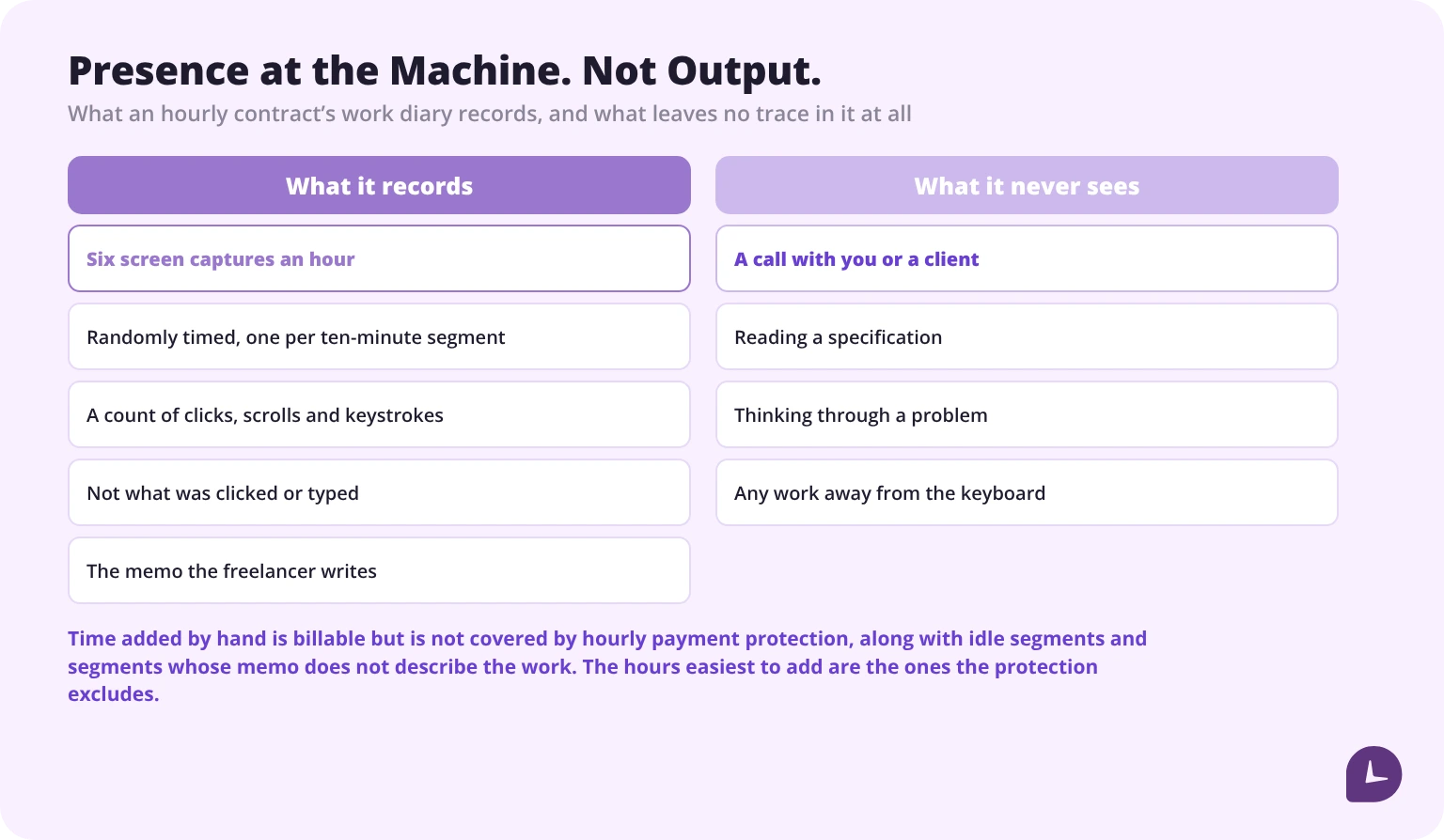
What it records. Roughly six screen captures an hour, randomly timed, one per ten-minute billing segment. A count of mouse clicks, scroll actions and keystrokes in each segment. And the memo the freelancer writes describing the work. It does not record what was clicked or typed — the activity meter is a count, not content.
What that proves. That someone was at the machine and active during the billed segment. That is genuinely useful, and it is the basis of Upwork’s hourly payment protection.
What it does not prove. That the time was productive, or that the work was any good. Activity is not output. A freelancer reading your specification carefully for twenty minutes produces a low activity score; someone who is merely busy looks identical to someone who is effective.
Three things employers get wrong about it.
- Work away from the machine never appears. Calls, research, reading, thinking. If you expect those, agree how they are billed before the contract starts, rather than querying a thin diary later.
- Manually added time is billable but is not protected. The client has to enable manual time, and once enabled those hours can be added by hand — but Upwork’s hourly payment protection does not cover them, alongside idle segments, time over the weekly limit, and segments whose memo does not describe the work. The hours easiest to add are precisely the ones the protection excludes. There is no work diary on fixed-price contracts at all.
- It is not a supervision tool. It exists to underpin payment protection. Checking it daily produces the same defensive behaviour as any other surveillance, and on a contractor it has a second cost covered in the next two sections.
Where does oversight stop being appropriate?
A freelancer is a contractor, and how much control you apply is a legal question as well as a management one.
| Appropriate | Starts to look like employment |
|---|---|
| Agreeing deliverables and deadlines | Setting their working hours |
| Reviewing work against acceptance criteria | Requiring availability through your business day |
| A weekly check-in | Daily mandatory status reports |
| Receiving the diary that backs an hourly invoice | Installing your own monitoring software on their machine |
| Asking for progress at milestones | Directing the order of their tasks |
Two things are specifically fine. Using the platform’s own time tracking on an hourly contract, because that is the contract mechanism the freelancer agreed to when they accepted. And asking for the work product at agreed points.
One is not. Asking a freelancer to install a monitoring agent that you administer. That is an employer-side tool applied to someone who is not your employee, and it sits in the right-hand column of the table above for a reason.
Does hiring on Upwork settle worker classification?
No. And this is the misconception worth correcting explicitly, because the platform has no particular reason to.
Hiring through a freelance marketplace does not make someone an independent contractor as a matter of law. The platform calls them freelancers, collects the tax forms and processes the payment. None of those things determines status.
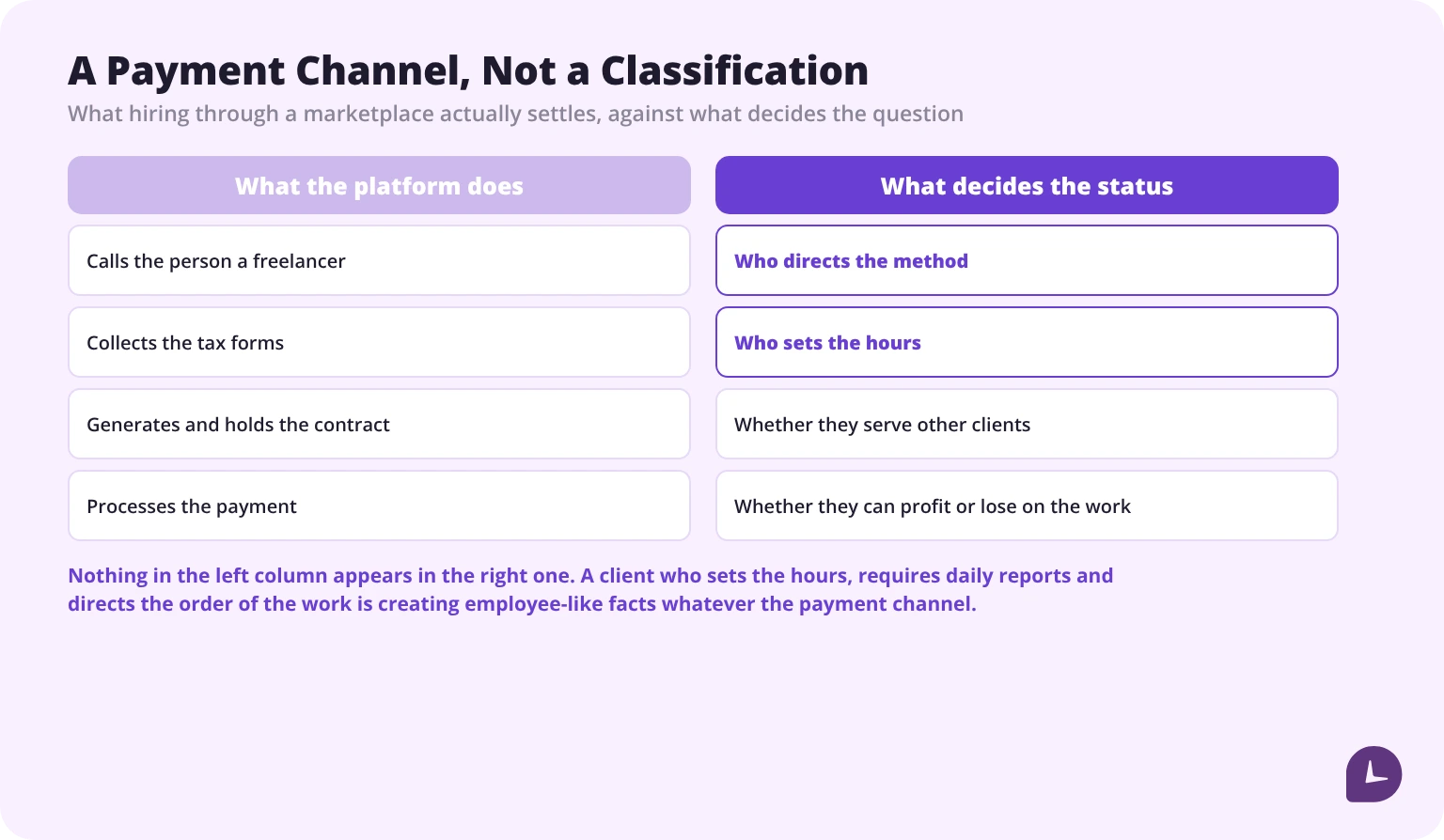
Status is assessed on the facts of the working relationship: who directs the method, who sets the hours, whether the worker serves other clients, whether they can make a profit or a loss on the work. A client who sets hours, requires daily reports and directs the sequence of tasks is creating employee-like facts whatever the payment channel says.
Where this most often goes wrong is not at the hire. It is eighteen months later. A freelancer engaged for a three-week project is still there, working your hours, in your meetings, on a fixed monthly amount, with no other clients. Nothing about the platform has changed. The relationship has, and nobody made a decision about it.
The full analysis, factor by factor, is in our independent contractor vs employee checklist. This page does not try to repeat it.
How much access should a freelancer have?
Enough to do the work, and nothing beyond it. The access question is the one that quietly accumulates risk across a long engagement.
- Role-based access only, never a shared admin account
- Time-limit it wherever the system allows
- Keep a written list of what was granted. You will need it at the end, and reconstructing it from memory is how credentials survive a contract
- Separate credentials you can revoke in one action
- Agree in the contract what happens to files held locally when the engagement ends
- Where sensitive data is involved, an NDA and a data handling agreement, not platform terms alone
In a mixed team, agree who owns what. Where a freelancer works alongside employees, ambiguity about who owns a system or a decision is the most reliable source of friction, and it is also the condition under which a contractor drifts into doing an employee’s job.
What should you not do?
Six things that cost you good freelancers.
- Do not ask for free work. A sample task should be paid, even if it is small.
- Do not push someone below their stated rate. It starts the relationship with resentment and selects for people who have no alternatives.
- Do not post a vague description and expect good applicants. Vague posts attract mass applications, which is exactly the problem you then complain about.
- Do not skip the interview for anything substantial.
- Do not leave milestones unapproved. It blocks payment, it is the fastest way to lose someone good, and after 14 days it approves itself anyway.
- Do not move the work or the money off the platform. This one is more specific than it is usually stated, so it is worth getting right.
Upwork’s terms prohibit arranging contact outside the platform before a contract is agreed. Once a contract exists, what remains prohibited is hiring, invoicing or paying off-platform. Ordinary conversation is not the issue; moving the work and the money is, and doing it costs you escrow, hourly payment protection and any dispute rights along with the freelancer’s.
There is a sanctioned way out, and it is priced. Upwork offers a conversion that moves the relationship off the platform legally, for a fee of 13.5% of the freelancer’s estimated annual earnings — calculated as their hourly rate multiplied by 2,080 hours, then 13.5% of that. The client starts the process and the freelancer has to accept. After two years of keeping work and payments on Upwork, it is free. If you are hiring someone you expect to keep working with, that is a number worth knowing at the start rather than discovering later.
When is Upwork the wrong choice?
No platform guide will tell you this, so here it is.
It suits defined projects with a clear deliverable, specialised skills you need occasionally, overflow capacity, and work you can specify precisely.
It suits poorly:
- Continuous, core work. Paying a premium rate indefinitely for what an employee would do costs more, and the arrangement drifts toward employment regardless.
- Work needing deep institutional context. The ramp-up cost recurs with every new freelancer, and it is rarely counted.
- Anything needing sustained access to sensitive systems. The access management overhead exceeds the benefit.
- Work you cannot specify. If you cannot describe what done looks like, no marketplace will fix that for you.
- Roles needing real-time collaboration across your whole business day. That requirement is itself a classification signal.
The honest test: if the work is permanent, core to the business, and needs someone available on your schedule, you are describing an employee. remote contractor management covers what to do when that turns out to be the answer.
One last piece of context for anyone building a plan around the platform. In the three months to 30 June 2026 Upwork reported gross services volume of $966.4 million, revenue of $191.7 million and 763,000 active clients. All three were down year on year, by 4%, 2% and 4% respectively. The marketplace is not collapsing, but it is not growing either, and the very large freelancer counts quoted in older articles are marketing copy rather than anything Upwork currently reports.
Whether a contract was project-shaped or quietly became a job is visible in the hours long before it is visible anywhere else.
Try Monitask free for 10 days
Sources
- Upwork Help Centre, Client Marketplace Fee, Contract Initiation Fee, Freelancer Service Fee, work diary and Time Tracker, Hourly Payment Protection, weekly billing cycle, fixed-price review and milestones, Project Catalog, agency contracts and conversion fee. support.upwork.com, read 23 October 2026
- Upwork pricing pages for clients, upwork.com/pricing/client, read 23 October 2026. Note that these currently disagree with the help centre on the client fee
- Upwork Terms of Use and User Agreement, upwork.com/legal, read 23 October 2026
- Upwork Reports Second Quarter 2026 Financial Results, 10 August 2026, for the three months ended 30 June 2026
- Upwork, How to Hire Freelancers, upwork.com/resources, for the 1.25 times salary figure
- Joseph G. Hadzima Jr., “How Much Does An Employee Cost?”, Starting Up: Practical Advice for Entrepreneurs, Boston Business Journal, hosted at web.mit.edu — the original 1.25 to 1.4 range
FAQ
How much does it cost to hire on Upwork?
Three things. The freelancer’s rate. A client marketplace fee charged to you on top, which Upwork’s help centre currently puts at up to 7.99%, reduced to 3% for qualifying US clients paying by bank account. And a one-time contract initiation fee of $0.99 to $14.99. Check the current numbers on the platform before budgeting: Upwork’s own pricing and help pages do not presently agree with each other.
What fee does the freelancer pay, and does it affect me?
Upwork takes 0% to 15% from the freelancer’s earnings, set per contract and shown to them before they bid. You never pay it directly, but it is inside the rate you are quoted, because freelancers price to net what they need. It is no longer a single flat rate, so two people quoting you the same number may be keeping noticeably different amounts of it.
Is it cheaper to hire a freelancer than an employee?
For project-shaped work, usually. Upwork’s own material puts the true cost of an employee at about 1.25 times salary once benefits, taxes, training and workspace are counted — though that is the floor of a 1.25 to 1.4 range from an MIT-hosted estimate that computes on mid-2000s payroll figures, so treat it as a reminder rather than a multiplier. For continuous ongoing work the comparison reverses.
How does Upwork track time?
Hourly contracts use a tracker in Upwork’s desktop app that produces a work diary: roughly six randomly timed screen captures an hour, one per ten-minute billing segment, plus a count of clicks, scrolls and keystrokes, plus a memo. It does not record what was clicked or typed. It shows presence at the machine rather than productivity, and it captures nothing done away from the keyboard. Fixed-price contracts have no work diary.
Can I monitor a freelancer I hired on Upwork?
The platform’s own time tracking on an hourly contract is part of the mechanism the freelancer agreed to, so using it is fine. Installing your own monitoring agent on their machine is a different thing: that is an employer-side tool applied to someone who is not your employee, and it is one of the facts that makes a relationship look like employment.
Does hiring on Upwork make someone an independent contractor?
No. Status is assessed on the facts of the working relationship, not the payment channel. Who directs the method, who sets the hours, whether the worker serves other clients, whether they can profit or lose on the work. Setting hours, requiring daily reports and directing the order of tasks creates employee-like facts whichever marketplace processed the payment.
How do milestones and escrow work?
On a fixed-price contract you fund a milestone into escrow before work begins, the freelancer submits it, and you approve to release the money. You have 14 days to review, and not acting counts as approval — the payment releases automatically. A fresh 14-day window starts if they resubmit after a change request. Make the first milestone small.
Can I hire an agency rather than an individual?
Yes. You hire the agency rather than a named person, and payment goes to the agency rather than to whoever does the work. Agencies cost more and offer continuity and capacity; they carry the same 0% to 15% service fee band as individuals, and Upwork documents no different client-side fee. Ask who specifically will do the work, and ask to see their profile, before you hire.
When should I not use a freelance platform?
For continuous core work, roles needing deep institutional knowledge, anything requiring sustained access to sensitive systems, or work you cannot specify. If the role is permanent and needs someone available on your schedule, you are describing an employee, and hiring them through a marketplace does not change that — it just means the facts and the paperwork disagree.