Reliable employee tracking software. Clear visibility and insights into how employees work. Even remotely.
Try Monitask free for 10 days
The most accurate way to keep track of work hours is to record start and end times the moment they happen, in whatever tool you will actually open. A dedicated hour tracker app loses the fewest minutes; a spreadsheet filled in daily is close behind; reconstructing the week on Friday is the least accurate method and the most common one. Pick by what you will do every day, not by feature count.
The six methods at a glance
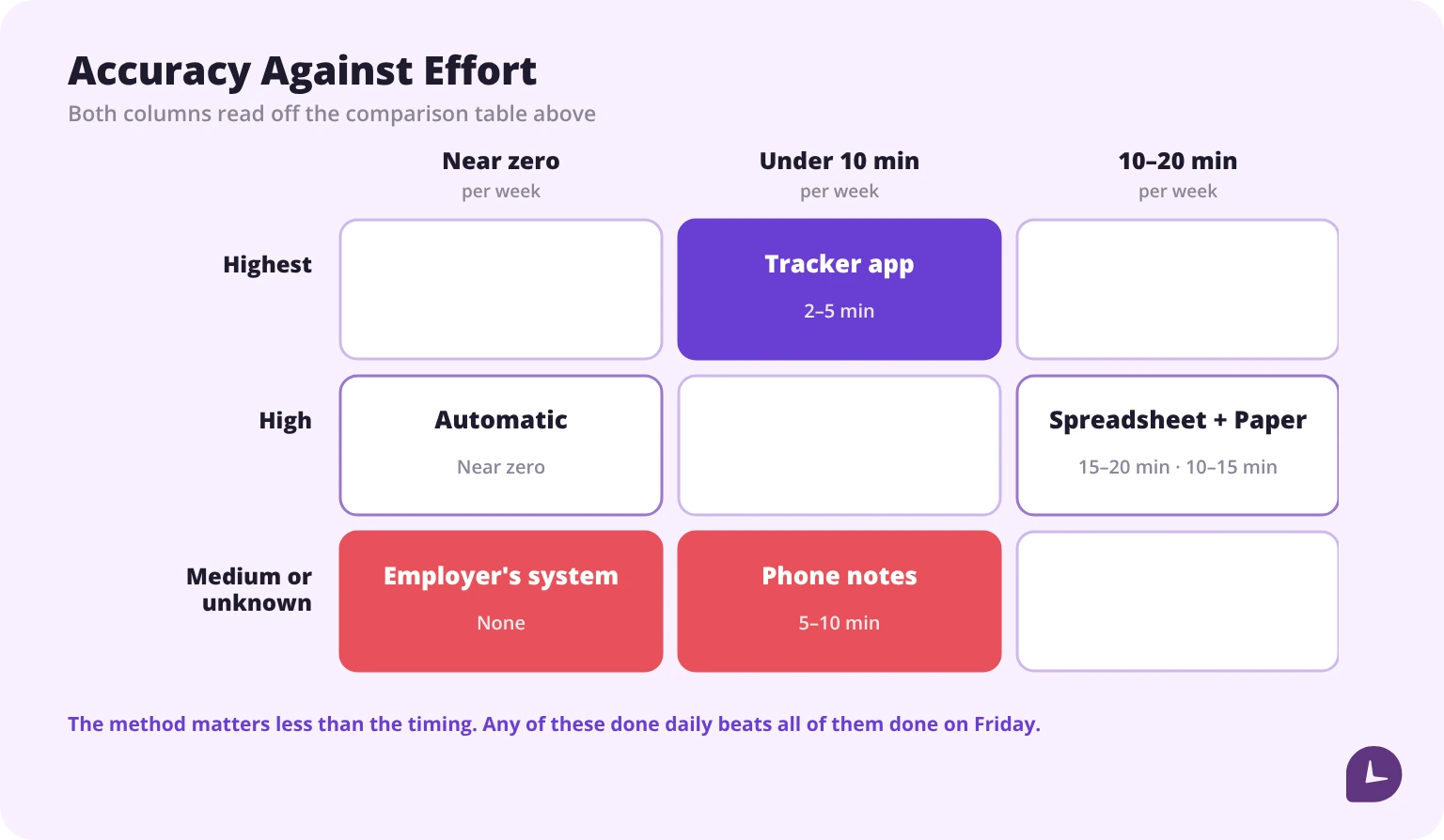
| Method | Effort per week | Typical accuracy | Works offline | Holds up as a record |
|---|---|---|---|---|
| Paper notebook or printed sheet | 10–15 min | High if written same-day | Yes | Yes, if dated and kept |
| Spreadsheet | 15–20 min | High if filled daily | Partly | Yes, with version history |
| Phone notes or calendar | 5–10 min | Medium | Yes | Weak — easy to edit, no structure |
| Dedicated hour tracker app | 2–5 min | Highest | Usually | Strong — timestamped, exportable |
| Automatic activity tracking | Near zero | High for computer work only | No | Medium — needs categorising |
| Your employer’s system | None | Depends entirely on the system | Varies | Strong, but you do not control it |
The differences between these are smaller than the difference between doing any of them daily and doing none of them until Friday.
What are the ways to keep track of work hours?
Paper notebook or printed sheet
Write the start time when you start and the end time when you stop. A printable weekly timesheet gives it structure.
Works well when: you are not at a computer, the job site has no signal, or you simply prefer paper.
Fails when: the notebook goes missing, or you do the arithmetic by hand and make an error nobody catches.
Accuracy: as good as any method, provided entries are made at the time. Paper does not degrade; memory does.
Spreadsheet
Excel or Google Sheets with one row per day, and formulas doing the totals. This is the middle ground: structured like an app, flexible like paper.
Works well when: you want totals calculated but do not want another app, or you need to hand the file to someone.
Fails when: the sheet is only opened at the end of the week, or when several people edit the same file and nobody can tell who changed what.
Accuracy: high when filled daily. The formulas remove arithmetic errors, which is the main advantage over paper.
Phone notes or calendar
Typing “8–5, 30 min lunch” into a notes app, or blocking the shift on a calendar.
Works well when: you want zero setup and track only occasionally.
Fails when: you need a total, or a record. Notes have no structure, no totals and no audit trail, and they are trivially editable after the fact.
Accuracy: medium. Entries are usually same-day, which helps, but nothing enforces consistency.
A dedicated hour tracker app
An app built for this: clock in, clock out, breaks handled, totals and pay calculated.
Works well when: you are paid by the hour and want to know what the paycheck should be, or you work irregular shifts.
Fails when: you forget to start the timer — although good apps handle this with idle detection or geofencing.
Accuracy: the highest of the six, because entries are timestamped rather than typed.
Automatic activity tracking
Software that records what your computer was doing and lets you categorise it afterwards. No timer to remember.
Works well when: all your work happens on a computer and you keep forgetting to start timers.
Fails when: the work is not on a screen. A two-hour site visit or a phone call from the car registers as idle.
Accuracy: high for the part it can see, and blind to the rest. Also requires a review step, which is a different kind of discipline.
Your employer’s system
A time clock, a kiosk, a badge reader, or an app the company administers.
Works well when: it exists and works. It is the official record and the one payroll uses.
Fails when: it rounds unfavourably, misses your clock-in, or you cannot see your own history.
Accuracy: unknown to you, which is the point. Keep your own record alongside it — not because the employer is wrong, but because you cannot check without one.
Which method is most accurate?
Accuracy in hour tracking is not a property of the tool. It is a property of when the entry is made.
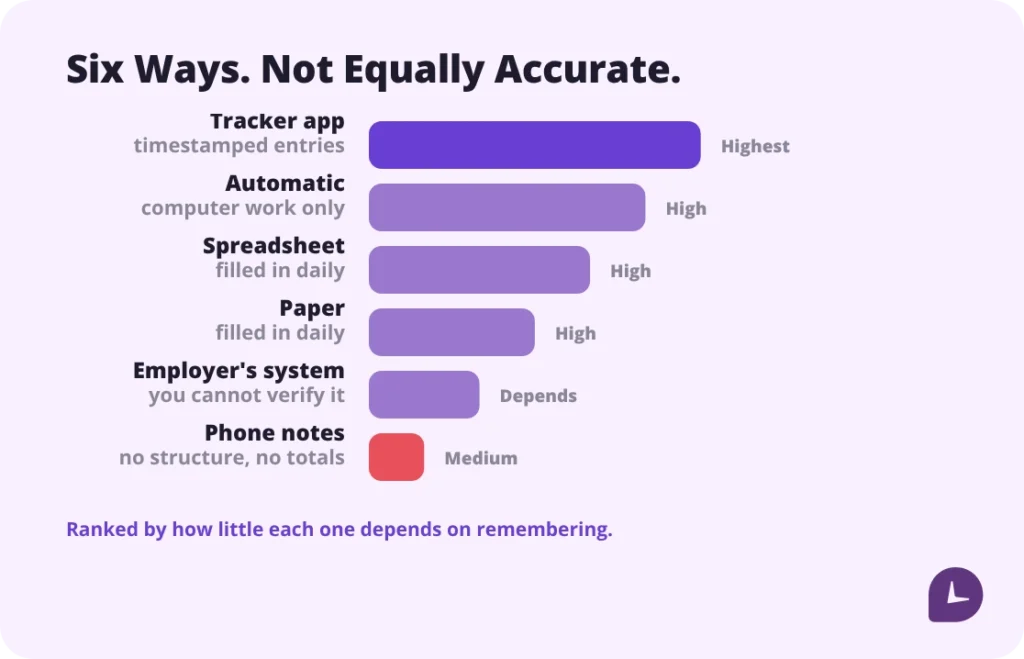
Rank the six by how much they depend on memory and the order becomes obvious. A timestamped clock-in depends on nothing. A same-day paper entry depends on the few seconds between finishing and writing. A spreadsheet filled in on Friday depends on remembering five days of start times, break lengths and interruptions — and memory rounds towards the convenient number.
That is why a $0 notebook used correctly beats a $12-a-month app used badly, and why the app wins when both are used correctly: it removes the step where memory enters.
Practical ranking, assuming honest use:
- Dedicated tracker app with timestamps
- Automatic tracking, for computer work only
- Spreadsheet filled in daily
- Paper filled in daily
- Employer’s system — accurate, but unverifiable from your side alone
- Phone notes
Boost your business productivity
Track performance and streamline teamwork
Why Friday reconstruction loses hours
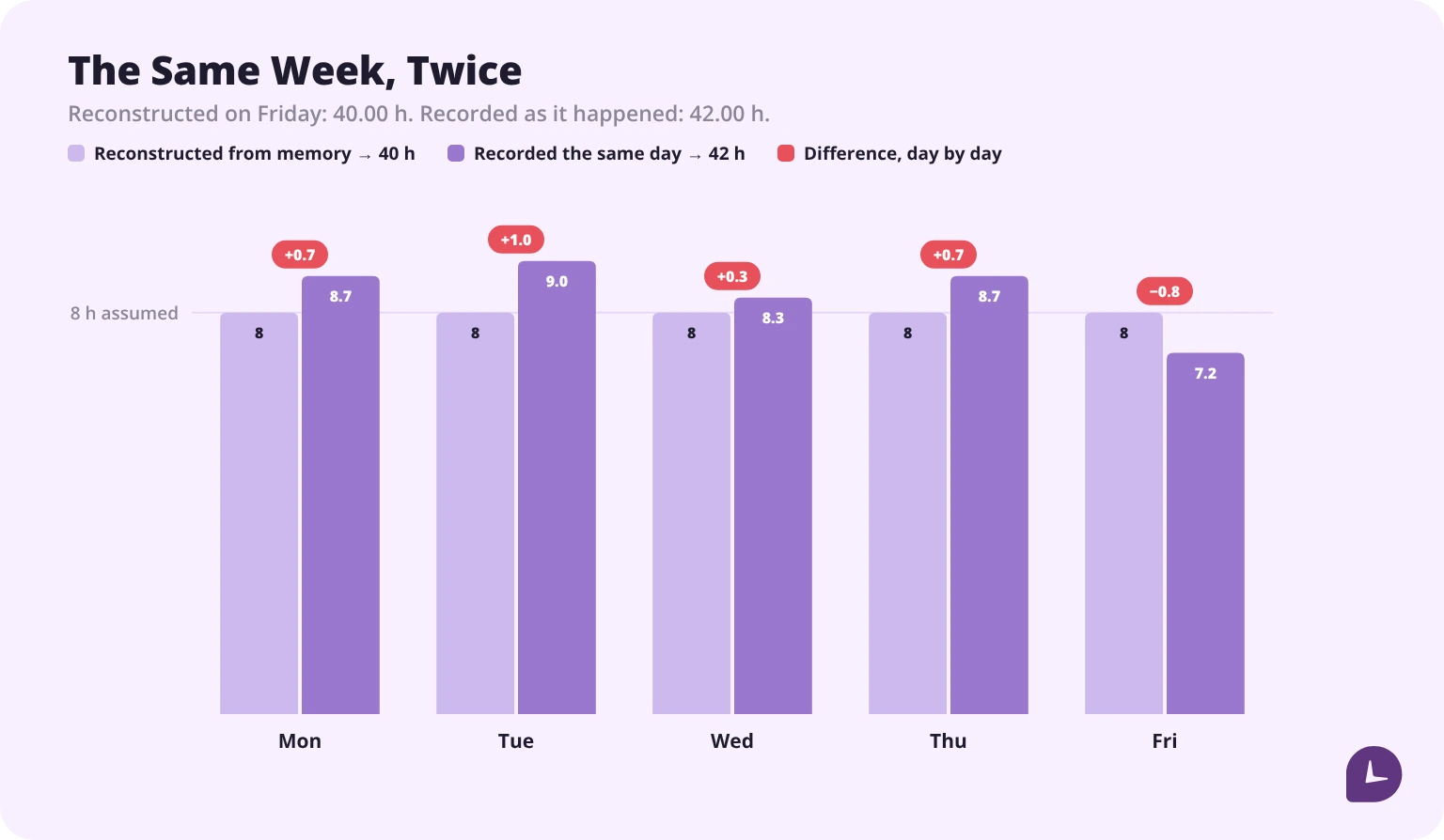
Reconstruction is the default method for most people who think they track their hours, and it is the one with the largest error.
Three things happen when you fill in a week from memory:
Short tasks disappear. The 20-minute call you took in the car, the half hour before the shift setting up, the 15 minutes after close. Individually forgettable, collectively significant.
Breaks get standardised. Every lunch becomes 30 minutes because that is the policy, even the days it was 15 or 50.
Start times get rounded. 7:52 becomes 8:00. 17:14 becomes 17:00. Both roundings usually run the same direction, and it is not yours.
None of this is dishonesty. It is what memory does with repetitive detail. The fix is not discipline, it is removing the recall step: write it when it happens, in whatever is nearest.
How to start tracking your hours this week
- Pick the tool you will actually open. If you already live in your phone, an app. If you already have a notebook on the counter, the notebook. The best method is the one that survives a bad Tuesday.
- Write down the rules before day one. What counts as a start, whether the lunch is paid, what your overtime threshold is. Decide once, not every day.
- Record start, end and breaks the moment they happen. Not at the end of the day. Not at the end of the week.
- Total on Friday, do not reconstruct on Friday. Friday is for adding up what you already wrote, and our guide to how to calculate time sheets covers the arithmetic if you are doing it by hand.
- Compare against your pay stub at the end of the first month. This is the step everyone skips and the only one that tells you whether any of it worked.
How to convert hours and minutes for pay
Payroll usually wants decimal hours. 7 hours 45 minutes is 7.75, not 7.45 — divide the minutes by 60.
| Minutes | Decimal | Minutes | Decimal |
|---|---|---|---|
| 15 | 0.25 | 40 | 0.67 |
| 20 | 0.33 | 45 | 0.75 |
| 30 | 0.50 | 50 | 0.83 |
If you would rather not do it in your head, a time card calculator will total the week and convert it in one step.
Whose job is it to keep the record?
The employer’s. Under the Fair Labor Standards Act, employers are required to keep records of hours worked for every non-exempt employee (DOL, Fact Sheet #21). The specific requirements are set out in 29 CFR Part 516.
There is no mandated format. Paper or digital both satisfy the requirement, as long as the records are accurate and accessible.
So why keep your own? Because the obligation being the employer’s does not mean the record will be there when you need it. When the employer’s records are missing, incomplete or disputed, your contemporaneous record is the evidence in the room. It does not replace theirs. It is what exists when theirs does not.
This section is general information, not legal advice. Rules vary by state and by contract.
What makes your own record credible
Three things, and they are the reason phone notes rank last in the table above.
1. It was made at the time. A timestamped entry made on Tuesday carries weight a Friday reconstruction does not. This is the single largest factor.
2. It exports in a plain format. A CSV with dates, start times, end times and breaks travels. A screenshot of an app screen does not. Export monthly and keep the file somewhere other than the app.
3. Edits are visible, or impossible. A notebook in pen, a spreadsheet with version history, an app that logs changes — all fine. A notes app where any entry can be silently rewritten is the weakest form.
Add a fourth for practical purposes: it is consistent. A record with three months of entries and a two-week gap invites the question of what happened in the gap.
How long should you keep your records?
Under the FLSA, employers must keep payroll records for at least three years, and the records the wage calculation rests on — time cards, work schedules, pay-rate tables — for at least two. Keep your own for three years, which covers the longer of the two.
Practically: export monthly, save to somewhere that is not your work device, and keep three years rolling. The exports are small. The one time you need them, nothing else substitutes.
What to do if your hours and your paycheck disagree
This is the situation the whole exercise exists for, and almost nobody plans for it.
- Check your own record first, before raising it. Confirm the discrepancy is real and quantify it — hours, dates, amount.
- Check the obvious mechanical causes. Rounding at clock-in, an unpaid break applied on a day you worked through, a shift that crossed midnight and landed in the wrong week, overtime calculated on the pay period rather than the workweek.
- Bring the record, not the complaint. “I have 43.5 hours for the week of the 9th, the stub shows 40” is a conversation. “I think I’m short” is not.
- Ask for their record. Be careful what you assume here. The FLSA requires your employer to keep those records and open them to the Department of Labor’s representatives — it does not give you a right to see them. A number of states do, with their own deadlines and penalties, so check your own state’s rule before you treat it as an entitlement. Asking plainly is usually the faster route anyway: most discrepancies are a mechanical error that somebody is glad to have found.
- If it is not resolved, the Department of Labor’s Wage and Hour Division handles unpaid wage complaints. Your contemporaneous record is what you bring.
Two of those mechanical causes have rules of their own worth knowing before the conversation: the 7-minute time clock rule governs how a clock-in may be rounded, and the steps to calculate overtime pay show what the hours above 40 should have been worth.
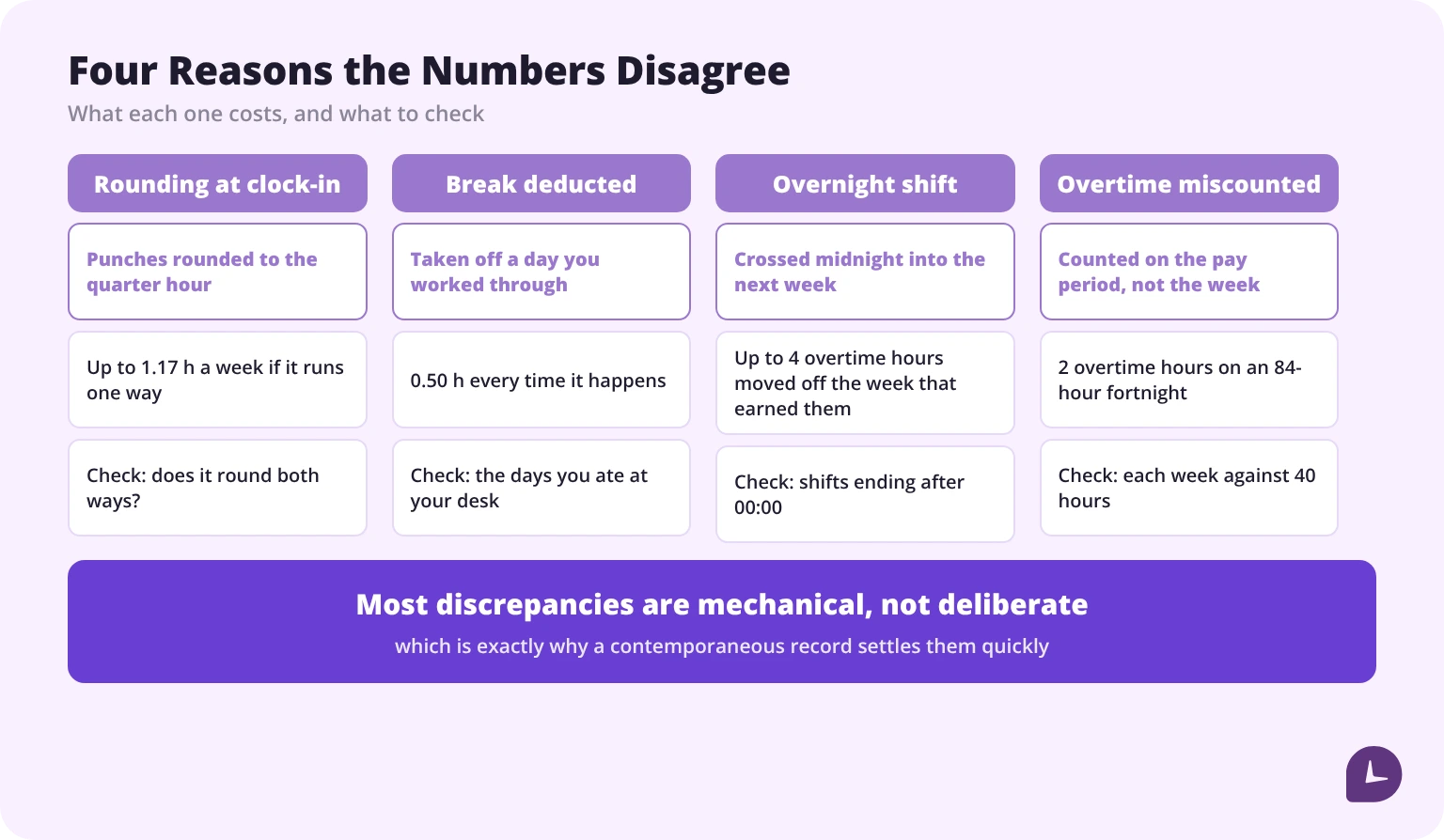
Most discrepancies are mechanical rather than deliberate. That is precisely why a record settles them quickly.
When to switch methods
- Paper to spreadsheet: when the arithmetic starts producing disagreements.
- Spreadsheet to app: when you are reconstructing rather than recording, or working more than one job.
- App to your employer’s system: never entirely. Keep your own alongside it.
- Anything to automatic: when you have tried three times to remember a timer and failed three times.
If you are the person collecting everyone else’s hours rather than your own, templates and personal apps stop working somewhere around the fifth employee. That is a different problem, and our time tracking software is built for it — approvals, one record for the whole team, hours that reach payroll without a re-keying step.
Sources
- U.S. Department of Labor, Fact Sheet #21: Recordkeeping Requirements under the FLSA
- Code of Federal Regulations, 29 CFR Part 516: Records to Be Kept by Employers
- U.S. Department of Labor, Overtime Pay
- U.S. Department of Labor, WorkWise Timesheet App
Reliable employee tracking software. Clear visibility and insights into how employees work. Even remotely.
Try Monitask free for 10 days
FAQ
How can I keep track of my hours for free?
A printed weekly timesheet or a spreadsheet costs nothing. Several tracker apps have free tiers, though most cap the number of jobs or entries.
Is my employer required to track my hours?
Yes, for non-exempt employees. The FLSA requires employers to keep records of hours worked, with the requirements set out in 29 CFR Part 516. There is no mandated format.
Does my own record of hours count for anything?
It does not replace the employer’s record, which is the one legally required. It becomes the evidence when the employer’s record is missing, incomplete or disputed — particularly if it was made at the time rather than reconstructed.
How do I convert my hours for payroll?
Divide minutes by 60. 7 hours 45 minutes is 7.75 hours. Writing 7.45 is the most common arithmetic error in manual hour tracking. For a whole month rather than a week, see [how many hours in a month](/blog/how-many-hours-in-a-month/).
How often should I record my hours?
Daily, at the moment the shift starts and ends. Weekly reconstruction is the most common method and the least accurate one.
What should a record of hours include?
Date, start time, end time, breaks with paid and unpaid separated, total hours, and the job or project if you work more than one.
How long should I keep my hour records?
Three years. That matches the FLSA retention period for employer payroll records, and comfortably covers the two-year period that applies to the time records themselves.
Can I use my phone's notes app to track hours?
You can, and it is better than nothing. It ranks last of the six methods here because it has no structure, no totals and no visible edit history — which is exactly what makes a record credible.
What if my employer's system misses my clock-in?
Report it the same day and keep your own note of the actual time. A same-day correction with a contemporaneous record behind it is straightforward; a correction raised three weeks later is a dispute.