Open Source Employee Monitoring Software: What You Take On

Reliable employee tracking software. Clear visibility and insights into how employees work. Even remotely.
Try Monitask free for 10 days
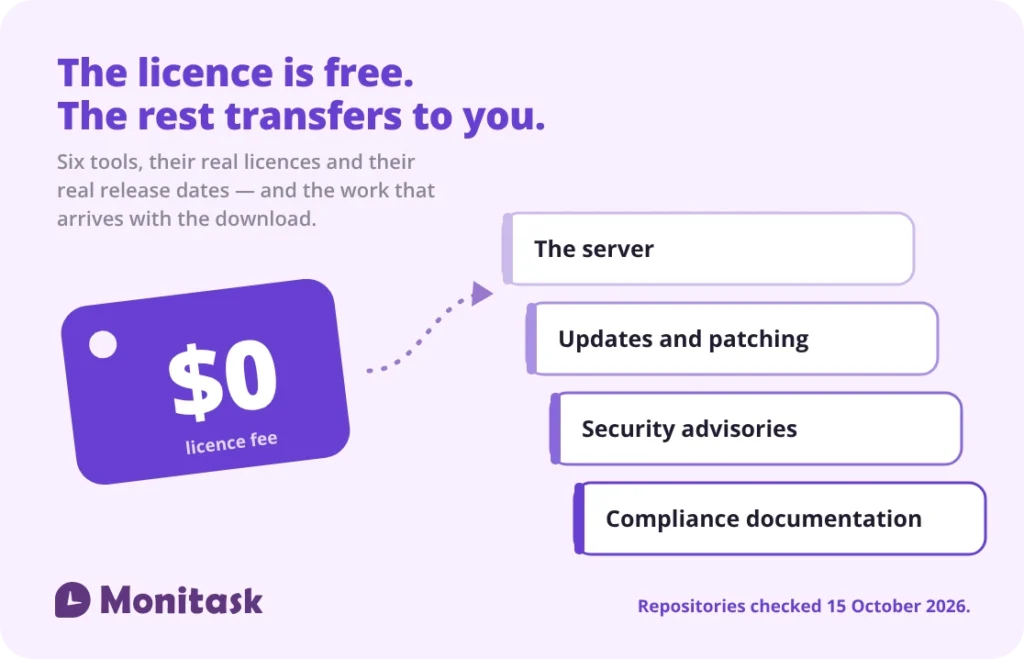
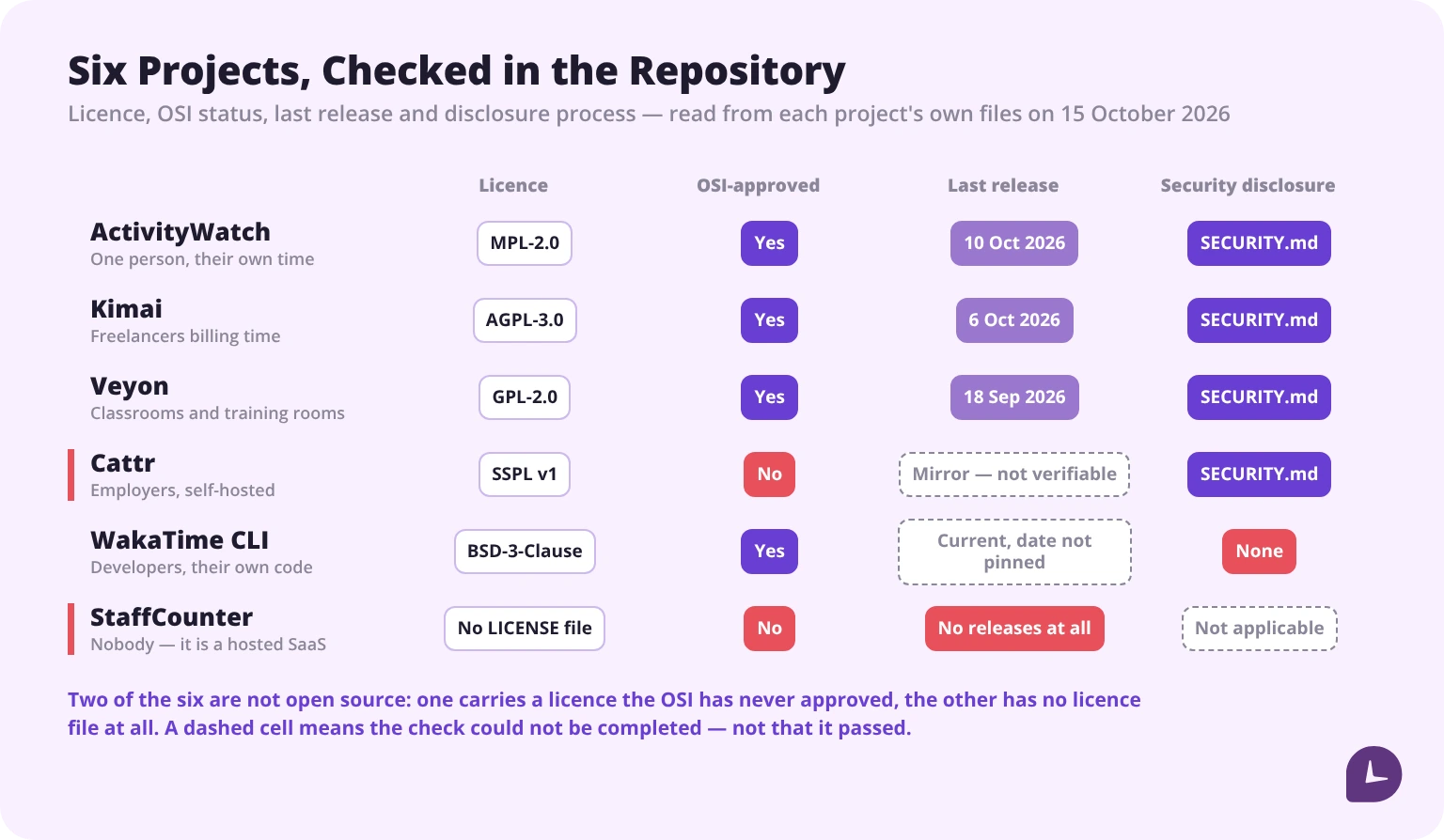
Open source monitoring tools are free to licence and not free to run. The licence question matters more than most guides admit — one popular option is under SSPL, which is not an OSI-approved open source licence, and one widely listed “open source” tool has no licence file at all. Two of the tools that appear on every list are not employee monitoring software in any sense their own authors would recognise. And self-hosting does not reduce your GDPR obligations; it moves all of them onto you. Check the licence and the last release date before anything else.
If you are looking for hosted tools with a free tier rather than something to run yourself, that is a different article. This one is about what arrives with the download.
The six tools, checked
| Tool | Licence | OSI-approved | Last release | Central dashboard | Screenshots |
|---|---|---|---|---|---|
| ActivityWatch | MPL-2.0 | Yes | v0.14.1 · 10 Oct 2026 | No, by design | No |
| Kimai | AGPL-3.0-or-later | Yes | 2.69.0 · 6 Oct 2026 | Yes | No |
| Veyon | GPL-2.0 | Yes | 4.11.3 · 18 Sep 2026 | Yes | Yes |
| Cattr | SSPL v1 | No | Not verifiable — see below | Yes | Yes |
| WakaTime CLI | BSD-3-Clause | Yes | 2.27.5, current | No — data goes to wakatime.com | No |
| StaffCounter | None — no LICENSE file | No | No releases at all | Not applicable | Not applicable |
Licence, release and security-disclosure data read directly from each project’s own files on 15 October 2026 — LICENSE and SECURITY.md from the repositories, release dates from Zenodo, Packagist and the projects’ own release announcements. Project health changes; the date matters more here than in any other comparison on this site.
What open source means here, and what it does not
Open source means the source code is public: you can read it, modify it, and in most cases run it without paying a licence fee. In monitoring, that translates to deploying on your own servers, inspecting exactly what data is collected, and adapting the code.
Three things it does not mean:
It does not mean free. The licence is free. Deployment, patching, server costs and support are not, and they land on your team. There is a worked costing further down.
It does not mean OSI-approved. Several tools marketed as open source use licences the Open Source Initiative has not approved — and at least one tool on every list has no licence at all, which means its code is not licensed to you for anything. That is not automatically a problem, but it is a different thing, and it has consequences covered below.
It does not mean built for employers. Two of the most frequently recommended tools in this category were designed for individual self-tracking or for developers tracking their own coding time. Absence of a manager dashboard is not a missing feature in those projects — it is the design, and in one case it is an explicit design goal stated in the project’s own README.
The six tools, one by one
Each block opens with what the repository said on 15 October 2026, not with what the download page says.
ActivityWatch
Licence MPL-2.0 · OSI-approved Yes · Last release v0.14.1, 10 October 2026 · Who ships releases Erik and Johan Bjäreholt · Security disclosure SECURITY.md in the repository · Platforms Windows, macOS, Linux, Android
ActivityWatch records the active application, the active browser tab and whether you are at the keyboard, and stores all of it on the machine that produced it. It is the healthiest project in this comparison by every measure here: a release five days before this check, a published disclosure process, two named maintainers and an archived, citable release history.
It is also not an employee monitoring tool, and its authors are clear about that. The stated goal in the README is “to enable the collection of as much valuable lifedata as possible without compromising user privacy“, achieved by storing data on the user’s own machine. The project lists centralised sync among the dealbreakers it was built to avoid — “it’s centralized and the sync server knows everything”. A manager cannot see a team in ActivityWatch because the project was designed so that nobody but the user can.
The funding tells the same story: the project runs on roughly $275 a month from 44 supporters. That is a healthy volunteer project, not a vendor.
Pros
- The most active project here, with a clear release cadence
- Local-first storage, so there is no central store to secure or breach
- Genuinely cross-platform, Android included
- Optional API-key authentication on the local server as of v0.14.1
Cons
- No central view of a team, and that is deliberate
- No screen capture, no activity classification, no reports for anyone but the user
- Deploying it across a company means deploying it on each machine and then having no way to aggregate
Kimai
Licence AGPL-3.0-or-later · OSI-approved Yes · Last release 2.69.0, 6 October 2026 · Who ships releases Kevin Papst · Security disclosure SECURITY.md in the repository · Platforms Self-hosted web application — PHP 8.2 or newer, nine PHP extensions and a database; users need only a browser
Kimai is a timesheet application with users, teams, roles, projects, rates and invoicing. It is maintained at a pace few projects in any category match, and the licence and release date are confirmed independently by the Packagist listing as well as the repository’s own files.
What it is not is a monitoring tool. Kimai records what people enter — start, stop, project, description. It takes no screenshots, measures no activity level and watches no applications. For a team that wants accurate billable time with an approval trail, that is the right shape. For a manager who wants to know what a machine is doing, it is the wrong category of software.
AGPL is worth a moment here. Internal deployment is unaffected. But if a modified Kimai is reachable over a network by people outside your organisation — a client portal, a subsidiary, a white-labelled instance — the obligation to publish your modifications can be triggered. That is the scenario AGPL exists for.
Pros
- Mature, actively released, with a real multi-user permission model
- Invoicing, exports and an API, which most projects here do not have
- The only tool in this comparison an employer could deploy today without surprises about scope
Cons
- No activity data of any kind — self-reported time only
- AGPL constrains anything you might offer outside the company
- A PHP and database stack to own, patch and back up
Veyon
Licence GPL-2.0 · OSI-approved Yes · Last release 4.11.3, 18 September 2026 · Who ships releases Tobias Junghans / Veyon Solutions · Security disclosure SECURITY.md in the repository · Platforms Windows and Linux
Veyon — “Virtual Eye On Networks” — gives one operator a live grid of every screen on a network, with remote view and control, screen locking, screenshots and the ability to broadcast one screen to all the others. On capability it is the closest thing here to what people picture when they say employee monitoring.
Read its own feature list, though, and the audience is unambiguous: start and end lessons, send text messages to students, broadcast the teacher’s screen, “record learning progress and document infringements”, distribute teaching material. Veyon is classroom management software, and it has been since 2004. Deploying it in an office means deploying a tool whose threat model is a student alt-tabbing away from an exam.
Two findings worth having before you commit. First, Veyon is open core: the GPL-2.0 application is surrounded by add-ons that are separately licensed and paid, including the Entra ID connector and internet access control. Second, Debian’s package tracker shows Veyon at 4.9.7 in unstable against 4.11.3 upstream, and the package was removed from testing in September 2026 over an unresolved bug. If your deployment plan was “install it from the distribution repository”, check what version that actually gets you.
Credit where it is due: version 4.11.3 added a visibility mode that blurs or hides screen thumbnails for sites with privacy policies. That is a maintainer thinking about the problem this article is about.
Pros
- Live screen view, remote control and screenshots, working today
- Genuinely one of the longest-maintained projects of its kind, with a named maintainer and a release cadence to match
- Privacy-aware features arriving in recent releases
Cons
- Built for classrooms; the vocabulary, the workflows and the assumptions all follow from that
- Open core — the features an enterprise would want most are the paid add-ons
- Distribution packages lag upstream badly, and Debian testing has dropped it
- Live screen viewing of employees is the single most consent-sensitive thing in this article
Cattr
Licence SSPL v1 · OSI-approved No · Last release Not verifiable from the public mirror · Who ships releases AmazingCat, on the vendor’s own GitLab · Security disclosure SECURITY.md in the repository · Platforms Self-hosted PHP/Laravel server plus desktop applications
Cattr is the one tool here built for the job: self-hosted time tracking with screenshots, activity levels, projects, reports and an API, with a central dashboard and desktop clients. If you came to this article wanting a free self-hosted replacement for a commercial monitoring platform, Cattr is the candidate. Two things should slow you down.
The licence is SSPL v1, and the Open Source Initiative has never approved it. The repository’s LICENSE file confirms it. For a company deploying internally this is usually survivable — SSPL’s teeth are in offering the software to third parties as a service. But “open source” is the wrong word for it, and if your procurement or security review has a policy that says OSI-approved licences only, Cattr fails that policy on paper.
The GitHub repositories are mirrors, not the project. They describe themselves as public clones of the vendor’s own GitLab at git.amazingcat.net. The consequence matters: the release entries on the mirror are all timestamped within minutes of each other, which makes them clone artefacts rather than release dates. The newest versions visible are server v2.6.0 and desktop v2.6.5. The real release history, the issue tracker that maintainers actually watch and the Docker images all live on infrastructure the vendor runs. You can still check all of it — you simply cannot do it from GitHub, which is where every list sends you.
One more thing from the README, since you will meet it on day one: the installation instructions ship a default administrator account with the password password. Change it before the server is reachable from anywhere.
Pros
- The only tool here designed for an employer to run, with screenshots, activity data and a central dashboard
- Self-hosted end to end, with a desktop client for each major platform
- A published security disclosure process
Cons
- SSPL v1 is not an OSI-approved open source licence
- Project activity cannot be assessed from the public mirror, which is where every list sends you
- Default credentials in the documented install path
- A Laravel stack plus desktop client packaging to own
WakaTime CLI
Licence BSD-3-Clause · OSI-approved Yes (the client only) · Last release 2.27.5, current on the check date · Who ships releases Alan Hamlett, with two other named development leads · Security disclosure No SECURITY.md in the repository · Platforms Windows, macOS, Linux
WakaTime is on almost every open source monitoring list, and it should not be. The client is open source; the product is not.
wakatime-cli is BSD-3-Clause and genuinely open — you can read it, build it and audit exactly what it sends. What it sends goes to wakatime.com, a commercial hosted service with paid plans that you cannot self-host. The README is explicit about the shape: it is the “command line interface to WakaTime used by all WakaTime text editor plugins”. Open source client, closed service.
So WakaTime belongs on a list of open source developer tools and does not belong on a list of open source employee monitoring software. It does not self-host, it has no employer dashboard, and the data leaves your network by design. It is also the only project here with a licence and no security disclosure file, which for a tool that transmits activity data is the gap most worth noting.
Pros
- A real, auditable open source client with an active release cadence and three named development leads
- Precise, low-friction coding-time data for the individual developer
Cons
- Not self-hostable: the service is proprietary and paid
- No employer view, by product design rather than omission
- No published security disclosure process in the repository
- Counts coding time, not work — it has nothing to say about anyone who is not writing code
StaffCounter
Licence None — the repository contains no LICENSE file · OSI-approved No · Last release No releases and no tags · Who ships releases Nobody · Security disclosure Not applicable · Platforms Not applicable — the product is a hosted service with installed agents
StaffCounter is on many of the same lists, and that one is not a close call either.
StaffCounter’s own README describes StaffCounter.net as “a fully automated and FREE employee monitoring service (Saas)”. The public repository holds the README for one component — the StaffCounter Safe Agent — and no licence file of any kind. Without a licence grant, the default is all rights reserved: you have no permission to use, modify or redistribute that code, whatever the listing article that sent you there implied.
StaffCounter may well be a reasonable free hosted monitoring product. It is not open source, there is nothing here to self-host, and it should not appear in this category.
Pros
- None that are relevant to this comparison — it is not an open source tool
Cons
- No licence file, so nothing in the repository is licensed to you
- No releases, no tags, no version history
- Only one component published; the service itself is closed
- Free and hosted means the data residency argument for open source does not apply
Licence types and what they mean for an employer
Every review names the licence and moves on. Here is what the names actually mean when you deploy internally.
| Licence | What it requires | Practical effect for an employer |
|---|---|---|
| MIT / Apache 2.0 | Attribution | Deploy and modify freely. No obligations beyond notice |
| BSD-3-Clause | Attribution, plus no use of the project’s name to endorse your product | As permissive as MIT, with one extra line about endorsement |
| MPL-2.0 | Modified files you distribute stay under MPL | File-level rather than project-level copyleft. The easiest of the copyleft licences to live with |
| GPL-2.0 / GPL-3.0 | Derivative works you distribute must be open-sourced | Internal use is fine. Distributing a modified build is not, unless you publish the source |
| AGPL-3.0 | The same, extended to use over a network | If people reach a modified version over a network, the source-publication duty can trigger |
| SSPL v1 | Publishing your entire service stack if you offer the software as a service | Not OSI-approved. Internal use is generally fine; offering it to others is where it bites |
| No licence file | Nothing is granted | Default copyright applies: no permission to use, modify or redistribute |
Why this matters more than it looks. Most employers deploy internally and never distribute anything, so the practical exposure is low. Two situations change that: offering the tool to a subsidiary or client as a service, and building a modified version into a product you ship. Both are more common than expected, and both are the scenarios AGPL and SSPL were written for.
Practical rule: if the plan is internal deployment only, the licence is rarely a blocker. If anyone in the room says the words “we could offer this to our clients”, bring the licence to legal first. And if there is no licence file, there is nothing to bring.
Boost your business productivity
Track performance and streamline teamwork
Project health: how to check before you deploy
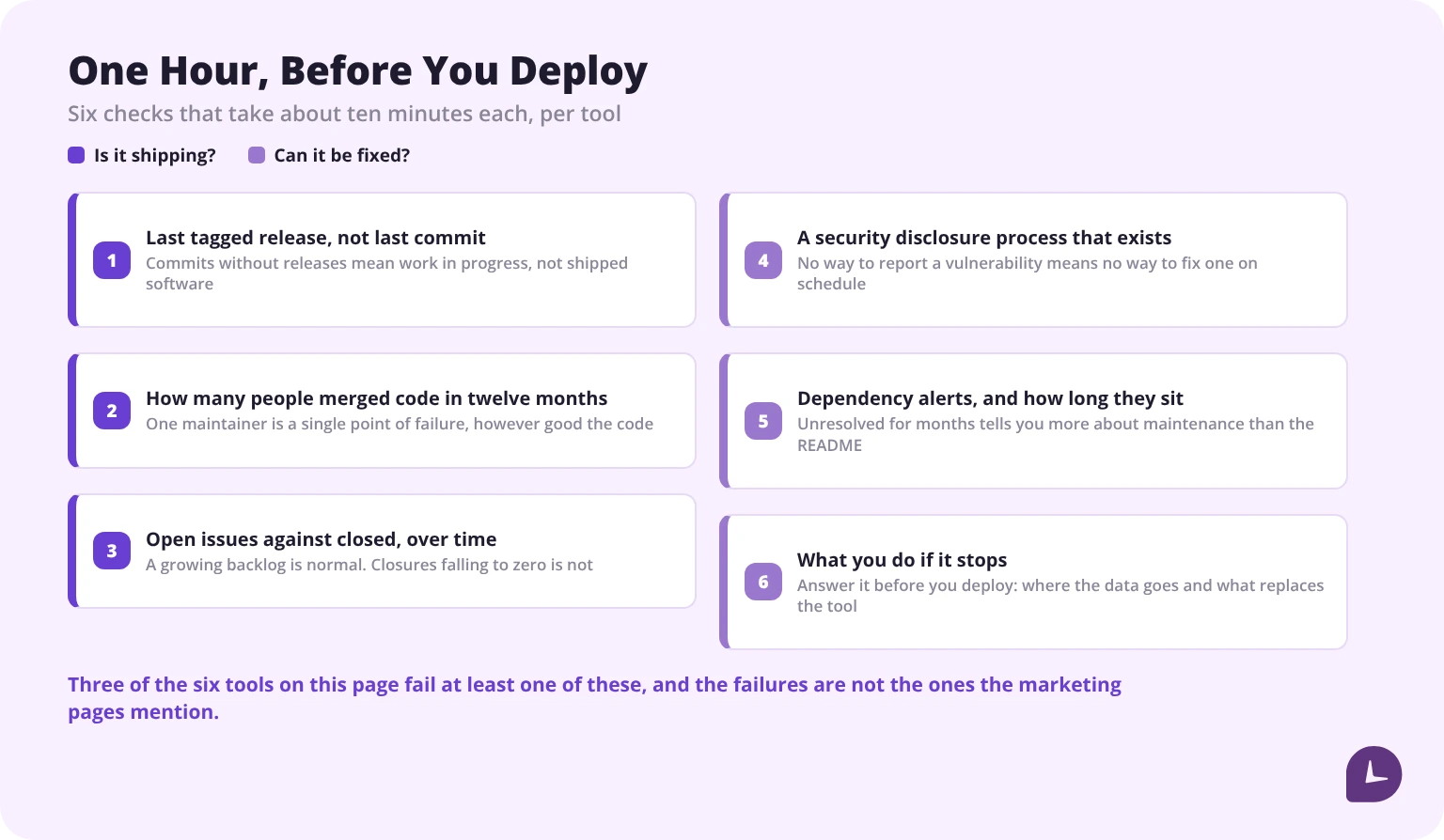
The single most repeated warning in this category is that an unmaintained project carries unpatched vulnerabilities. What no guide does is check. It takes about an hour for six tools.
1. Last tagged release, not last commit. A project with commits but no release in a year is being worked on, not shipped. Be careful where you read it: if a repository is a mirror, its release timestamps may be clone artefacts. Cattr’s are.
2. How many people merged code in twelve months. One maintainer is a single point of failure, however good the project. This is the one figure in this article that cannot be read out of a file — you need the repository’s own contributor view, which on GitHub is the Insights tab, filtered to the last twelve months. Do that check yourself rather than trusting any published number, this page included. What can be said from the files: four of these six name between one and three people on their releases, one names a company, and one has no releases at all.
3. Open issues against closed, over time. A growing backlog is normal. A backlog growing while closures fall to zero is not.
4. A security disclosure process that exists. Is there a SECURITY.md, a contact address, a published advisory history? A project with no way to report a vulnerability has no way to fix one on schedule. Four of the six here have one; one has none; one has no code to disclose against.
5. Dependency alerts, and how long they sit. Automated dependency alerts left unresolved for months tell you more about maintenance than the README does.
6. What you do if it stops. For each tool, answer: if this project is abandoned tomorrow, what do we do with the data and how long can we keep running it safely?
A seventh check, which this comparison added by accident and would now run every time: check whether the repository you are reading is the project. Two of the six here point somewhere else — one to a vendor’s own GitLab, one to a hosted service with no source at all.
What open source monitoring usually cannot do
Coverage varies, but the gaps are consistent across the category:
- Real-time manager dashboards with team-wide visibility. Most tools store data per device
- Automated productivity classification across apps and tasks
- Workload distribution reporting — the view that shows who is overloaded
- Scheduled reports pushed to managers or HR
- Support with an SLA. Community forums are the support model
- Compliance documentation you can hand to an auditor
None of these is a criticism of the projects. They are volunteer efforts solving the problems their maintainers had — or, in two cases here, software for classrooms and for individual developers that someone else filed under employee monitoring. The mismatch appears when a buyer expects a free replacement for a commercial platform.
If your actual requirement is detecting risky behaviour rather than measuring time, that is a different tool category again — see insider threat detection tools.
Self-hosting does not reduce your GDPR obligations
This is the most expensive misconception in the category, and it is the one the comparison articles skip.
The assumption: the data sits on our server, so the privacy problem is solved.
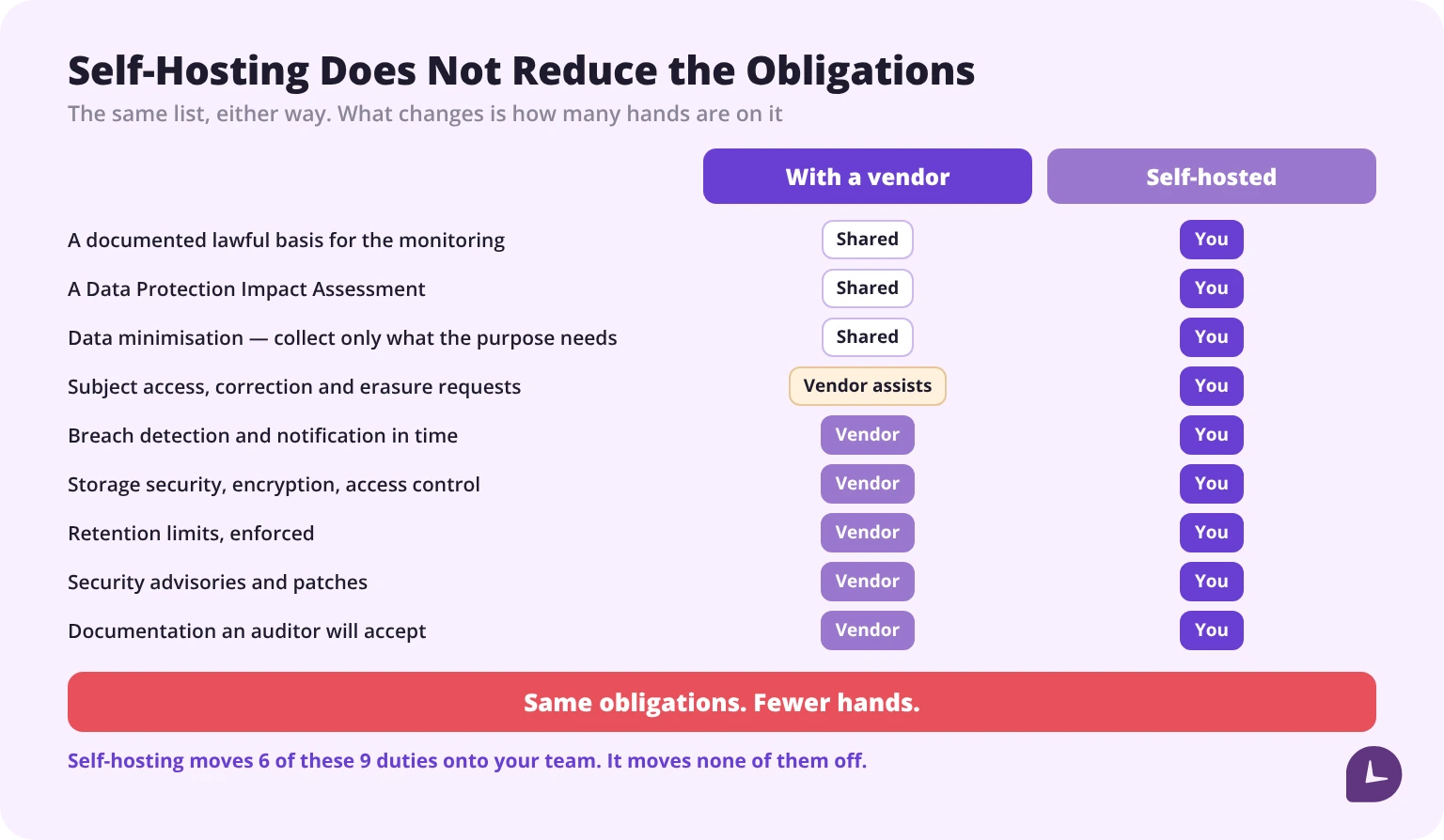
The reality: by self-hosting, you become both the controller and the processor. Every obligation that existed before still exists, and the ones a vendor used to carry now sit with you:
- A documented lawful basis for the monitoring. Consent rarely works in employment
- A Data Protection Impact Assessment, for systematic monitoring
- Data minimisation — collect only what the purpose needs, not everything the agent can see
- Subject access, correction and erasure requests, answered by you
- Breach detection and notification in time, which means detecting it yourself first
- Storage security, encryption, access control, configured and reviewed by you
- Retention limits, enforced rather than intended
- Security advisories and patches, tracked by you
- Documentation an auditor will accept, written by you
What you gain is data residency and auditability of the code. What you lose is the vendor’s compliance documentation, their security advisories, and someone to hold accountable.
For the full picture on what the regulation requires of a monitoring programme, see our GDPR requirements for employee monitoring guide.
This is general information, not legal advice.
What free actually costs
The licence fee is zero. The running cost is not. The figure usually quoted for this comes with no workings attached, so here it is built from its parts — which means you can argue with the parts.
| To stand it up | Hours |
|---|---|
| Server, OS, database, TLS and a hostname | 6–10 |
| Install, configure and harden the application | 4–8 |
| Package and roll out agents across platforms | 5–10 |
| Policy, notice and the DPIA | 3–8 |
| Test, pilot and fix what the pilot finds | 2–4 |
| Total | 20–40 |
Add roughly 4 hours a month for updates, patching and user support: 48 hours over the first year.
At a fully loaded internal IT cost of $60 an hour, year one comes to $4,080 to $5,280. Against a commercial tool at $8 per user per month, that is the same money as 43 to 55 seats. Below that team size, at these inputs, the licence is the cheaper line.
Both inputs are yours to change, and they move the answer a long way. Halve the hourly rate and the break-even halves with it. Use a tool at $4 a seat and it doubles. The arithmetic is simple: year-one hours × your rate, divided by twelve times your per-seat price.
The honest version: cost is rarely the deciding factor. The deciding factors are whether you have someone to own the server, and whether device-level data is enough. Cost follows from those two answers.
Questions to answer before you commit
- Who owns the server, by name, and what happens when they leave?
- Do managers need a central view, or is device-level data enough?
- What is the patching process when the upstream project is slow?
- What happens to monitoring capability if the project is abandoned?
- Are employees in jurisdictions with data residency or notice requirements?
- Who writes the DPIA, and who handles a subject access request?
If four or more of these have no clear answer, open source is not the path.
When open source is the right answer
It genuinely is, in three situations:
You have a DevOps function that already runs internal services, and one more is marginal work rather than a new responsibility.
Device-level data is enough. You want individuals to see their own time use, not managers to see the team’s. This is a legitimate and under-served use case, and it is precisely what ActivityWatch was built for — which is why it is a good tool badly categorised rather than a bad tool.
Data residency is non-negotiable. Government, defence, healthcare in certain configurations — cases where no commercial cloud is acceptable regardless of cost. Note that two of the six tools here fail this test outright, because their data goes to someone else’s service.
Where a paid tool makes more sense
The inverse of the above: no dedicated IT ownership, a need for central visibility, employees across jurisdictions, or a compliance function that needs documentation rather than source code.
At that point the comparison is not open source versus paid. It is whether you are buying software or hiring someone to run software.
Monitask is a proprietary hosted product with no free tier, so it is not a candidate in the list above and does not belong in it. It becomes relevant at the point where the answers to the six questions come back negative — where you need clock-in records, timesheets an approver signs, and a vendor who carries the compliance documentation. Our employee monitoring software page covers it.
Disclosure: Monitask published this article and sells proprietary monitoring software. No tool in this comparison is a Monitask product, and we have no commercial relationship with any of them.
Reliable employee tracking software. Clear visibility and insights into how employees work. Even remotely.
Try Monitask free for 10 days
FAQ
Is open source employee monitoring software really free?
The licence is. Standing one up works out at 20 to 40 hours of IT time, with roughly 4 hours a month after that. At $60 an hour that is $4,080 to $5,280 in the first year, which is the same money as 43 to 55 seats of a tool at $8 per user per month.
Is ActivityWatch an employee monitoring tool?
No. It is an activity tracker built for one person tracking their own time, storing data locally on each device with no central dashboard. That is by design: the project’s README names a central sync server that “knows everything” as one of the problems it set out to avoid. It appears in employer-facing lists far more often than its own purpose supports.
Is WakaTime open source?
The client is; the service is not. `wakatime-cli` is BSD-3-Clause and auditable, but every heartbeat goes to wakatime.com, a commercial hosted product you cannot self-host. It belongs on a list of open source developer tools, not on this one.
Is StaffCounter open source?
No. Its public repository contains the README for one agent component and no licence file at all, and its own description calls StaffCounter.net a free hosted employee monitoring service. With no licence grant, the code is all rights reserved.
Is Cattr's licence really SSPL?
Yes — the LICENSE file in the repository is SSPL v1, and the Open Source Initiative has never approved that licence. Internal deployment is generally unaffected; what SSPL targets is offering the software to others as a service. If your policy requires OSI-approved licences, Cattr does not qualify.
What licence should I look for?
For internal deployment, MIT, Apache 2.0, BSD-3-Clause and MPL-2.0 are the simplest. GPL and AGPL are fine internally but constrain distribution. SSPL is not OSI-approved and matters if you ever offer the tool as a service. A repository with no licence file grants you nothing at all.
Does self-hosting help with GDPR?
It helps with data residency. It does not reduce your obligations — you become controller and processor at once, and the vendor’s compliance documentation, advisories and incident support are no longer available to you.
How do I know if an open source project is still maintained?
Check the last tagged release rather than the last commit, how many people merged code in the past year, whether the issue backlog is being closed, and whether there is a security disclosure process. Check as well that the repository you are reading is where development actually happens — two of the six here are not.
Can open source monitoring work for a remote team?
Technically yes, practically with difficulty. Most tools store data per device or need a self-hosted server reachable across locations, and someone has to own that server across time zones.
What happens if the project is abandoned?
The software keeps running until an OS update breaks it. Plan the exit before you deploy: where the data lives, how to export it, and what replaces the tool.
Is open source monitoring more private?
More auditable, which is not the same thing. You can read the code and verify what is collected. Whether the deployment is private depends entirely on how you configure and secure it — and on self-hosting, that is entirely your work.
When should we move off open source?
Commonly at three points: headcount past roughly 20 to 30 people, a shift to distributed work where central visibility becomes necessary, or a compliance event where an auditor asks for documented data governance.