Project Management Dashboard: Metrics, Formulas and How to Build One

A project management dashboard shows the few numbers that tell you whether a project will finish on time and on budget. The core set is schedule variance, cost variance, the schedule and cost performance indexes, and a forecast of final cost. All four come from three inputs: the budget, the percentage of work actually complete, and the cost incurred to date.
Key takeaways
- Four numbers carry most of the signal: SPI = EV ÷ PV, CPI = EV ÷ AC, and the variances behind them.
- A dashboard needs a forecast, not just a status. EAC = BAC ÷ CPI turns today’s performance into a final cost.
- Every metric needs a stated threshold. A CPI of 0.87 means nothing until someone decides that below 0.90 triggers a conversation.
- Different metrics refresh at different speeds. Task status changes hourly; cost closes monthly. Mixing them on one view makes the slow numbers look stale and the fast ones look volatile.
- Actual cost and actual hours come from timesheets. If those are reconstructed at month end, every derived metric inherits the error.
What is a project management dashboard?
A project management dashboard is a single view that combines schedule, cost, scope and resource data for one project or a portfolio. Its job is to answer three questions without anyone opening a spreadsheet: where are we, where should we be, and where will we end up.
The third question is what separates a dashboard from a status report. A report describes the past. A dashboard that only shows completed tasks and spent budget is a report with charts. A dashboard earns its name when it forecasts — when today’s performance is projected forward into a final cost and a final date.
What metrics belong on a project dashboard?
Eighteen metrics cover most projects. Not all belong on one view; pick by what the project is managed against. If you are starting from scratch, our guide to KPIs for your team covers how to choose before you build.
| Metric | Formula | What it tells you |
|---|---|---|
| Planned value (PV) | BAC × planned % complete | What should have been earned by now |
| Earned value (EV) | BAC × actual % complete | What has actually been earned |
| Actual cost (AC) | sum of costs incurred | What has been spent |
| Schedule variance (SV) | EV − PV | Work ahead or behind, in currency |
| Cost variance (CV) | EV − AC | Over or under spend on work done |
| Schedule performance index (SPI) | EV ÷ PV | Pace against plan, as a ratio |
| Cost performance index (CPI) | EV ÷ AC | Value per currency unit spent |
| Estimate at completion (EAC) | BAC ÷ CPI | Forecast final cost |
| Estimate to complete (ETC) | EAC − AC | Forecast remaining spend |
| Variance at completion (VAC) | BAC − EAC | Forecast overrun or saving |
| To-complete performance index (TCPI) | (BAC − EV) ÷ (BAC − AC) | Efficiency needed to hit budget |
| Forecast duration | planned duration ÷ SPI | Projected end date |
| Milestone slippage | actual date − baseline date | Days lost per milestone |
| Task completion rate | completed ÷ total tasks | Throughput |
| Overdue task count | tasks past due date | Immediate blockers |
| Resource utilization | billable hours ÷ available hours | Whether capacity is used |
| Velocity | story points completed ÷ sprint | Agile delivery pace |
| Open risk count by severity | count by probability × impact | Exposure |
The first eleven are earned value metrics and they all derive from the same three inputs. That is the practical point: get the budget, the percent complete and the cost right, and eleven dashboard numbers come free.
How do you calculate earned value metrics?
Three inputs produce everything else.
- BAC — budget at completion, the approved total.
- Percent complete — the share of planned work actually finished, assessed against deliverables rather than effort spent.
- AC — actual cost incurred to date.
Schedule variance and SPI
PV = BAC × planned % complete
EV = BAC × actual % complete
SV = EV − PV
SPI = EV ÷ PV
A negative SV and an SPI below 1.0 both mean the project is behind. The variance says how much, in money. The index says how badly, as a proportion, which is what makes it comparable across projects of different sizes.
Cost variance and CPI
CV = EV − AC
CPI = EV ÷ AC
CPI is the more useful of the two for forecasting, because it is a rate. A CPI of 0.87 says you are earning 87 cents of planned value for every dollar spent, and that rate can be projected forward.
Forecasting with EAC, ETC and TCPI
EAC = BAC ÷ CPI
ETC = EAC − AC
VAC = BAC − EAC
TCPI = (BAC − EV) ÷ (BAC − AC)
EAC assumes current efficiency continues. TCPI answers the opposite question: what efficiency would the remaining work need in order to still land on budget. When TCPI rises above about 1.10, recovery inside the original budget usually requires cutting scope rather than working harder.
Forecast duration = planned duration ÷ SPI
Worked example: a project at week six
A project with a $120,000 budget and a 12-week schedule, assessed at the end of week six.
| Input | Value |
|---|---|
| BAC | $120,000 |
| Planned % complete (6 of 12 weeks) | 50% |
| Actual % complete (assessed on deliverables) | 42% |
| Actual cost to date | $58,000 |
| Metric | Calculation | Result |
|---|---|---|
| PV | $120,000 × 0.50 | $60,000 |
| EV | $120,000 × 0.42 | $50,400 |
| SV | $50,400 − $60,000 | −$9,600 |
| CV | $50,400 − $58,000 | −$7,600 |
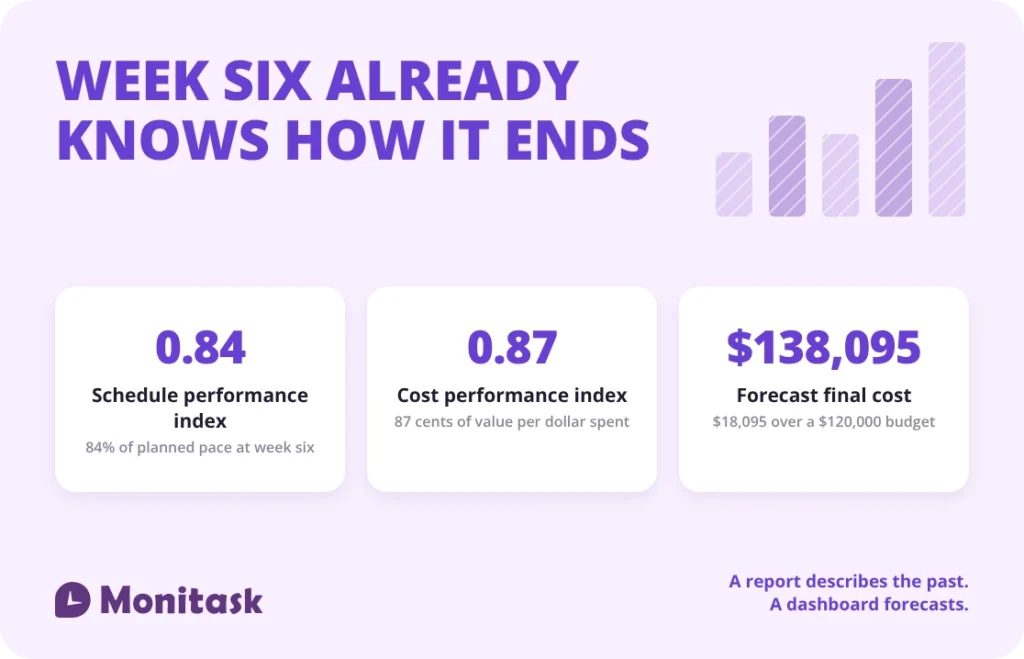
| SPI | $50,400 ÷ $60,000 | 0.84 |
| CPI | $50,400 ÷ $58,000 | 0.87 |
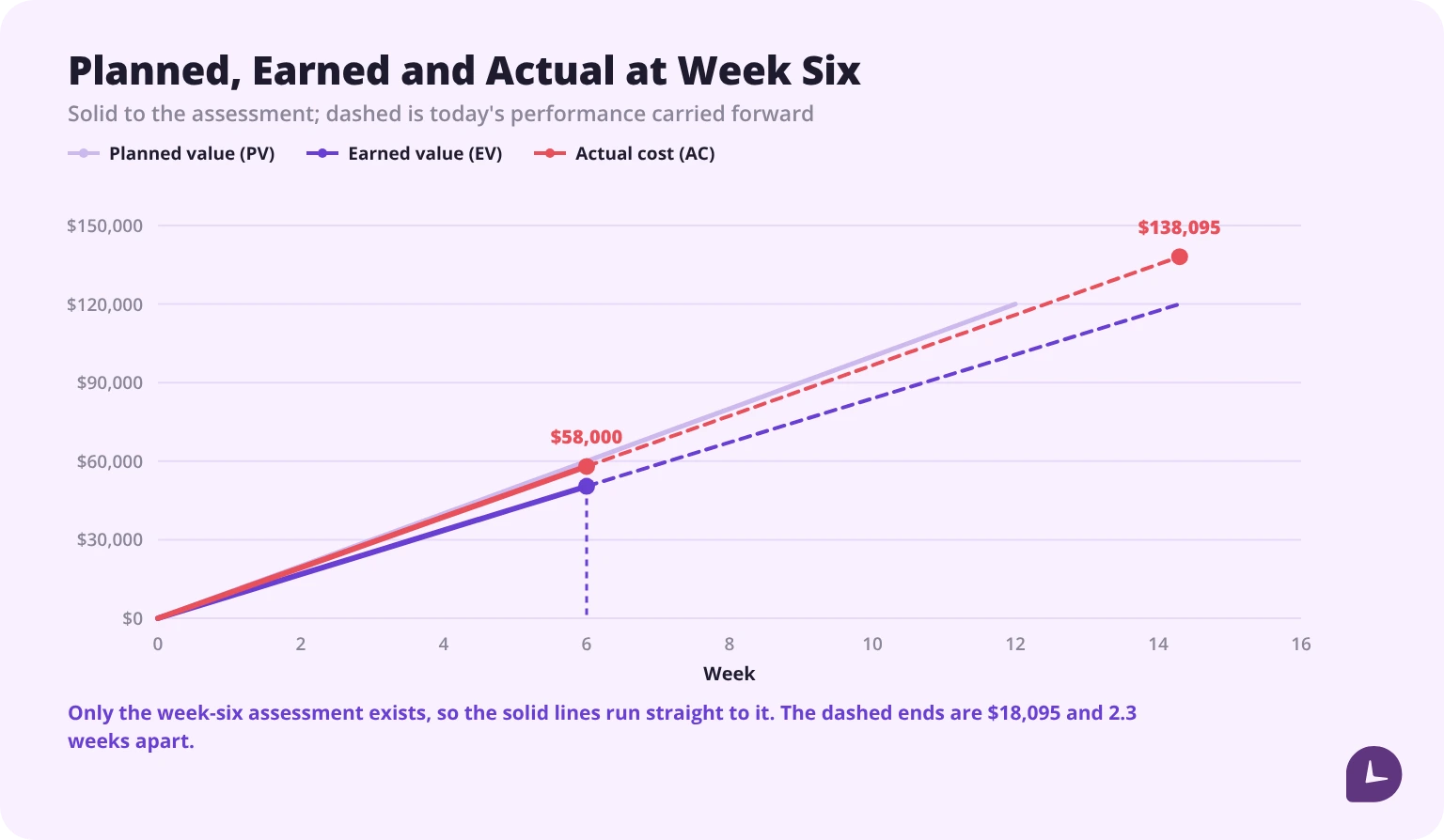
| EAC | $120,000 × $58,000 ÷ $50,400 | $138,095 |
| ETC | $138,095 − $58,000 | $80,095 |
| VAC | $120,000 − $138,095 | −$18,095 |
| TCPI | ($120,000 − $50,400) ÷ ($120,000 − $58,000) | 1.12 |
| Forecast duration | 12 ÷ 0.84 | 14.3 weeks |
One note on that EAC row, because it catches people out. The formula is BAC ÷ CPI, but if you divide $120,000 by the rounded CPI of 0.87 you get $137,931 — not the $138,095 above. The difference is $164, and it comes from rounding CPI to two decimals before dividing. The row therefore shows the equivalent exact form, BAC × AC ÷ EV, which gives the same answer without a rounding step. On a larger project the same slip is worth more: always carry CPI unrounded into a forecast, and round only the result.
Read together, those numbers say something a status report cannot: the project is running at 84% of planned pace and 87% cost efficiency, and if nothing changes it will finish in 14.3 weeks — 2.3 weeks late — at $138,095, which is $18,095 over budget.
The TCPI of 1.12 is the decision point. Landing on the original $120,000 would require delivering the remaining work 12% more efficiently than planned to date. That is rarely achievable by effort alone, which makes this a scope or budget conversation in week six rather than a surprise in week twelve.
If the project is not run on a fixed scope
Earned value needs an approved budget and a measurable percent complete. Product teams working a continuous backlog have neither, and for them the equivalent pair is velocity and burndown.
Velocity = story points completed ÷ sprints
A team completing 23, 27, 25 and 21 points over four sprints averages 24 points per sprint. With 168 points left in the backlog, the forecast is 7 sprints to completion. That is the same logic as EAC — current rate projected forward — expressed in points instead of currency.
When should a metric trigger action?
A dashboard without thresholds is decoration. Each metric needs a band that says watch, and a band that says act.
| Metric | Healthy | Watch | Act |
|---|---|---|---|
| SPI | 0.95 – 1.05 | 0.90 – 0.95 | below 0.90 |
| CPI | 0.95 – 1.05 | 0.90 – 0.95 | below 0.90 |
| TCPI | below 1.00 | 1.00 – 1.10 | above 1.10 |
| VAC | positive | 0 to −5% of BAC | worse than −5% of BAC |
| Milestone slippage | 0 days | 1–5 days | more than 5 days, or two milestones in a row |
| Overdue tasks | under 5% of open | 5–10% | above 10% |
| Resource utilization | 70–85% | 85–90% | above 90% or below 60% |
These bands are a common starting point, not a standard. Set them once per project type and write them on the dashboard itself, next to the number. A threshold that lives in someone’s head is not a threshold.
Two cautions. An SPI above 1.05 is not automatically good — it often means percent complete is being over-assessed, and the correction arrives later as a sudden drop. And a CPI above 1.05 on a fixed-price project can mean the work was underscoped rather than delivered efficiently.
The utilization band is the one worth defining for your own firm rather than borrowing, because the denominator changes the number — the same person reads 70% or 62% depending on whether you divide by available hours or a fixed year.
Where does dashboard data come from?
This is the question that decides whether a dashboard can be built at all. Each metric has a source, and some sources are harder than they look.
| Metric | Source | Difficulty |
|---|---|---|
| BAC | approved budget or statement of work | Easy, one number |
| Planned % complete | baseline schedule | Easy if a baseline exists |
| Actual % complete | deliverable assessment, not effort spent | Hardest input on the dashboard |
| Actual cost — labour | timesheets × burdened rates | Depends entirely on time capture |
| Actual cost — non-labour | invoices, purchase orders, expenses | Reliable but lags by the approval cycle |
| Task status and overdue counts | project management tool | Automatic |
| Milestone dates | baseline versus actual in the schedule | Automatic if milestones are maintained |
| Resource utilization | timesheets ÷ available hours | Depends on time capture |
| Velocity | sprint board | Automatic |
| Risk register | maintained manually | Only as current as the last review |
Two rows deserve attention.
Actual percent complete is the weak point of every earned value dashboard. It is a judgement, and the easiest wrong way to produce it is to divide hours spent by hours budgeted — which measures effort, not progress, and guarantees that a project burning hours without delivering looks on track. Assess it against completed deliverables or milestones instead; our guide to measuring your project’s impact covers how to define those so the assessment is repeatable.
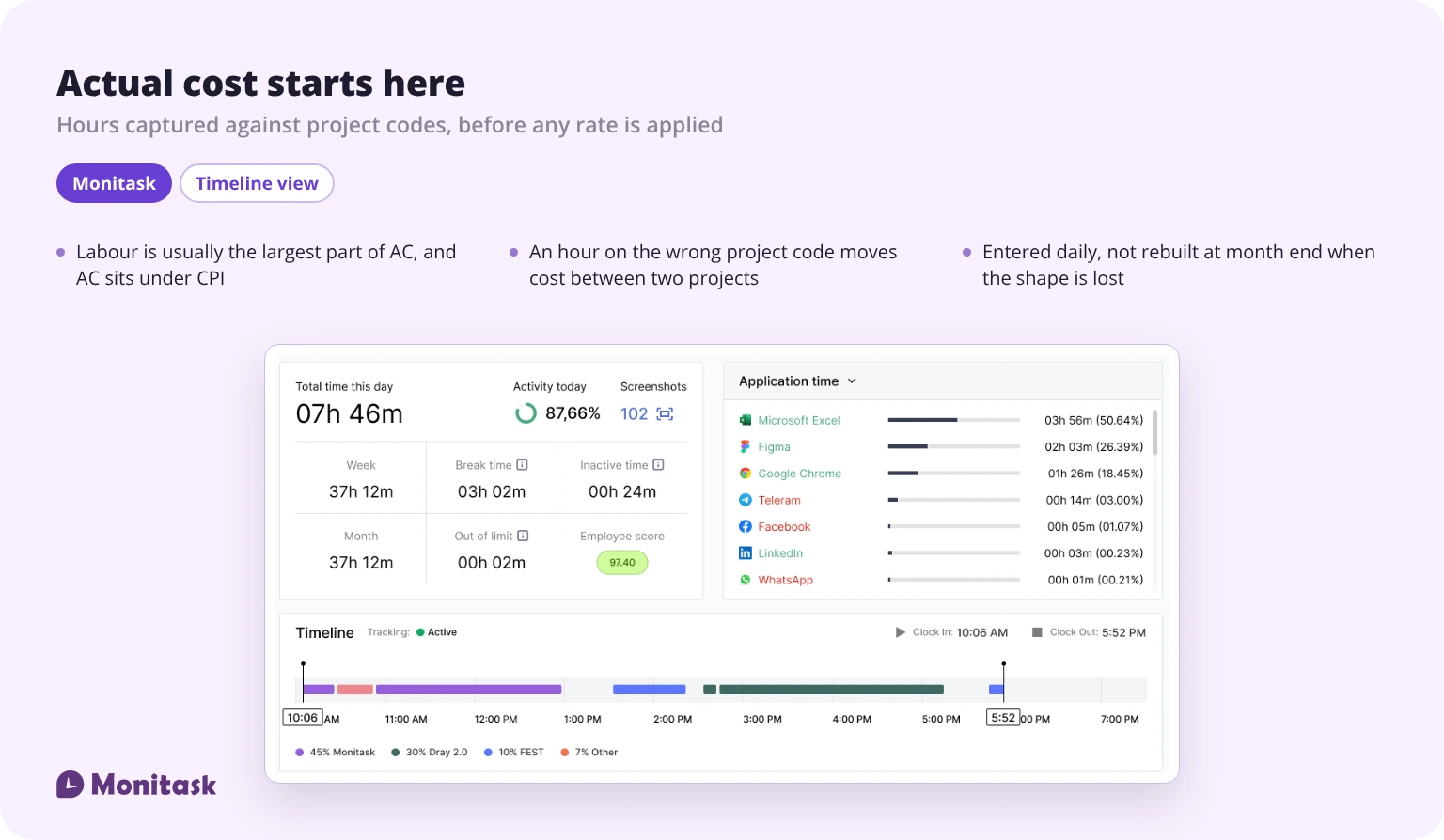
Labour cost is the other. On most projects it is the largest component of actual cost, and it comes from timesheets multiplied by burdened rates. Hours entered a week late, rounded to whole numbers, or booked to the wrong project code produce an AC that is wrong — and AC sits in the denominator of CPI, which drives EAC, ETC and VAC. One soft input propagates into four forecast numbers. Time tracking reports that break hours down by project are what turn that input from an estimate into a measurement.
How often should each metric refresh?
“Real time” is the usual answer and it is wrong for most of a dashboard. Cost data cannot be real time, because invoices arrive late. Putting a monthly number next to an hourly one makes the monthly number look broken.
| Metric group | Refresh | Why |
|---|---|---|
| Task status, overdue counts, blockers | Continuous | Changes through the day |
| Hours and resource utilization | Daily | Entries close each day |
| Velocity, burndown | Per sprint | Only meaningful at sprint boundaries |
| EV, SV, SPI | Weekly | Percent complete is assessed, not measured |
| AC, CV, CPI, EAC, ETC, VAC | Monthly, at period close | Depends on invoice and payroll cycles |
| Risk register | Per review cycle | Updated by people, not systems |
Label each panel with its own refresh and its last-updated timestamp. A dashboard where everything appears equally fresh invites decisions on numbers that are five weeks old.
Which chart fits which metric?
| Metric type | Chart | Avoid |
|---|---|---|
| PV, EV, AC over time | Line chart, three series | Stacked bars — they hide the gap between curves |
| SPI, CPI | Single number with a threshold band | Gauge dials — they use space without adding precision |
| Budget spent against total | Horizontal progress bar | Pie chart — two segments do not need a circle |
| Milestone dates, baseline versus actual | Gantt or timeline | Table alone — slippage is a visual pattern |
| Task status counts | Stacked bar or kanban count | Multiple pies |
| Remaining work per sprint | Burndown line with ideal line | Bar chart — the trend is the point |
| Utilization by person | Horizontal bar with a target line | Heatmap for fewer than 15 people |
| Risks | Probability-impact matrix | List sorted by date |
One rule covers most cases: if the metric has a target, show the target on the chart. A CPI of 0.87 printed alone requires the reader to remember what good looks like.
How do you build a dashboard for different audiences?
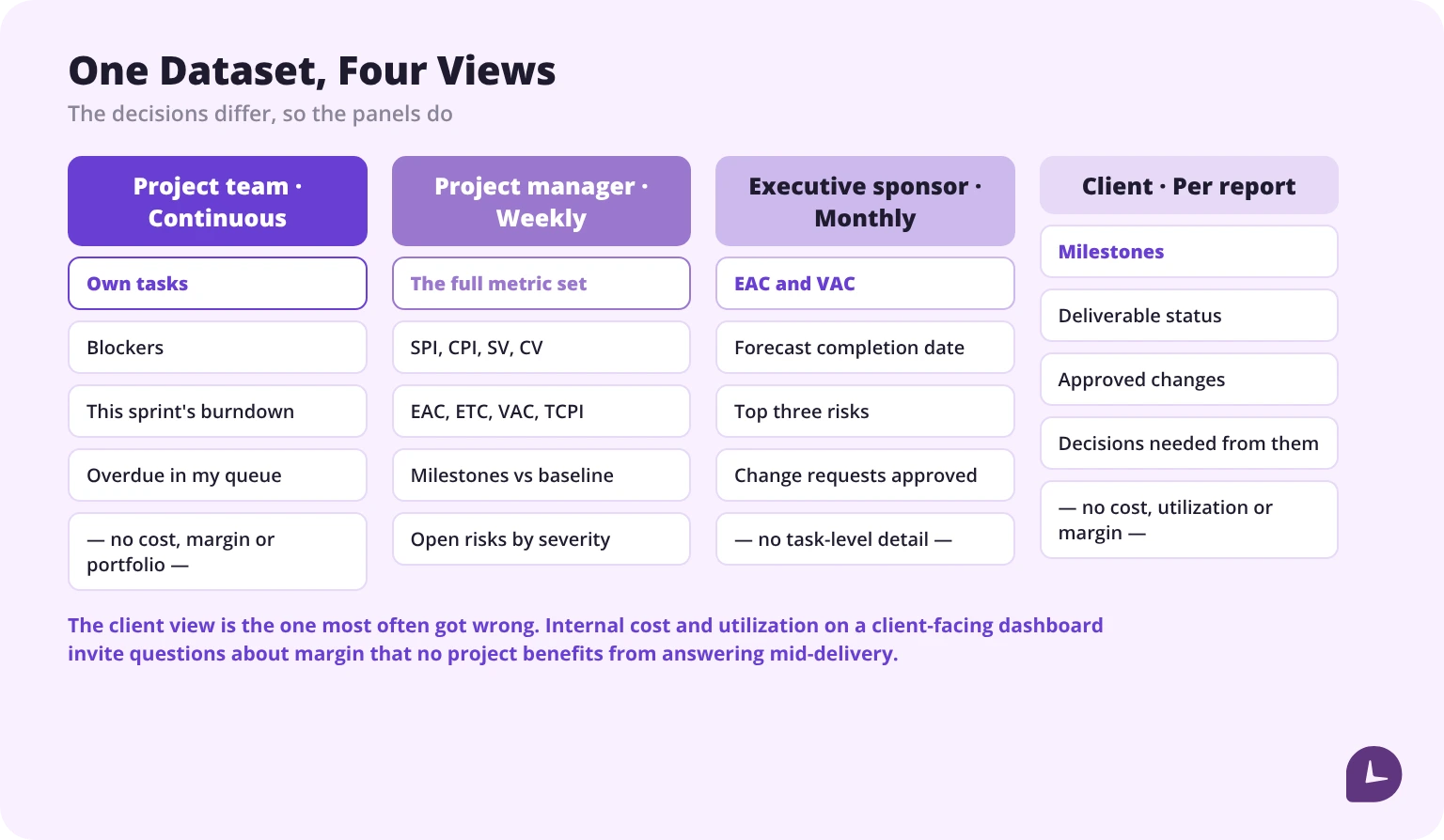
The same project needs different views, because the decisions differ.
| Audience | Needs | Refresh | Leave out |
|---|---|---|---|
| Project team | Own tasks, blockers, this sprint | Continuous | Cost, margin, portfolio |
| Project manager | Full metric set, forecast, risks | Weekly | Nothing |
| Executive sponsor | EAC, VAC, forecast date, top three risks | Monthly | Task-level detail |
| Client | Milestones, deliverable status, approved changes | At reporting cadence | Internal cost, utilization, margin |
The client view is the one most often got wrong. Internal cost and utilization on a client-facing dashboard invite questions about margin that no project benefits from answering mid-delivery.
For the sponsor and portfolio views, productivity reporting across projects is usually a better source than rolling up individual project dashboards by hand. Where several projects run at once, the view needs rethinking rather than repeating — managing multiple projects is a different problem from managing one well.
How do you show project risk on a dashboard?
Risks belong on a dashboard as a count and a trend, not as a list. The register itself lives elsewhere; the dashboard shows exposure.
Risk score = probability × impact
With probability and impact each rated 1 to 5, scores run 1 to 25. A practical split: 1–6 low, 8–12 medium, 15–25 high.
Those bands look as though they have gaps, and they do — deliberately. A score is the product of two integers from 1 to 5, so only fourteen values are reachable at all: 1, 2, 3, 4, 5, 6, 8, 9, 10, 12, 15, 16, 20 and 25. There is no such thing as a risk scoring 7, 11, 13 or 14. Bands drawn by splitting 1–25 into equal thirds cut through empty space and put adjacent real scores on opposite sides of a boundary; these ones do not.
Three panels cover it:
- Open risks by severity, as a stacked bar. The number that matters is the high band.
- New risks this period, as a count. A rising count on a project past halfway usually signals that scope is still moving.
- Risks past their review date, as a count. An unreviewed register is a stale register, and this is the only panel that measures whether risk management is actually happening.
What does not belong on the dashboard: the full register, mitigation plans, and owners. Those are the working document, and compressing them into a dashboard panel makes both worse.
Six steps to build the dashboard
- Decide what the project is managed against. Fixed scope and budget point to earned value. A continuous backlog points to velocity and burndown. Picking metrics before answering this produces a dashboard nobody uses.
- Confirm each metric has a source. Walk the source table above and name the system for every panel. Any metric without a source is a manual update, and manual updates stop within a month.
- Fix the percent-complete method. Deliverable-based or milestone-based, agreed before the first assessment. This single decision determines whether EV and everything derived from it means anything. Defining project milestones properly is what makes the second option workable.
- Set thresholds and write them on the dashboard. Healthy, watch, act — next to each number, not in a separate document.
- Build one view per audience. Four views from one dataset, not one view with everything on it.
- Label every panel with its refresh and last update. Then review the dashboard itself after two cycles and delete the panels nobody looked at.
What makes dashboards fail?
| Failure | Cause | Fix |
|---|---|---|
| Nobody opens it | Built for the tool, not for a decision | One view per audience, with only their decisions on it |
| Numbers are not trusted | Manual updates, no timestamps | Automate the source or remove the panel; label last update |
| Percent complete looks fine until it collapses | Progress measured by hours spent | Assess against deliverables |
| Cost metrics are always stale | Labour cost reconstructed at month end | Daily time entry against project codes |
| Thirty panels, no signal | Every available metric added | Keep what has a threshold and an owner |
| Forecast never changes | EAC recalculated from the original estimate instead of CPI | EAC = BAC ÷ CPI, recomputed each period |
| Client asks about margin | Internal cost on a shared view | Separate client view |
FAQ
How do you calculate SPI and CPI?
SPI is earned value divided by planned value. CPI is earned value divided by actual cost. With $50,400 earned, $60,000 planned and $58,000 spent, SPI is 0.84 and CPI is 0.87 — the project is at 84% of planned pace and 87% cost efficiency.
What is a good CPI for a project?
A CPI between 0.95 and 1.05 is normally treated as healthy, 0.90 to 0.95 as watch, and below 0.90 as requiring action. A CPI above 1.05 is not automatically good: on fixed-price work it often means the project was underscoped rather than delivered efficiently.
How do you forecast a project's final cost?
Divide the budget at completion by the cost performance index: EAC = BAC ÷ CPI. A $120,000 budget with $50,400 earned against $58,000 spent forecasts $138,095. Carry CPI unrounded into that division — using a CPI rounded to 0.87 gives $137,931, which is $164 out.
What is TCPI and when does it matter?
TCPI is the efficiency the remaining work needs in order to finish on budget: (BAC − EV) ÷ (BAC − AC). Above roughly 1.10 it signals that recovery inside the original budget requires reducing scope, because the required improvement is larger than teams typically achieve.
Where does actual cost on a dashboard come from?
Labour cost comes from timesheets multiplied by burdened hourly rates; non-labour cost comes from invoices, purchase orders and expense claims. Labour is usually the largest component and the least reliable, because hours entered late or against the wrong project code feed directly into CPI and every forecast derived from it.
How is percent complete measured?
Against completed deliverables or passed milestones, not against hours spent. Dividing hours used by hours budgeted measures effort rather than progress, which makes a project that is burning time without delivering appear on schedule.
How often should a project dashboard update?
By metric. Task status and blockers change continuously, hours and utilization close daily, earned value metrics are assessed weekly, and cost metrics close monthly with the invoice and payroll cycle. Label each panel with its own refresh rather than claiming the whole dashboard is real time.
What is the difference between a project dashboard and a status report?
A status report describes what has happened. A dashboard adds a forecast: it projects current performance forward into a final cost and a final date. A view that shows only completed tasks and spent budget is a report with charts.
How many metrics should a project dashboard have?
Few enough that every one has a threshold and an owner — in practice six to ten per audience view. Panels without a threshold cannot trigger a decision, and panels without an owner stop being updated.