The best time tracking software for consultants records time against a client and a project, separates billable from non-billable hours, and turns approved time into an invoice without re-entry. Beyond those three, the choice depends on how you bill: hourly work needs billing increments, retainers need a running balance, and fixed-fee work needs an effective hourly rate. This guide compares ten tools and then covers the billing decisions the tools leave to you.
Key takeaways
- Three capabilities are non-negotiable for consulting: client and project codes on every entry, a billable flag, and time-to-invoice without re-typing.
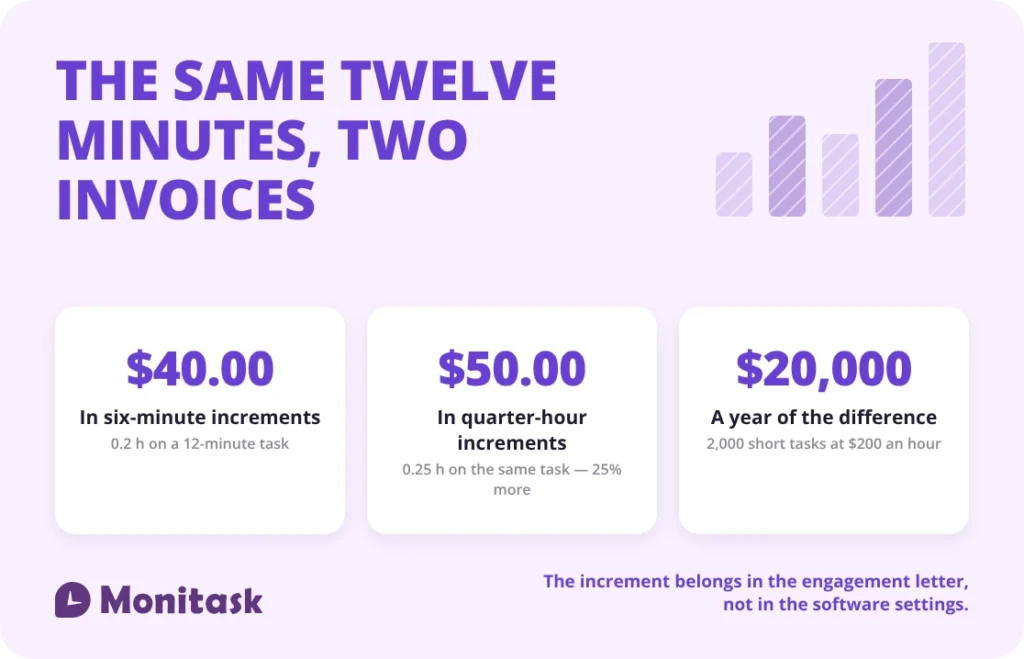
- Billing increments change invoice totals. A 12-minute task bills 0.2 hours in six-minute increments and 0.25 hours in quarter-hour increments — 25% more on the same work.
- Fixed-fee projects still need hours. Without them you cannot compute the effective hourly rate the engagement actually earned.
- Billable utilization is billable hours divided by available hours. Harvest puts the industry average at 55–60% and a healthy target at 70–80%.
- Activity monitoring splits this market. Decide whether you want it before you shortlist, because it rules tools in or out.
What makes time tracking different for consultants?
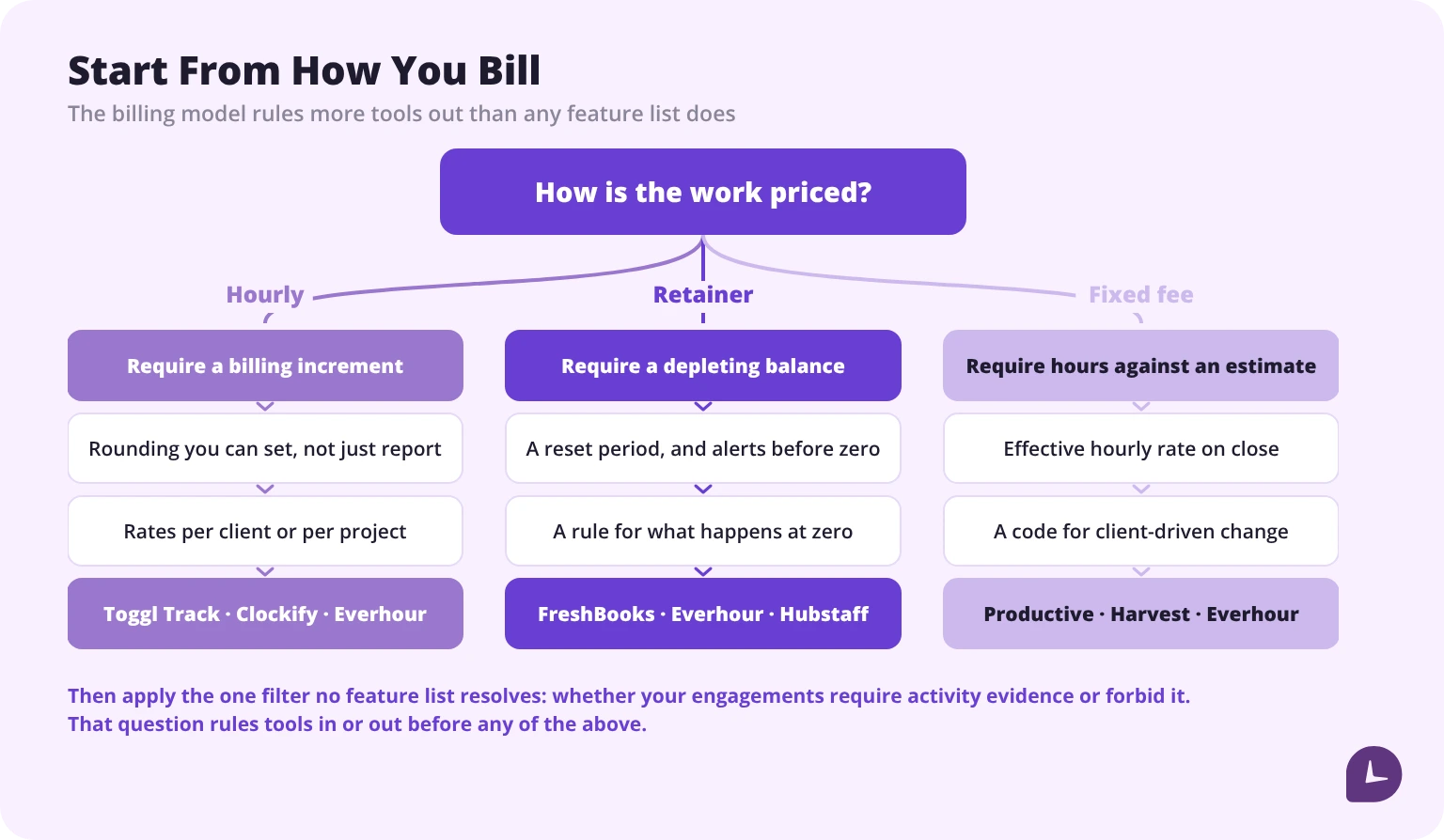
A generic timer records how long something took. Consulting time has to survive an invoice, a client question about that invoice, and a margin review three months later. Five requirements follow from that, and most tool comparisons skip all five.
Client and project on every entry. Not a note, not a tag applied later. If the client code is not a field in the entry, hours cannot be summed per client without manual sorting, and the invoice is built from memory.
A billable flag that defaults correctly. Consultants log a mix of billable and non-billable hours all day. The flag has to be set at entry, because reclassifying a week of entries on Friday is how non-billable work quietly becomes billable work and how billable work gets written off.
Billing increments. Hourly consulting is billed in units — six minutes, a tenth of an hour, or a quarter hour. The tool either supports your unit or it does not, and the difference shows up in every invoice you send.
Rate by client, project or person. One rate across all work is rare after the first year. A tool with a single global rate forces the arithmetic back into a spreadsheet. Whatever you pick, timesheets are what the rate gets applied to, so the entry structure matters more than the rate card.
An approval trail. When a client disputes a line, the defence is a timestamped entry that was approved before it was invoiced. An editable spreadsheet is not evidence.
Comparison of consultant time tracking tools
Every row below was read on 15 October 2026 from that vendor’s own pricing, feature or help pages — not from review sites or from other people’s comparisons. Where a vendor’s own pages would not answer, the cell says Not stated, which is not the same as “no”.
| Tool | Best for | Billing increments | Retainer balance | Rate levels | Time-to-invoice | Activity monitoring | Starting price |
|---|---|---|---|---|---|---|---|
| Monitask | Teams that need verified hours | Not stated | Not stated | Per user | No — exports only | Yes | $6.49/user/mo annual |
| Harvest | Solo and small firms billing hourly | Yes | Not stated | Project, task | Yes, native | No | Free (1 seat, 2 projects); $9/seat/mo annual |
| Productive | Agencies running projects end to end | Not stated | Yes, recurring budgets | Project, person | Yes, native | No | ~$10/user/mo |
| Toggl Track | Rate detail without any monitoring | Yes — 1 to 30 min, reports only | No — recurring estimates | Workspace, member, project, task | No — CSV or PDF export | No, by stated policy | Free (3 users); $9/user/mo annual |
| Clockify | Large teams on a budget | Yes — Standard and up | No — monthly-resetting budgets | Workspace, project, task, user | Yes, Standard and up | Yes — Pro and up | Free (5 users); $3.99/seat/mo annual |
| Hubstaff | Distributed teams needing proof of work | No — none documented | Yes — client budgets, Team and up | Member, member per project | Yes, native | Yes — metered by plan | Not retrievable |
| Everhour | Retainers with a visible balance | Yes — 6-minute stated | Yes — client level, with alerts | Client, project, member, task | Yes, native | Screenshots only, opt-in | Free (5 seats); $8.50/seat/mo yearly |
| TimeCamp | Automatic capture of app and site use | Yes — Premium and up | No — budgets cannot recur | Account, group, user, project | Yes, native | Yes — Ultimate | Free; $3.99/user/mo annual |
| FreshBooks | Consultants who want billing first | No | Yes — a true retainer, Plus and up | Account, project, member, service | Yes, native | No | $23/mo list, by client count |
| Timing | Mac users who forget to start a timer | Yes — Easy reports only | No | None in the app | No — export or hand off | Local capture, opt-in sync | Not published |
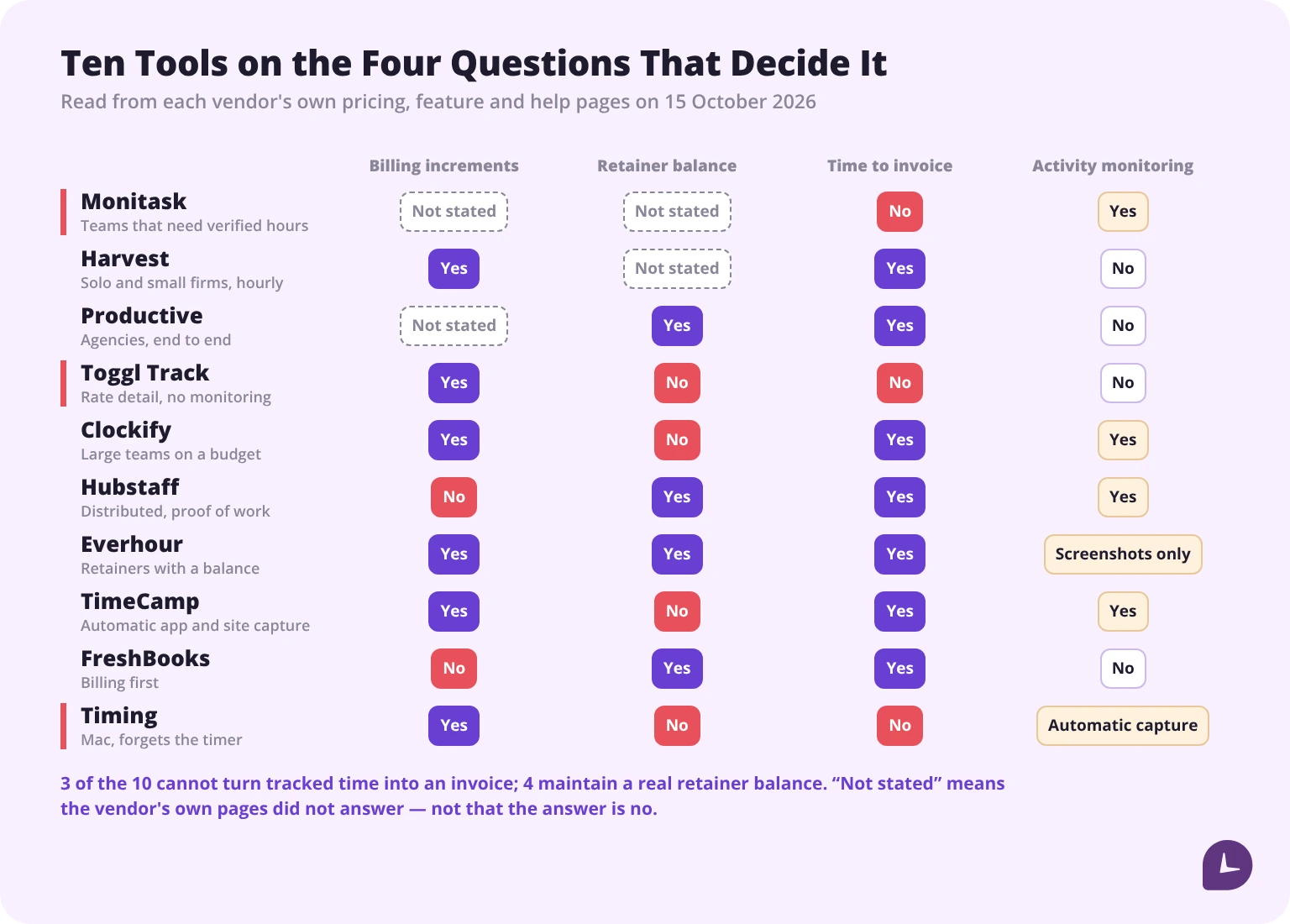
Four notes on reading that table.
Three of the ten cannot produce an invoice. Monitask, Toggl Track and Timing all export instead. That is a legitimate design — they assume you bill somewhere else — but it means the “without re-entry” requirement at the top of this article is not met by a third of the market.
Only four maintain a real retainer balance. FreshBooks, Everhour, Hubstaff and Productive. Several others offer project budgets that reset monthly, which is close but not the same thing: a budget that resets is not a balance that depletes, and the distinction matters the first time a client asks how many hours are left.
“Activity monitoring” divides the market and no feature comparison resolves it. Either your engagements require that evidence or they make it unacceptable. Toggl Track states the position most plainly of any vendor here: “Toggl doesn’t monitor employees, take screenshots, or record keystrokes, browsing history, or location.”
Starting price is the headline tier, which usually excludes what consulting needs. Harvest’s timesheet approvals and profitability reporting are on Enterprise, not Teams. Clockify’s invoicing starts at Standard but its budgets at Pro. Hubstaff’s approvals and client budgets are both Team-and-up. Price the tier you would really buy, and if you need the tool to talk to your accounting stack, check the integrations before the price.
The 10 tools, reviewed
1. Monitask
Best for: consulting teams that need hours a client will accept without argument.
Monitask records time against a project as the work happens, with screenshots, application and website use and an activity percentage attached to the entry. For engagements where the deliverable includes proof that the hours were worked — staffed placements, outsourced delivery, disputed accounts — that evidence is the product, and it arrives without anyone reconstructing a week on Friday afternoon.
What it does not do is bill. There is no billing-increment setting, no retainer balance and no invoice generation: Monitask produces an accounting summary and a payroll export, and the invoice is raised elsewhere. Read it as the verification layer under a billing stack rather than a replacement for one. Our time tracking for consultants page covers the consulting setup specifically.
Price: Pro $6.49, Business $8.99, Business Premium $12.99 per user per month billed annually; Enterprise on request. Monthly billing is roughly 18% higher. 10-day free trial, no credit card.
2. Harvest
Best for: solo consultants and small firms billing hourly.
Harvest keeps time and invoicing in one place: approved hours become an invoice with the client’s rate applied, and it connects to Stripe, PayPal, QuickBooks Online and Xero for payment and bookkeeping. Rates can be set per project or per task. The free tier covers one seat and two projects, which is enough to test the workflow but not to run a practice. Timesheet approvals and profitability reporting sit on the Enterprise tier at $14 per seat per month billed annually, not on Teams — worth checking before you price the cheaper plan, and worth knowing that a free trial exposes both, so the tier you tested may not be the tier you bought. There is no activity monitoring, which for client-facing consulting is usually the right default.
Price: Free (1 seat, 2 projects) · Teams $9/seat/month annually, $11 monthly · Enterprise $14/seat/month annually, $17.50 monthly · Enterprise Plus custom. 30-day trial, 20% annual discount.
3. Productive
Best for: agencies and consultancies running projects from proposal to invoice.
Productive covers budgeting, resource planning, time off and invoicing alongside tracking, which suits firms that would otherwise run three tools. Budgets can be fixed-price or recurring, and the platform reports budget burn and profitability per client; recurring budgets are how it handles retainers, in its own words, “Set up recurring budgets to automate retainer management.” It uses notifications rather than monitoring to prompt timely entry, and supports per-entry approval — “Review and approve submitted time entries before they’re billed or finalized” — and timesheet locking after a set period.
Two tier details matter more than the headline price. Recurring budgets and billable time approvals are both on Professional, not Essential, so the retainer and approval workflow is not available on the entry plan. The breadth is the other trade-off: if you only need a timer and an invoice, most of the platform goes unused.
Price: Essential around $10 and Professional around $25 per user per month; Ultimate on request. The published page carries both monthly and annual figures without binding them clearly — confirm the billing period before you commit.
4. Toggl Track
Best for: firms that want rate precision and have ruled out monitoring on principle.
Toggl Track has the most granular rate model here — workspace, member, project, project member and task, with the most specific rate winning — and rounding rules to match: round up, down or to nearest, at 1, 5, 6, 10, 12, 15 or 30 minutes. Six-minute billing is directly supported. Rounding is a paid-plan feature.
Two limits shape who it suits. Rounding applies in reports only, so the rounded figure is a view rather than the stored record of billable time. And there is no invoicing at any tier: the product’s own position is that it hands you every number the invoice needs and you “drop it into the invoicing tool you already use”, exporting to CSV or PDF. If your billing already runs through an accounting system, that is a clean division of labour. If you wanted one tool, it is not this one.
Price: Free for up to 3 users · Starter $9/user/month annually, $12 monthly · Premium $16 annually, $24 monthly · Enterprise on request. Note that Toggl’s own help centre quotes different figures from its pricing page; the pricing page is the one to trust.
5. Clockify
Best for: large teams that need rounded time and an invoice at the lowest seat price.
Clockify is the cheapest route from a rounded hour to a sent invoice. Rounding — up, down or to nearest — arrives at Standard, invoicing at Standard, and the invoice carries statuses through sent, paid and overdue. Project budgets with a visible remaining amount and monthly reset arrive a tier higher at Pro. Billable rates start at Basic.
Two things to know. Rounding again affects reports only, and the vendor warns that invoices round each entry to two decimal places and can therefore differ slightly from the report you checked. And the monitoring tier is a culture decision rather than a feature: at Pro the agent captures websites, apps, keyboard and mouse activity and screenshots, and by Clockify’s own documentation “employees can’t access their own monitoring results”, with a manual off-switch described as a future item.
Price: Free for up to 5 users, but only one month of data history · Basic $3.99 · Standard $5.49 · Pro $7.99 · Enterprise $11.99 per seat per month billed annually, each roughly $1–3 higher monthly.
6. Hubstaff
Best for: distributed delivery teams where proof of work matters more than billing finesse.
Hubstaff has the strongest retainer mechanics of the monitoring-first tools. Client budgets can be set in total hours or total cost, calculated from either a pay rate or a bill rate, with a reset of Never or Monthly and a notify-at percentage — a monthly-resetting client budget with a threshold alert is structurally a retainer. Invoices build line items from tracked time natively. Bill rates are per member and can be overridden per member per project.
The gaps are specific. No billing-increment rounding is documented anywhere — not on the pricing page, the plans page, the invoicing docs or organisation settings — which rules it out for a firm that bills in tenths of an hour. Client budgets and timesheet approvals are both Team-tier, so the approve-then-bill workflow sits on the second-most-expensive plan. And seats bill whether or not the person tracks: in Hubstaff’s own words, “even if only two out of your three team members are using its tracking features, you will still have to pay for all three members.”
Price: not retrievable. The pricing table renders client-side and returns no figures; the support centre confirms the plan names — Free, Essentials, Starter, Grow, Team, Enterprise — and a Small Business Essentials bundle at $144 a year, but declines to list per-seat prices. Check it in a browser.
7. Everhour
Best for: small consultancies running retainers who want the balance visible.
Everhour models retainers more completely than anything else here. Budgets can be in hours or money, one-time or recurring, resetting daily through yearly, and — the part Toggl and Clockify lack — they can sit at client level across several projects, which is what a retainer agreement actually is. The dashboard shows spending and remaining amount, email alerts fire at 75%, 90% and 100% or custom levels, and an optional budget protection mode stops running timers once a budget is exceeded. Rates can be set per client, project, member or task, and tracked time becomes an invoice natively, with invoiced time locked so it cannot be billed twice.
Two caveats. The Team plan carries a five-seat minimum, so a three-person firm pays for five. And rounding is thinly documented — one line on the feature page and one on the legal-industry page claiming 6-minute increments, with no help-centre article, no interval list and no stated tier. That is thin ground if a client queries a rounded invoice.
Price: Free for up to 5 seats with limited features and no integrations · Team $8.50 per seat per month billed yearly, minimum 5 seats · Custom from 50 seats.
8. TimeCamp
Best for: firms that want automatic capture of application and website use alongside billing.
TimeCamp’s paid ladder is built around the progression its own plan names describe: Time & Billing, then Profit & Productivity, then Analytics & Collaboration. Invoicing from project hours arrives at Starter, with a guard against double-billing — a time entry can only be invoiced once. Rounding, to a value you set, arrives at Premium. Multi-level rates — account, group, user, project, and user within project, with the most specific winning and historical rates preserved — arrive at Ultimate.
The retainer gap is the one to notice: budgets exist but cannot recur. TimeCamp’s own documentation says plainly, “It is not possible to set a periodical (daily/weekly/monthly) or recurring budget to a task”, with the workaround being to raise the budget or clone the task every period. A monthly retainer therefore means monthly housekeeping per client. Screenshots every ten minutes and application capture arrive at Ultimate, and tracked users cannot view their own screenshots.
Price: Free · Starter $3.99 · Premium $6.99 · Ultimate $9.99 per user per month billed annually, each a few dollars higher monthly · Enterprise on request.
9. FreshBooks
Best for: solo consultants and small practices running retainers, invoicing and books in one place.
FreshBooks is the only tool here with a genuine retainer rather than a budget that resembles one. Its own description: “Create a retainer to bill your client for a fixed amount upfront and track time towards the remaining balance.” Each period carries a fee amount and an hours allowance, the overview shows hours logged against budget with remaining in budget and remaining in period, invoices generate automatically on the period you set, and overage is logged as excess hours. Rates can be set account-wide, per project, per team member, per service or as a flat project fee. Invoicing pulls all unbilled time and marks it billed, with detailed, grouped or simple line items.
Two real limits. There is no billing-increment rounding — the only rounding documented is sub-minute timer tidying — so a firm billing in tenths of an hour is rounding by hand. And invoicing tracked time has a hard cap of 400 line items, after which you lose per-entry detail on the invoice.
Price: Lite $23, Plus $43, Premium $70 per month list, priced by billable client count rather than seats; team members $11 per month each. Retainers require Plus or above. Promotional pricing runs well below list and is time-boxed — check what renews.
10. Timing
Best for: Mac-based solo consultants who want capture without remembering to start anything.
Timing records every app, document and website automatically and lets you assign that history to projects afterwards, which solves the single most common cause of lost billable time: the timer nobody started. Rounding is well specified — 1, 5, 6, 10, 12, 15 or 30 minutes, up, down or nearest — and available from the entry tier. Its privacy posture is the strongest here and is a genuine selling point to a nervous client: “Tracked times are stored locally and never leave your Mac (unless you opt into sync)”, private browsing is discarded, and team administrators explicitly cannot see which apps, documents and websites their colleagues use.
The limits are structural. There is no invoicing — “While Timing can’t create invoices by itself” is the vendor’s own phrasing — no rates in the app, and no retainer; billing runs through a separate paid app. Rounding is unavailable in Advanced reports, which is where detailed breakdowns live. And it is Mac only, licensed per Mac.
Price: not published on the pricing page, which shows the tier ladder — Professional, Expert, Connect — and states that amounts appear at checkout. 30-day trial, no credit card.
How do you choose billing increments?
A billing increment is the smallest unit of time you put on an invoice. The choice is a pricing decision, not a formatting one, and no tool makes it for you.
| Increment | Decimal hours | A 12-minute task bills as | At $200/hour |
|---|---|---|---|
| 6 minutes (0.1 h) | 0.1 | 0.2 h | $40.00 |
| 15 minutes (0.25 h) | 0.25 | 0.25 h | $50.00 |
| 30 minutes (0.5 h) | 0.5 | 0.5 h | $100.00 |
The same twelve minutes of work bills 25% higher in quarter-hour increments than in six-minute increments, and 150% higher in half-hour increments.
Now scale it. A consultant handling eight short tasks a day across 250 working days logs 2,000 of them a year. Moving from six-minute to quarter-hour increments adds 0.05 hours to each: 100 billable hours a year, or $20,000 at a $200 rate.
That cuts both ways, which is why the decision belongs in the engagement letter rather than in the software settings. Six-minute increments are the professional-services norm and the easiest to defend line by line. Quarter-hour increments are simpler to log and harder to justify when a client audits a 0.25-hour entry for a two-minute email. Half-hour increments invite dispute on any engagement with frequent short tasks.
Two rules keep either choice defensible. Round at the task, not at the day, because rounding a daily total hides which work was inflated. And apply the same increment to every client, since a client who learns they are billed in larger units than another has a grievance that no explanation fixes.
One practical warning from the comparison above: in several tools rounding is applied in reports only, not to the stored entry. Check which yours does before you tell a client your invoices are rounded to the tenth. If you just need to add hours up before they reach an invoice, the time card calculator does that part on its own.
How do you track time against a retainer?
A retainer is a prepaid block of hours or fees. Tracking it means maintaining a balance, which most timers do not do natively.
Remaining balance = retainer hours − hours logged to the retainer code
Three decisions have to be made before the first entry, and the tool has to support whichever you choose.
Does the unused balance roll over? If hours expire at period end, the balance resets and unused time is revenue you keep. If they roll, you are carrying a liability that needs to be visible in both your reporting and the client’s. Note that tools differ here by default: FreshBooks states that unused time in a retainer period does not carry forward, with a prepayment credit as the workaround.
What happens on overage? Either work stops at zero, or it continues at an agreed overage rate, or it continues unbilled. Each produces a different entry: the first needs an alert at a threshold — or a hard stop, which Everhour offers — the second needs a second rate on the same project, the third needs a non-billable code so the write-off is measured rather than invisible.
Does the client see the balance? Client-visible balances prevent the end-of-month argument but require that entries be accurate daily rather than reconstructed. A tool with a client portal makes this easy; without one, a monthly statement does the same job more slowly.
Set a threshold alert at 75% and 90% of the balance. Discovering an exhausted retainer after the work is done converts billable hours into a negotiation.
Why track hours on a fixed-fee project?
This is the most common objection to time tracking in consulting: the price is agreed, so why count hours. The answer is that the price is fixed and the cost is not.
Effective hourly rate = fixed fee ÷ hours actually spent
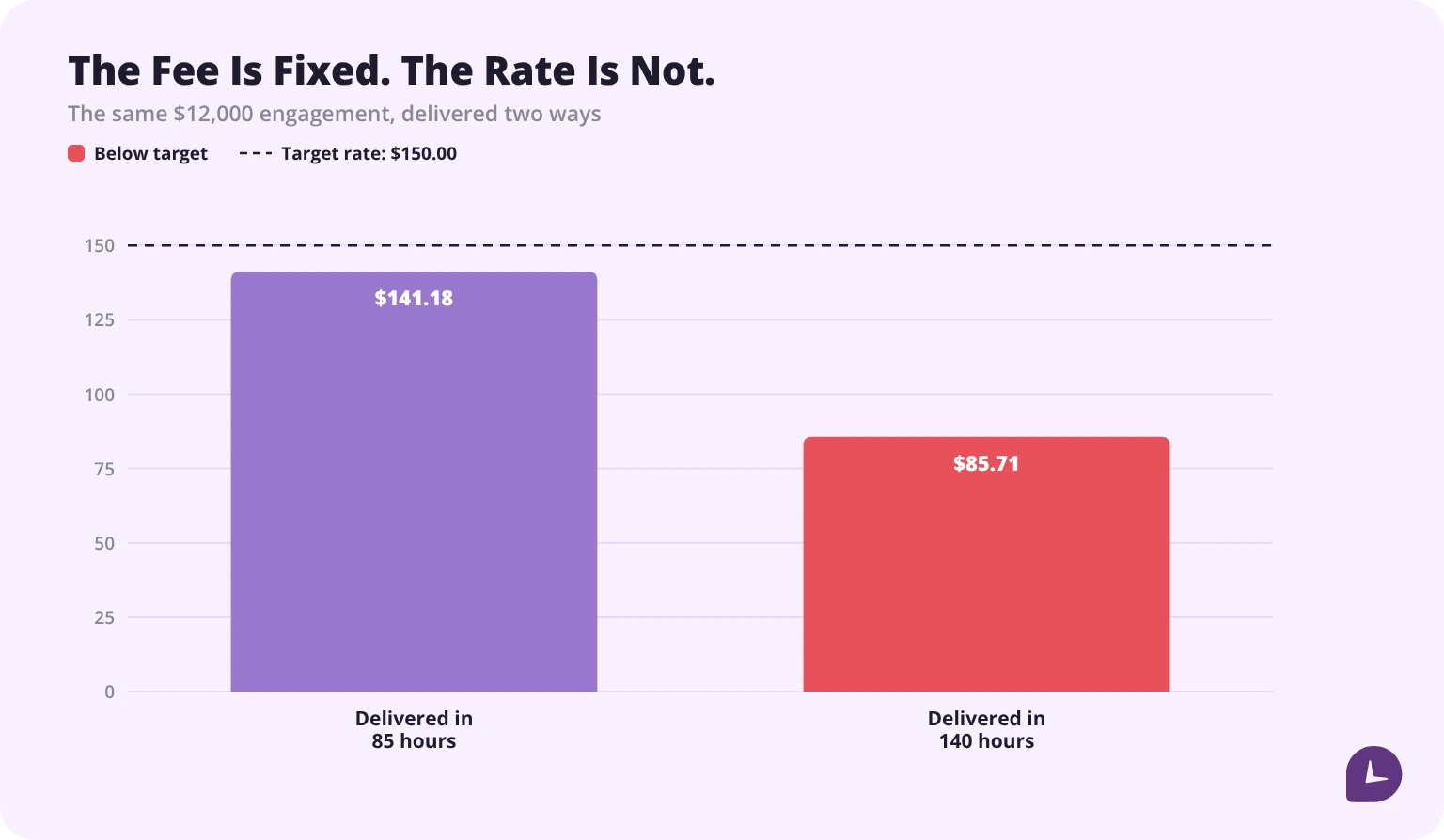
A $12,000 engagement delivered in 85 hours earned $141.18 per hour. The same engagement delivered in 140 hours earned $85.71 per hour. Nothing about the invoice changed; the second one was a different business.
Against a $150 target rate, the first result is slightly under and the second is a loss of positioning that will repeat on every similar proposal until someone counts the hours.
Three more uses follow from the same data. Scope creep becomes visible while it is happening rather than at delivery, because hours accumulate against an estimate. The next proposal is priced from what the work took, not what it was guessed to take. And a client asking for “a quick addition” can be answered with a number.
None of this requires billing the client by the hour. It requires knowing what the hour cost you — the same logic as job costing in trades and manufacturing, applied to professional services.
How do you calculate billable utilization?
Utilization is the share of paid time that reaches a client. It is the single number that tells a consulting practice whether it is busy or merely occupied.
Billable utilization = billable hours ÷ available hours
Two conventions exist and they give different answers, so state which you use.
| Basis | Formula | Use it when |
|---|---|---|
| Against paid hours | billable ÷ hours actually paid | Measuring a person or a month |
| Against a standard year | billable ÷ 2,080 | Comparing across people and years |
A consultant paid for a standard 2,080-hour year who billed 1,400 hours ran at 67.3% billable utilization.
Harvest puts the industry average at 55–60% and a healthy target at 70–80%. Those figures are stated for agencies and service businesses generally; on the same page Harvest gives higher numbers for consulting specifically — firms aiming for 70% to 85%, against a worldwide consulting average of 67.7%. Use the consulting pair if you are benchmarking a consultancy.
One caveat, which is our view rather than Harvest’s: utilization above roughly 85% is usually a warning rather than an achievement, because it leaves no capacity for business development, training or the next proposal.
Utilization alone can also mislead. A practice at 80% utilization on discounted work earns less than one at 65% at full rate. Read it next to the effective hourly rate, never instead of it.
Which hours are non-billable?
Every tool offers a billable flag. None of them tells you what belongs on each side of it. For consulting, the categories are predictable enough to set up once.
| Category | Usually | Why it matters |
|---|---|---|
| Business development and pre-sales | Non-billable | The real cost of winning work; without it, margin per client is wrong |
| Proposal writing | Non-billable | Often larger than expected on competitive bids |
| Travel to client sites | Depends on contract | Frequently billable at a reduced rate; defaulting to non-billable writes off real money |
| Internal meetings and admin | Non-billable | The baseline overhead of the practice |
| Training and certification | Non-billable | An investment, and worth measuring as one |
| Rework from your own error | Non-billable | Charged to the job, it hides the cost of the mistake |
| Rework from a client change | Often billable | The category most commonly written off by habit |
| Documentation and knowledge capture | Non-billable | Pays back on the next engagement, if it is tracked |
The seventh row is where money is lost most quietly. A client who changes a requirement after sign-off has usually triggered a billable change under the engagement terms, but the hours get logged as ordinary project work and absorbed. A separate code for client-driven change makes the conversation possible; without one, there is nothing to point at.
Give travel its own code even when it is non-billable. It is the category most likely to change terms between engagements, and a practice that cannot say how many travel hours it absorbed last year cannot negotiate it.
How do you roll out time tracking without resistance?
Consultants resist time tracking when it feels like surveillance and accept it when it shortens the month-end. The difference is in the rollout.
- Name the purpose before the tool. Faster invoicing and fewer client disputes are reasons people accept. “Visibility” is not.
- Pre-build the codes. Clients, projects and non-billable categories should exist before anyone logs in. An empty system gets filled with free text that no report can read.
- Pilot with one team for one billing cycle. Fix the code structure on real work before rolling it wider.
- Set one expectation, not a policy document. Deltek’s case study of Capgemini describes an internal branding campaign built on a single promise — “One Minute. Once a Week.” — after which, in Deltek’s words, “user adoption skyrocketed, hitting close to 100% in the first test market with almost zero follow-up.”
- Make the first report about them. Show each consultant their own utilization and effective rate before showing anyone a team dashboard.
- Close the loop on accuracy. When tracked hours change a proposal or win a dispute, say so publicly. Adoption follows evidence that the data is used.
- Audit the first two cycles. Entries with no client code, days logged in round numbers, and weeks entered on Friday are the three signals that the structure needs fixing rather than the people.
The scale of the problem is worth stating plainly. Deltek’s 7th Annual Clarity Industry Study, a survey of 375 architecture, engineering and consulting firms in Germany, the UK and Australia, found that only 22% run a single, fully integrated, end-to-end project management system — which is to say most firms have the tools and still move numbers by hand. The same programme at Capgemini eventually replaced, in Deltek’s description, “approximately 17 applications around the world as well as many internal Excel based tools”.
Time against a client and a project, captured as the work happens, with an approval trail a disputed invoice can stand on.
Try Monitask free for 10 days
FAQ
How do consultants track billable hours?
Consultants log each block of work against a client and project code with a billable flag, using a defined billing increment such as six minutes or a quarter hour. Entries are made as work happens, approved before invoicing, and kept with a timestamp so a disputed line can be evidenced.
What billing increment should consultants use?
Six-minute increments, or tenths of an hour, are the professional-services norm and the easiest to defend line by line. Quarter-hour increments are simpler to log but harder to justify on short tasks. The same 12-minute task bills 0.2 hours at six-minute increments and 0.25 hours at quarter-hour increments.
How do you track time against a retainer?
Maintain a running balance: retainer hours minus hours logged to the retainer code. Decide in advance whether unused hours roll over, what rate applies on overage, and whether the client sees the balance. Set alerts at 75% and 90% so an exhausted retainer is never discovered after the work. Of the ten tools compared here, four maintain a real balance rather than a budget that merely resets.
Should you track time on fixed-fee projects?
Yes. The fee is fixed but the cost is not. Dividing the fee by hours spent gives the effective hourly rate: a $12,000 project delivered in 85 hours earned $141.18 per hour, the same project in 140 hours earned $85.71. Without hours, neither number exists and the next proposal repeats the error.
What is a good billable utilization rate for consultants?
Harvest puts the industry average at 55–60% of available hours and a healthy target at 70–80%, with consulting-specific targets of 70% to 85% against a worldwide consulting average of 67.7%. Sustained utilization above roughly 85% usually signals no remaining capacity for business development or training. Read utilization alongside effective hourly rate, since high utilization on discounted work can earn less than lower utilization at full rate.
Which consulting hours are non-billable?
Business development, proposal writing, internal meetings, admin, training and rework caused by your own error are normally non-billable. Travel depends on the engagement terms and is often billable at a reduced rate. Rework caused by a client change is usually billable but most often written off by habit.
Do consultants need activity monitoring in a time tracker?
It depends on the engagement. Screenshots and app tracking provide evidence some clients and contracts require, particularly on staffed or government work. On advisory engagements the same features can be unacceptable to the client or the consultant. Decide this before shortlisting, because it rules tools in or out — four of the ten tools here offer it and one states a policy of never adding it.