Best Apps to Track Work Hours in 2026: Compared for Hourly Workers

Reliable employee tracking software. Clear visibility and insights into how employees work. Even remotely.
Try Monitask free for 10 days
HoursTracker and Work Log are the best apps to track work hours for most hourly employees, because both calculate pay, handle overtime, and work without a manager account. Toggl Track is the best free option if you want a clean cross-platform timer without ads. Clockify is the best choice when your whole team needs to log hours. Pick by who sees your data, not by feature count.
Most “best time tracking app” lists are written for the person who signs the invoice. This one is written for the person who works the hours.
Quick comparison
| App | Best for | Platforms | Free tier | Paid from |
|---|---|---|---|---|
| HoursTracker | Hourly workers who need pay estimates | iOS, Android, Apple Watch | 3 jobs, 21 days of entries | Subscription (from $4.99/mo) |
| Toggl Track | Free tracking without ads | Android, iOS, Windows, macOS, Linux, web, browser extensions | Up to 3 users | $9/user/mo annually |
| Work Log | Android users tracking shifts and tips | Android | Ads, limited | Work Log Pro |
| Memtime | Automatic desktop tracking | macOS, Windows, Linux | None | $12/user/mo on 24 months |
| WorkingHours | Freelancers and contractors | Android, iOS, Windows, macOS | Limited; Pro for export and sync | One-time Pro per platform |
| Clockify | Teams and unlimited free projects | Android, iOS, Windows, macOS, Linux, web, browser extensions | Up to 5 users, unlimited projects | Paid tiers available |
| DOL WorkWise | A neutral record for a pay dispute | iOS, Android | Free, government-issued | — |
Pricing and platform data verified 25 September 2026 from each vendor’s own pricing page or store listing.
What is a work hours tracker app?
A work hours tracker app records when you start and stop working, then totals your hours automatically. Most apps also separate breaks, flag overtime, and export a timesheet as PDF or CSV.
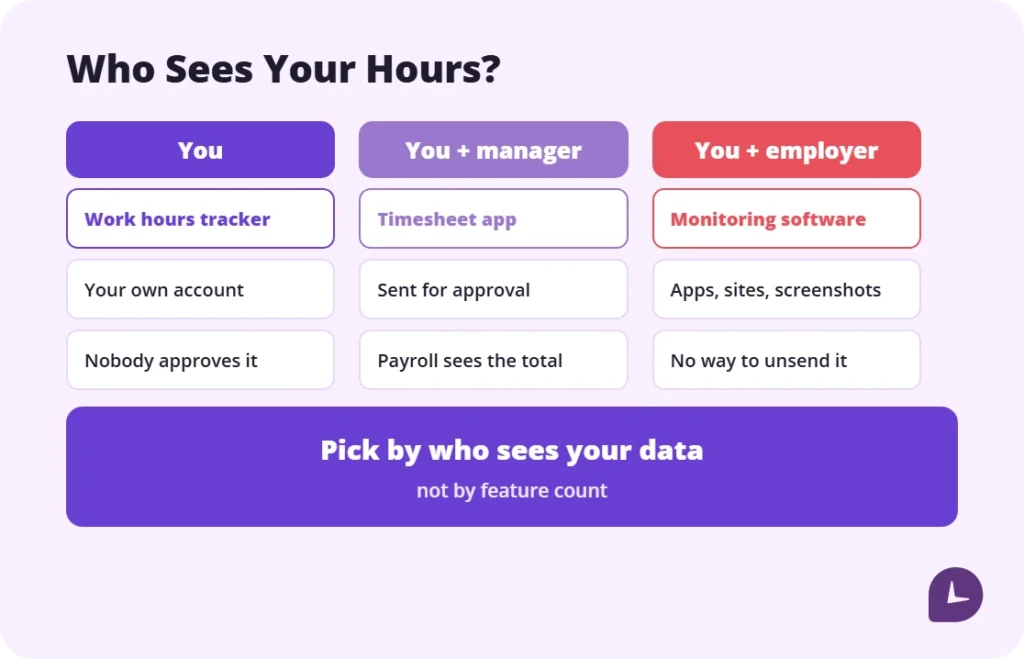
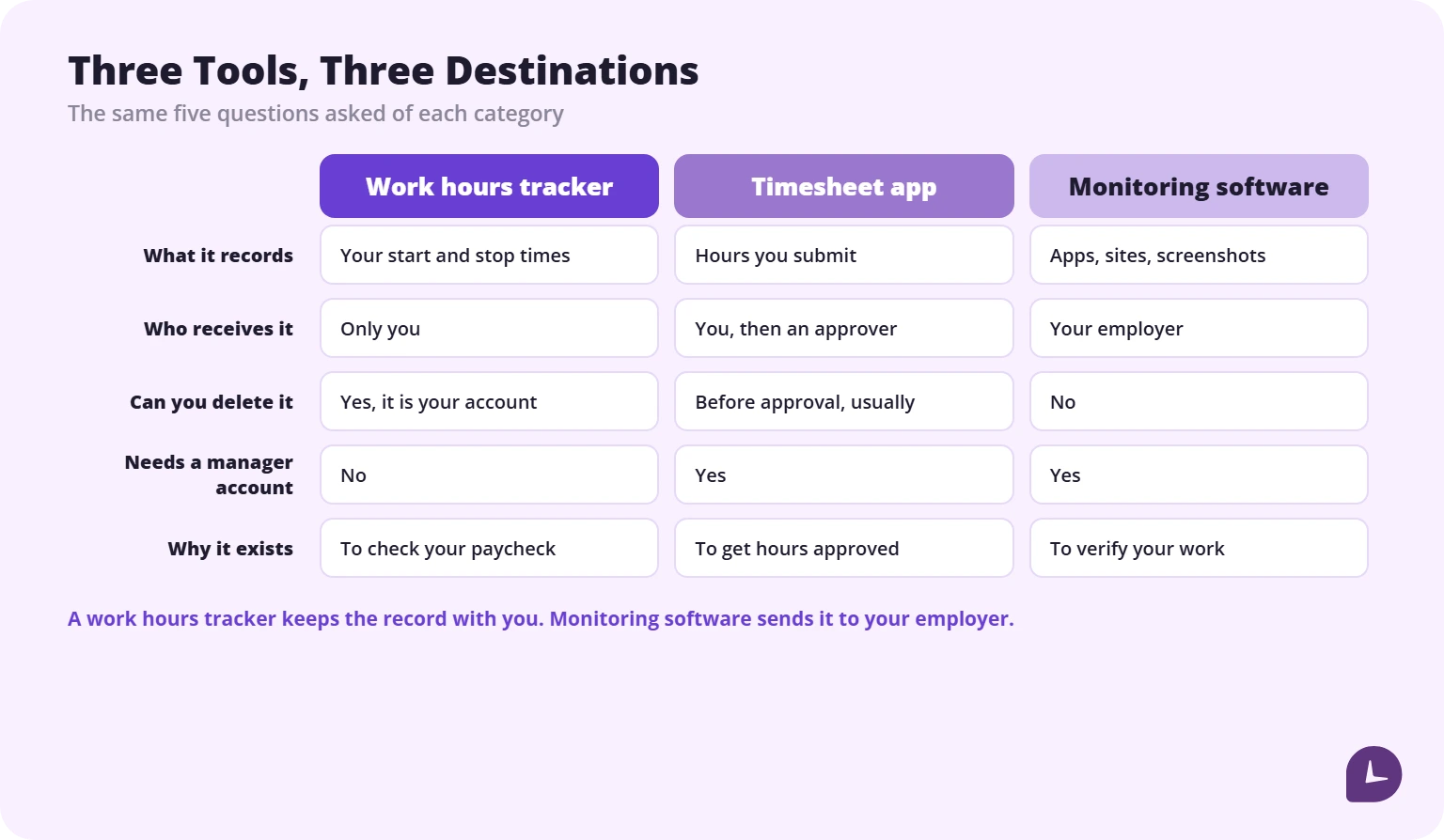
Three terms get mixed up constantly, and the difference decides which app you need:
- A work hours tracker records your own time, for you.
- A timesheet app collects hours and sends them to an approver.
- Employee monitoring software records activity, apps, websites or screenshots, and reports to your employer.
The first is yours. The third is not. Several apps that appear on “best work hours tracker” lists belong to the third category, and the review sites rarely say so.
How we compared these apps
We compared each app on the questions that decide whether it is useful to an hourly worker, using the vendor’s own feature and pricing pages, current app store listings and published support documentation as of 25 September 2026. This is a desk comparison of what each vendor publishes, not a timed device test. Where a limitation comes from user reports rather than vendor documentation, the article says so.
What we compared:
- Pay calculation — whether the app turns hours into an estimated paycheck, or only counts minutes.
- Overtime — weekly or daily rules, and support for a second overtime rate.
- Breaks — logged separately, or silently included in the shift.
- Export — formats available on the free tier, and whether breaks appear in the export.
- Data visibility — who else can see your entries by default.
- Cost over a year, not per month.
We have no affiliate arrangements with any app in this list. Monitask makes team time tracking software, which is a different product from most of the apps reviewed here; where our own category comes up, we say so directly.
What we did not include
No project management suites with a timer bolted on. No invoicing platforms. No browser extensions that only work inside one web app. And no app that requires an employer account to function, except the one clearly labelled as such.
The 7 best apps to track work hours
Best overall for hourly workers: HoursTracker
Platforms: iOS, Android, Apple Watch · Free tier: three jobs, 21 days of entries
HoursTracker is built around a question most trackers ignore: what will the paycheck actually be. It records time with timers that support breaks and pauses, including automatic breaks, and tracks pay along with tips, mileage and manual adjustments to time and earnings. Overtime is calculated daily and weekly, and reports come by day, week and month across common pay period schedules.
The feature that matters most in practice is geofencing: set your job location and the app reminds you to clock in and out when you arrive or leave, or handles it automatically on supported devices.
Pros: pay estimates including tax, flexible timer editing, Apple Watch control, strong tagging and filters
Cons: the free edition stores only three jobs and 21 days of entries; removing the limits needs a subscription; tax percentage is set per job and awkward to change afterwards, a limitation users flag repeatedly in store reviews
Skip it if: you track project work rather than shifts, or you need more than three jobs without paying.
Best free app to track work hours: Toggl Track
Platforms: Android, iOS, Windows, macOS, Linux, web, browser extensions · Free tier: up to 3 users
Toggl Track’s free plan covers every platform and the core tracking functions, which is unusual. It also asks less of you than most trackers: you can start a timer immediately without first creating a client, project and task, and sort the details later.
Its idle detection is the best in this list. When the app sees the computer has been idle while a timer runs, it offers to correct the block — so a 20-minute interruption does not silently become billable. There is also a Pomodoro setting for timed work intervals. Tasks, boards and simple planning are included on the free plan.
Pros: genuinely generous free plan, works everywhere, excellent idle detection, browser button appears inside most web apps
Cons: billable rates, time rounding and team-level reports require a paid plan; paid tiers are on the expensive side
Toggl Track pricing: free for up to 3 users; from $9/user/month billed annually for Starter, which adds billable rates, time rounding and team reports.
Best for tracking hours and pay together: Work Log
Platforms: Android · Free tier: ad-supported
Work Log is the Android counterpart to HoursTracker and covers the same ground: punch in and out or enter hours manually, set your pay period so hours and wages calculate per paycheck, and track expenses, tips, sales, mileage and holiday pay alongside the time. Deductions and bonuses feed into a paycheck estimate, and it handles up to two separate overtime rates.
The Pro version adds multiple jobs, removes ads, and exports everything as CSV or PDF plus a database backup by email.
Pros: paycheck estimation built in, two overtime tiers, broad tracking options, clean export in Pro
Cons: Android only; ads in the free version; multiple jobs require Pro
Best for automatic tracking: Memtime
Platforms: macOS, Windows, Linux · Free tier: none
Memtime records your computer activity in the background so you categorise it afterwards, rather than remembering to start a timer. The timeline view lets you drag to create entries, with zoom from one-minute to one-hour intervals.
The trade-off is explicit: it is desktop-only, with no mobile or web access, and the tracking is passive by design. All capture stays on your machine, but if the idea of a background recorder bothers you, this is not your app.
Memtime pricing: from $12/user/month on a 24-month subscription for Basic.
Best for Android: WorkingHours
Platforms: Android, iOS, Windows, macOS · Free tier: free tracking; Pro adds export, cloud sync and unlimited tasks
WorkingHours positions itself as a timesheet and personal work log for freelancers, hourly workers, employees, contractors and consultants. You start, pause and stop the timer as the day goes, or add and correct entries afterwards, then organise hours by project, task and tag, review visual reports, export a timesheet and turn tracked time into invoices.
Pros: built for individuals rather than adapted from team software, overtime and earnings tracking, no account required
Cons: Excel and CSV export, cloud sync and unlimited tasks require Pro; Pro is purchased per platform, so multi-device users pay twice
Best if your team also needs hours: Clockify
Platforms: Android, iOS, Windows, macOS, Linux, web, browser extensions · Free tier: up to 5 users, unlimited projects
Clockify’s free plan is one of the broadest on the market: unlimited tracking, up to five users, unlimited projects and tasks. You track with a one-click timer, add missing time manually later, track breaks in break mode, and export reports as PDF. Free reports cover a one-month range; CSV and Excel report export require a paid plan. Weekly reports show who logged what each day, including overtime and time off.
One thing to know before your employer adopts it: activity monitoring is a paid feature on the Pro plan. If it is switched on, tracking is no longer only yours.
Best neutral record: DOL WorkWise Timesheet App
Platforms: iOS, Android · Free
The U.S. Department of Labor publishes its own timesheet app. WorkWise tracks regular work hours, break time and overtime hours, and supports multiple pay frequency options with additional pay calculations.
It will not win on interface. It wins on provenance: a record kept in a government-issued app is a different kind of document in a wage dispute than a screenshot from a commercial tracker. The DOL notes the app is a public service under continual development and does not cover every workplace situation.
Use it as a second record, alongside whichever app you actually enjoy using.
Boost your business productivity
Track performance and streamline teamwork
What free plans actually restrict
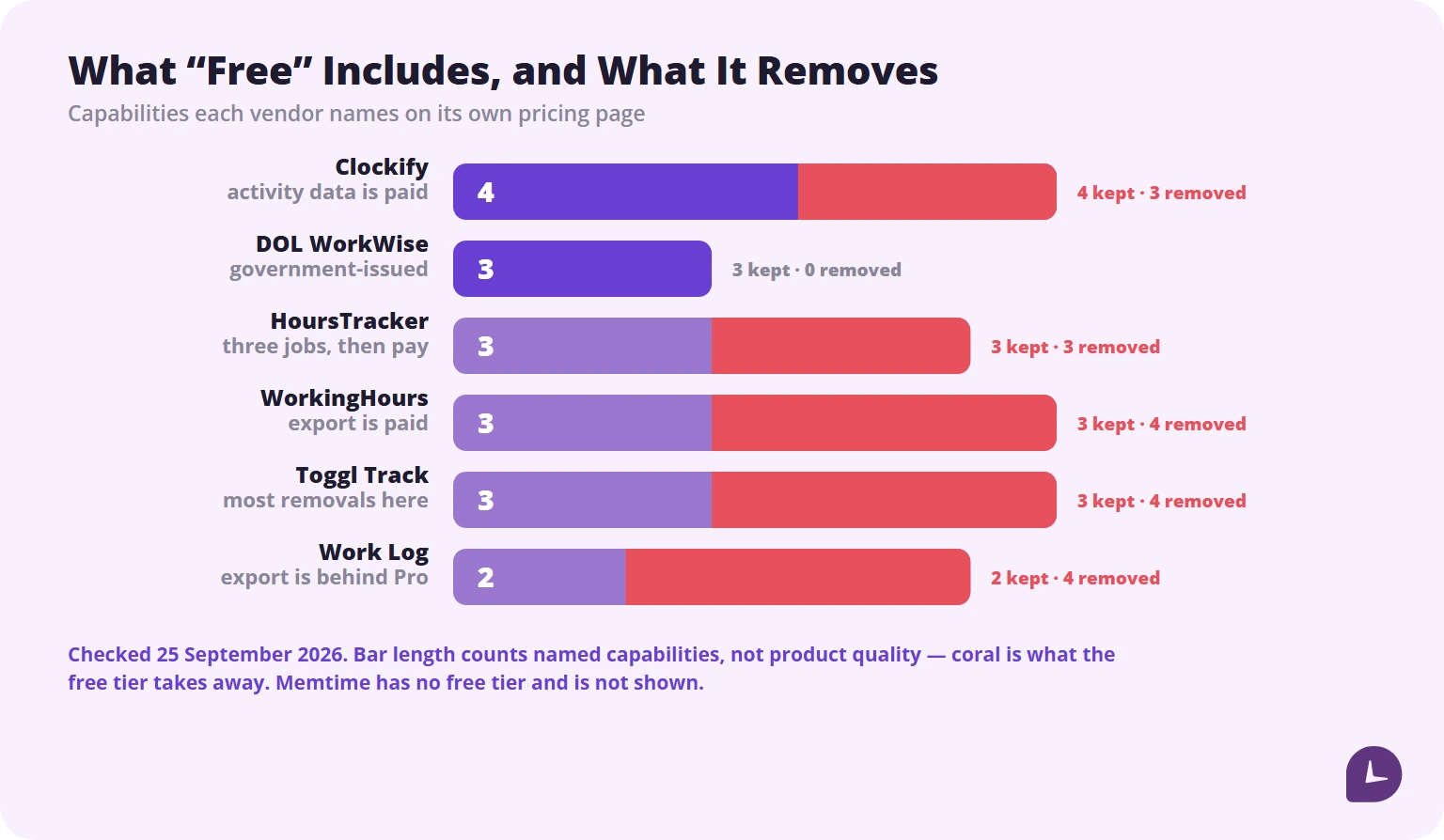
Every list says “free plan available.” None say what is removed. Here is the same question asked of each vendor’s own pricing page.
| App | What “free” includes | What is removed |
|---|---|---|
| Toggl Track | All platforms, core tracking, tasks and boards, up to 3 users | Billable rates, time rounding, team reports, saved report views |
| Clockify | Unlimited tracking, up to 5 users, unlimited projects, one-month reports | CSV and Excel report export, longer report ranges, activity monitoring |
| HoursTracker | 3 jobs, 21 days of entries, pay estimates | Additional jobs and history, advanced features |
| Work Log | Full tracking, with ads | Multiple jobs, CSV/PDF export, backup, ad removal |
| WorkingHours | Time tracking, projects, tags, overtime and earnings | Excel/CSV export, cloud sync, unlimited tasks, ad removal |
| DOL WorkWise | Full timesheet app with pay calculation | Nothing — there is no paid tier |
Checked 25 September 2026. Free tiers change often; verify before committing a year of records to one. Memtime is not in this table because it has no free tier.
What happens when you forget to start the timer
This is the single largest source of error in self-tracked hours, and almost no review covers it. Three behaviours exist:
Idle detection. The app notices the computer went quiet while the timer ran and offers to trim the block. Toggl Track does this well. Some desktop trackers also flag idle time, though reviewers note it can be difficult to deduct excess hours once a tracker has kept running.
Retroactive entry. You add the block afterwards. Every app in this list supports it; the question is how many taps it takes.
Geofencing. The app clocks you in when you arrive at the job site. HoursTracker supports this on iOS.
Do these apps count overtime correctly?
Overtime under the Fair Labor Standards Act is calculated weekly, not monthly. The Department of Labor defines the workweek as a fixed and regularly recurring period of 168 hours, and non-exempt employees are owed at least one and a half times the regular rate above 40 hours in that week (DOL, Fact Sheet #23).
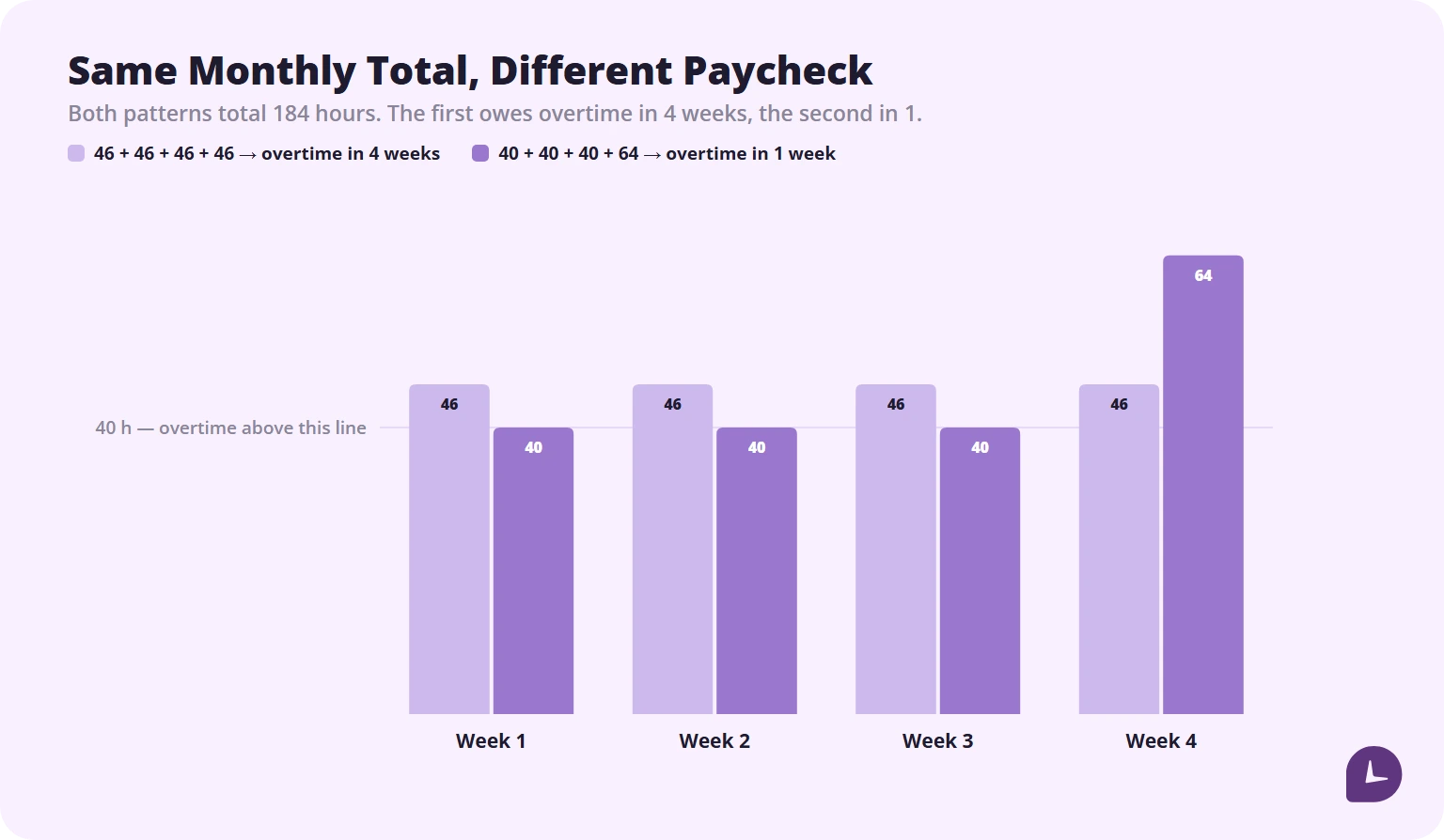
That matters for app selection. An app that only reports monthly totals cannot tell you whether overtime is owed. Work Log handles two separate overtime rates; HoursTracker calculates daily and weekly overtime automatically. Most project-oriented trackers do neither, because they were built to bill clients rather than to check a paycheck.
Two payroll rules sit either side of the app’s own arithmetic: the 7-minute time clock rule governs how your punches are rounded before they are totalled, and the steps to calculate overtime pay decide what the hours above 40 are actually worth.
Unpaid meal breaks generally do not count as hours worked when you are fully relieved of duty, but time spent on duty during a break typically is compensable (DOL, Fact Sheet #22). Pick an app that logs breaks separately rather than lumping them into the shift.
Rules vary by state and by contract. This section is general information, not legal advice.
Are your own hour records legally useful?
Partly. Under the FLSA the employer, not the employee, carries the record-keeping obligation. Your own log does not replace theirs — but when the employer’s records are missing or disputed, a contemporaneous personal record is the evidence you have.
Three things make a personal record more credible:
- It was made at the time, not reconstructed later. Apps with timestamps beat spreadsheets filled in on Friday.
- It is exportable in a plain format. A CSV with dates, start times, end times and breaks travels further than a screenshot.
- It is not editable without a trace, or at least the edits are visible.
Export monthly and keep the file somewhere outside the app. If you then have to total a stack of those exports by hand, our guide to how to calculate time sheets covers the arithmetic.
How to choose a work hours tracker
| Factor | What to check |
|---|---|
| Who sees the data | Does anyone but you have an account attached to your entries? |
| Pay calculation | Does the app compute earnings, or only minutes? |
| Overtime handling | Weekly threshold, and support for a second overtime rate if your state requires one |
| Breaks | Logged separately, or silently included in the shift? |
| Offline | Does a clock-in survive a dead signal? |
| Export | Which formats, on which tier, and do breaks appear in the export? |
| Platform | Pro purchased once, or once per platform? |
| Annual cost | Multiply the monthly price by twelve before deciding, the same way you would scale a weekly schedule into hours in a year |
How to start tracking your work hours in 5 minutes
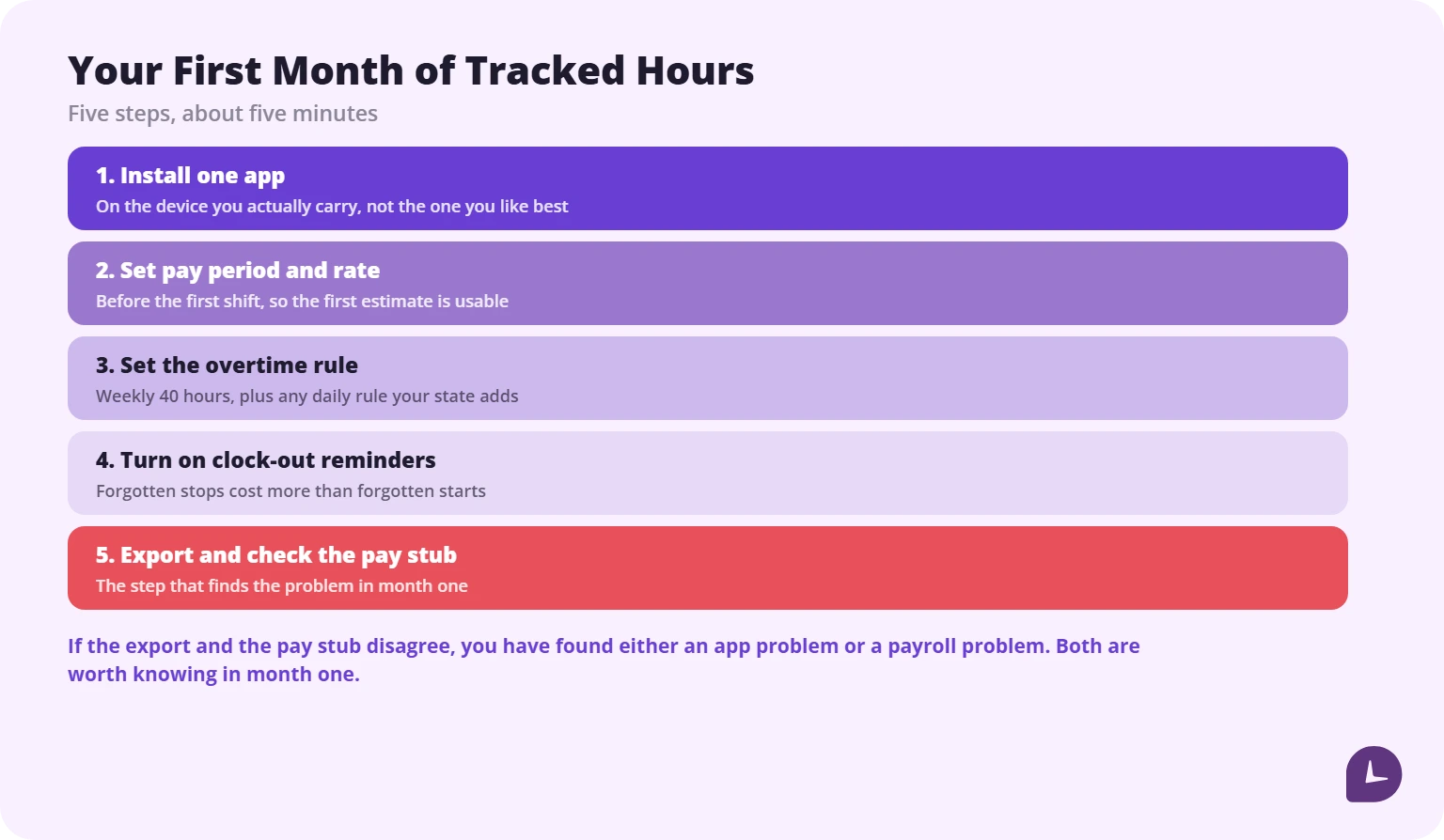
- Pick one app and install it on the device you carry, not the one you like best.
- Set your pay period and hourly rate before the first shift, so the first paycheck estimate is usable.
- Set your overtime rule — weekly 40 hours as the baseline, plus a daily rule if your state has one.
- Turn on clock-out reminders. Forgotten stops cost more than forgotten starts.
- Export at the end of the first month and check the total against your pay stub. A time card calculator is the quickest way to add the shifts up independently. If the two totals disagree, you have found either an app problem or a payroll problem, and both are worth knowing about in month one rather than month twelve.
Where Monitask fits — and where it does not
Monitask is team time tracking software. Employees clock in and out themselves, and the hours, apps and screenshots go to a shared dashboard the employer administers.
That makes it the wrong tool for everything above. If you are tracking your own hours to check a paycheck, you want an app with no manager account attached to it, and this list covers seven of them.
It becomes the right tool at one point: when your employer needs everyone’s hours in one place, timesheets approved before payroll, and a record both sides can look at. Our time tracking software is built for that case. If that is not your situation, ignore it — we would rather you kept reading than bounced off a pitch.
Disclosure: Monitask published this article. No app in the ranked list paid for placement, and we have no affiliate arrangements with any of them.
Reliable employee tracking software. Clear visibility and insights into how employees work. Even remotely.
Try Monitask free for 10 days
FAQ
Is there a completely free work hours tracker?
Yes. Clockify’s free plan includes unlimited tracking for up to five users and unlimited projects, with one-month PDF reports. Toggl Track is free for up to three users. The DOL WorkWise app is free with no paid tier.
Can I track work hours without my employer seeing them?
Yes, if you use a personal account in an app your employer does not administer. If the employer created your account, assume they can see your entries.
Do work hour apps calculate overtime?
Some do. HoursTracker calculates daily and weekly overtime; Work Log supports two overtime rates. Project-focused trackers frequently do not, because overtime is a payroll concept rather than a billing one.
How many hours are in a full-time month?
160 to 184, averaging 174 before holidays. US payroll systems generally use 173.33. See our breakdown of [how many hours are in a month](https://www.monitask.com/blog/how-many-hours-in-a-month/).
Do these apps work offline?
Several do, syncing when the connection returns. Offline behaviour is inconsistent enough that it is worth testing during your first week rather than discovering it on a job site.
What is the difference between a work hours tracker and a timesheet app?
A tracker records start and stop times in real time. A timesheet app collects hours, often entered after the fact, for approval. Many tools now do both.
Can I use a work hours app for multiple jobs?
Yes, but usually on a paid tier. HoursTracker’s free version allows three jobs; Work Log requires Pro for multiple jobs.
Are screenshots needed to prove hours worked?
No. Screenshots are a feature of employee monitoring software, which serves the employer’s need for verification, not yours. A timestamped export is the record that matters for a personal claim.
How long should I keep my own hour records?
Keep at least two years of exports. FLSA record-keeping obligations run to three years for payroll records, and your own copy is worth having for as long as the employer’s is required to exist.