Free Work Hour Trackers: 6 Tools That Are Actually Free

Updated 25 September 2026
Reliable employee tracking software. Clear visibility and insights into how employees work. Even remotely.
Try Monitask free for 10 days
Six free hour trackers, compared from vendor pricing pages and current store listings. The honest summary: several are free because they show ads, most lock pay calculation or export behind a paid tier, and for one person a one-time unlock often beats a subscription within a few months. Pick by which limit you can live with, not by the word free.
The six, compared
| Tool | Free limit | Ads | Calculates pay | Export on free |
|---|---|---|---|---|
| HoursTracker | 3 jobs, 21 days of entries | Yes | Yes | CSV, XLSX |
| Work Log | Full tracking, multiple jobs paid | Yes | Yes | No — Pro only |
| Toggl Track | Up to 3 users | No | No — billable rates paid | PDF, CSV |
| Clockify | Up to 5 users, one-month reports | No | No — billable rates paid | PDF reports only |
| WorkingHours | Free tracking; Pro adds export and sync | Yes | Yes | No — Pro only |
| DOL WorkWise | Free, no paid tier | No | Yes | No documented export |
Every figure in this table was checked against the vendor’s own pricing page or current store listing on 25 September 2026. Free tiers and ad policies change frequently — the date matters.
What “free” actually means in an hour tracker
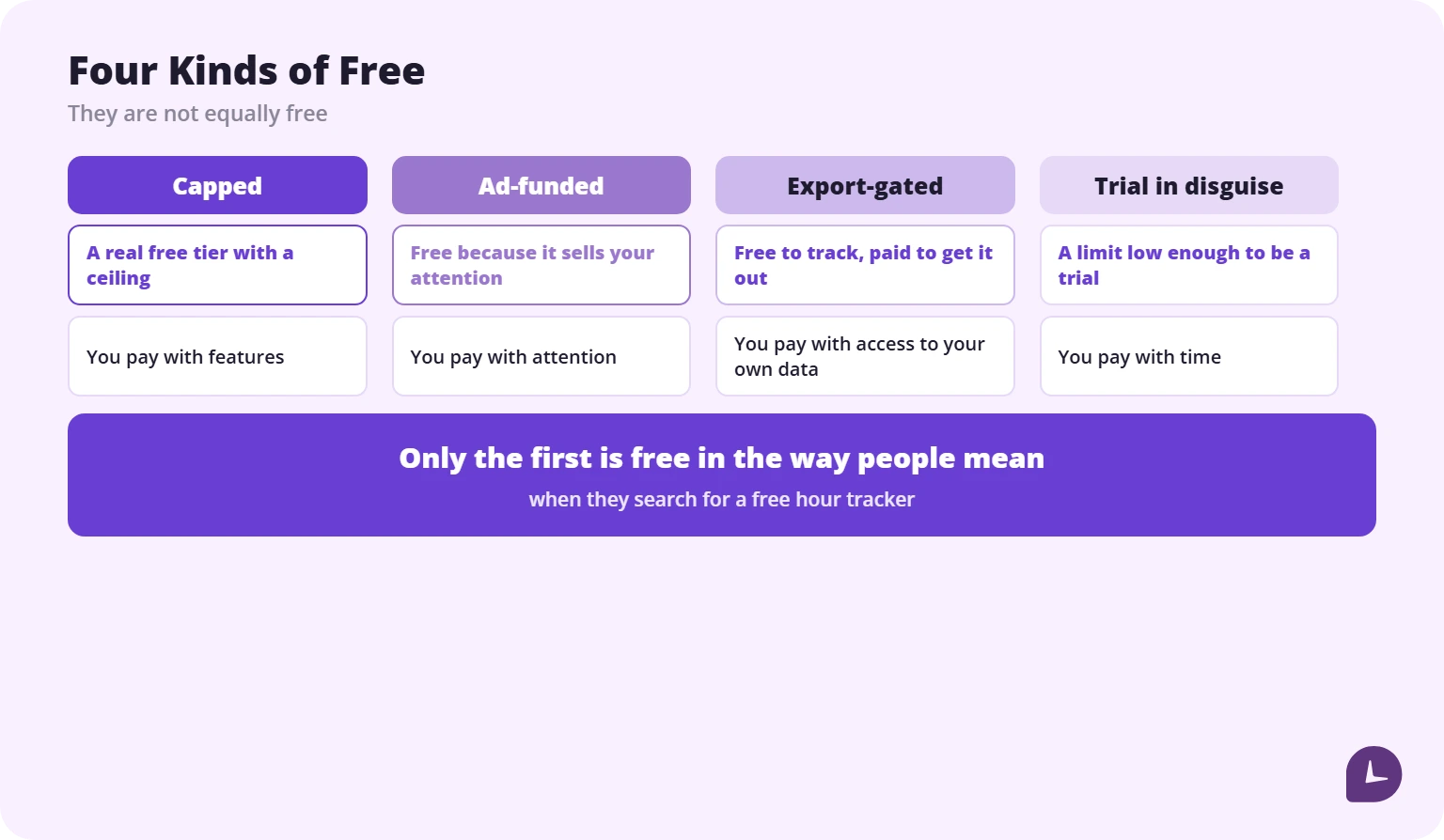
The word covers four different arrangements, and they are not equally free.
Free forever, with a cap
A real free tier with a ceiling. The ceiling is usually the number of jobs, the number of entries, or how far back you can look. HoursTracker’s free version allows three jobs and 21 days of entries. That is genuinely free and genuinely limited.
Free, paid for by ads
A common arrangement in personal hour trackers. You pay with attention rather than money, and in several apps the advertising is aggressive enough to affect the thing you came for — tapping the wrong button when clocking in.
Free until you want your data out
The app tracks for nothing and charges to export. This is the arrangement that matters most for hour tracking specifically, because the whole point of the record is being able to produce it later.
A trial in disguise
A free plan that stops at two projects is a trial wearing a different label. Any “free” plan measured in days rather than limits belongs in this category.
How this comparison was put together
Each app was checked against its own pricing page, feature page and current app store listing on 25 September 2026. This is a desk comparison of published features and prices, not a device test; where a vendor does not publish a limit, the table says so rather than guessing.
The focus is deliberately narrow: what the free version gives you, where exactly it stops, and what it costs to remove that stop. If price is not the criterion, our full comparison of apps to track work hours covers the paid tiers and the payroll rules behind them.
Monitask publishes this article and sells team time tracking software. We have no free plan and are not in the list below; there is a short note at the end explaining where we do fit.
The six free work hour trackers
HoursTracker
Platforms iOS, Android, Apple Watch · Free limit 3 jobs, 21 days of entries · Ads Yes · Pay calculation Yes · Export CSV, XLSX · Paid tier subscription
HoursTracker is the strongest free option for an hourly worker who wants to know what the shift was worth, not just how long it lasted. It records clock-in and clock-out times, breaks and pauses, then calculates regular pay, overtime, tips and mileage. Overtime can be calculated daily and weekly, which matters because most payroll rules work on a weekly threshold.
The free edition stores three jobs and 21 days of entries. That is enough to test the app against a real pay period, but not enough to keep a year of records. Removing the limits needs a subscription: Premium covers up to five jobs, Unlimited removes the job cap.
Pros: pay estimates, overtime, geofencing reminders, Apple Watch control
Cons: 21-day history, ads, subscription only, tax settings awkward to change later
Work Log
Platforms Android · Free limit full tracking with ads; multiple jobs require Pro · Ads Yes · Pay calculation Yes · Export Pro only · Paid tier one-time Pro purchase
Work Log is the Android counterpart to HoursTracker and covers the same ground: punch in and out or enter hours manually, set your pay period so hours and wages calculate per paycheck, and track expenses, tips, sales, mileage and holiday pay alongside the time. Deductions and bonuses feed into a paycheck estimate, and it handles two separate overtime rates.
The free version is usable as a daily tracker, but the ads are part of the deal and multiple jobs sit behind Pro. Pro also adds CSV and PDF export plus a database backup by email. If you need your records out of the app, that export is the reason to pay.
Pros: paycheck estimation built in, two overtime tiers, broad tracking options
Cons: Android only, ads, multiple jobs and export require Pro
Toggl Track
Platforms Android, iOS, Windows, macOS, Linux, web, browser extensions · Free limit up to 3 users · Ads No · Pay calculation No — billable rates are paid · Export PDF, CSV · Paid tier subscription
Toggl Track is the best free option if you want a clean timer and no advertising. The free plan covers every platform, manual and real-time timers, calendar integrations, tasks, boards and simple planning. You can start a timer before deciding which project it belongs to, which is why it survives busy days better than stricter apps.
What the free plan does not do is turn hours into money. Billable rates, time rounding and team-level reports start on the paid Starter plan. Idle detection is included, so a forgotten timer does not silently absorb a lunch break.
Pros: no ads, works everywhere, generous core tracking, good idle detection
Cons: no pay calculation on free, team reports and billable rates are paid
Clockify
Platforms Android, iOS, Windows, macOS, Linux, web, browser extensions · Free limit up to 5 users, one-month reports · Ads No · Pay calculation No — billable rates are paid · Export PDF reports only · Paid tier subscription
Clockify’s free plan is broad on seats and projects: unlimited tracking, up to five users, unlimited projects and tasks. You track with a one-click timer, add missing time later, use break mode, and export a report as PDF. Free reports cover a one-month range, and CSV and Excel report export require a paid plan.
For a single person tracking their own hours, the one-month report range is the limit that matters. It is enough to check a pay period, not enough to build a long archive. Activity monitoring is also a paid feature, so the free tier is time tracking rather than employee monitoring.
Pros: up to five users free, unlimited projects, no ads, cross-platform
Cons: one-month report range, PDF-only report export, billable rates paid
WorkingHours
Platforms Android, iOS, Windows, macOS · Free limit free tracking; Pro adds export, cloud sync and unlimited tasks · Ads Yes · Pay calculation Yes · Export Pro only · Paid tier one-time per platform
WorkingHours is built for individuals rather than teams. You start, pause and stop the timer as the day goes, or add and correct entries afterwards, then organise hours by project, task and tag. Hourly rates, standard working hours and tags let it calculate earnings and overtime without a second spreadsheet.
The free version is a genuine tracker, but the useful exit routes are paid: Excel and CSV export, cloud sync and unlimited tasks are Pro features. Pro is a one-time purchase per platform, and on Android there is also a subscription option. A two-device user should price both licences before committing.
Pros: no account required, overtime and earnings, one-time Pro option
Cons: export and sync are paid, ads, Pro is licensed per platform
DOL WorkWise Timesheet
Platforms iOS, Android · Free limit free, no paid tier · Ads No · Pay calculation Yes · Export No documented export · Paid tier none
The U.S. Department of Labor publishes its own timesheet app. WorkWise tracks regular work hours, break time and overtime, and calculates pay with multiple pay frequency options. It is free, has no ads and no upsell.
It will not win on interface, and it publishes no export path. What it does have is provenance: a record kept in a government-issued app carries different weight in a wage dispute than a screenshot from a commercial tracker. The DOL notes the app does not cover every workplace situation, including tips, commissions and some premium pay.
Use it as a second record, alongside whichever app you actually enjoy using.
Boost your business productivity
Track performance and streamline teamwork
For a personal tool opened twice a day, advertising is not a minor annoyance. It is part of the daily workflow.
Ad-supported trackers in this category are not quietly ad-supported. A common complaint in Google Play reviews of popular free trackers describes banners that shift position near the clock-in control, and an offer to remove them for a yearly fee. The exact price varies by app and by country.
Why it matters more here than elsewhere. An hour tracker is opened twice a day, every working day, at moments when you are half out the door. An interface that is fighting you at exactly those moments produces mis-taps, and a mis-tapped clock-in is a wrong record. The ad is not just annoying; it is a source of error in the thing you installed the app to get right.
Three questions before you commit to an ad-supported tracker:
- Where does the ad sit relative to the clock-in button?
- Does it appear on launch, before the app is usable?
- What does removal cost, and is it a one-off or a subscription?
The third question is the one that changes the maths entirely.
One-time purchase beats free after month four
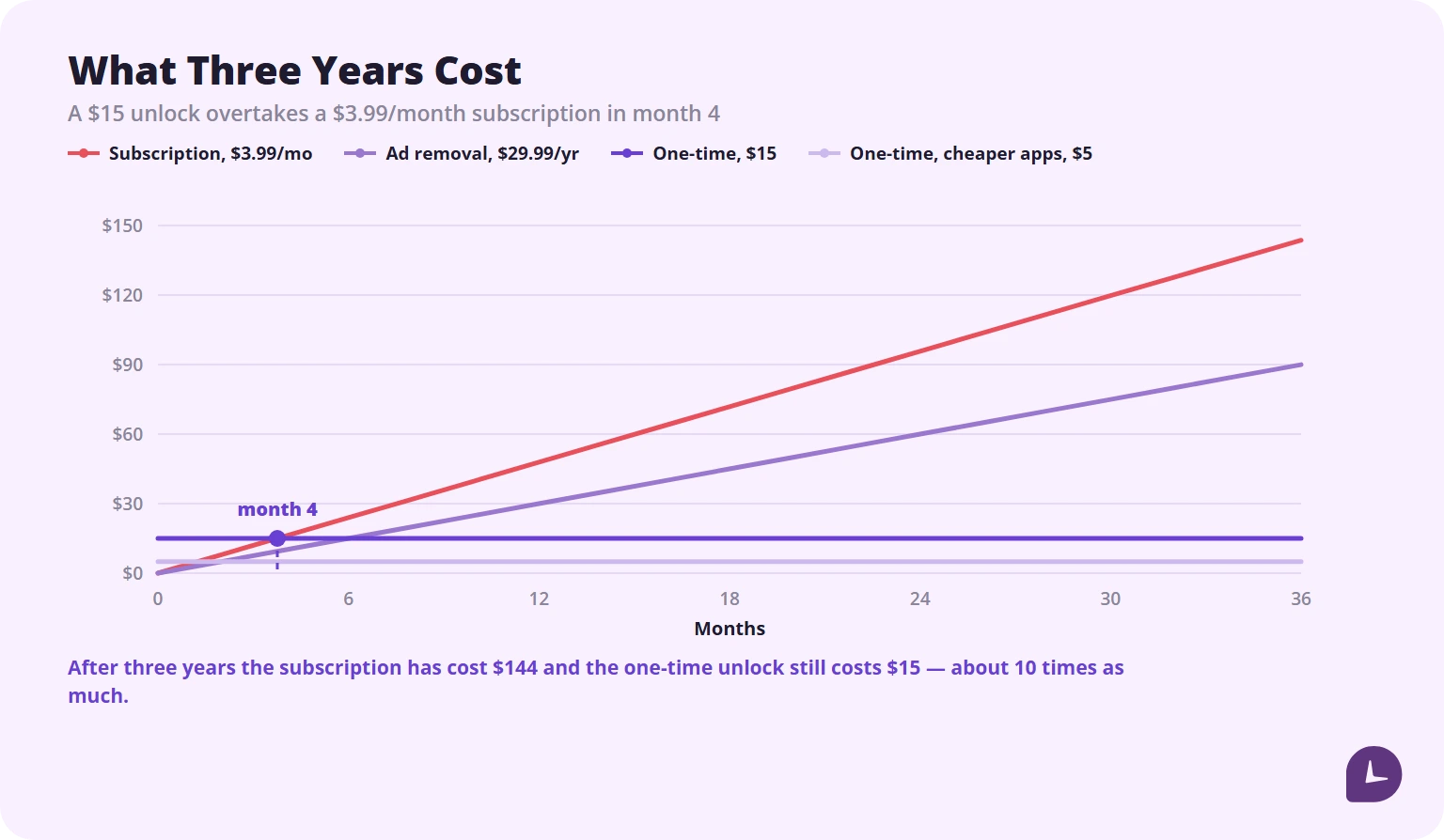
For a personal tool used by one person, a one-time unlock is usually cheaper than a subscription within a few months. The figures below are illustrative, using typical prices for this category as of September 2026.
| Cost | After 6 months | After 1 year | After 3 years | |
|---|---|---|---|---|
| Ad removal, subscription | ~$30/year | $15 | $30 | $90 |
| Subscription tracker | ~$3.99/month | $24 | $48 | $144 |
| One-time Pro unlock | ~$15 once | $15 | $15 | $15 |
| One-time unlock, cheaper apps | ~$5 once | $5 | $5 | $5 |
A $15 one-time unlock costs the same as six months of ad removal and less than four months of a subscription tracker. After three years the difference is roughly tenfold.
When a subscription is still right: if you need sync across devices, a web app, or invoicing. Those are genuinely ongoing services. Removing ads and unlocking a fourth job are not.
Does the free version tell you what you’ll earn?
If you are paid by the hour, this is the feature that matters, and it is the one most often paywalled.
Minutes are not the answer to the question people actually have. “I worked 43 hours” is a fact; “I am owed $X, of which Y is overtime” is the reason for tracking at all. An app that stops at minutes leaves you doing the arithmetic yourself — and the decimal conversion is where most people get it wrong. Seven hours forty-five minutes is 7.75, not 7.45.
Two further rules decide what those hours are worth before any app can tell you: the 7-minute time clock rule governs how punches may be rounded, and the steps to calculate overtime pay cover what the hours above 40 are owed at.
What to check specifically:
- Does the free version accept an hourly rate at all?
- Does it apply an overtime multiplier, or only a flat rate?
- Can it handle two rates, for a second job or a weekend premium?
- Is gross pay shown, or an estimate after tax?
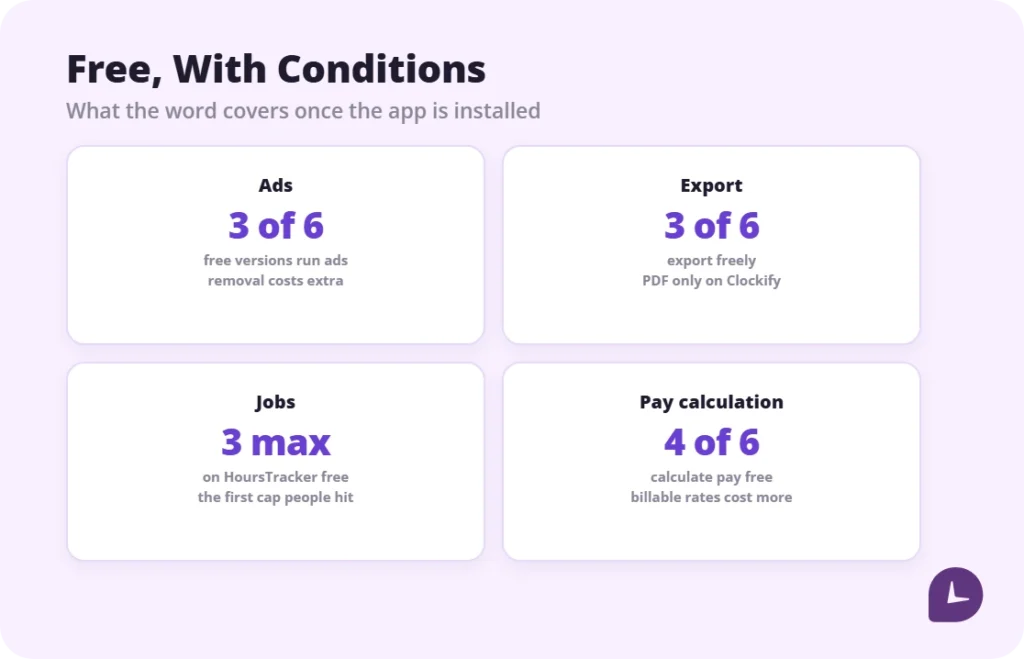
In this list, HoursTracker, Work Log, WorkingHours and DOL WorkWise calculate pay on the free tier. Toggl Track and Clockify do not: their billable rates start on a paid plan.
What happens to your hours if you stop
Four questions, and the answers are rarely on the pricing page.
Can you export before you leave? Some free tiers include CSV or Excel export, some allow only PDF, some allow none. Clockify’s free plan moved CSV and Excel report export behind payment in its April 2026 update, leaving PDF as the only free report format, and free reports now cover a one-month range.
Does downgrading delete history? If you upgrade, run a year, then stop paying, most vendors do not publish what happens to entries outside the free retention window. Ask before you upgrade.
Is the data on the device or in the cloud? Local-only apps keep working when the vendor disappears. Cloud apps do not.
Is the app still maintained? A personal tracker abandoned two years ago still runs — until an OS update stops it, with your history inside.
Practical rule: export monthly, whatever tool you use, and keep the file somewhere other than the app. It takes a minute and it is the only thing that survives every scenario above.
What free plans removed in 2025 and 2026
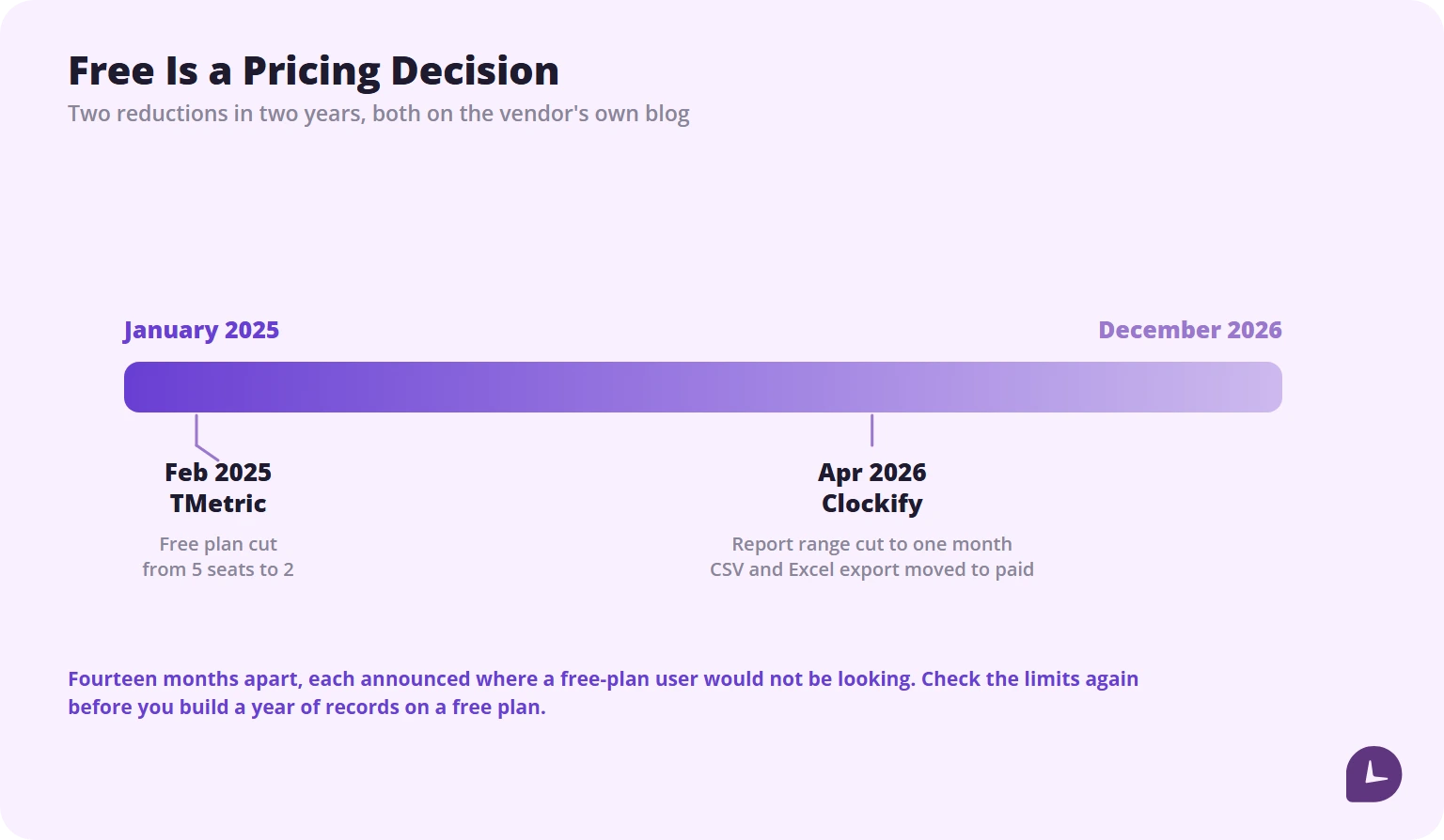
Free tiers are a pricing decision, not a product property, and the last two years have been active ones.
| Change | What happened | Confirmed |
|---|---|---|
| Clockify | Free report range cut to one month, and CSV and Excel report export moved to paid — PDF is now the only free report format | April 2026, announced by Clockify’s parent CAKE.com and reflected on Clockify’s own pricing page |
| TMetric | Free plan cut from 5 seats to 2 | February 2025, announced on TMetric’s own blog |
Both are worth knowing before you build a year of records inside a free plan. Both were announced on the vendor’s own blog — and nowhere a free-plan user would be looking.
How to choose a free hour tracker
| If this is true | Look for |
|---|---|
| You are paid by the hour | Pay calculation on the free tier, first |
| You open the app twice a day | No ads, or a cheap one-time removal |
| You will use it for years | One-time unlock, not a subscription |
| You may need records for a dispute | Export on the free tier, in CSV |
| You work more than one job | Check the job cap before installing |
| Your shift crosses midnight | Test an overnight entry in the first week |
| You work where there is no signal | Test airplane mode before you rely on it |
When free stops being free
Three signals:
- You are working around the cap. Deleting old entries to make room is not a workflow.
- You cannot get your data out. If a year of records is trapped, the tool now owns your history.
- The ads are causing mistakes. A mis-tapped clock-in costs more than the removal price.
At that point you are choosing between a one-time unlock and a subscription, and the table above answers it. If you need a printable fallback, our weekly timesheet template is free and does not expire.
Where Monitask fits. Monitask is team time tracking software with no free plan — it is the wrong tool for everything above, which is about one person tracking their own hours. It becomes relevant only when someone needs everyone’s hours in one place, with approvals before payroll. If that is not your situation, one of the six above is your answer.
Disclosure: Monitask published this article and sells time tracking software. No app in the list paid for placement, and we have no affiliate arrangements with any of them.
Reliable employee tracking software. Clear visibility and insights into how employees work. Even remotely.
Try Monitask free for 10 days
FAQ
Are free hour tracker apps really free?
Some are. Others are funded by advertising, capped at a number of jobs, or free to track but paid to export. The four arrangements are covered at the top of this article.
Do free hour trackers show ads?
Several do. In this list, HoursTracker, Work Log and WorkingHours show ads in their free versions, and each offers a paid way to remove them. Toggl Track, Clockify and DOL WorkWise do not.
Is a one-time purchase cheaper than a subscription?
For one person, usually yes. A $15 one-time unlock costs less than four months of a $3.99 subscription and stays at $15 forever.
Can a free hour tracker calculate my pay?
Some can. HoursTracker, Work Log, WorkingHours and DOL WorkWise calculate pay on the free tier. Toggl Track and Clockify leave billable rates to a paid plan.
Can I export my hours from a free plan?
It varies, and it is the limit most worth checking. Toggl Track exports PDF and CSV on the free plan. Clockify’s free plan exports reports as PDF only, with a one-month range. Work Log and WorkingHours require Pro for export, and DOL WorkWise publishes no export path.
Do free hour trackers work offline?
Some do, some silently fail. Test it in airplane mode during the first week rather than discovering it on a job site.
What happens to my data if I stop using the app?
Export monthly to a file you keep outside the app. That is the only answer that works regardless of what the vendor does.
Which free tracker is best for multiple jobs?
Check the job cap before installing. HoursTracker allows three jobs on the free tier; Work Log requires Pro for multiple jobs; WorkingHours and Clockify do not impose a job cap on the free plan.
How is this different from free employee monitoring software?
Entirely. The tools here track one person’s own hours with no manager account attached. Employee monitoring software reports to an employer, which is a different product for a different reader — we cover that separately in [free employee monitoring software](/blog/free-employee-monitoring-software/).