Weekly Timesheet Template: Free Download (Excel, Sheets, PDF, Word)

Updated 25 September 2026
Reliable employee tracking software. Clear visibility and insights into how employees work. Even remotely.
Try Monitask free for 10 days
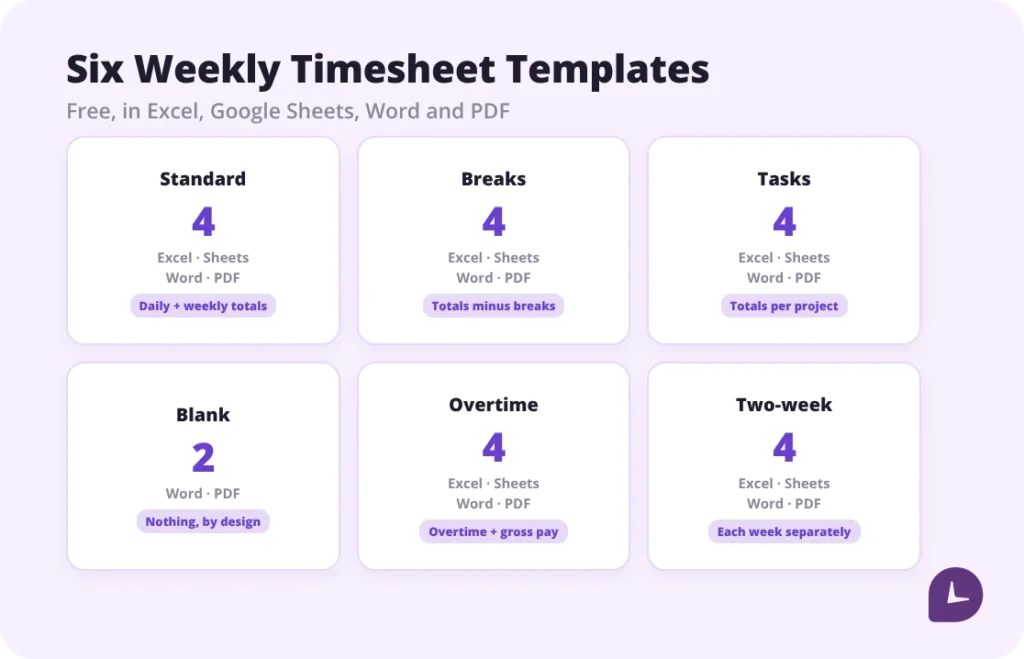
Download six free weekly timesheet templates below — standard, with breaks, with tasks, blank for printing, with overtime and pay, and a two-week version for biweekly payroll. Every template comes in Word and PDF; the five that calculate anything also come in Excel and Google Sheets. Each file carries an instructions panel and a filled-in example, and the Excel and Sheets versions calculate totals, overtime and decimal hours automatically.
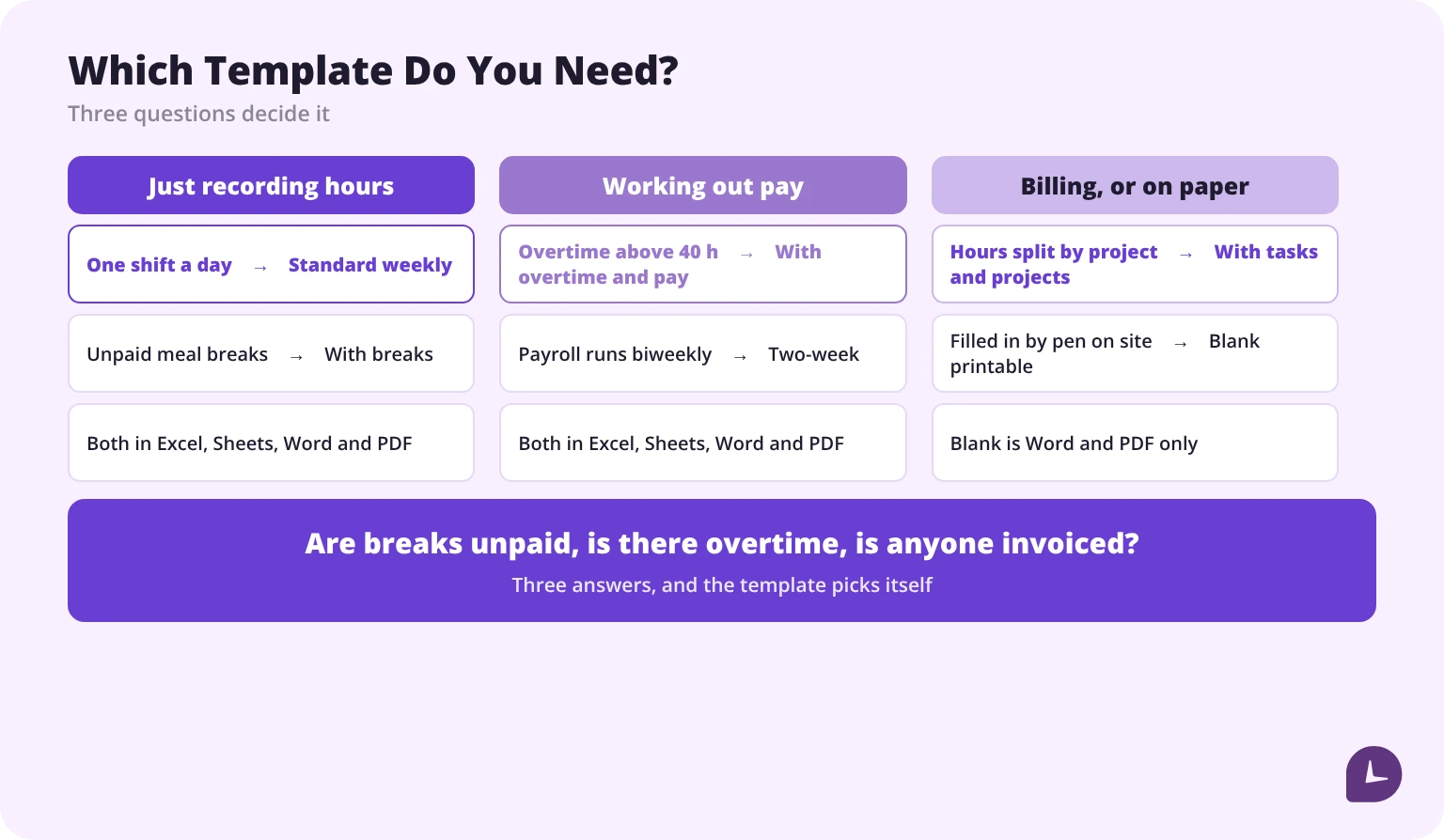
Which weekly timesheet template do you need?
| Template | Use it when | Calculates automatically |
|---|---|---|
| Standard weekly | One employee, one shift a day, weekly payroll | Daily and weekly totals |
| With breaks | Unpaid meal breaks are deducted from paid hours | Totals minus breaks |
| With tasks and projects | Hours are billed to clients or split across projects | Totals per project |
| Blank for printing | Field or shop workers filling in by hand | Nothing — it is a paper form |
| With overtime and pay | Hourly workers with overtime above 40 hours a week | Overtime, regular pay, total pay |
| Two-week | Payroll runs biweekly | Each week’s overtime separately |
Weekly timesheet templates
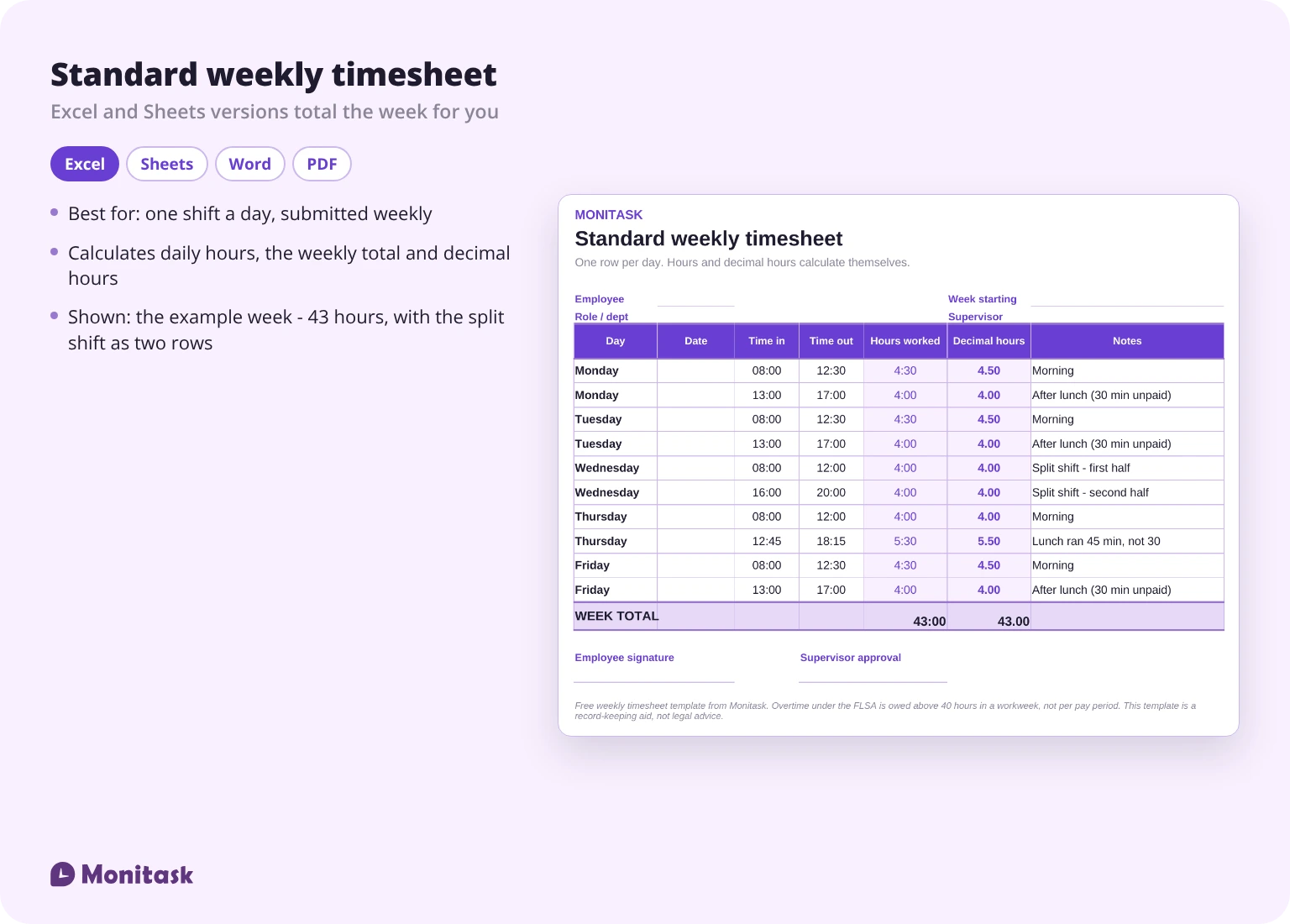
Standard weekly timesheet template
The plain version: seven rows, one per day, with start time, end time and daily total. A weekly total at the bottom and signature lines for the employee and the supervisor.
Best for: salaried or hourly employees on one shift a day, with weekly submission.
Calculates: daily hours, weekly total, decimal hours.
Weekly timesheet with breaks
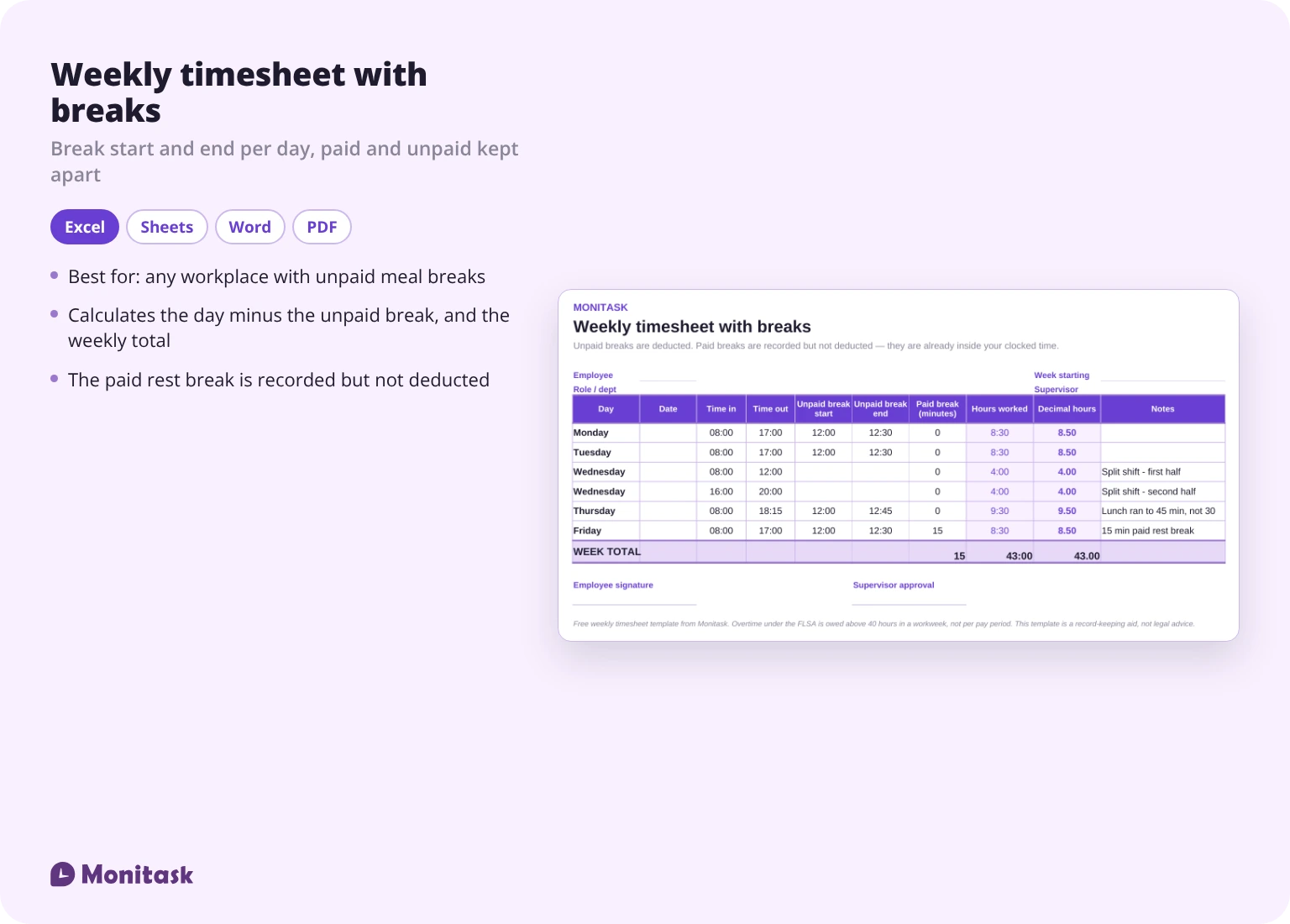
Adds a break start and break end column for each day, and subtracts unpaid break time from the daily total. Paid and unpaid breaks are separate columns, because they are treated differently in payroll.
Best for: any workplace with unpaid meal breaks, which in practice means most hourly work.
Calculates: daily hours minus unpaid breaks, weekly total.
Weekly timesheet with tasks and projects
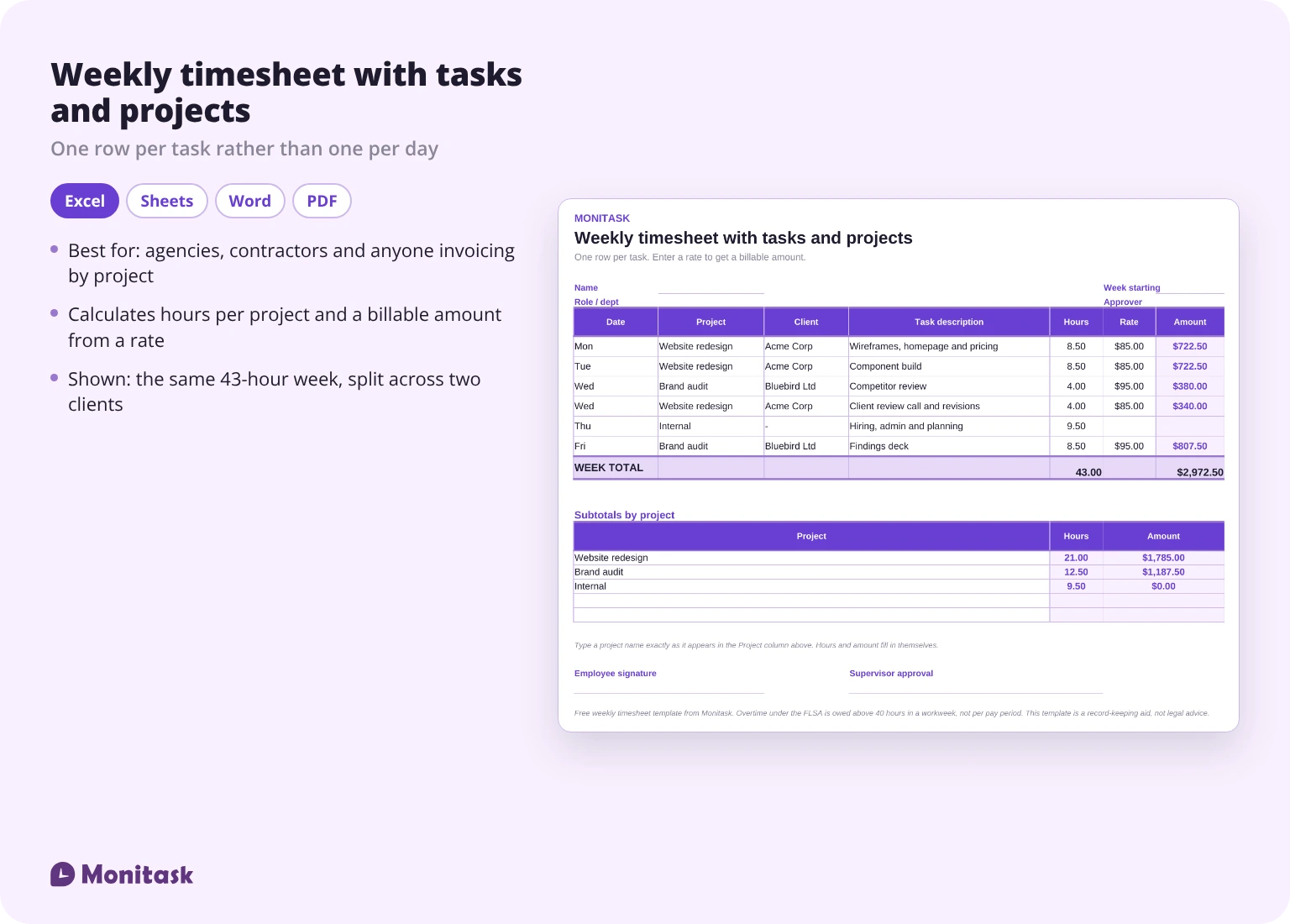
Each row is a task, not a day. Columns for project, client, task description and hours, with subtotals per project at the bottom.
Best for: agencies, contractors, consultants and anyone who invoices by project.
Calculates: hours per project, weekly total, billable amount if you enter a rate.
Blank weekly timesheet for printing
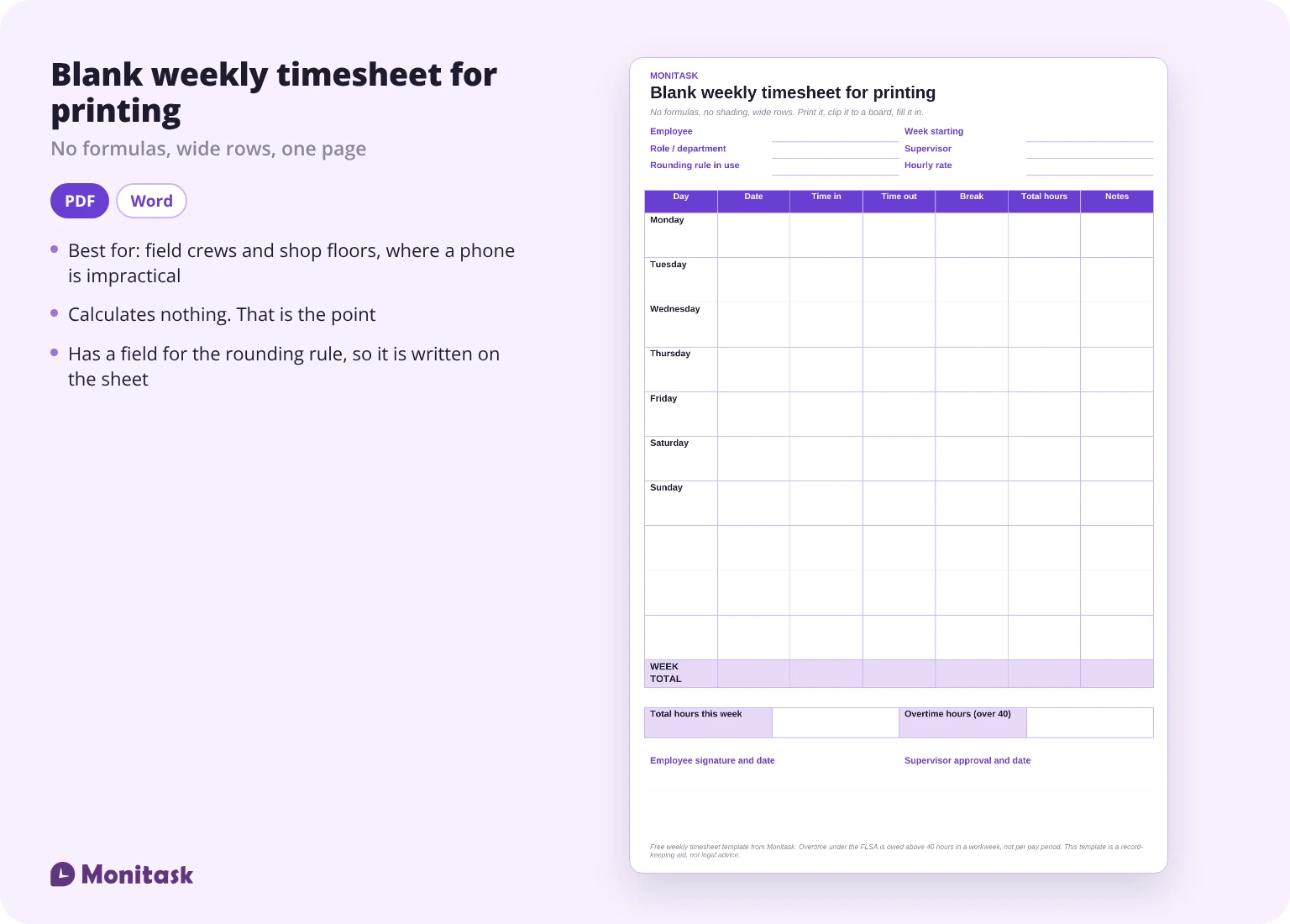
No formulas, no shading, wide rows. Built to be printed and filled in with a pen on a job site, then handed in.
Best for: field crews, shop floors and anywhere a phone is impractical.
Calculates: nothing. That is the point.
Weekly timesheet with overtime and pay
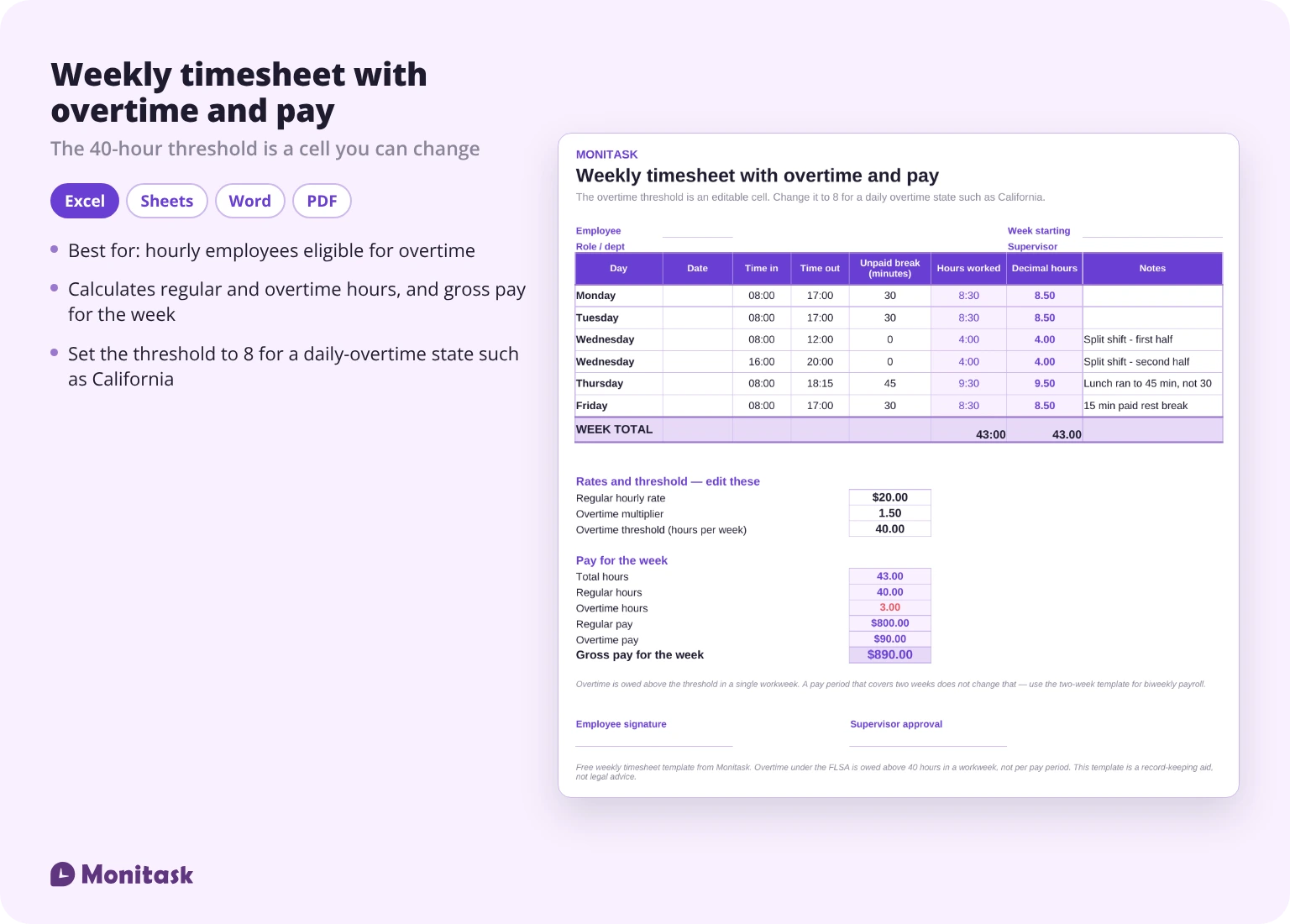
Separates regular hours from overtime, applies a regular rate and an overtime rate, and totals gross pay for the week. The 40-hour threshold sits in its own cell so you can change it if your state has a daily overtime rule.
Best for: hourly employees eligible for overtime.
Calculates: regular hours, overtime hours, regular pay, overtime pay, gross weekly pay.
Two-week timesheet for biweekly payroll
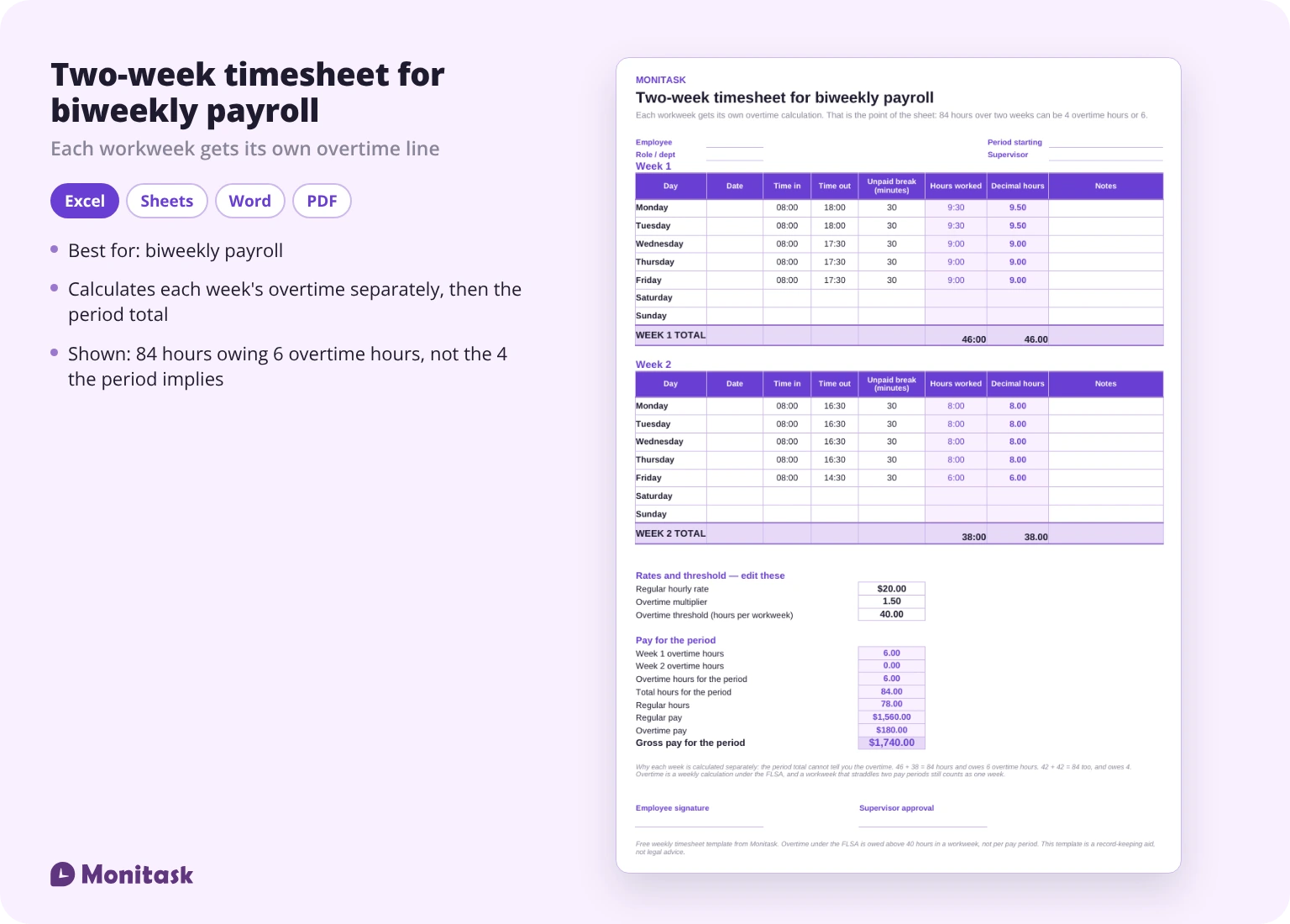
Two weekly blocks on one sheet, each with its own overtime calculation. This matters more than it sounds — see the section on split workweeks below.
Best for: biweekly payroll.
Calculates: each week’s overtime separately, then a combined period total.
Boost your business productivity
Track performance and streamline teamwork
What to include in a weekly timesheet
A complete weekly timesheet has ten fields:
- Employee name, and role or department where relevant
- Supervisor or approver name
- Pay period and the dates covered
- Hours worked per day — either start and end times, or a daily total
- Regular hours, kept separate from overtime hours
- Breaks taken, with paid and unpaid separated
- Leave hours by type: sick, PTO, vacation, holiday
- Hourly rate, if the sheet is used for pay or billing
- Total hours and total pay for the period
- Signature or approval from both the employee and the supervisor
The three that get skipped most often are the separation of regular from overtime hours, the paid-versus-unpaid break split, and the supervisor’s approval. All three matter if the record is ever questioned.
How to fill out a weekly timesheet
- Set the header first. Employee, supervisor, week start date, hourly rate, overtime rate. Do this before the first shift, not at the end of the week.
- Log start and end times daily. Not on Friday from memory. The gap between a same-day entry and a Friday reconstruction is where hours disappear.
- Record breaks as they happen, and mark whether each one is paid.
- Enter leave hours by type. Sick, PTO, vacation and holiday are not interchangeable in payroll.
- Check the overtime line. Overtime is calculated per week, not per pay period.
- Convert to decimal hours if your payroll system expects them. The Excel and Sheets templates do this in a separate column, and our guide to how to calculate time sheets walks through the manual version.
- Sign and submit. The employee signs, the supervisor reviews and approves.
- Save a copy before it goes to payroll.
A filled-in example: a week with overtime, a split shift and an unpaid lunch
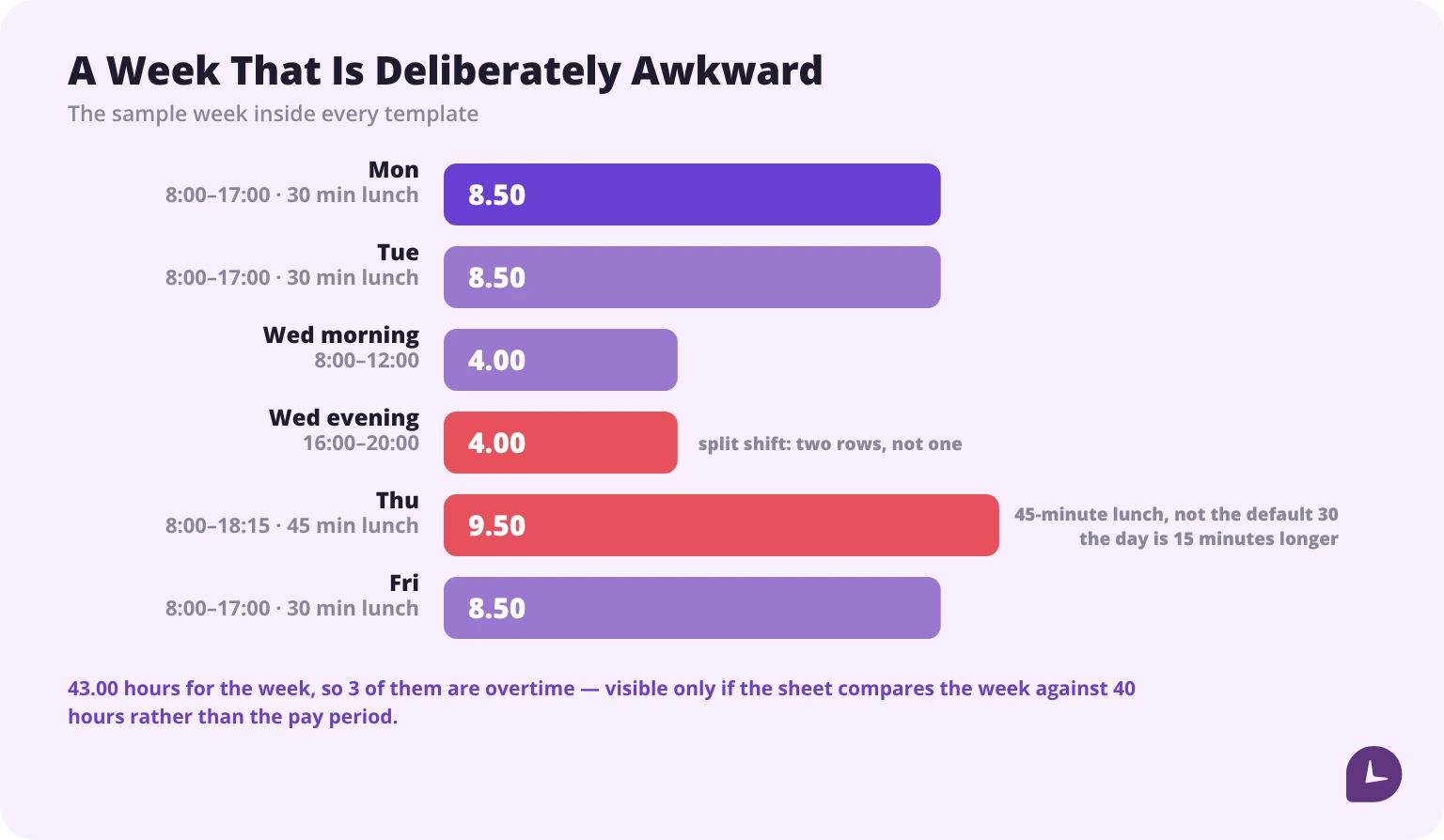
The sample week inside every template is deliberately awkward, because a clean week teaches nothing.
| Day | In | Out | Unpaid lunch | Worked | Decimal |
|---|---|---|---|---|---|
| Mon | 8:00 | 17:00 | 30 min | 8h 30m | 8.50 |
| Tue | 8:00 | 17:00 | 30 min | 8h 30m | 8.50 |
| Wed | 8:00 | 12:00 | — | 4h 00m | 4.00 |
| Wed | 16:00 | 20:00 | — | 4h 00m | 4.00 |
| Thu | 8:00 | 18:15 | 45 min | 9h 30m | 9.50 |
| Fri | 8:00 | 17:00 | 30 min | 8h 30m | 8.50 |
| Total | 43h 00m | 43.00 |
Three things are happening here. Wednesday is a split shift, entered as two rows rather than one — a single row from 8:00 to 20:00 would silently bill the four-hour gap. Thursday’s lunch is 45 minutes, not 30, and using the default would overstate the day by 15 minutes. And the week totals 43 hours, so 3 hours are overtime, which only appears if the sheet compares the weekly total against the 40-hour threshold rather than the pay-period total.
Five mistakes that make a weekly timesheet wrong
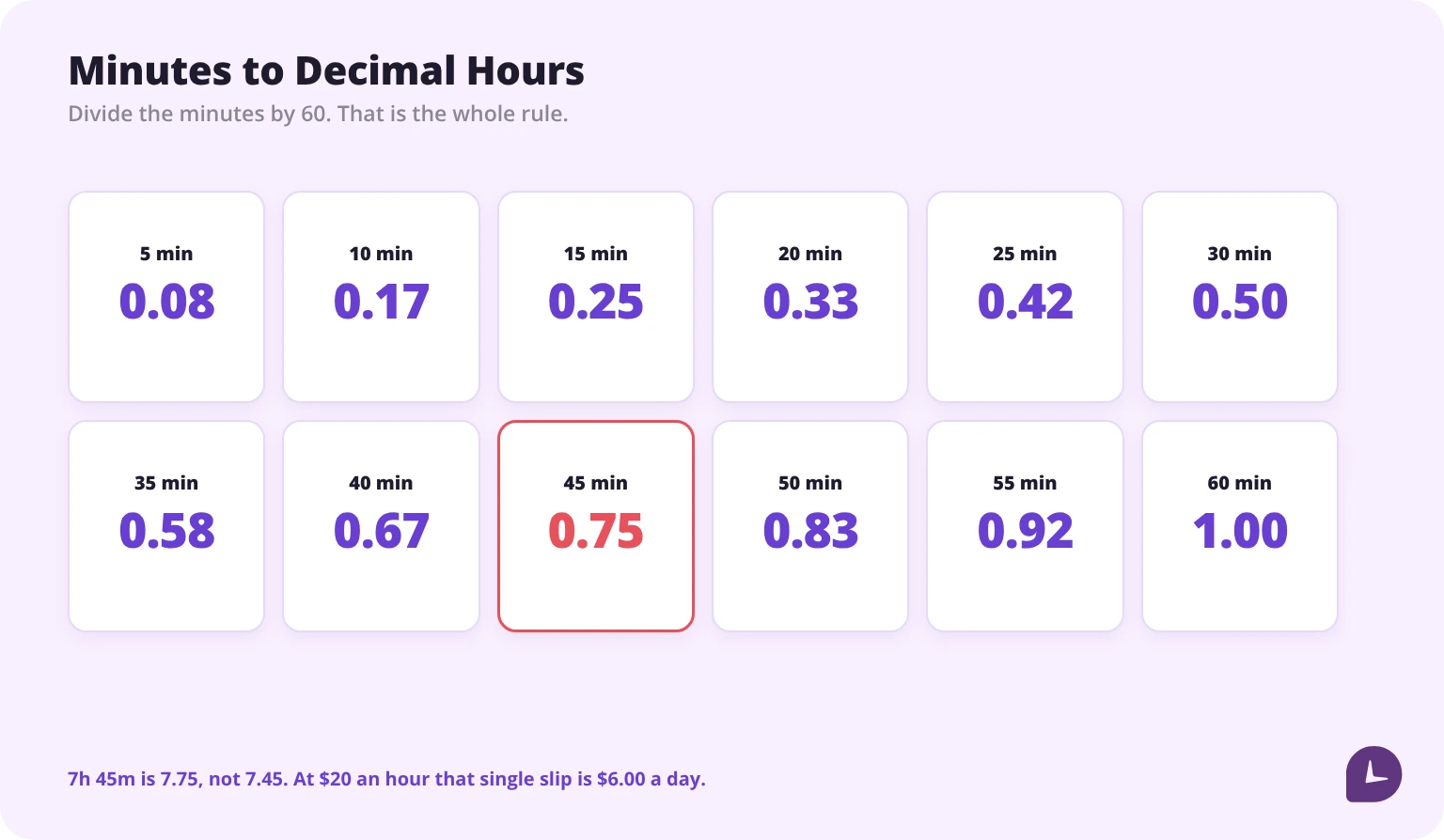
1. Treating 7h 45m as 7.45. It is 7.75. Minutes are sixtieths, not hundredths. At $20 an hour that single error is $6 a day, which is roughly $120 over a month of similar days.
2. Entering a split shift as one row. From 8:00 to 20:00 with a four-hour gap is eight hours worked, not twelve. One row makes it twelve.
3. Using the default break instead of the real one. A pre-filled 30-minute lunch that was actually 45 minutes overstates every day it appears on.
4. Calculating overtime on the pay period. Eighty-four hours across two weeks might be 42 and 42, which is four overtime hours, or 40 and 44, which is four — or 46 and 38, which is six. The period total does not tell you.
5. Filling the sheet in on Friday. Reconstructed hours are estimates. Same-day entries are records. Only one of them holds up if the timesheet is ever questioned.
How to convert hours and minutes to decimal hours
Divide the minutes by 60. That is the whole rule, but here is the table people actually want.
| Minutes | Decimal | Minutes | Decimal |
|---|---|---|---|
| 5 | 0.08 | 35 | 0.58 |
| 10 | 0.17 | 40 | 0.67 |
| 15 | 0.25 | 45 | 0.75 |
| 20 | 0.33 | 50 | 0.83 |
| 25 | 0.42 | 55 | 0.92 |
| 30 | 0.50 | 60 | 1.00 |
In Excel or Google Sheets, if the worked time is in cell E2 formatted as time, the decimal value is =E2*24. Format the result as a number, not as time.
The Excel and Google Sheets templates on this page include a decimal column already. The Word and PDF versions do not, because they have no formulas — if you are paid hourly and filling in by hand, keep this table nearby, or use a time card calculator to check the week before you submit it.
How should you round clock-in times?
Rounding is allowed in US payroll, but it has to be neutral — it cannot systematically favour the employer. The common practice is rounding to the nearest quarter hour, where minutes 1 to 7 round down and 8 to 14 round up. We cover the detail in our guide to the 7-minute time clock rule.
Two practical points for a template. Decide the rounding rule before you distribute the sheet, and write it on the sheet. And apply it consistently in both directions — a sheet that rounds arrivals up and departures down is the version that causes claims.
What happens when a workweek splits across two pay periods
This is the gap that no timesheet guide covers, and it costs real money.
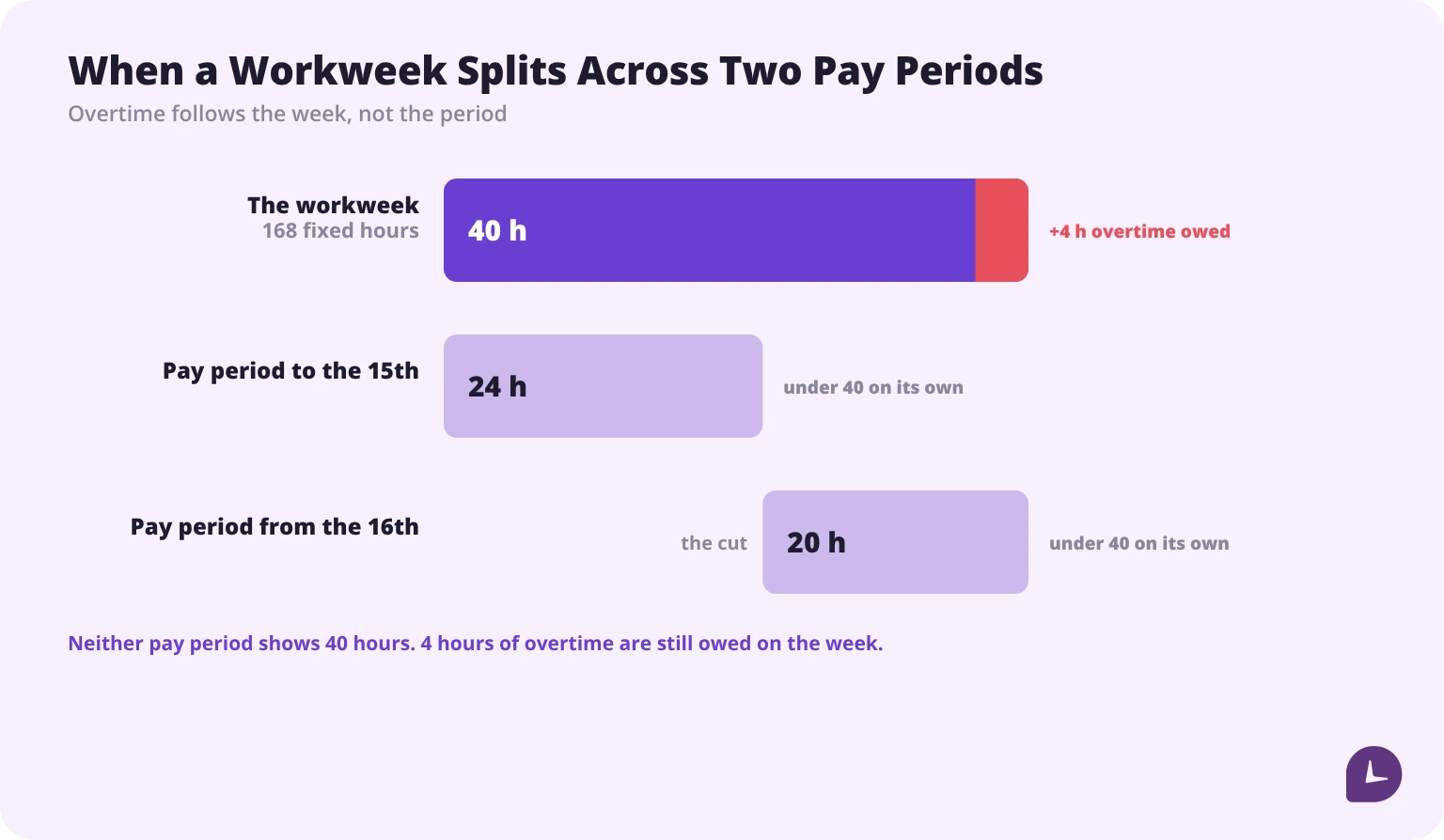
Overtime under the Fair Labor Standards Act is owed above 40 hours in a workweek, defined as a fixed and regularly recurring period of 168 hours. Pay periods are a separate concept. A semi-monthly payroll running on the 1st and the 16th will regularly cut a workweek in half.
When that happens, the hours on each side of the cut still belong to the same workweek for overtime purposes. If an employee works 44 hours in a week that splits 24 hours into one pay period and 20 into the next, they are owed 4 hours of overtime — even though neither pay period shows 40 hours on its own.
What to do: track by workweek, pay by pay period, and keep the two calculations separate. The two-week template on this page does exactly that, calculating each week’s overtime independently before summing the period.
Choosing the cycle in the first place is its own decision, and our guide to pay periods covers the trade-offs; the arithmetic once overtime is owed is in our steps to calculate overtime pay.
One more point from the same rulebook: unauthorised overtime is still owed. If a non-exempt employee works it, it gets paid, whether or not it was approved. A no-overtime policy is a management tool, not a payroll exemption.
Do you have to track breaks on a timesheet?
Federal law does not require employers to provide meal or rest breaks. State law frequently does. The Department of Labor’s own tables list 21 states with a meal period requirement for adult employees in the private sector, and eight states with a paid rest period requirement — California, Colorado, Illinois, Kentucky, Minnesota, Nevada, Oregon and Washington. All eight appear on the meal list too, so eight states require both.
Where it matters for the timesheet: if an employee keeps working through an unpaid lunch, that time is generally compensable, and a sheet with a pre-filled 30-minute deduction will understate their hours. Track breaks as they actually happen, with paid and unpaid in separate columns.
How long do you have to keep weekly timesheets?
The FLSA sets two periods, not one. Payroll records must be kept for at least three years. The records those wage calculations are based on — time cards, work and time schedules, pay-rate tables, and the timesheets behind them — must be kept for at least two years. The Department of Labor sets both out in its recordkeeping fact sheet. Some records must be kept longer, state law can require more, and tax authorities can look further back in specific circumstances.
Practical version: keep everything for three years. It is one rule instead of two, it covers the longer of the two federal periods, and the timesheet is usually the evidence behind the payroll record it feeds. Store them somewhere that is not one person’s laptop, and make sure the approval is recorded along with the hours. A timesheet nobody signed is a draft. Our guide to timesheets for payroll covers what the handover to payroll should look like.
Excel or PDF: which format to use
| Excel / Google Sheets | Word / PDF | |
|---|---|---|
| Calculates totals | Yes | No |
| Calculates overtime | Yes | No |
| Decimal hours column | Yes | No |
| Fill in by hand | Awkward | Yes |
| Print and post on a wall | Poor | Yes |
| Edit history | Sheets has it | No |
| Best for | Office and remote work | Field, shop floor, site |
Most teams need both: spreadsheets for people at a computer, printed forms for people who are not.
When a template stops being enough
Templates work well up to a point. Past it, the failure modes are consistent:
- You are chasing submissions. A template cannot remind anyone.
- Corrections outnumber entries. Every mistake needs a correction and review process, which is more admin than the tracking.
- Version control breaks down. Anyone with access can edit a spreadsheet, and it is hard to see who changed what last.
- Hours are reconstructed rather than recorded. Minutes not captured daily accumulate into hundreds of hours a year.
- Retrieval becomes a search. Three years of files across email and shared drives is not an archive.
At that stage the question is whether the admin cost has passed the software cost — the case for automated timesheets is mostly an argument about that arithmetic. Monitask records hours as they happen, keeps breaks and idle time separate from worked time, and produces timesheets an approver signs before payroll — our online timesheets page covers how. If you are not there yet, the templates above are a perfectly good answer.
Reliable employee tracking software. Clear visibility and insights into how employees work. Even remotely.
Try Monitask free for 10 days
FAQ
Is there a free weekly timesheet template in Excel?
Yes. The Excel and Google Sheets versions on this page are free and calculate daily totals, weekly totals, overtime and decimal hours automatically.
How do I calculate total hours on a weekly timesheet?
Subtract unpaid breaks from each day’s elapsed time, total the days, then compare the weekly total against 40 hours to identify overtime. Convert to decimal hours by dividing minutes by 60 before applying an hourly rate. If you are working out a month rather than a week, see [how many hours are in a month](/blog/how-many-hours-in-a-month/).
How do I convert 7 hours 45 minutes to decimal?
7.75. Divide 45 by 60 to get 0.75. Writing 7.45 is the most common arithmetic error on a manual timesheet.
Should overtime be calculated weekly or per pay period?
Weekly. The FLSA sets the overtime threshold at 40 hours in a workweek, defined as a fixed and regularly recurring 168-hour period. A pay period is a separate cycle and does not determine overtime.
Do I need to include breaks on a timesheet?
Track them. Federal law does not mandate meal or rest breaks, but 21 states require a meal period and eight of those also require paid rest breaks. Where breaks are unpaid, they must be deducted accurately rather than assumed.
How long should weekly timesheets be kept?
Two years is the federal minimum for the time records themselves, and three years for the payroll records they feed. Keep everything for three years — one rule instead of two — somewhere retrievable, with the approval recorded alongside the hours.
Can a timesheet be changed after it is submitted?
Yes, and it often should be if the approver requests a correction. After approval, most systems lock the record and require a permission to change it, with the change logged.
Who approves a weekly timesheet?
The employee’s direct supervisor or manager, before the hours go to payroll. The approval is part of the record, not an administrative formality.
Is a printable weekly timesheet still acceptable?
Yes. There is no mandated format — paper or digital both work, as long as the records are accurate, complete and accessible.