Timesheet Approval Process: Who Approves, By When, and What It Means

The timesheet approval process is the set of steps between an employee recording hours and those hours reaching payroll: submission, review, correction, approval and period close. The deadline is not chosen, it is counted backwards from pay date. The review is not a matter of diligence, it is a matter of how many hours the approver has. And approval has a narrower meaning than most workflows assume — under 29 CFR § 785.11 the obligation attaches to hours worked and to what the employer knew, not to who signed off.
> This is not legal advice. The regulations below are quoted as written; how they apply depends on facts this page cannot know. Check with counsel before changing pay practices. Regulations were checked against primary sources on 22 October 2026.
Key takeaways
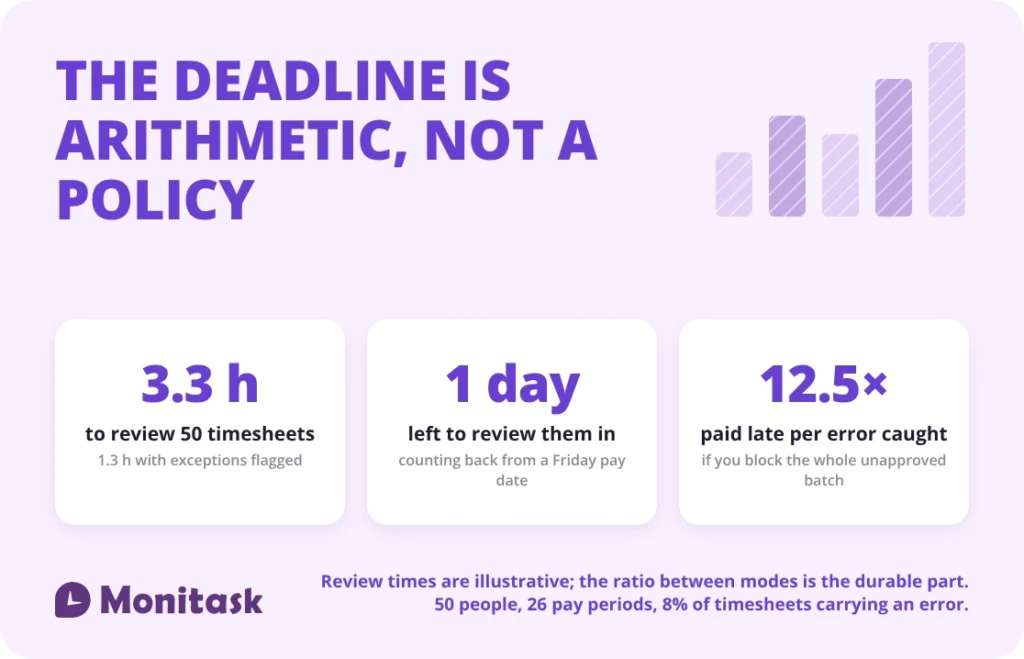
- A manager with 50 reports needs 3.3 hours to read timesheets line by line, and 1.3 hours with exceptions flagged — rubber-stamping is arithmetic, not laziness.
- Counting back from a Friday pay date leaves about one business day for the review, once submission has taken its share.
- A missed deadline is not a symmetric choice. Auto-approving lets 4.0 defective timesheets through per period; blocking payroll delays all 50 unapproved people, not just the 4.0 with an error — 12.5 paid late for every error caught.
- An employee’s sign-off is a data point, not a release: “The mere promulgation of a rule against such work is not enough.” (29 CFR § 785.13).
- Approval by an administrator standing in for a manager keeps the record of a control while removing the control.
What is the timesheet approval process?
Five steps, each with an owner and a deadline. The sequence is the same whether the record is a paper sheet or a row in a system, and it is the sequence rather than the tooling that makes the approval mean something. If the vocabulary is new, the timesheets glossary entry covers what a timesheet holds before any of this begins.
| Step | Owner | Produces | Typical deadline |
|---|---|---|---|
| Record | Employee | Hours against days, projects and pay attributes | Daily, as the work happens |
| Submit | Employee | A complete period, marked as finished | First business day after period end |
| Review | Approver | Exceptions identified, questions raised | Same day as submission, or next |
| Correct | Employee, or approver with a note | Amended entries with the original preserved | Before approval |
| Approve and close | Approver, then payroll | A locked period released to payroll | Two business days before pay date |
The sequence matters more than the names. Review has to sit between submission and approval as a separate step with its own time, because an approval performed in the same action as receiving the timesheet is not a review. Most workflows that produce formal-looking approvals with no substance have collapsed those two steps into one click. If you are setting the first step up from nothing, a timesheet template fixes what gets recorded before you decide who approves it.
One detail about step one is easy to miss and sits in the regulations rather than in any workflow. Section 785.11 lists, among its own examples of work an employer suffers or permits, time spent to “correct errors, paste work tickets, prepare time reports or other records”. Filling in a timesheet, and going back to fix one after an approver returns it, is itself working time. A process that pushes correction rounds into an employee’s own evening is not saving the time it appears to save.
Does an employee’s approval settle the hours?
Not in the way approval workflows usually imply. The obligation to pay attaches to hours worked and to what the employer knew about them, not to a signature on a record.
| Regulation | Section title | What it establishes |
|---|---|---|
| 29 CFR § 785.11 | Work not requested but suffered or permitted | Work the employer suffers or permits is work time whatever the reason the employee performs it, and the section names preparing time reports among its own examples. The test is knowledge: “The employer knows or has reason to believe that he is continuing to work and the time is working time” |
| 29 CFR § 785.12 | Work performed away from the premises or job site | The same applies to work away from the premises, including at home: “If the employer knows or has reason to believe that the work is being performed, he must count the time as hours worked” |
| 29 CFR § 785.13 | Duty of management | “The mere promulgation of a rule against such work is not enough.” Management “cannot sit back and accept the benefits without compensating for them”, and “must make every effort” to enforce the rule it has. |
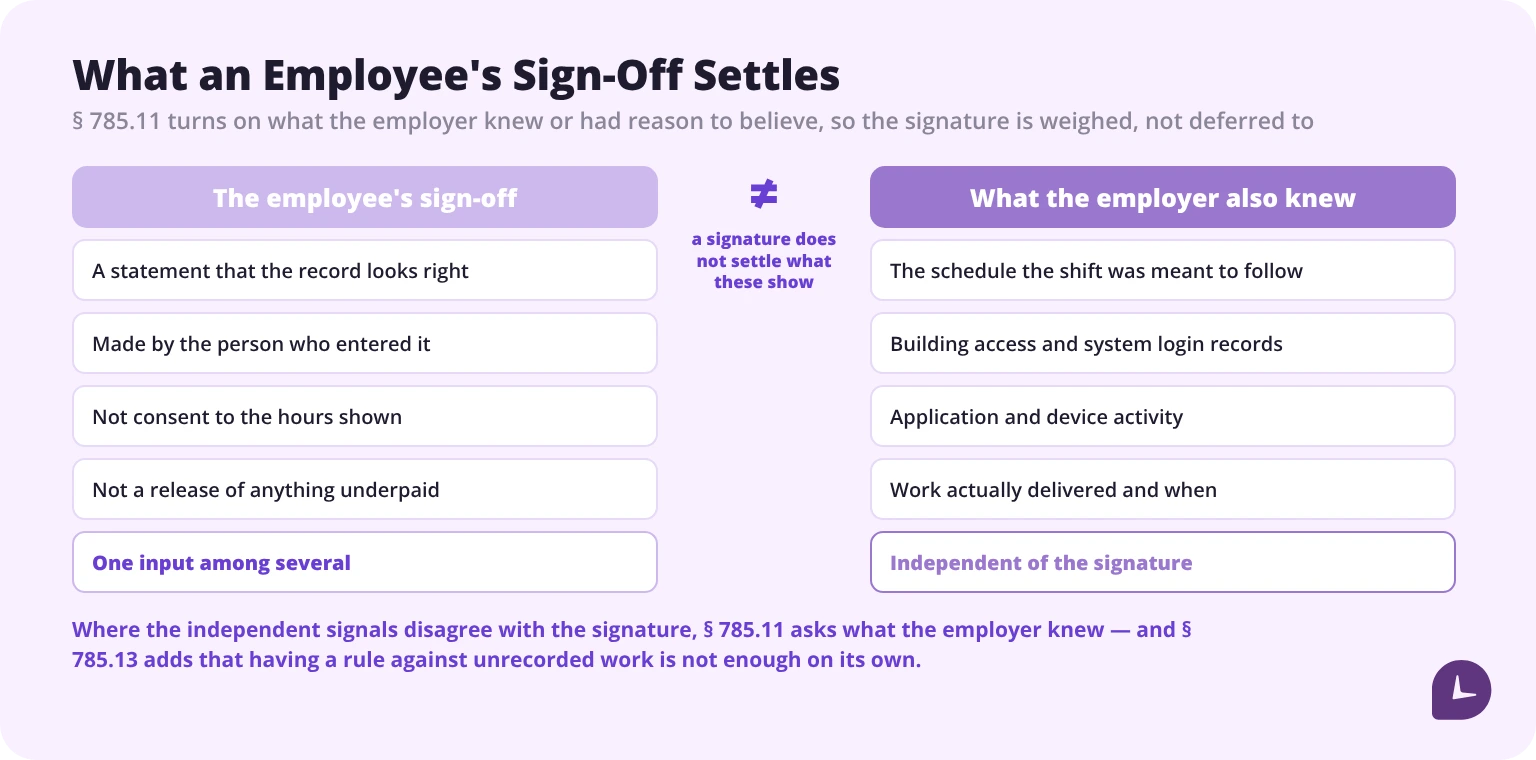
Read that against a standard workflow and the employee-confirmation step changes meaning. It is not consent and it is not a release. It is one input: a statement that the employee believes the record is right. Where independent signals say otherwise — a schedule, a building access log, a system login, an email timestamp, a delivered piece of work — the signature does not outweigh them, because § 785.11’s test is what the employer knew or had reason to believe.
Two practical consequences follow. An approval process should be designed as a data-quality control rather than as a waiver-collection exercise, because the second thing it cannot achieve. And an approver who has a reason to think the recorded hours are low should resolve that before approving rather than treat the employee’s submission as settling it.
Section 785.13 is the one that closes the usual escape route, and it is worth reading past the sentence that gets quoted. “The mere promulgation of a rule against such work is not enough.” is the famous half. The sentence after it is the operative one: “Management has the power to enforce the rule and must make every effort to do so.”. The duty is affirmative. A policy saying hours must be recorded accurately, with no mechanism that would notice when they are not, is the exact arrangement § 785.13 describes as insufficient.
Who is allowed to approve a timesheet?
Someone with direct knowledge of the work, who did not enter the hours. Four roles exist in any approval chain, and some combinations defeat the purpose of having one.
| Role | What it does | Must not also |
|---|---|---|
| Recorder | Enters the hours | Approve their own hours |
| Approver | Reviews and authorises | Enter hours for the person whose record they approve |
| Administrator | Configures the system, makes retroactive edits | Approve, or record on anyone’s behalf |
| Payroll | Moves approved hours into pay | Edit an approved record without a new approval |
Two failure modes account for most broken approval chains, and neither is a software limitation.
Administrator approval standing in for a manager. When a deadline is close, approval rights are often handed to an administrator or to HR so the period can be closed. From that point the person approving has no knowledge of the work, which removes the control while leaving its record intact — an audit trail showing approvals that tested nothing. If a deadline cannot be met, delaying approval is more honest than reassigning it.
A manager who both records and approves. Where a supervisor enters hours on behalf of a crew and then approves them, there are two steps in the system and one person in reality. The fix is a confirmation step by each employee on their own record, which is a weak control on its own but makes the chain two-person.
The practical test for an approver is whether they can answer a question the timesheet raises. If the answer to “was she on site on Tuesday?” is “the system says so,” that is not approval; it is forwarding.
How many timesheets can one approver review?
Fewer than most organisations assign, and the limit is arithmetic. Timing three ways of reviewing a weekly timesheet:
| Review mode | Minutes per timesheet | In 60 minutes | In 120 minutes |
|---|---|---|---|
| Line by line, nothing flagged | 4.0 | 15 | 30 |
| Review with exceptions flagged | 1.5 | 40 | 80 |
| Exceptions only, the rest not opened | 0.5 | 120 | 240 |
What that means by team size:
| Team size | Line by line | With exceptions flagged | Exceptions only |
|---|---|---|---|
| 10 | 0.7 h | 0.3 h | 0.1 h |
| 25 | 1.7 h | 0.6 h | 0.2 h |
| 50 | 3.3 h | 1.3 h | 0.4 h |
| 100 | 6.7 h | 2.5 h | 0.8 h |
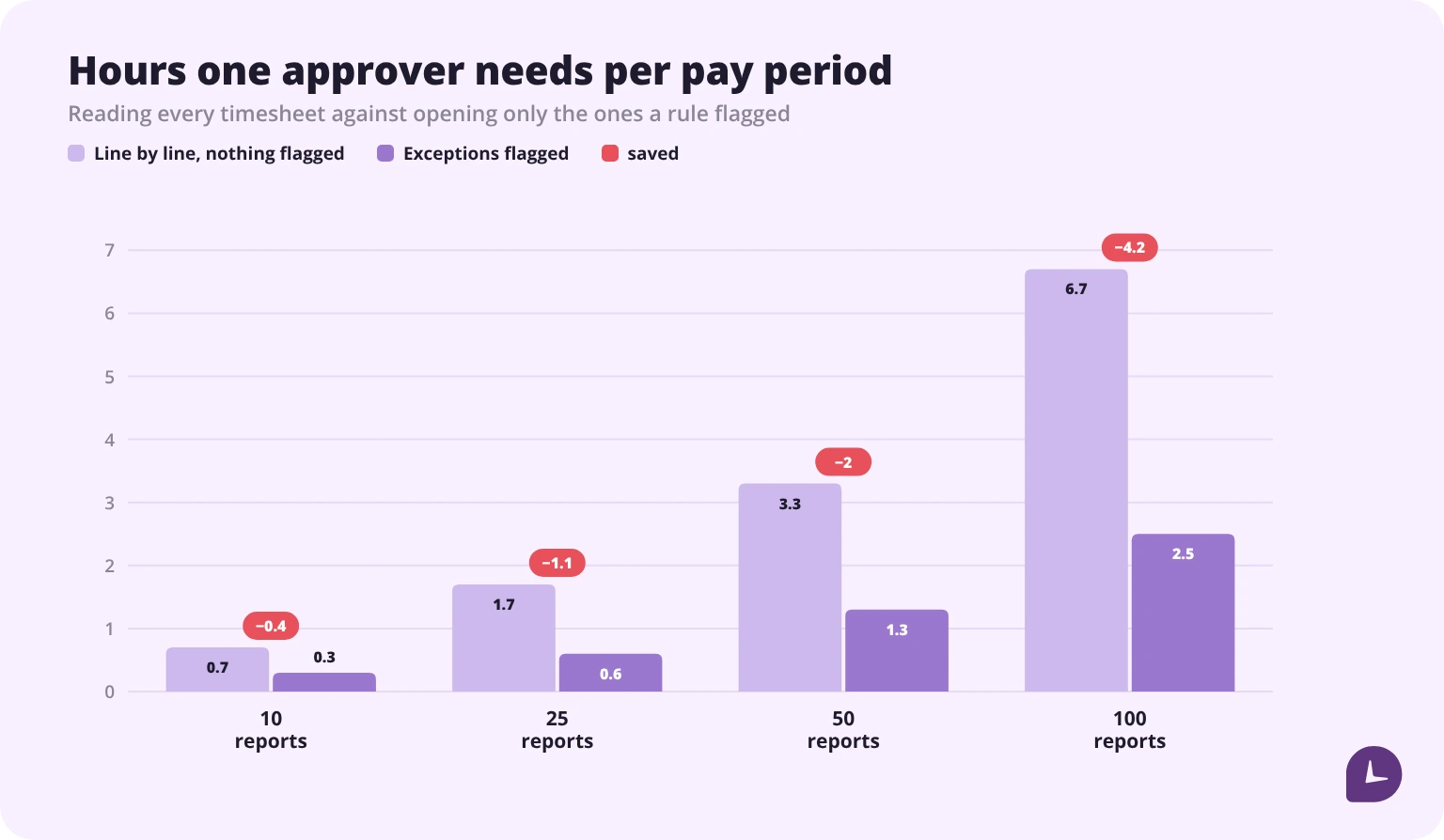
A manager with 50 reports needs 3.3 hours to read every timesheet line by line. That time does not exist inside a close window that also contains the manager’s actual job. So the review becomes formal — and it becomes formal because of the arithmetic, not because the manager is careless. Asking for more diligence from someone who has no hours for it changes nothing.
Three responses actually work. Reduce what has to be read, by surfacing exceptions and leaving clean timesheets closed — that is the move from 3.3 hours to 1.3. Split approval across more approvers so no one carries 50. Or extend the window, which the next section covers. What does not work is adding a reminder.
The figures above are illustrative; time your own review on ten timesheets and substitute the result. The ratio between the modes is the durable part.
How do you set the approval deadline?
By counting backwards from pay date. The deadline is a consequence of the payroll calendar, not a policy choice, and the handover into payroll is where the count starts — getting timesheets ready for payroll sets what the provider needs and when.
| Step | Day | Days before pay date |
|---|---|---|
| Pay date | Friday | 0 |
| Data with the payroll provider | Wednesday | 2 |
| Approval complete | Tuesday | 3 |
| Timesheets submitted | Monday | 4 |
| Period ends | Sunday | 5 |
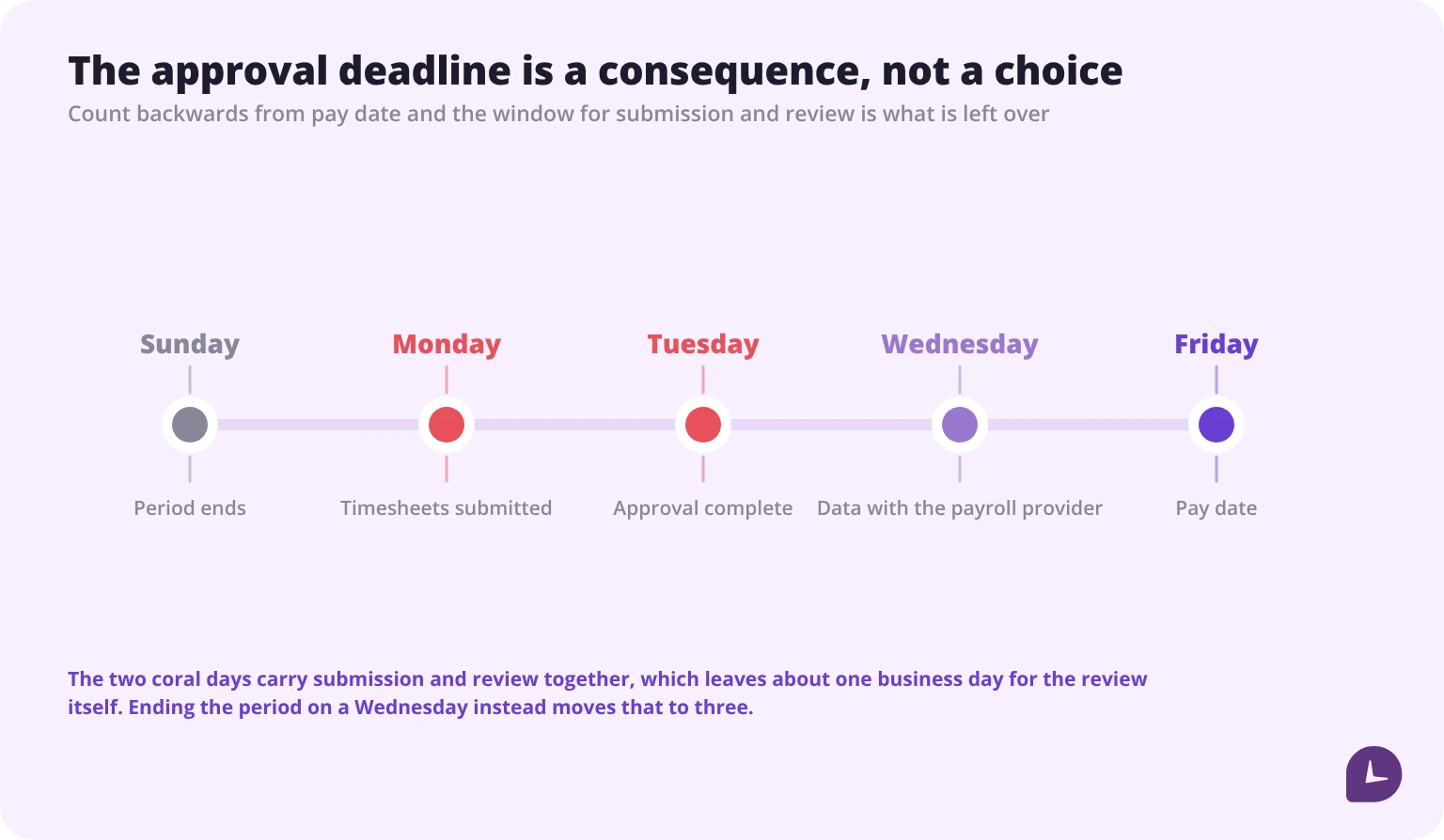
Now look at the gap. Submission is due Monday and approval closes Tuesday, so the window holding both is 2 business days — and submission takes the first of them, which leaves about 1 business day for the review itself. That single compressed day is where formal approval comes from, and it is why “set a firm deadline” is not useful advice on its own: the deadline is already as late as the payroll cut-off permits.
Four changes widen the window, in rough order of cost:
| Change | What it costs |
|---|---|
| End the period mid-week instead of Sunday | Nothing in money. It breaks a familiar habit, and that is the whole price |
| Move pay date one day later | Nothing in money, but employees are paid later |
| Record daily so submission is confirmation, not data entry | Requires daily entry to actually happen |
| Flag exceptions instead of reading line by line | Requires detection rules to be built and maintained |
The first is usually the cheapest and least considered, and it is worth counting rather than estimating. Keep the Friday pay date and move the period end from Sunday to Wednesday: submission falls on Thursday, approval is still due the following Tuesday, and the window goes from 2 business days to 4 — about 3 business days of review instead of 1.
That is not a marginal gain. If roughly 2.0 hours a day are genuinely free for review during a close, the Sunday-end calendar offers about 2.0 hours and the Wednesday-end calendar about 6.0. The line-by-line review of 50 timesheets needs 3.3. The period end is the difference between a real review fitting in the window and not fitting in it.
What happens when an approver misses the deadline?
Two options, both with a cost, and most organisations pick one without pricing either. The pricing is also where the usual comparison goes wrong, because the two options do not act on the same group of people.
Take an approver with 50 reports who reaches the payroll cut-off with none of them approved, in an organisation where 8% of timesheets carry an error. Auto-approving releases every unapproved timesheet, and the ones that do damage are the erroneous ones — 4.0 of them. Blocking payroll delays every unapproved person, because until someone reviews them nobody knows which 4.0 are wrong — so all 50 are paid late. Across 26 pay periods:
| Option | Who it affects per period | Per year |
|---|---|---|
| Auto-approve on timeout | 4.0 timesheets carrying an error reach payroll | 104 timesheets |
| Block payroll until approved | 50 employees paid late — everyone unapproved, not only the 4.0 with an error | 1,300 late payments |
| Block only the flagged ones | 4.0 blocked, 46.0 paid on time | 104 blocked |
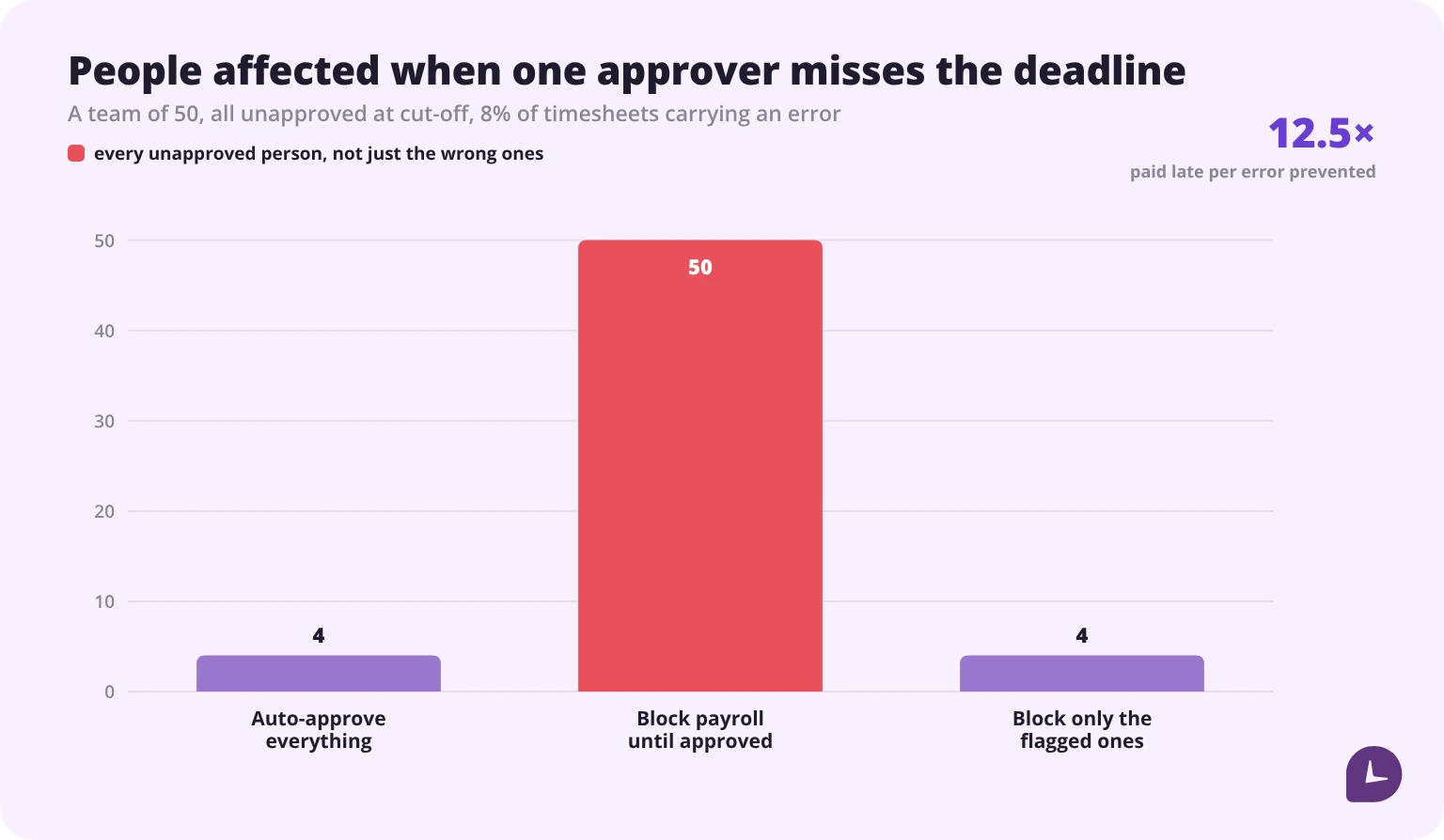
The ratio is the part worth remembering, and it does not depend on the size of the team or on how much of it the approver got through. Blocking everyone to stop the erroneous ones delays 12.5 people for every error it catches, because that is simply one divided by the error rate. At 2% it would be 50 people per error; at 15% it would be under 7.
How the exposure scales with the error rate, still on a 50-person team across 26 pay periods:
| Timesheets carrying an error | Reach payroll per period | Per year |
|---|---|---|
| 2% | 1.0 | 26 |
| 5% | 2.5 | 65 |
| 8% | 4.0 | 104 |
| 15% | 7.5 | 195 |
The choice is not between order and disorder. It is between a wrong payment on time and a right payment late, and which is worse depends on the size of the typical error and on what a late payment costs in your jurisdiction and in trust. But it is not an even trade, and treating it as one is how organisations end up blocking payroll for a whole team to catch four timesheets.
Which is why the third option is the one to build: decide per timesheet rather than per company. Auto-approve timesheets where no detection rule fired, and block only those carrying a flagged exception. The volume blocked then equals the exception rate rather than the unapproved rate — 4.0 people instead of 50, a 92% reduction in delayed pay — and the blocked cases are the ones where blocking is justified. This requires exception rules to exist and to be trusted, which is the same prerequisite as the 1.3-hour review mode above. The two investments are one investment.
Whichever option is chosen, it belongs in writing before a deadline is missed. A decision made during a close, by whoever is available, is the route to administrator approval.
How should a discrepancy be handled?
Inside the open period, by returning the record rather than editing it. The route matters because an approver who corrects an entry themselves has created a record no one has confirmed.
| Situation | Who acts | What happens |
|---|---|---|
| Hours look low against the schedule | Approver asks before approving | Employee amends or confirms; the question itself is the control |
| Hours look high against the schedule | Approver asks before approving | Employee explains or amends; approval waits |
| Missing day | Approver returns the timesheet | Employee records the day; a blank is not a zero |
| Wrong project or task code | Approver returns with the correct code | Employee amends; hours unchanged, allocation fixed |
| Employee unavailable before the deadline | Approver notes the open question | Approve the undisputed portion if the system allows; escalate the rest |
| Employee disagrees with the approver | Neither resolves it alone | Escalate; do not approve a record either party considers wrong |
The last row is the one most processes lack. An approver and an employee who disagree about hours have a dispute, not a data-entry problem, and resolving it by having the senior person approve their own version removes the disagreement from the record without resolving it.
A returned timesheet needs a reason attached. “Please fix” generates a second round; “Tuesday shows 6 hours, the schedule shows 8 — which is right?” usually ends it in one. Which errors are worth a round trip at all is a separate question, and it depends on what the common ones actually cost rather than on how obvious they look.
What should escalation look like?
| Level | Trigger | Who acts | Within |
|---|---|---|---|
| 1 | Timesheet not submitted by the submission deadline | Employee, prompted | Same day |
| 2 | Still not submitted | Approver contacts the employee directly | Next business day |
| 3 | Not approved by the approval deadline | Approver’s manager notified | Same day as the deadline |
| 4 | Still not approved at payroll cut-off | Pre-agreed rule applies — auto-approve or block | At cut-off, no discretion |
| 5 | Dispute between employee and approver | Approver’s manager, with HR where pay is contested | Before cut-off if possible, otherwise pay the undisputed amount and resolve after |
Two design rules keep escalation from becoming noise. Each level must reach a different person — an escalation that re-notifies the same approver is a reminder with a louder name, and the mechanics of making the first level work at all are covered in timesheet reminders. And level 4 must be a rule decided in advance rather than a judgement made under time pressure, because the whole point of reaching level 4 is that the person who should have decided has not.
Level 5 deserves its own note. Where pay is genuinely in dispute at cut-off, paying the undisputed portion on time and resolving the remainder afterwards is better than withholding everything, and it keeps the dispute about the contested hours instead of about late payment.
How do you close a period?
| Check | Why |
|---|---|
| Every expected timesheet is present | A missing timesheet is not a zero-hour week |
| No day is blank where the schedule shows a shift | Blanks are the most common silent under-record |
| Every exception has been resolved or explicitly accepted | An unresolved flag that reaches payroll was not a control |
| Corrections preserve the original value with author and reason | Needed to show what was first recorded |
| Hours sit in the period the work was performed in | Moving them changes which week counts toward overtime |
| Approvals came from eligible approvers, not from administrators | The control is the approver’s knowledge, not the click |
| The period is locked after approval | Post-close edits should require a new approval |
| Totals released to payroll match the approved totals | The handover is where silent differences appear |
Most of these are checks a person has to remember to make, which means most of them are checks that get skipped in a close that is already late. The ones worth automating first are the two that produce silence rather than an error: a missing timesheet and a blank day. Both look identical to a clean record from payroll’s side, and employee time clock software that knows the expected roster can raise them without anyone checking.
Monitask records hours as they are worked, so submission is a confirmation rather than a reconstruction, and shows hours by employee and project with an edit history behind every change.
See how online timesheets work in Monitask
Sources
- 29 CFR Part 785, Subpart C — Application of Principles; §§ 785.11, 785.12, 785.13. U.S. Department of Labor. https://www.ecfr.gov/current/title-29/subtitle-B/chapter-V/subchapter-B/part-785/subpart-C
All sources checked 22 October 2026. Part 785 carries the source note “26 FR 190, Jan. 11, 1961, unless otherwise noted”; none of §§ 785.11, 785.12 or 785.13 has been amended since.
FAQ
Who should approve timesheets?
Someone with direct knowledge of the work who did not enter the hours. The practical test is whether the approver can answer a question the timesheet raises; if the only available answer is “the system says so,” that is forwarding rather than approving. Administrators and payroll staff should not approve, because the control is the approver’s knowledge of the work rather than the act of clicking.
Can an administrator approve timesheets instead of the manager?
It is the most common way an approval chain stops working. Reassigning approval to an administrator to meet a deadline leaves an audit trail of approvals that tested nothing, because the person approving has no knowledge of the work. Delaying the approval is more honest than reassigning it.
Does an employee approving their own timesheet settle the hours?
No. Under 29 CFR § 785.11 the obligation attaches to work the employer suffers or permits, and the test is whether “the employer knows or has reason to believe” the work is being performed. Section 785.13 states that “The mere promulgation of a rule against such work is not enough.” and adds that management “must make every effort” to enforce the rule it has. An employee’s sign-off is one input saying they believe the record is right — not consent and not a release.
How many timesheets can one manager approve?
With nothing flagged, reading line by line takes around four minutes each, so a 50-person team needs about 3.3 hours. With exceptions flagged it falls to roughly 1.5 minutes each, or 1.3 hours. A close window rarely contains 3.3 spare hours, which is why large spans produce formal approvals — the cause is arithmetic, not diligence. Time your own review on ten timesheets and use that figure.
How do you set a timesheet approval deadline?
Count backwards from pay date. If pay is Friday and the payroll provider needs data two business days earlier, approval must finish Tuesday, submission Monday and the period ends Sunday — leaving about one business day for the review once submission has taken its share. The deadline is a consequence of the payroll calendar, not a policy choice.
How can we give managers more time to review?
Ending the period mid-week rather than Sunday is usually the cheapest change. Keeping a Friday pay date and moving the period end to Wednesday widens the submission-to-approval window from 2 business days to 4, which is about 3 days of review instead of 1. Moving pay date a day later also works but pays people later. Recording daily makes submission a confirmation rather than data entry, and flagging exceptions instead of reading line by line cuts review time by more than half.
Should timesheets auto-approve if the manager misses the deadline?
Price both options, and note that they do not affect the same people. At an 8% error rate across 50 employees, auto-approval sends about 4.0 defective timesheets per period — 104 a year — into payroll. Blocking delays every unapproved person, not just the erroneous ones, so it delays all 50: about 12.5 people paid late for every error caught. The better third option is to decide per timesheet: auto-approve where no detection rule fired and block only flagged exceptions, so the volume blocked equals the exception rate rather than the unapproved rate.
What should a manager do if hours look wrong?
Ask before approving, and return the timesheet rather than editing it — an approver who corrects an entry themselves creates a record nobody has confirmed. Attach a specific reason: “Tuesday shows 6 hours, the schedule shows 8 — which is right?” usually resolves in one round where “please fix” does not. If the employee and approver disagree, escalate; approving a record either party considers wrong removes the disagreement without resolving it.
What happens if pay is disputed at the payroll cut-off?
Paying the undisputed portion on time and resolving the contested hours afterwards is generally better than withholding the whole amount, because it keeps the dispute about the contested hours rather than adding a late-payment problem. The rule for what happens at cut-off should be written down in advance rather than decided during a close by whoever is available.
Is time spent filling in a timesheet paid time?
Section 785.11 lists time spent to “correct errors, paste work tickets, prepare time reports or other records” among its examples of work an employer suffers or permits, and says the reason the employee does it is immaterial. So the minutes an employee spends completing a timesheet, and redoing one an approver returned, are working time on the same footing as the rest. It is a reason to keep correction rounds short rather than to stop asking for them.