Employee Attendance Tracking: Methods, Templates and Legal Limits

Updated 15 October 2026
Reliable employee tracking software. Clear visibility and insights into how employees work. Even remotely.
Try Monitask free for 10 days
Attendance tracking records when people start, break and finish, so hours, lateness and absence are accurate. The method matters less than two things most guides skip: separating protected absences from countable ones, and knowing that a fingerprint time clock is the single most litigated piece of attendance hardware in the US. Start with the template below, then read the two legal sections.
Five ways to track attendance, compared
| Method | Setup cost | Accuracy | Works offline | Main risk |
|---|---|---|---|---|
| Paper register or punch card | Near zero | Low | Yes | Buddy punching, lost records |
| Spreadsheet | Near zero | Medium | Partly | Manual error, no audit trail |
| Browser or mobile app | Low | High | Varies | Needs devices and connectivity |
| SMS or text-based | Low | Medium | Yes | No location verification |
| Biometric or RFID clock | Hardware | Highest | Yes | Legal exposure — see below |
There is no single best method. A warehouse with shared tablets, a field crew with phones and an office with desktops need different answers, and most companies end up with two.
How not to track attendance
Four methods that still appear in small businesses and consistently cause problems.
Punch cards store only a name and timestamps, have no verification, and are the classic vector for buddy punching. Entering the data afterwards is manual and error-prone.
Paper timesheets hold limited data, are easily lost or damaged, and introduce errors from handwriting alone. Every one of those errors becomes a follow-up conversation.
Manual spreadsheets are slow, error-prone and hard to audit. They also do not scale: workable at five people, unmanageable at twenty. If a spreadsheet is lost or damaged, you are out of compliance with FLSA recordkeeping, with penalties assessed per violation and per employee.
Attendance registers carry every drawback of the above with no real-time visibility.
The honest version: all four are acceptable at very small scale if the records are accurate and retrievable. They stop being acceptable the moment nobody can find last quarter’s data.
What to look for in an attendance tracker
| Feature | What it does | Why it matters |
|---|---|---|
| Real-time view | Shows who is in now | Coverage gaps get fixed same-day |
| Flexible check-in | Mobile, tablet, kiosk, desktop | One method never fits everyone |
| Location or identity verification | Confirms who and where | Reduces buddy punching |
| Missed clock-in alerts | Flags a shift that never started | Catches absence before the shift ends |
| Separate absence codes | Distinguishes types of leave | Protected absences must not be pooled |
| Call-off audit trail | Time, method and reason recorded | The documentation you need later |
| Point tracking with thresholds | Applies the policy consistently | Inconsistency is where claims start |
| PTO and leave balances | One place for time off | Stops parallel spreadsheets |
| Payroll export | Hours reach payroll without re-keying | Every manual transfer adds errors |
Free attendance tracker template
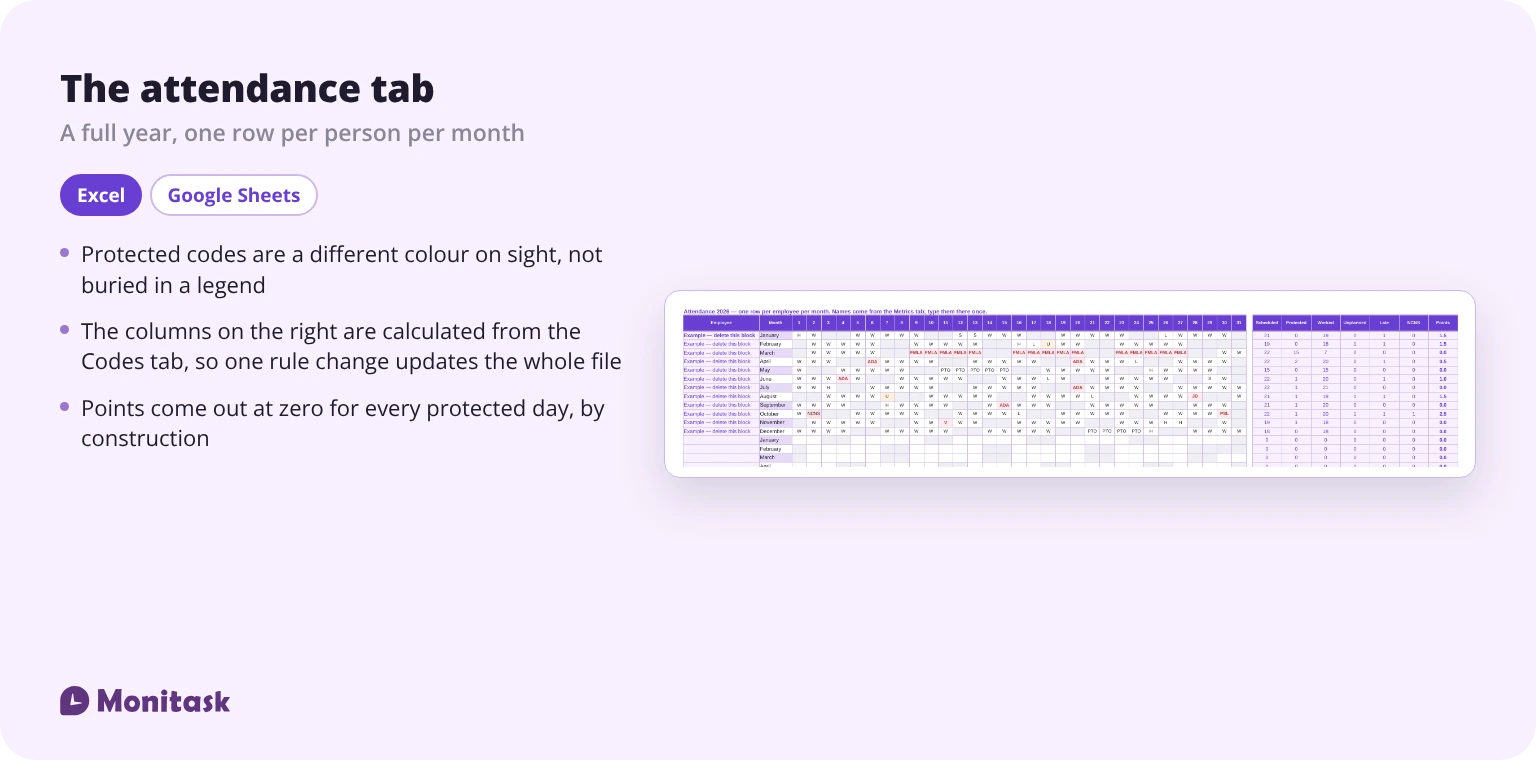
The template below covers a full year, with a metrics tab that calculates attendance and absence rates automatically.
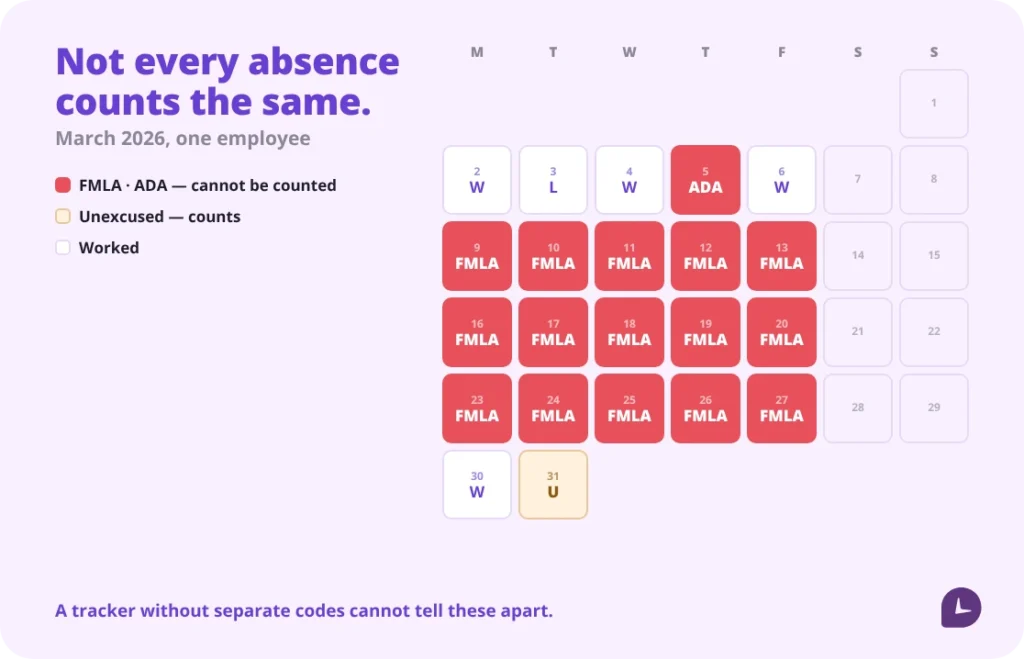
What makes it different: it has separate codes for every kind of protected absence, and the metrics tab excludes them from any countable total. Most free trackers pool every absence into one bucket, which is exactly how protected leave ends up in a point system.
| Code | Meaning | Counts toward points |
|---|---|---|
| W | Worked | — |
| L | Late arrival (worked) | Yes |
| PTO | Approved paid time off | No |
| S | Sick, per company policy | Per policy |
| U | Unexcused absence | Yes |
| NCNS | No call, no show | Yes |
| FMLA | Protected FMLA leave | No |
| ADA | Accommodation-related absence | No |
| JD | Jury duty | No |
| MIL | Military leave (USERRA) | No |
| V | Voting leave, where state law gives it | No |
| PSL | Protected sick leave (state or local) | No |
| H | Company holiday | — |
The six codes in bold are the protected ones. In the file their point value is a cell holding zero on the Codes tab, and every total elsewhere in the workbook is built from that cell. So protected leave carries no points by construction, not because a formula happens to leave it out.
If you need to total hours rather than days, our weekly timesheet template covers that side of the same job.
Attendance metrics and how to calculate them
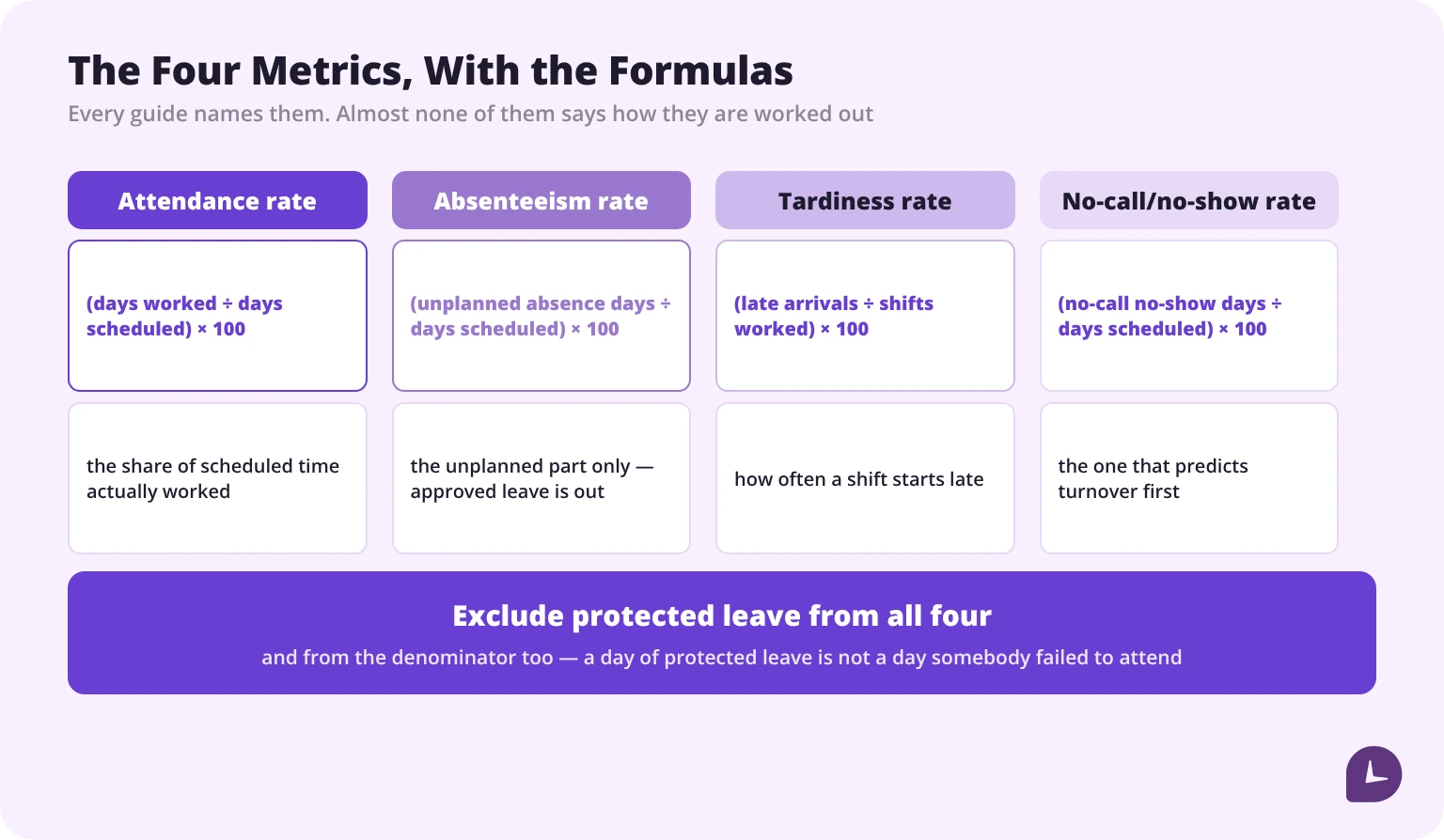
Every guide tells you to track absenteeism. None of them says how it is calculated. Here are the four metrics that matter, with the formulas.
Attendance rate — the share of scheduled time actually worked.
Attendance rate = (days worked ÷ days scheduled) × 100Absenteeism rate — the share of scheduled time lost to unplanned absence. Approved leave is excluded; this measures the unplanned part. Our guide to what is absenteeism covers what sits behind the number.
Absenteeism rate = (unplanned absence days ÷ days scheduled) × 100Tardiness rate — how often shifts start late. If you also care whether people are working their scheduled hours rather than merely present for them, that is schedule adherence, which is a different measurement.
Tardiness rate = (late arrivals ÷ shifts worked) × 100No-call/no-show rate — the one that predicts turnover before anything else does.
NCNS rate = (no-call no-show days ÷ days scheduled) × 100Two rules for using them. Exclude protected leave from every one of these — FMLA and ADA absences are not attendance problems. And read them at team level before individual level: a single person’s number is noise, a department’s trend is information.
A third rule worth adding, because it is the one that quietly distorts a rate: approved time off and company holidays are not scheduled days either. A day nobody expected you at work cannot be a day you failed to attend. The template treats PTO and holidays as unscheduled for exactly this reason.
For context on why this matters financially, the World Economic Forum and McKinsey Health Institute’s 2025 Thriving Workplaces report puts US absenteeism costs at roughly $226 billion a year, about $1,695 per employee. Two caveats worth knowing if you plan to quote it: the report attributes that figure mainly to chronic health conditions rather than to attendance management, and the underlying estimate traces back to a CDC Foundation analysis rather than to new 2025 data. Our own guide to the cost of absenteeism works through what it means for a single employer.
Attendance point systems: how they work and where they break
A point system assigns a value to each attendance event — half a point for lateness, one for an unexcused absence, two or three for a no-call/no-show — and sets a threshold at which discipline follows.
Used consistently, it is defensible: the same rule applied to everyone, documented.
Three ways it breaks:
1. Protected absences get points. This is the big one and it is covered below. A point assessed for FMLA leave is a problem regardless of intent.
2. The threshold is applied unevenly. If one supervisor forgives points and another does not, the system stops being a rule and becomes evidence of inconsistent treatment.
3. Nobody documents the call-off. A point with no record of when the employee called, how, and what they said is a number without a basis.
Our guide to the attendance point system covers the mechanics of setting one up.
Absences you cannot count against an employee
This section has no equivalent in any comparable guide, and it is the one that costs money when it is missing.
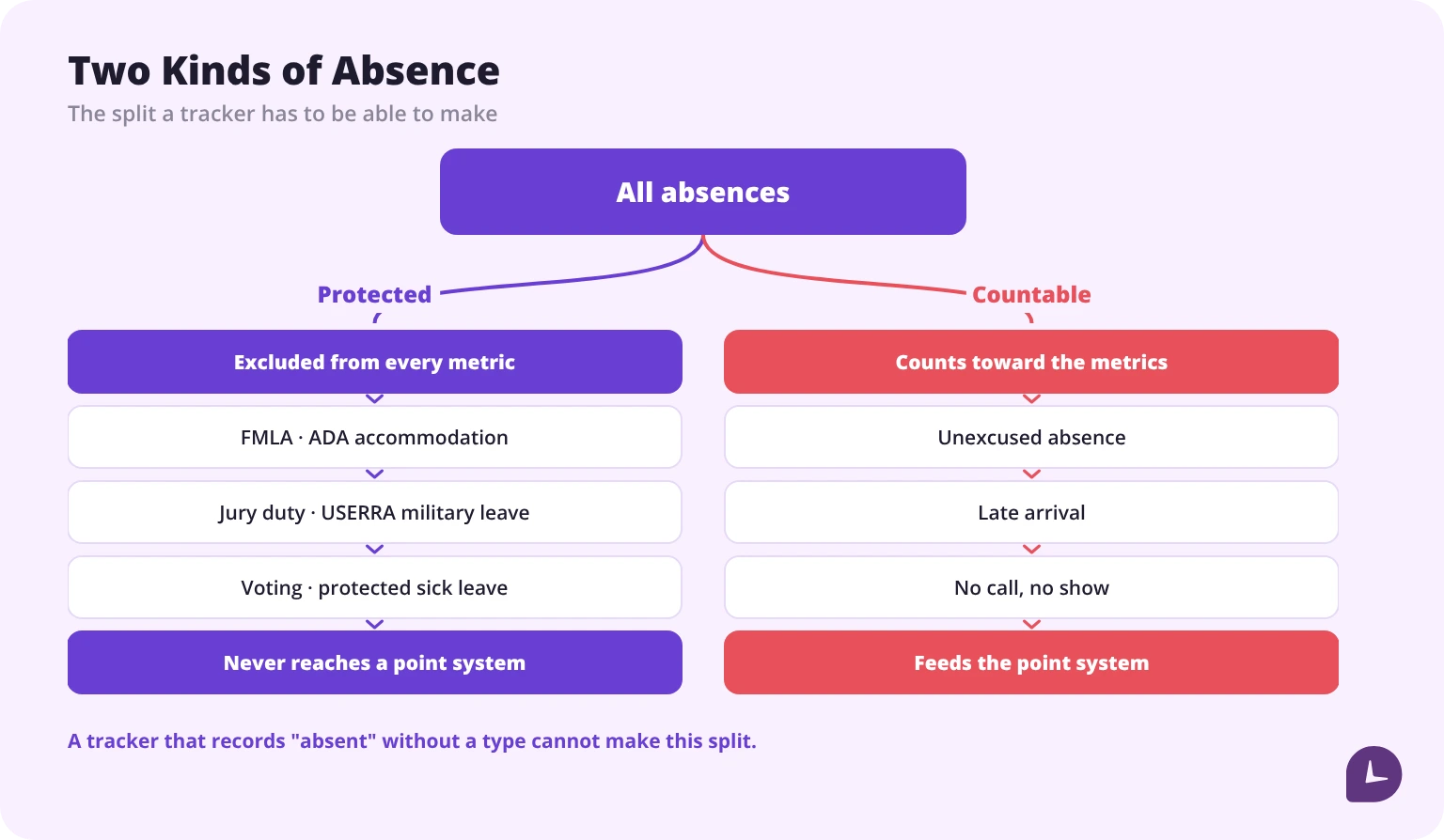
FMLA leave. Under the Family and Medical Leave Act, eligible employees at covered employers may take protected leave for qualifying reasons. Counting that leave as an attendance occurrence, or assessing points for it, is the issue — the leave is protected precisely so that using it carries no penalty.
ADA-related absences. Where leave functions as a reasonable accommodation for a disability, treating it as a countable absence creates exposure under the Americans with Disabilities Act.
Others that commonly appear: jury duty, military leave under USERRA, voting leave where state law provides it, and protected sick leave under state and local paid sick leave ordinances.
What this means for the tracker itself: you need separate codes, and your metrics must exclude them. A system that records “absent” without a type cannot distinguish a protected absence from an unexcused one, which means the number it produces cannot safely be used for discipline.
How much difference does it make? In the worked example inside the template, one employee’s year contains fifteen days of FMLA leave and a handful of ADA, jury duty and protected sick days. Excluding them, as the law requires, their attendance rate is 97.29%. Pooling them into one bucket, as most free trackers do, the same person reads 88.11% — a nine-point swing, and the difference between an unremarkable record and a performance conversation. The template shows both numbers side by side so you can see the size of the mistake.
This is general information, not legal advice. FMLA eligibility, ADA obligations and state leave laws each have their own conditions. Confirm with counsel before building a policy on them.
Boost your business productivity
Track performance and streamline teamwork
Before you buy a biometric time clock
Fingerprint and facial recognition clocks appear near the top of most attendance recommendations, including from the largest vendors in this category. What those recommendations leave out is that biometric time clocks are the single most litigated category of attendance hardware in the United States.
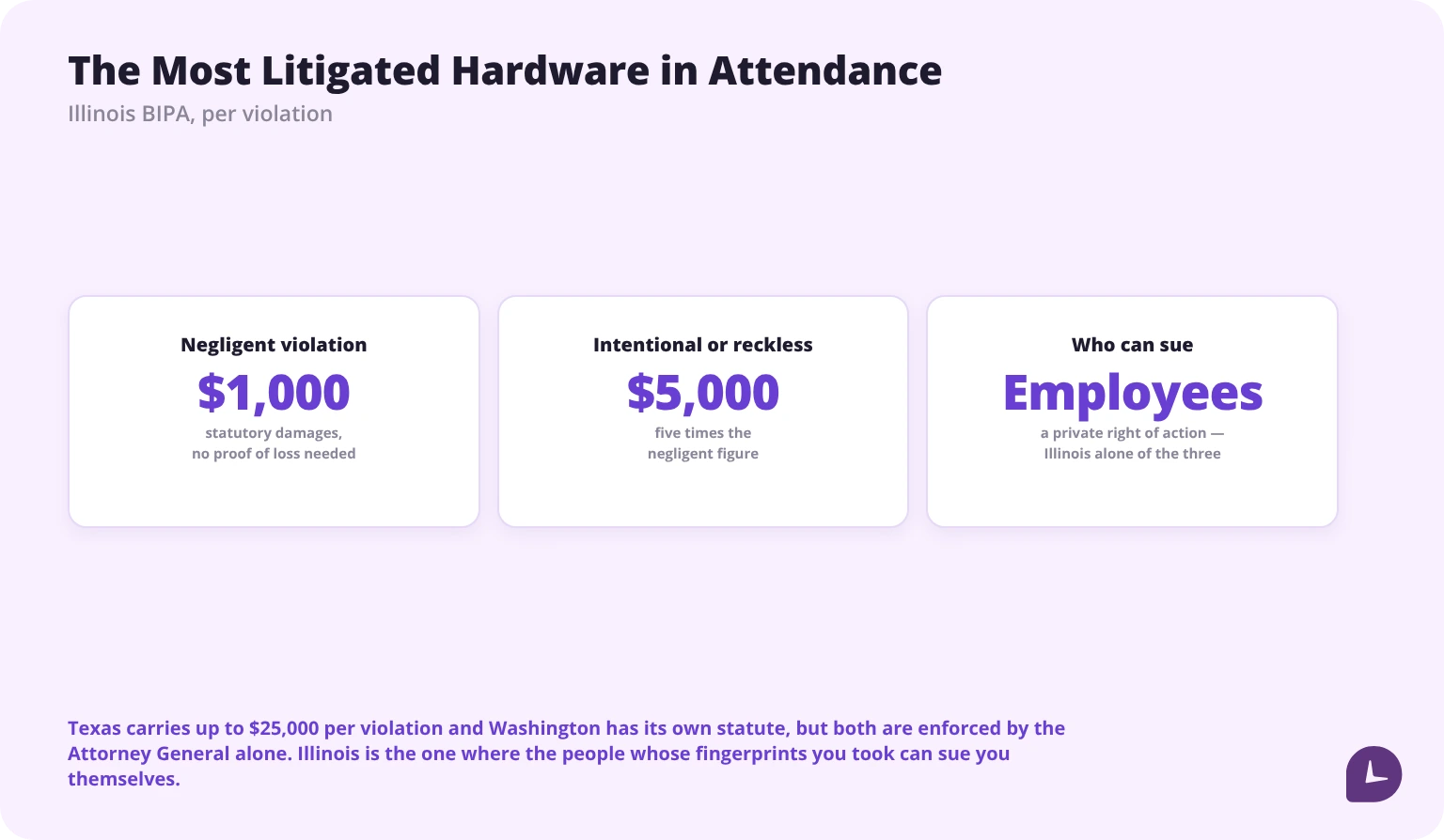
Illinois’ Biometric Information Privacy Act requires written informed consent before collecting a biometric identifier, plus a written retention policy and secure storage with destruction timelines. It carries a private right of action — employees sue directly — with statutory damages of $1,000 per negligent violation and $5,000 per intentional or reckless one. Cumulative BIPA settlements run into the hundreds of millions.
Texas and Washington have their own biometric statutes, and they are not the same law in a different state:
| Illinois (BIPA) | Texas (CUBI) | Washington (RCW 19.375) | |
|---|---|---|---|
| Consent | Written release, before collection | Inform and obtain consent before capture | Notice, consent or an opt-out mechanism |
| Written retention policy | Required, and must be published | Destruction within a set period | Not specified in the same terms |
| Who enforces | Employees, directly | Attorney General only | Attorney General only |
| Exposure | $1,000 negligent / $5,000 intentional, per violation | Up to $25,000 per violation | Consumer Protection Act remedies |
Illinois is the outlier, and it is the one that matters most to an employer: it is the only one of the three where the people whose fingerprints you took can sue you themselves.
This does not mean do not use biometrics. It means:
- Get written informed consent before first collection, not after.
- Publish a retention and destruction policy.
- If you have any Illinois employees, treat this as a legal project rather than an IT purchase.
- Consider whether PIN or photo verification solves the same problem — buddy punching — at a fraction of the exposure.
We cover the full picture in is employee monitoring legal.
Rounding clock-in times
Rounding to the nearest quarter hour is common and permitted in US payroll, provided it is neutral — it cannot systematically favour the employer over time. Rounding arrivals up and departures down is the pattern that produces claims.
Decide the rule before rollout, write it into the policy, and apply it in both directions. Our guide to the 7-minute time clock rule covers the detail.
How long to keep attendance records
The FLSA sets two periods rather than one. Payroll records must be kept for at least three years. The records on which wage computations are based — time cards, work and time schedules, and the attendance data behind them — must be kept for at least two, as the Department of Labor sets out in its recordkeeping fact sheet.
Practically: keep everything three years, which covers the longer of the two, store it somewhere that is not one manager’s laptop, and keep the call-off documentation alongside the attendance data. A point with no record behind it is not documentation.
Writing an attendance policy
The policy is what makes the tracking defensible. It should state:
- What counts as an absence, a late arrival and a no-call/no-show
- How and by when an employee reports an absence
- Which absence types are excluded from counting
- The point values and thresholds, if you use them
- Who reviews and who approves exceptions
- How long records are kept
Our free company forms and policies section includes templates, and we cover the drafting in creating an employee attendance policy.
How to roll it out
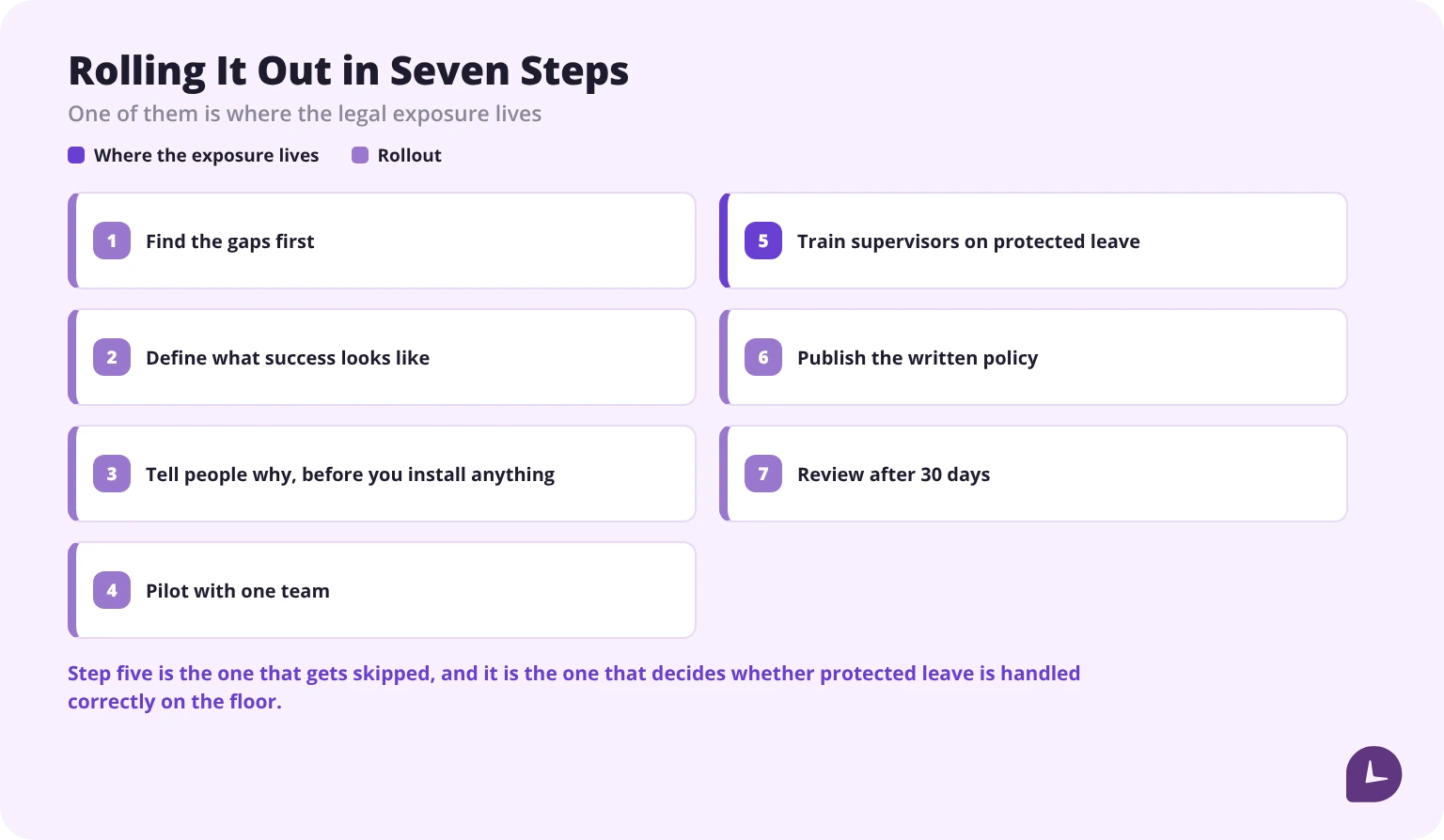
- Find the gaps first. Undocumented call-offs, hidden overtime, inconsistent point application. These are what you are fixing.
- Define what success looks like. Fewer payroll corrections, faster coverage decisions, documentation that holds up.
- Tell people why, before you install anything. Adoption problems are almost always communication problems.
- Pilot with one team. Multilingual, offline and device issues surface here, not in the rollout plan.
- Train supervisors specifically on call-off handling and protected leave. This is where the legal exposure lives.
- Publish the written policy before the first shift under the new system.
- Review after 30 days and adjust. The first month always reveals something the plan missed.
When a spreadsheet stops working
Three signals, and one is enough:
- You cannot answer a question about last quarter without opening several files.
- Corrections outnumber entries. Every missed clock-in becomes a conversation.
- Hours are re-keyed into payroll. Each manual transfer is a new error opportunity. The arithmetic itself is covered in how to calculate payroll, and every step of it is a step somebody can mistype.
At that point the question is whether the admin cost has passed the software cost. Monitask records clock-ins as they happen, keeps breaks and idle time separate, and produces timesheets an approver signs before payroll — our employee attendance software page covers it. Below that threshold, the template above is the right tool.
Reliable employee tracking software. Clear visibility and insights into how employees work. Even remotely.
Try Monitask free for 10 days
FAQ
What is the best way to track employee attendance?
There is no single best method. Office teams usually need an app or desktop clock-in; field teams need mobile with location; frontline teams without smartphones need SMS or a shared kiosk. Most companies run two methods.
How do you calculate an absenteeism rate?
Unplanned absence days divided by scheduled days, times 100. Exclude approved leave and all protected leave from the numerator, and exclude protected leave from the denominator too — a day of protected leave is not a day the person failed to attend.
Can I count FMLA leave as an absence?
No. FMLA leave is protected, and assessing attendance points for it creates legal exposure. Your tracker needs a separate code so it never enters a countable total.
Are attendance point systems legal?
Generally yes, when applied consistently and when protected absences are excluded. The problems come from uneven application and from pooling protected leave with unexcused absence.
Is a fingerprint time clock legal?
Yes, with conditions, and the conditions differ by state. Illinois requires a written release before collection and a published retention and destruction policy, and it lets employees sue directly. Texas requires you to inform the person and obtain consent before capture, but only the Attorney General enforces it. Washington’s statute is narrower again and is also enforced only by the Attorney General. Illinois is the one to plan around.
How long do I have to keep attendance records?
Payroll records for at least three years under the FLSA, and the time records behind them for at least two. Keeping everything for three years covers both.
Do I need an attendance policy in writing?
It is what makes the tracking defensible. Without a written policy, point assessments and disciplinary decisions have no documented basis.
Can I track attendance for remote employees?
Yes, through app or browser clock-in. Location verification is optional and raises its own questions — cover it in the policy rather than switching it on quietly.
What is a good attendance rate?
It depends entirely on the industry and on how you count. The useful comparison is your own trend over time, not an external benchmark.