
Most guides to small business time tracking are lists of eight or ten tools. This one is not, because the tool matters less than two things nobody explains before selling you one.
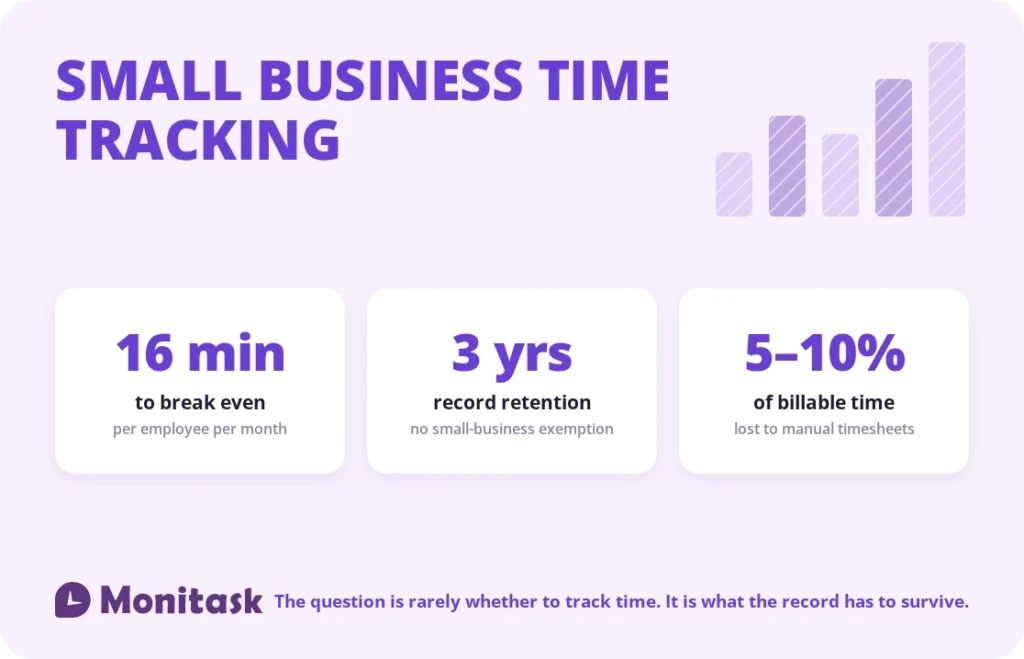
Record-keeping obligations do not scale with headcount. A business with three employees faces the same FLSA requirements as one with three hundred: hours worked each day, total hours each workweek, the day the workweek begins, kept for the required period. There is no small-business exemption.
The economics are lopsided. At a $25 hourly rate, time tracking software at around $6.49 per user per month pays for itself if it recovers roughly 16 minutes per employee per month, which is under a minute a day.
This guide covers what to look for, when a spreadsheet is genuinely still fine, and what the record must contain.
What you are legally required to keep
Under the FLSA, every covered employer must maintain specific records for each non-exempt employee. The list is short and specific:
- Name, Social Security number, address, and birth date if under 19
- Sex and occupation
- The time and day of week when the workweek begins
- Hours worked each day
- Total hours worked each workweek
- Pay basis, regular hourly rate, straight-time and overtime earnings
- Additions to and deductions from wages, total wages per pay period, pay date and period covered
Retention: three years for payroll records, two years for the underlying records that wage computations are based on, including time cards and work schedules.
The Department of Labor does not prescribe a format. Paper, spreadsheet or software are all acceptable, provided the records are accurate and can be produced for inspection, which the regulations require within 72 hours of a request.
Two items on that list catch small employers out. The workweek start must be recorded, because it determines when overtime is owed. And hours worked each day must be recorded for non-exempt employees, even where everyone is salaried in practice but not exempt in law.
The reason this matters more than it sounds: where an employer has no adequate records and an employee claims unpaid hours, the burden shifts. Our attendance sheet guide covers that rule in detail. In short, the employee’s reasonable estimate can stand.
The economics
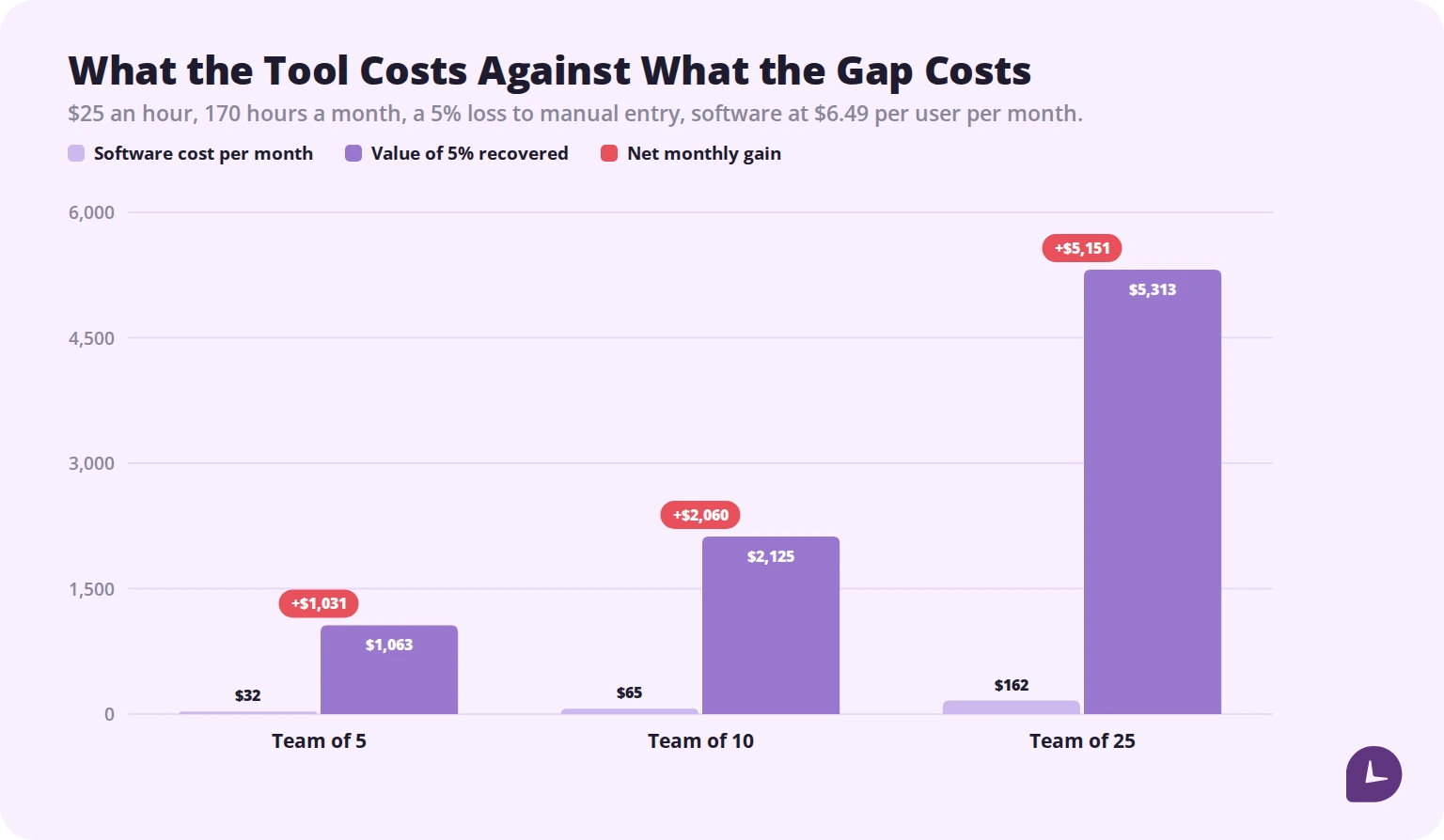
Manual timesheets typically lose 5 to 10% of billable time, to forgotten hours and end-of-week reconstruction from memory. On a $25 hourly rate and 170 hours a month, that is $212 to $425 per employee per month.
Against that, software at $6.49 per user per month:
| Team size | Software per month | Value of 5% recovered |
|---|---|---|
| 5 people | $32 | $1,063 |
| 10 people | $65 | $2,125 |
| 25 people | $162 | $5,313 |
The break-even is about 16 minutes recovered per employee per month, or roughly 43 seconds per working day.
Two honest caveats. The recovery is only real if you bill hourly or pay hourly; for a fully salaried team with no client billing, the benefit is planning accuracy rather than recovered revenue. And a tool nobody uses recovers nothing, which is why rollout matters more than feature count.
When a spreadsheet is still fine
A spreadsheet is genuinely sufficient when all of these hold:
- Under about ten people
- One person compiles the records
- Nobody is paid hourly and no hours are billed to clients
- Nobody works in a state with daily overtime rules
- Records are filled in daily, not reconstructed
Break any one of those and the spreadsheet starts costing more than it saves. In particular, “reconstructed on Friday” fails both the accuracy requirement and the practical purpose, because a record assembled from memory is exactly the kind that does not hold up when challenged.
Our free attendance sheet template and daily schedule template are built for the case where a spreadsheet is still the right answer.
Three kinds of small business, three different needs
The most common buying mistake is choosing a tool built for a different business than yours.
Shift-based and hourly. Retail, hospitality, trades, care. What matters: clock in and out, overtime calculated automatically against state rules, break tracking, scheduling, and payroll export. What does not: project codes and billable rates.
Billable and professional services. Agencies, consultancies, accountants, law firms. What matters: time by client, project and task, billable versus non-billable, rates per person or per project, and invoice-ready exports. Utilisation reporting matters more than attendance.
Salaried knowledge work. Product teams, internal functions. What matters: project-level time for planning and estimation, and low friction. Clock-in precision matters least here, and imposing it produces resistance without benefit.
Most tools do one of these well and the others adequately. Buy for the one you actually are.
What to look for
Automatic timesheets. Hours should roll up on their own. If someone types the timesheet, you have bought a more expensive spreadsheet.
Overtime rules that match your states. Weekly at 40 is the federal floor. If you employ anyone in California, daily overtime above eight hours and double time above twelve have to be handled by the tool, not by someone with a calculator.
Payroll export or integration. Direct integration with your payroll system, or at minimum a clean export. Retyping hours into payroll is where errors enter, at the point where they cost money.
Approval workflow. A manager reviews and approves before the run. Corrections should happen before the money moves.
Works on the devices your team actually has. Desktop, mobile and browser. A tool that only runs on a company laptop does not cover a field team.
Records you can retrieve years later. You need the two and three year retention. Check what happens to your data if you cancel, before you subscribe rather than after.
Employees can see their own data. This is the difference between a time record and surveillance, and it determines whether the rollout succeeds.
Boost your business productivity
Track performance and streamline teamwork
Rounding rules
Rounding clock times is permitted and widely done, but it has a condition that small employers frequently miss.
The common practice is rounding to the nearest quarter hour, sometimes called the seven-minute rule: minutes 1 to 7 round down, 8 to 14 round up. That is acceptable only if the rounding is neutral over time, meaning it works in the employee’s favour as often as the employer’s.
Rounding that always goes down, or a policy that rounds start times up and end times down, is not neutral and creates unpaid work time. It is a common source of wage claims precisely because it looks like a small administrative convenience.
Any tool you buy should let you configure rounding, and the safest configuration for a small business is usually none at all. Our guide to the 7-minute rule for payroll covers the detail.
What to skip
Small teams overbuy in predictable ways.
Keystroke logging. It measures compliance with monitoring rather than work, and it carries a real trust cost. It is also restricted in several states.
Continuous screen recording. Storage-heavy, rarely reviewed, and a data liability if it is ever breached.
Geofencing, unless you have a genuinely field-based team. For office and remote workers it is friction without information.
Enterprise workforce management suites. Priced and configured for organisations with an HR systems team.
Per-feature pricing tiers you will not reach. Buy for the team you have, not the one in the plan.
Rolling it out without a mutiny
How you introduce it matters more than which tool you pick.
Explain the reason honestly. Accurate payroll, accurate client billing, better estimates. Not “because I want to see what you are doing.”
Show people their own data first. If employees can see what is recorded, the tool reads as a record. If they cannot, it reads as surveillance.
Say what is not tracked. Explicitly. What happens outside clocked-in hours, whether keystrokes are recorded, who can see what.
Provide the written policy, and get it acknowledged. New York, Connecticut and Delaware require notice before electronic monitoring, and New York requires acknowledgment. Even where it is not required, having it signed removes the worst conversation later.
Start with one team for a fortnight. Fix the friction before rolling out to everyone.
Common mistakes
Assuming small businesses are exempt from record-keeping. There is no headcount threshold in the FLSA record-keeping rules.
Recording only totals. Hours worked each day is required, not just the weekly sum.
Not recording the workweek start. Overtime cannot be assessed without it.
Reconstructing timesheets weekly. Contemporaneous records are the point.
Rounding in one direction. Rounding must be neutral over time.
Buying for the business you might become. Buy for the team you have now.
Rolling it out without explaining it. The single most common cause of a tool being bought and abandoned.
How Monitask helps
Monitask is built for teams that need an accurate record without turning it into surveillance. Tracking starts when the employee clocks in and stops when they clock out, and the keys pressed are never recorded.

- Automatic timesheets remove manual entry, which is where the 5 to 10% loss comes from.
- Hours by day and by workweek match what the FLSA record set requires.
- Project and client time supports billing and gives you real data for the next estimate.
- Approval before payroll, so corrections happen before the run rather than after it.
- Plans from $6.49 per user per month, with a free 10-day trial and no credit card.
See how it works: Monitask online timesheets.
Sources
- US Department of Labor, Fact Sheet #21: Recordkeeping Requirements under the FLSA — required records, retention periods, and the absence of a prescribed format or headcount threshold.
- US Department of Labor, Fact Sheet #23: Overtime Pay Requirements of the FLSA — the fixed workweek and the 40-hour overtime threshold.
- 29 CFR Part 516 — the underlying record-keeping regulations, including the requirement to produce records for inspection.
- Break-even figures calculated at a $25 hourly rate, 170 monthly hours, a 5% loss to manual entry, and software at $6.49 per user per month.
Related reading
- Attendance Sheet Template
- Timesheets for Payroll
- The 7-Minute Rule for Payroll
- Unlocking Efficiency: How Automated Timesheets Transform Business Time Management
- Overtime Calculator
- How Many Hours in a Month?
FAQ
How long must a small business keep time records?
Three years for payroll records and two years for the time records wage computations are based on, including time cards and schedules.
Is a spreadsheet acceptable for time tracking?
Legally yes, as long as records are accurate and retrievable. Practically it stops working once you pay hourly, bill clients, employ in a daily-overtime state, or grow past about ten people.
How much does time tracking software cost for a small business?
Commonly a few dollars per user per month. At around $6.49 per user, it breaks even on roughly 16 minutes of recovered time per employee per month.
What features does a small business actually need?
Automatic timesheets, overtime rules matching your states, payroll export, an approval step, and records you can retrieve for the retention period. Keystroke logging and screen recording are not on that list.
Can I round employee clock times?
Yes, if the rounding is neutral over time. Rounding that consistently favours the employer creates unpaid work time and is a common source of wage claims.
Do I have to tell employees they are being tracked?
In New York, Connecticut and Delaware, yes, and New York requires acknowledgment. Elsewhere it is not federally required, but it is the difference between a record and surveillance.
What is the best time tracking setup for a hourly team?
Clock in and out on the devices they already have, automatic overtime against your state’s rules, break tracking, and a direct payroll export.
Do salaried employees need time tracking?
Exempt employees do not need hours recorded under the FLSA. Salaried non-exempt employees do. Beyond compliance, project-level time is useful for estimating regardless of how people are paid.