
A construction timesheet records who worked, where, on what, and for how long. On a private job that is a payroll and job-costing document. On a federally funded or federally assisted job it is the source data for a weekly certified payroll report, and it needs two fields that almost no free template includes: work classification and cost code.
The template below has both, splits straight time from overtime, and comes with a checklist of every field Form WH-347 requires.
What’s in the template
Three tabs, no macros, no sign-up. Works in Excel and Google Sheets.
Weekly Crew Timesheet. One row per worker, per classification, per day. Enter time in, time out and break in minutes; total hours, straight time and overtime calculate themselves. Columns for cost code, classification and work performed, with a foreman sign-off block at the bottom.
Certified Payroll Prep. Every field Form WH-347 requires, where each one comes from, and a captured column to tick off before the week closes. Use it only on prevailing wage jobs.
How to Use. Which cells to edit, why a worker who switches trade needs two rows, and the retention rule.
Amber cells are yours to fill in. Formula columns are marked.
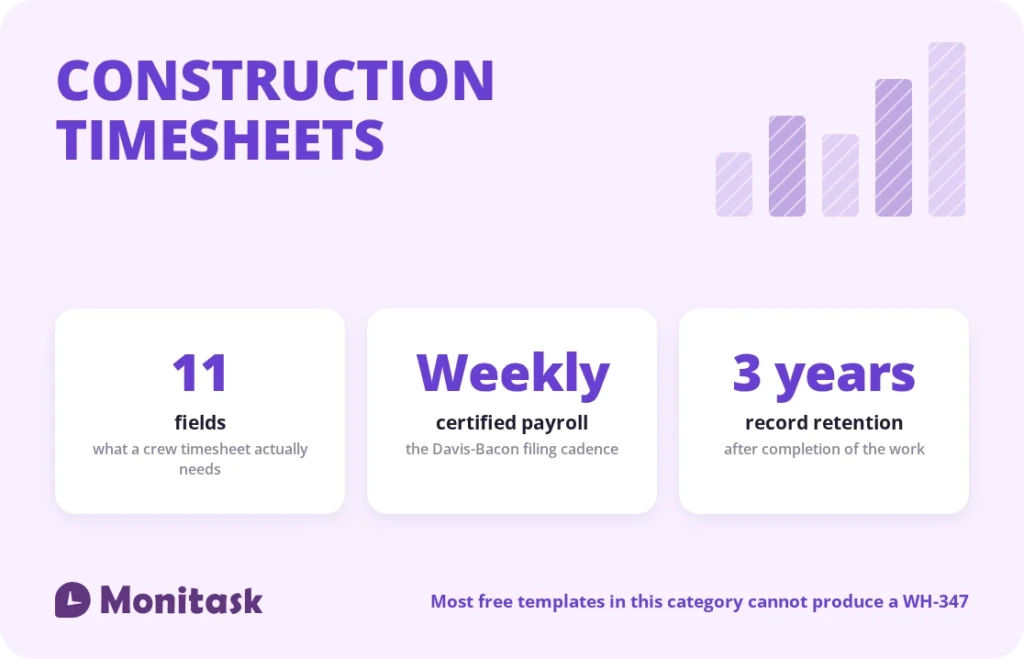
The 11 fields a construction timesheet needs
| Field | Why it’s there |
|---|---|
| Worker name | Identification |
| Work classification | Determines the prevailing wage rate; required on certified payroll |
| Cost code | Ties labour to a scope of work for job costing |
| Date | Daily hours are required, not just weekly totals |
| Time in, time out | The actual punch, not an estimate |
| Break (minutes) | Deducted from paid hours |
| Total hours | Calculated |
| ST / OT split | Payroll applies different multipliers |
| Notes / work performed | Supports the classification and the daily log |
| Job and job number | Separates sites when a crew moves |
| Foreman sign-off | Verification at source |
The two in bold are the ones the free templates in this category consistently omit, and they are the two that decide whether the sheet is usable for anything beyond gross payroll.
Why classification matters more than job title
On a prevailing wage job, the rate is set by the work actually performed, not by what someone’s badge says.
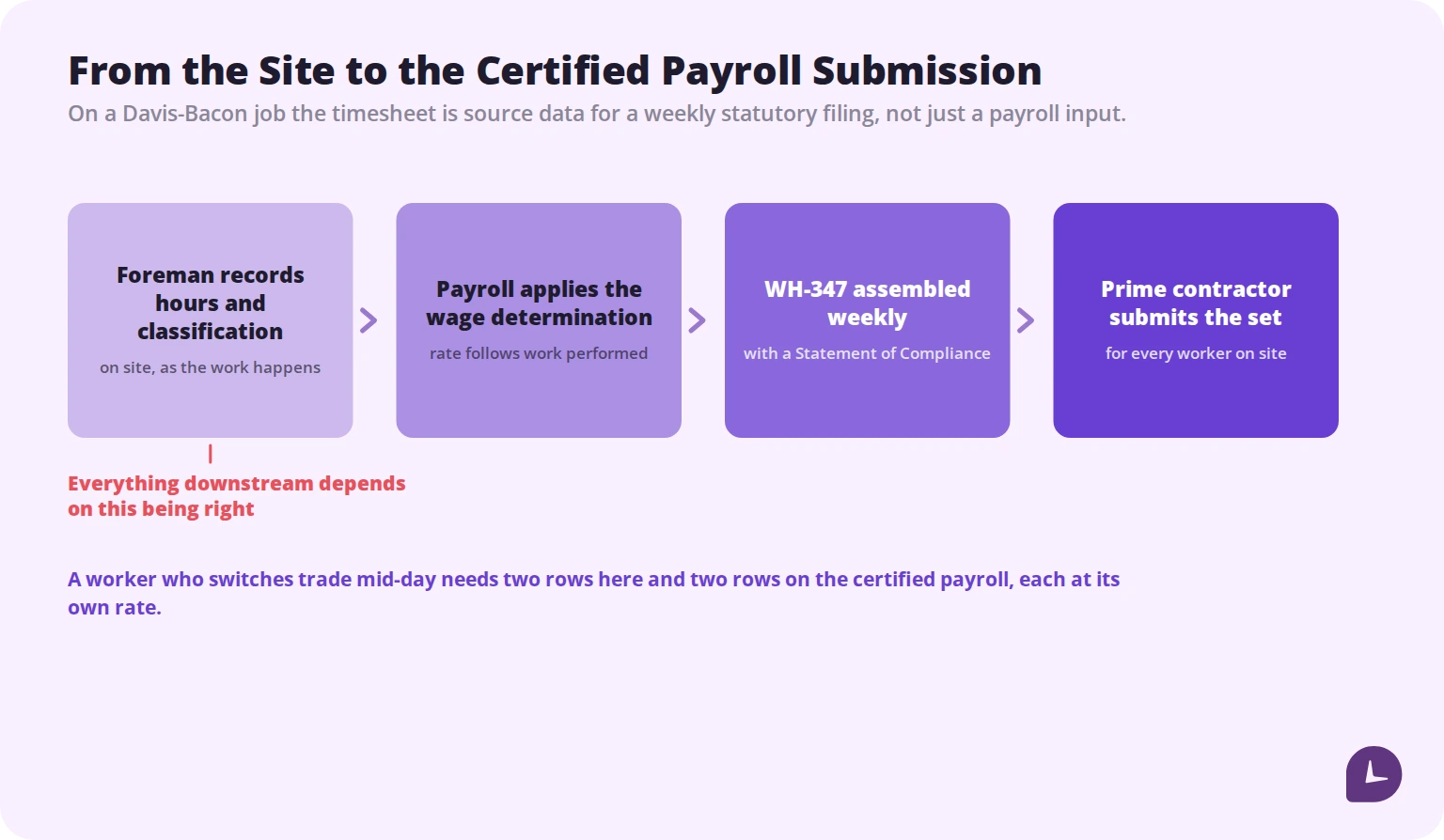
A worker described as a general labourer who spends the morning hanging drywall is a drywall installer for those hours, at the drywall rate. If they spend the afternoon on carpentry, those hours belong to a different classification at a different rate. Two trades in a day means two rows on the timesheet and two rows on the certified payroll, each at its own rate.
The consequence of getting this wrong is counterintuitive and worth stating plainly: misclassification can trigger back wages even when the worker was paid more than required, because the obligation attaches to the classification rather than to the total paid.
That is why the classification column belongs on the timesheet rather than being reconstructed in the office. The foreman who was on site knows what the person did; the payroll clerk on Monday does not.
Certified payroll: the weekly obligation
On construction contracts covered by the Davis-Bacon and Related Acts — federally funded or federally assisted work above the contract threshold — contractors and subcontractors must submit weekly certified payroll.
The essentials:
Frequency. Weekly, filed within seven days of each regular pay date. Including weeks when no work was performed, which requires a “no work” report. The schedule does not pause, which is why contractors set the routine up from day one rather than discovering it in month three.
The form. Form WH-347 is the Department of Labor’s standard. Using the form itself is optional; filing the weekly payroll information and a signed Statement of Compliance with identical wording is not.
What it must show. Each worker’s name and last four digits of their SSN, work classification, daily and weekly hours including overtime, straight time and overtime totals, rate of pay per classification, gross earnings, deductions, net wages, and fringe benefits paid either into a bona fide plan or as cash in lieu.
Who files. Every contractor and subcontractor files for its own employees. The prime contractor collects the subcontractors’ reports and transmits the full set to the contracting agency, which makes the prime responsible for the whole job’s compliance.
Why it bites. Penalties escalate: the contracting agency can withhold progress payments, back wages plus interest become due for every non-compliant hour, civil penalties run to roughly $2,325 per violation per affected worker, and the contract can be terminated for cause with the contractor liable for re-procurement costs.
Errors here usually surface months later in an audit, when correcting them costs far more than capturing the data correctly would have.
Cost codes and job costing
A timesheet that records eight hours on a job tells payroll what to pay. It tells the estimator nothing.
Cost codes attach labour to a scope of work rather than to a project as a whole: formwork, rough framing, electrical rough-in, finishes. With them you can compare actual labour hours against the estimate for that specific scope, which is the only way bids improve between jobs.
Two practical points. Keep the code list short enough that a foreman will use it correctly under time pressure — a picker with 200 entries produces garbage data. And use the same codes on the estimate and on the timesheet, or the comparison is meaningless.
Every hour also carries more than the wage. Payroll taxes, workers’ compensation insurance and equipment costs attach to it, which is why a timesheet showing a daily total and nothing else hides where the money went. Our guide to labour costs covers the loaded rate.
Travel time: what you have to pay for
A construction-specific question that none of the template guides in this category address, and a common source of unpaid wage claims.
Under the Portal-to-Portal Act, ordinary commuting from home to the first worksite and back at the end of the day is generally not compensable. What is generally compensable:
- Travel between sites during the working day. Once the workday has begun, moving from one job to another is hours worked.
- Travel from a required reporting point. If workers must report to the yard first to collect tools, materials or a vehicle, time from the yard to the site is generally work time.
- Time spent loading or securing equipment before travel, where it is required.
- Travel away from home overnight, during hours that correspond to the employee’s normal working hours, including on non-working days.
The practical consequence for the timesheet: if your crews move between sites or report to a yard, that time needs a place to be recorded. A template with one time-in and one time-out per day cannot capture it, and time that has nowhere to go tends not to be paid.
State rules can be broader than the federal baseline. Check your states rather than assuming.
Overtime on construction sites
Federal law sets overtime at hours over 40 in a fixed seven-day workweek, at not less than 1.5 times the regular rate. Three construction-specific wrinkles:
Daily overtime in some states. California applies 1.5× past 8 hours in a day and 2× past 12, regardless of the weekly total. Alaska, Nevada and Colorado have their own daily thresholds. Four ten-hour days is 40 hours and no federal overtime, and eight overtime hours in California. Our California overtime guide covers the detail, and the overtime calculator has a daily mode.
The regular rate includes more than the base wage. Non-discretionary bonuses, shift differentials and, on prevailing wage jobs, cash paid in lieu of fringe benefits generally enter the regular rate. Calculating overtime off the base rate alone underpays.
Two classifications, one week. Where a worker performs at two rates, overtime is calculated on a weighted average of the rates for that week rather than on whichever rate is convenient.
The template splits ST and OT at an 8-hour daily threshold by default, which suits daily-overtime states. Adjust the formula if your state uses the weekly rule only.
How long to keep the records
Two separate clocks, and the longer one governs.
FLSA. Payroll records for three years; the records wage computations are based on, including time cards and schedules, for two.
Davis-Bacon. Payroll records for the site must be kept for at least three years after completion of the work, and the prime contractor must hold records for all laborers and mechanics on site, not only its own employees.
Digital records are acceptable provided they are organised, complete and can be produced in readable form. A box of paper timesheets from a 2024 job will not satisfy an investigator in 2027.
Boost your business productivity
Track performance and streamline teamwork
Paper, spreadsheet or app
Honest assessment of each.
Paper. Works with no signal, no battery and no training. Fine for a crew of five on one site. Fails at transcription: every sheet gets retyped, and every retyping introduces errors at the point where they cost money.
Spreadsheet. Adds calculation and eliminates arithmetic errors. Still depends on someone collecting files on Friday, and still records what people remember rather than what happened.
App. Removes transcription and records time as it happens. The construction-specific objections are real — signal, battery, gloved hands, workers without smartphones — and the answers are offline capture with later sync, and a foreman-entered crew mode where individual devices are not practical.
The decision point is usually not team size. It is whether you run prevailing wage work, bill clients by the hour, or move crews between sites, because all three make transcription errors expensive.
What to look for in construction timesheet software
If you move off the spreadsheet, these are the features that matter on a jobsite rather than in a demo:
Offline capture with sync. Sites lose signal. Data entered underground or in a basement has to survive.
Crew or bulk entry. A foreman clocking in eight people is faster and more realistic than eight individual clock-ins.
Cost codes and classifications at entry. If they are added afterwards in the office, they are guesses.
GPS or geofence on clock-in, if site attendance is the question. This answers “was this person on this site” without collecting biometric data, which matters given the exposure biometric systems carry in some states. Our biometric time clock guide covers that trade-off.
Certified payroll export if you run federal work. Assembling WH-347 by hand every week is a job in itself.
Payroll and accounting integration. Retyping into QuickBooks is the error you bought software to remove.
Retention and export. Confirm what happens to your data if you stop paying, before you start.
Common mistakes
No classification field. Makes certified payroll impossible and misclassification invisible.
One row per worker per week. Daily hours are required, and two trades need two rows.
Filling the sheet in on Friday. Reconstructed hours are both late and wrong, and payroll and client invoices are built on them.
Rounding in one direction. Rounding is permitted only if it is neutral over time. Consistently favouring the employer creates unpaid work time.
No place for travel time. Time with nowhere to go on the form does not get paid, and unpaid compensable travel is a standard wage claim.
Skipping “no work” certified payroll weeks. The weekly filing obligation does not pause when the site is quiet.
Deleting records at year end. Three years after job completion on federal work.
How Monitask helps
A construction timesheet is only as good as the moment it was filled in. Hours recorded at the end of the week are a reconstruction, and reconstructions are what auditors and wage claims are built on.
Monitask records hours as they happen. Workers clock in when they start and clock out when they stop, so nothing runs in the background without their knowledge.

- Clock-in and clock-out on desktop, mobile or browser, so office staff, supervisors and field crews produce one consistent record.
- Time by project and task gives the job-costing view that a daily total cannot.
- Daily and weekly totals matching what the FLSA record set requires, and what daily-overtime states assess against.
- Retained history covering the multi-year retention periods that apply to construction payroll records.
See how it works: Monitask online timesheets.
Sources
- US Department of Labor, Form WH-347 — weekly certified payroll form and the Statement of Compliance requirement.
- US Department of Labor, Fact Sheet #21: Recordkeeping Requirements under the FLSA — three-year and two-year retention periods.
- US Department of Labor, Fact Sheet #23: Overtime Pay Requirements of the FLSA — the fixed workweek and the 40-hour threshold.
- US Department of Housing and Urban Development, Davis-Bacon Compliance Requirements — required payroll record contents, weekly payment and certification, and the three-year retention after completion of work.
- Portal-to-Portal Act provisions on commuting and compensable travel, as applied under the FLSA.
Related reading
- Attendance Sheet Template
- Daily Schedule Template
- Overtime Calculator
- California Overtime Law
- Biometric Time Clock
- Small Business Time Tracking
- Understanding and Calculating Your Labor Costs
FAQ
What should a construction timesheet include?
Worker name, work classification, cost code, date, time in and out, break, total hours, a straight time and overtime split, notes on work performed, the job and job number, and a foreman sign-off.
What is certified payroll?
A weekly report on Davis-Bacon covered projects confirming each worker was paid at least the prevailing wage and fringe benefits for their classification. It is filed within seven days of each pay date, with a signed Statement of Compliance.
Do I have to file certified payroll every week?
Yes, including weeks when no work was performed, which requires a “no work” report. The filing schedule does not pause.
Is Form WH-347 mandatory?
Using the form is optional. Filing the weekly payroll information and a signed Statement of Compliance with identical wording is mandatory on covered projects.
What happens if a worker does two trades in one day?
Each classification gets its own row, at its own rate. Classification follows the work actually performed rather than the job title, and misclassification can trigger back wages even where the worker was paid more than required.
Is travel time paid in construction?
Home to the first site and back is generally not compensable. Travel between sites during the workday, travel from a required reporting point such as a yard, and overnight travel during normal working hours generally are.
How long must construction payroll records be kept?
At least three years after completion of the work on Davis-Bacon projects. Under the FLSA, three years for payroll records and two for time cards and schedules.
Do construction workers get daily overtime?
Under federal law, no — overtime is weekly over 40. California, Alaska, Nevada and Colorado apply daily thresholds, so four ten-hour days generates overtime in those states.
Can I use this template in Google Sheets?
Yes. Upload the file and open it with Google Sheets. The formulas and dropdowns carry across.