DeskTime Alternatives: What to Check Before Switching

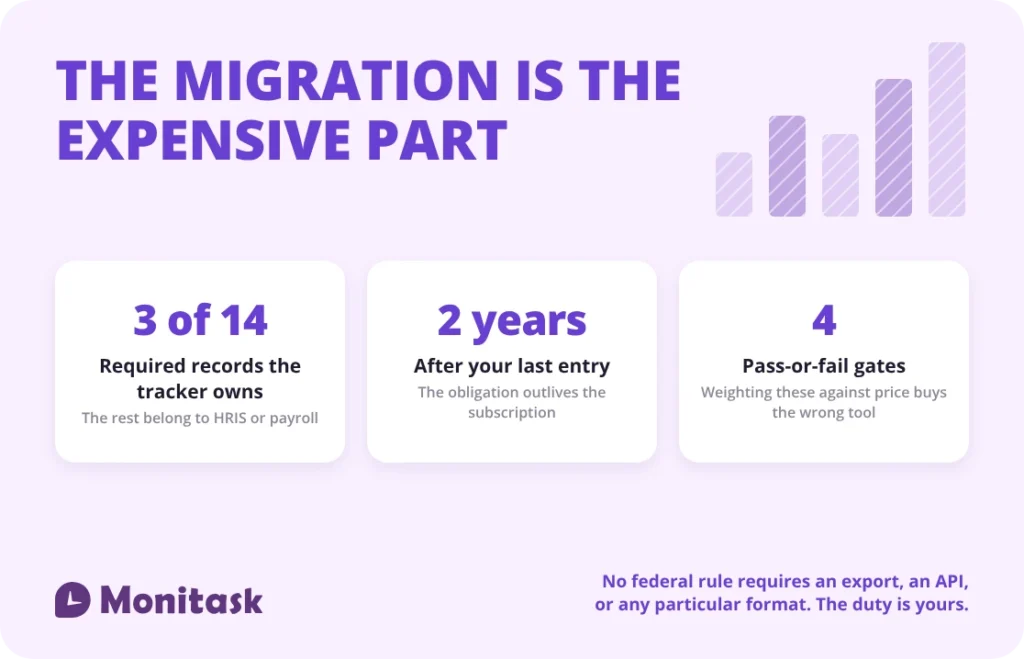
Most alternatives lists compare feature grids. The decision that actually costs money is the migration. Federal law lets you pick any timekeeping method you like, but it also fixes which records have to exist, how accurate they have to be, and how long they survive after you cancel the account. This page is the switching checklist, ordered by what breaks first.
This is not legal advice. The federal floor quoted below is the Fair Labor Standards Act recordkeeping rule as published by the Department of Labor, together with the regulations it administers. State rules add requirements on top of it, and some add longer retention. Take your own retention schedule to counsel before you rely on it.
Why do most DeskTime alternative lists fail to help you decide?
Because they compare the wrong layer.
A feature grid answers “what can this tool do,” which is the easy question. In this category the answers converge: almost everything on the market records time against projects, captures screenshots at some interval, produces an activity percentage, and exports a report. A grid of those capabilities shows you ten tools that look nearly identical, which is why reading one leaves you no closer to a decision.
The hard question is “what happens to my records.” Its answer does not go stale, because it comes from a regulation rather than a release note, and it produces a short list quickly: most of the market passes the feature test and a meaningful share fails the record test.
There is a second reason the list format misleads. A list implies your constraint is choice. Your actual constraint is continuity: you have a running record of hours worked that carries legal weight, it lives inside one vendor’s database, and you are about to move it. Nothing in a feature comparison addresses that, and it is where switching projects go wrong.
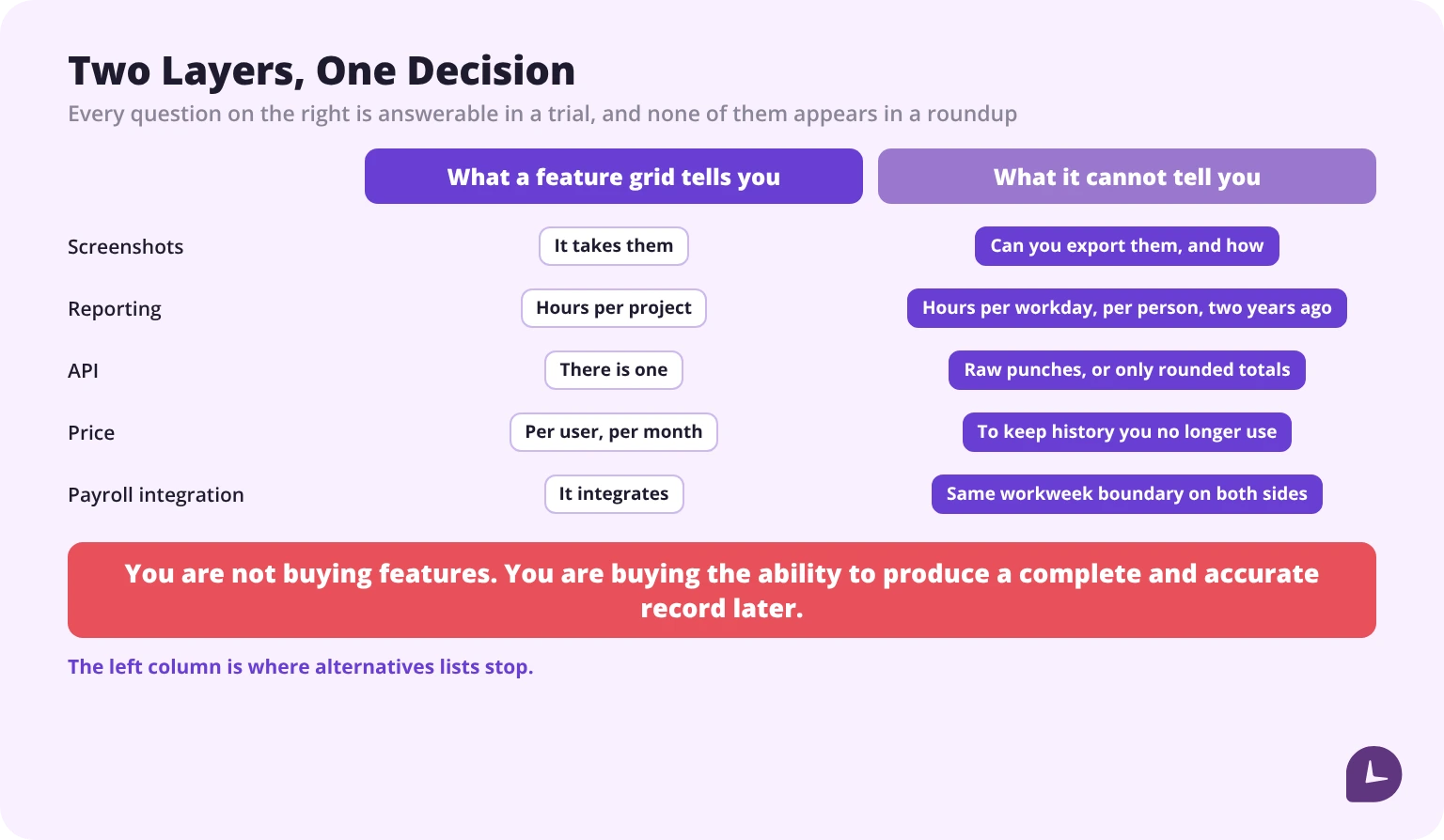
| What a feature grid tells you | What it cannot tell you |
|---|---|
| The tool takes screenshots | Whether you can export them, and in what form |
| The tool reports hours per project | Whether it reports hours per workday per person for an arbitrary past week |
| The tool has an API | Whether the API returns raw punches or only rounded totals |
| The price per user per month | What the price is to keep two years of history you no longer use |
| It integrates with your payroll tool | Whether the workweek boundary the two systems use is the same one |
Every row on the right is answerable in a trial. None of them appear in a roundup.
Boost your business productivity
Track performance and streamline teamwork
What does federal law actually require from any time-tracking tool?
Less than most buyers assume about the tool, and more than most buyers assume about the record.
The Department of Labor’s recordkeeping fact sheet is blunt on the first half. “The Act requires no particular form for the records, but does require that the records include certain identifying information about the employee and data about the hours worked and the wages earned.” And, in four words, “Employers may use any timekeeping method they choose.” The recording-time regulation says the same thing about hardware: “Time clocks are not required.” The regulations are equally plain: “No particular order or form of records is prescribed by the regulations in this part.”
So nobody will call your chosen tool non-compliant because of what it is. There is no approved-vendor list, no certification, no format mandate.
And — this is the part most switching advice gets wrong — there is no federal right to an export, an API, or data portability either. The same sentences that free you to choose any tool also decline to require anything of its outputs. Nothing in this material entitles you to a CSV, a bulk download or a documented format. Everything below about exports is a practical argument, not a legal entitlement, and it is worth knowing which is which before a vendor tells you the same thing.
The obligation sits one layer back. The same fact sheet qualifies the freedom immediately: “Any timekeeping plan is acceptable as long as it is complete and accurate.” And the recording-time regulation warns that “Minor differences between the clock records and actual hours worked cannot ordinarily be avoided, but major discrepancies should be discouraged since they raise a doubt as to the accuracy of the records of the hours actually worked.”
That inverts the shopping question. You are not buying features. You are buying the ability to produce a complete and accurate record of hours worked, and to prove it later, to someone who was not there.
| Free to choose | Not free to choose |
|---|---|
| The vendor | That a record of hours worked exists for every non-exempt worker |
| Whether there is hardware at all | That it is complete |
| Paper, spreadsheet, app, badge reader | That it is accurate |
| The interval of screenshots, if any | That it is retained for the required period |
| The report layout | That it can be produced for inspection |
| Whether the tool offers an export at all | That you can produce the record, whatever the tool does |
The last row is the one to carry into a trial. The duty is yours, not the vendor’s, and no regulation will rescue you from a tool that cannot give the record back.
Which records must your new tool be able to produce?
The fact sheet lists 14 items of information an employer must keep for each non-exempt worker — “The following is a listing of the basic records that an employer must maintain:” Read that list once and the scope of your tool decision gets dramatically smaller, because a time tracker is the system of record for only part of it.
| Required item | Whose system owns it | What to test in a trial |
|---|---|---|
| Employee’s full name and social security number. | HRIS | Nothing — do not put it in the tracker |
| Address, including zip code. | HRIS | Nothing |
| Birth date, if younger than 19. | HRIS | Nothing |
| Sex and occupation. | HRIS | Nothing |
| Time and day of week when employee’s workweek begins. | Time tracker | Can you set it, and does it match payroll? |
| Hours worked each day. | Time tracker | Export one arbitrary past week, per person |
| Total hours worked each workweek. | Time tracker | Does the total respect your workweek boundary? |
| Basis on which employee’s wages are paid | Payroll | Nothing |
| Regular hourly pay rate. | Payroll | Nothing |
| Total daily or weekly straight-time earnings. | Payroll | Do the hours feed cleanly? |
| Total overtime earnings for the workweek. | Payroll, from tracker hours | Is the overtime split visible in the export? |
| All additions to or deductions from the employee’s wages. | Payroll | Nothing |
| Total wages paid each pay period. | Payroll | Nothing |
| Date of payment and the pay period covered by the payment. | Payroll | Nothing |
3 rows carry your decision: the workweek boundary, hours worked each day, and total hours each workweek. A fourth, the overtime split, is derived but must be traceable. Everything else belongs to your HRIS or your payroll system, and putting it in a time tracker creates a second copy of data you now have to protect.
The workweek boundary is the row people skip, and it is the one that causes the worst migration bugs. Overtime is computed on the workweek, not on the pay period. If the outgoing tool was configured with a workweek that starts Monday at 00:00 and the new one defaults to Sunday, every weekly total shifts, and the shift is invisible in a monthly summary because the month-level numbers still look right. The mismatch surfaces as a handful of workers whose overtime hours moved between weeks, usually several pay cycles later.
Write the boundary down before you start shopping, and make it the first configuration item you check in every trial.
One scope note: the fact sheet is about non-exempt workers and says nothing about what must be kept for exempt employees. That is a different provision and is not covered here.
How long must you keep the data after you cancel?
This is the part of a switch that nobody plans for, because the obligation does not end when the subscription does.
Two retention periods apply. The payroll-records rule opens “Each employer shall preserve for at least 3 years:” — and for payroll records those 3 years run “From the last date of entry, all payroll or other records containing the employee information and data required under any of the applicable sections of this part”. The shorter rule covers the underlying time data: 2 years for “From the date of last entry, all basic time and earning cards or sheets on which are entered the daily starting and stopping time of individual employees”.
| Record | Minimum period | When the clock starts |
|---|---|---|
| Payroll records containing the required employee information | 3 years | Last date of entry |
| Certificates, agreements, plans, notices | 3 years | Their last effective date |
| Sales and purchase records | 3 years | The regulation states no trigger for this category |
| Basic time cards or sheets with daily start and stop times | 2 years | The date of last entry |
| Wage rate tables | 2 years | Their last effective date |
The run-from column is not decoration. Three different triggers appear in two short regulations, and one category has none at all. A retention schedule that applies “last date of entry” to everything will be wrong about agreements and about wage rate tables.
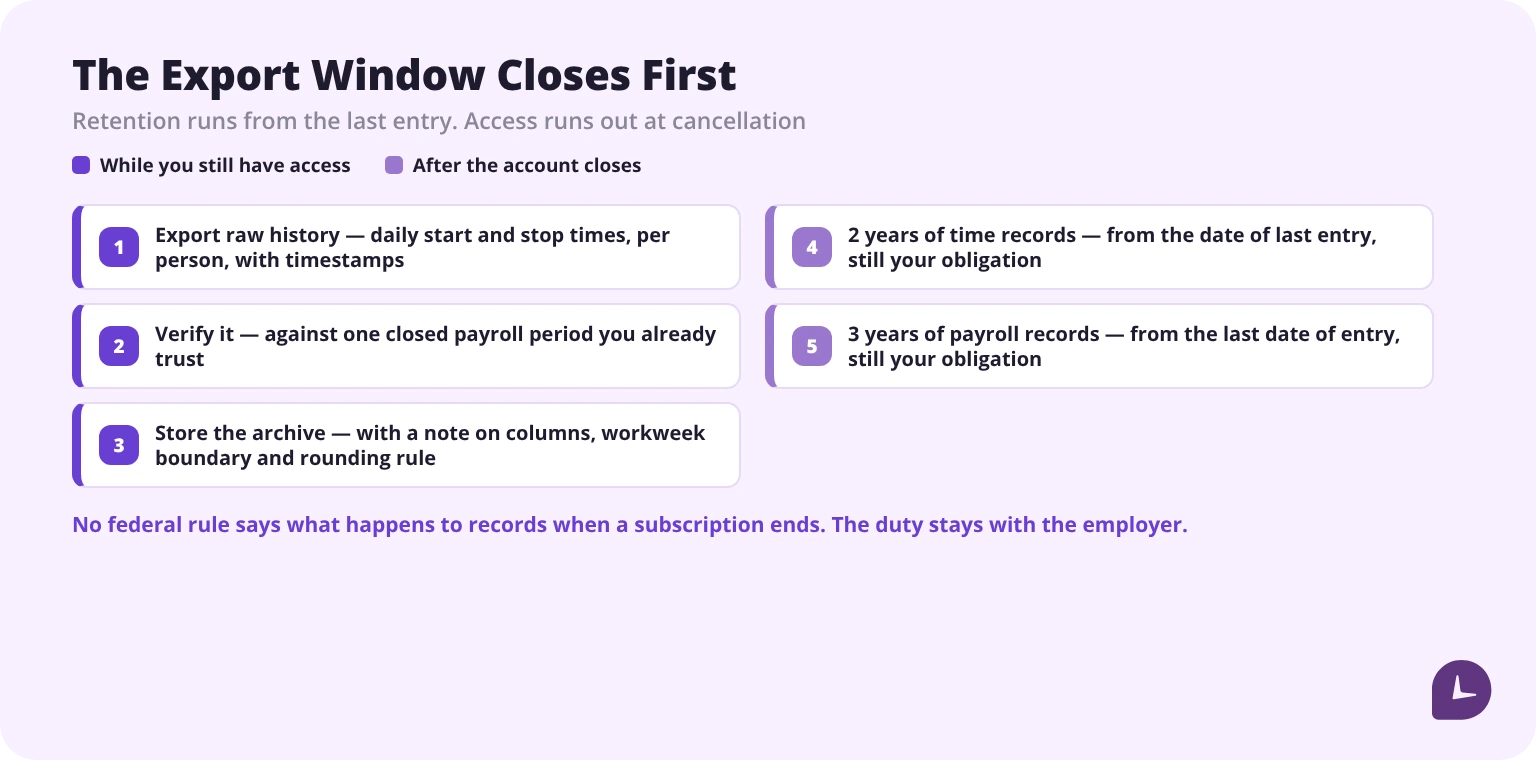
Now put the cancellation date next to that. The last day you have access to the outgoing tool is the last day you can create the archive you are legally required to hold for up to two more years. After the account closes, your retention obligation continues and your access does not.
Nothing in the federal material addresses this. It says nothing about vendors, cloud services, subscription expiry, or what becomes of records when a contract ends. What it does say is that the duty is the employer’s throughout — every operative sentence begins “Each employer shall” — and the conclusion that you stay liable whatever the vendor does follows from that, as an inference rather than as a rule anyone wrote down.
The regulations do set the standard the archive has to meet, and it is about access rather than format. Records must be kept “safe and accessible at the place or places of employment, or at one or more established central recordkeeping offices where such records are customarily maintained”, must be available “for inspection and transcription”, and where they are held at a central office “such records shall be made available within 72 hours following notice from the Administrator or a duly authorized and designated representative”. An archive nobody can search is retained in name only, and so is an export whose columns you can no longer interpret because the tool that produced them is gone.
In order of operations:
- Export raw history before you cancel, not after you have chosen a replacement.
- Export it at the granularity the rule describes — daily start and stop times per person — not as a monthly summary.
- Keep a plain-text or CSV copy alongside any proprietary format.
- Write a one-page note describing the columns, the workweek boundary in force, and the rounding rule in force. In two years nobody will remember.
- Store it where your records retention process already looks, not in the project folder of whoever ran the migration.
The obligation is yours. It does not transfer to either vendor.
How should you handle rounding in a new system?
Carefully, and not at the same time as anything else.
The recording-time regulation describes rounding and names the common increments: “there has been the practice for many years of recording the employees’ starting time and stopping time to the nearest 5 minutes, or to the nearest one-tenth or quarter of an hour.” It is worth being precise about what kind of statement that is. The paragraph sits in a part of the regulations headed statements of general policy or interpretation, it introduces its own premise with “Presumably,” and it frames the permission this way: “For enforcement purposes this practice of computing working time will be accepted, provided that it is used in such a manner that it will not result, over a period of time, in failure to compensate the employees properly for all the time they have actually worked.” That is an enforcement tolerance with a condition attached, not an affirmative right to round.
The condition describes a test you have to be able to run, and running it requires both numbers: the rounded figure and the raw punch. If a candidate shows you only rounded totals, you cannot run the test, which means you cannot demonstrate the practice meets the condition.
So rounding becomes 3 questions in a trial, not a preference:
| Question | Why it matters | What a good answer looks like |
|---|---|---|
| Does the tool round at all, by default? | Defaults get shipped to production unexamined | Rounding is off by default, or clearly labeled |
| Does it round in both directions, or only one? | The condition is about not failing to compensate over a period of time, which one-directional rounding makes hard to satisfy | Neutral rounding to the nearest increment |
| Can you see raw punches next to rounded ones? | The condition is only testable with both | Both are exportable, in the same report |
Our page on the seven-minute rule covers the arithmetic of quarter-hour rounding in more detail. Worth knowing that the phrase itself is a gloss: it appears nowhere in the regulation, whose own units are five minutes, a tenth of an hour and a quarter of an hour.
One rule for the migration itself: do not change the rounding configuration in the same cycle as the tool. If totals move, you need to know whether the cause was the new system or the new rule, and running both changes together makes that unanswerable. Match the outgoing configuration first, reconcile, then change rounding later as its own project.
What should you check about monitoring and screenshots?
Not whether the tool can monitor. Assume it can.
Bennett Cyphers and Karen Gullo, “Inside the Invasive, Secretive ‘Bossware’ Tracking Workers”, Electronic Frontier Foundation Deeplinks Blog, 30 June 2020 surveyed ten companies in this category and found that “Every product we looked at has the ability to take frequent screenshots of each worker’s device, and some provide direct, live video feeds of their screens.” and that “9 of the 10 companies we looked at offered “silent” or “invisible” monitoring software, which can collect data without worker knowledge.” The same piece notes that “In addition, there isn’t a reliable way for workers themselves to know, since so much invisible software is explicitly designed to evade detection.”
Two qualifications the authors supply themselves. The sample is not the market — “This isn’t a comprehensive list, and may not be representative of the industry as a whole;” — and the nine-of-ten figure counts vendors that offered a silent mode rather than employers that use one. It is a survey of what was for sale in mid-2020, and it is quoted as such.
So the capability is not a differentiator; the configuration is. The useful questions are about what the tool lets you choose, and what it lets the people being measured see.
| Question | Why it matters |
|---|---|
| Can the agent run visibly, with an indicator the worker can see? | Visible operation is a configuration choice, and it is yours to make |
| Can a worker see the screenshots and activity data captured about them? | Disputes about a record are far shorter when both sides see the same record |
| Can screenshots be turned off while time tracking stays on? | Many teams need hours, not images |
| Can the capture interval be set, and blurred or disabled per project? | Client work and internal work often need different settings |
| Who inside your company can view the captures, and is that logged? | Access control is the control that survives a staff change |
| Is there a documented retention period for screenshots specifically? | Images are the part of the dataset with the shortest useful life |
For the wider argument about this software category and how workers experience it, see what bossware is. If you are weighing whether to run monitoring without notice at all, that decision belongs with stealth monitoring rather than with your tool shortlist, and it should be taken before you shop, not after.
How do you run the migration without a gap in the record?
8 steps, in this order. The order matters more than the speed.
| Step | What you do | What goes wrong if you skip it |
|---|---|---|
| 1 | Write down the workweek boundary in force today | Weekly totals and overtime shift silently |
| 2 | Write down the rounding rule in force today | You cannot tell which change moved the numbers |
| 3 | Export raw per-person, per-day history with timestamps | The export window closes with the account |
| 4 | Verify the export against one closed payroll period you already trust | You discover the export is wrong two years later |
| 5 | Store the archive and its column note in your retention system | Retained in theory, unretrievable in practice |
| 6 | Run both systems for one full pay cycle | No baseline to reconcile against |
| 7 | Reconcile, and investigate any difference above a threshold you set in advance | Differences get rationalized after the fact |
| 8 | Announce the new tool and its visibility settings before installation | A monitoring surprise costs more trust than the tool saves |
Step 7 deserves a number, not a judgment call. Decide in advance what counts as a discrepancy worth chasing — 15 minutes per person per week is a common threshold — and write it down before you see the data. Thresholds chosen after the results are in are not thresholds.
Step 6 is the one teams compress under deadline pressure. One full pay cycle is the minimum, because a cycle is the period over which your payroll arithmetic closes. If your cycle is monthly, that is a month of double entry, and it is cheaper than a restated payroll.
Monitask keeps per-person daily detail with its timestamps and exports it — which is the whole of what makes a migration reconcilable
See how the time clock stores hours
How do you score candidates against each other?
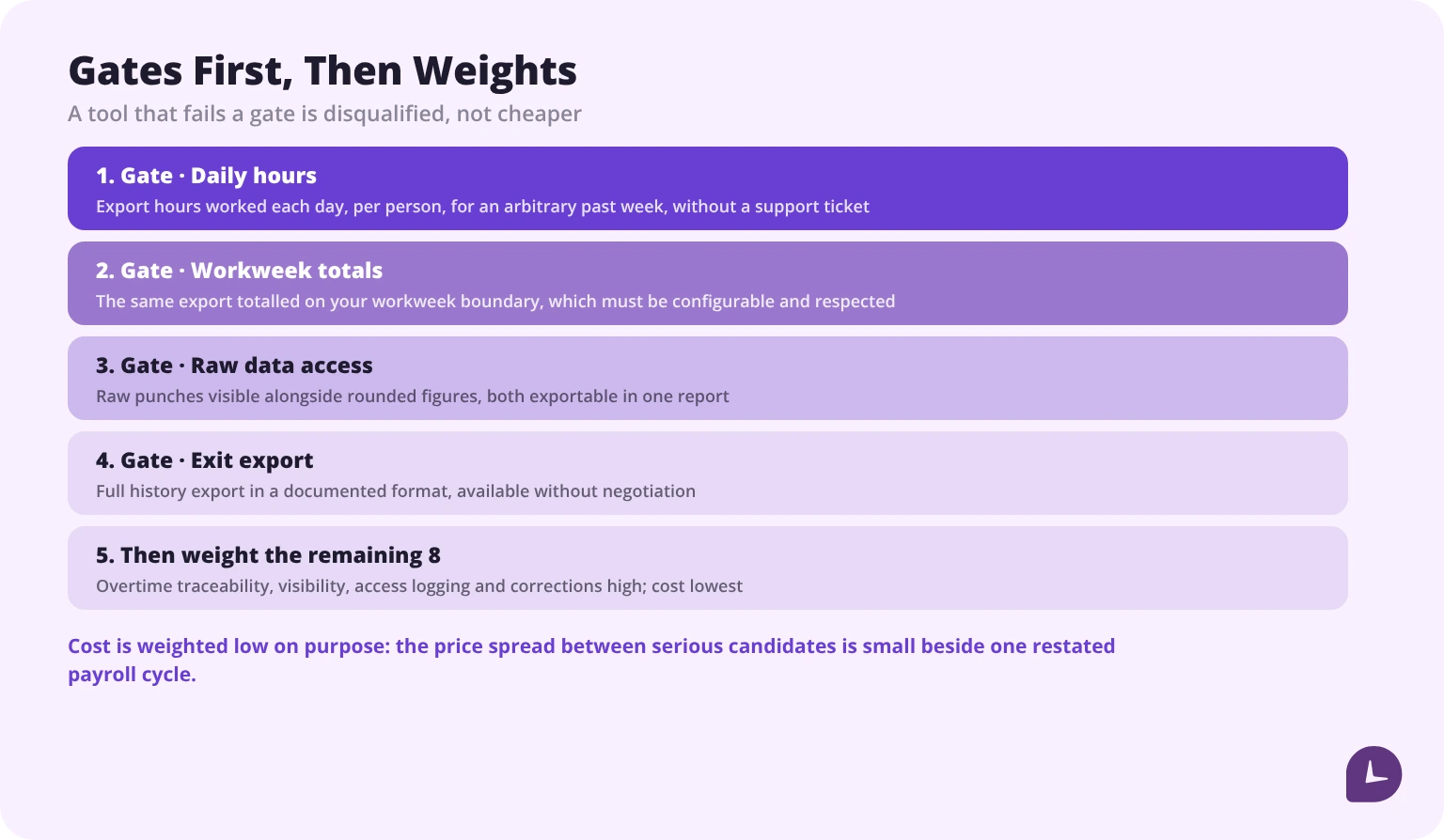
With 4 gates first, then a weighted score for whatever is left.
The first 4 criteria are pass or fail. A tool that cannot do them is not a cheaper candidate, it is a disqualified one, and weighting them against price produces the wrong answer every time. Note what these gates are and are not: they are your requirements, derived from an obligation that is yours, not compliance tests a vendor can fail in the abstract.
| Gate | Test | Pass condition |
|---|---|---|
| Daily hours | Export hours worked each day, per person, for an arbitrary past week | Produces it without a support ticket |
| Workweek totals | Same export, totaled on your workweek boundary | Boundary is configurable and respected |
| Raw data access | Punches visible alongside rounded figures | Both exportable in one report |
| Exit export | Full history export, documented format | Available without negotiation |
Then score the rest, on a scale you decide. Zero, one or two is enough resolution.
| Criterion | Weight | What a two looks like |
|---|---|---|
| Overtime split traceability | High | Straight-time and overtime hours separable in the export |
| Visibility configuration | High | Visible agent available, worker-facing view of captures |
| Access control and audit log | High | Per-role access, viewing is logged |
| Screenshot controls | Medium | Interval, per-project disable, documented retention |
| Approval and correction flow | Medium | Edits leave a trail showing who changed what |
| Integration with your payroll tool | Medium | Hours transfer with the workweek boundary intact |
| Offline and mobile capture | Varies | Matches how your team actually works |
| Cost over three years | Low | Priced, in writing, including the retention period |
Cost is weighted low deliberately: across serious candidates the price spread is small relative to the cost of one restated payroll cycle.
Where does Monitask fit?
Against the gates above: Monitask records time per day and totals per workweek, keeps the per-person daily detail that the 2-year rule describes, and exports it. Screenshots run at a configurable interval and can be turned off with time tracking left on. The agent is intended to run visibly rather than silently.
If you want the product detail rather than the framework, the employee time clock software and timekeeper software pages cover it, and there is a DeskTime integration page if you are connecting rather than replacing. For federal contract work, where the recordkeeping bar is higher than the FLSA floor described here, start with DCAA timekeeping requirements.
The gates above are the whole shortlist: daily hours, workweek totals, raw punches beside rounded ones, and an export you can take with you
Check Monitask against the gates
Sources
- U.S. Department of Labor, Wage and Hour Division, Fact Sheet #21: Recordkeeping Requirements under the Fair Labor Standards Act (FLSA), Revised July 2008. The 14 required record items; “The Act requires no particular form for the records, but does require that the records include certain identifying information about the employee and data about the hours worked and the wages earned.”; “Employers may use any timekeeping method they choose.”; “Any timekeeping plan is acceptable as long as it is complete and accurate.”; “Every covered employer must keep certain records for each non-exempt worker.”; “These records must be open for inspection by the Division’s representatives, who may ask the employer to make extensions, computations, or transcriptions.”; and “The records may be kept at the place of employment or in a central records office.”. The fact sheet also states the retention periods in words — “Each employer shall preserve for at least three years payroll records, collective bargaining agreements, sales and purchase records.” and “Records on which wage computations are based should be retained for two years, i.e., time cards and piece work tickets, wage rate tables, work and time schedules, and records of additions to or deductions from wages.” — where the regulations use digits, and says the two-year records “should be retained” where the regulation says “shall preserve”. Retrieved 10 November 2026. https://www.dol.gov/agencies/whd/fact-sheets/21-flsa-recordkeeping
- 29 C.F.R. § 516.1, Form of records. “No particular order or form of records is prescribed by the regulations in this part.”
- 29 C.F.R. § 516.5, Records to be preserved 3 years. “Each employer shall preserve for at least 3 years:”; “From the last date of entry, all payroll or other records containing the employee information and data required under any of the applicable sections of this part”; and “From their last effective date, all written:” The sales and purchase records paragraph states no running-from trigger.
- 29 C.F.R. § 516.6, Records to be preserved 2 years. “Each employer required to maintain records under this part shall preserve for a period of at least 2 years”; “From the date of last entry, all basic time and earning cards or sheets on which are entered the daily starting and stopping time of individual employees”; and “From their last effective date, all tables or schedules of the employer which provide the piece rates or other rates used in computing straight-time earnings, wages, or salary, or overtime pay computation.”
- 29 C.F.R. § 516.7, Place for keeping records and their availability for inspection. “safe and accessible at the place or places of employment, or at one or more established central recordkeeping offices where such records are customarily maintained”; “such records shall be made available within 72 hours following notice from the Administrator or a duly authorized and designated representative”; and “All records shall be available for inspection and transcription by the Administrator or a duly authorized and designated representative”
- 29 C.F.R. § 785.48, Use of time clocks. “Time clocks are not required.”; “Minor differences between the clock records and actual hours worked cannot ordinarily be avoided, but major discrepancies should be discouraged since they raise a doubt as to the accuracy of the records of the hours actually worked.”; “there has been the practice for many years of recording the employees’ starting time and stopping time to the nearest 5 minutes, or to the nearest one-tenth or quarter of an hour.”; “Presumably, this arrangement averages out so that the employees are fully compensated for all the time they actually work.”; and “For enforcement purposes this practice of computing working time will be accepted, provided that it is used in such a manner that it will not result, over a period of time, in failure to compensate the employees properly for all the time they have actually worked.” Status note: this part sits under the subchapter headed “STATEMENTS OF GENERAL POLICY OR INTERPRETATION NOT DIRECTLY RELATED TO REGULATIONS”, so it is a statement of interpretation and enforcement policy rather than a substantive rule. The 2000 and 2025 GPO printings of § 785.48 are textually identical, and the eCFR timeline reports no changes to the content after 3 January 2017. No rulemaking amending or withdrawing it was found. Whether it has been tested in court was NOT checked and is not asserted.
- Bennett Cyphers and Karen Gullo, “Inside the Invasive, Secretive ‘Bossware’ Tracking Workers”, Electronic Frontier Foundation Deeplinks Blog, 30 June 2020. “Every product we looked at has the ability to take frequent screenshots of each worker’s device, and some provide direct, live video feeds of their screens.”; “9 of the 10 companies we looked at offered “silent” or “invisible” monitoring software, which can collect data without worker knowledge.”; “In addition, there isn’t a reliable way for workers themselves to know, since so much invisible software is explicitly designed to evade detection.”; and “This isn’t a comprehensive list, and may not be representative of the industry as a whole;” Retrieved 10 November 2026. https://www.eff.org/deeplinks/2020/06/inside-invasive-secretive-bossware-tracking-workers
- How these were read. dol.gov, law.cornell.edu and govinfo were reachable; ecfr.gov was intermittently robots-disallowed, so the regulation text was read at Cornell and cross-checked against the official GPO printings. The fetch tool caps quotations at about 125 characters, so longer passages were reconstructed from consecutive short fragments.
- No federal requirement of an export, an API or data portability. Nothing quoted above prescribes any form of record, and one provision says so in terms. The practical case for an export rests on the employer’s own duty to produce the record, not on an entitlement against a vendor. Nothing in this material addresses vendors, cloud services or subscription expiry at all.
- A note on what is deliberately absent. This page contains no vendor price table and no per-product feature comparison. Pricing and packaging in this category change without notice, and the figures circulating in roundups are usually copied from review aggregators rather than from the vendors. The criteria here are drawn from regulations, which is why they were still correct when this page was last updated and will be correct at the next one.
Frequently Asked Questions
Do I have to keep time records if payroll already has the hours?
Payroll holds the wage figures. The 2-year rule covers something different: the basic time cards or sheets on which “the daily starting and stopping time of individual employees” are entered. Those are the underlying records, and a payroll summary does not replace them, because it does not contain the daily detail.
Can I change the rounding rule when I switch tools?
You can, but do not do both at once. Rounding is accepted for enforcement purposes only if, over a period of time, it does not fail to compensate workers for all the time actually worked, and demonstrating that requires knowing which change moved the totals. Match the existing configuration through the migration, reconcile, then change rounding as a separate step.
Is silent monitoring legal?
The federal recordkeeping rules quoted on this page say nothing about it; they govern what records exist, not how they are collected. Notice and consent are governed elsewhere, vary considerably between states, and in some cases between the type of data captured. That makes it a question for counsel rather than for a tool comparison, and it should be settled before you shortlist.
How long should I run both tools in parallel?
One full pay cycle, minimum. The point of the overlap is to reconcile a closed period against a known-good figure, and a partial cycle does not close. If your cycle is monthly, budget a month.
Does switching tools reset the retention clock?
No. The clock runs from the last date of entry in the record, so the data you created in the outgoing tool keeps its own retention period regardless of what you install next. A switch is a reason to archive, not a reason to discard.
Are time clocks required at all?
No. The regulation states plainly that “Time clocks are not required,” and the fact sheet confirms that employers “may use any timekeeping method they choose.” What is required is that the resulting record be complete and accurate, and that major discrepancies between the record and actual hours worked be discouraged.
What should I do about the activity percentage?
Decide what it is for before you buy it, and write that down. It is a vendor-specific metric with no standard definition, which means it is not comparable between tools and not a record of hours worked. It can be a useful internal signal; it is not evidence, and it does not belong in a payroll dispute.