Monitask is computer monitoring software for teams that need a clear, real-time view of how work happens on company devices. It tracks time worked, activity levels, the apps and websites used, and captures periodic screenshots — only while the employee is clocked in. Built around transparent, consent-based monitoring, Monitask gives you the proof of work and productivity data you need, with no keystroke logging and a separate stealth mode for the narrow cases where the law requires it.
1000+ clients worldwide increase workforce productivity with Monitask
How to Track Employee Computer Activity?
From sign-up to your first report in four steps — no setup headaches.
Click "Invite your team" from the dashboard and add your team members’ email addresses. You can add an unlimited number of employees to your account.
Step 3
Ask employees to start tracking time using Monitask
Your team members will need to download the time-tracking app and start using it to track the time spent on work items. Company owners, administrators, and managers do not need to install Monitask, as data is accessible via the web-based real-time dashboard.
Step 4
Assign projects and tasks
Project management features allow you to assign projects to team members and review work hours associated with each project and task.
Step 5
Review work hours and proof of work
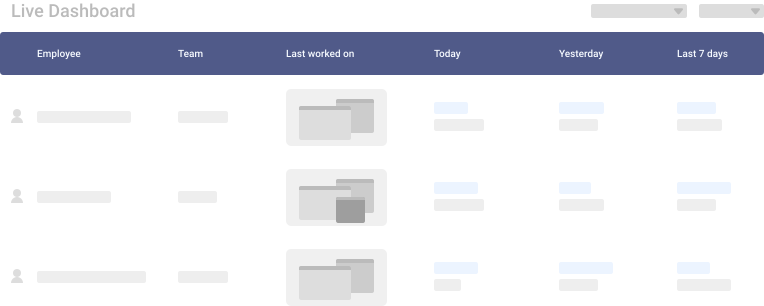
Use Live Dashboard to review online employees, their time entries, screenshots, activity levels, and internet usage.
Step 6
Continue using Monitask to get in-depth insights
Monitask analyzes time and data across your company. After you use the software for several weeks, it generates comprehensive reports so that you can analyze and identify bottlenecks, employee productivity, and processes.
What Monitask tracks on a computer
Real-time visibility into activity, apps and time — captured only while the employee is clocked in.
Time, attendance & idle time
Hours worked, who's online, and stretches with no input — with proof of work behind every entry.
See who's working right now and review activity as it happens, from any browser.
Daily email summaries
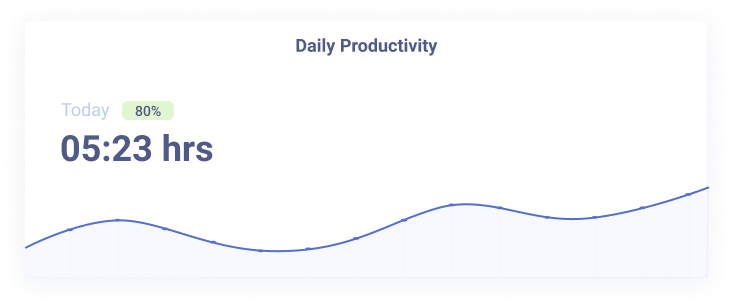
End-of-day recap of hours, activity and usage, so nothing slips by without you checking the dashboard.
Mouse-jiggler detection
Flags idle time, unnatural cursor patterns and USB-device signals that fake presence — keeps your data honest.
No keystroke logging
Monitask measures activity, not content. The actual keys typed are never recorded, and the content of emails and chats is not read.
Transparent by default
Most monitoring tools feel like surveillance. Monitask is built around consent-based tracking — with a separate stealth option only for the cases where the law requires it.
Installed with the employee's permission
The desktop app is installed openly, and tracking only runs while the employee is clocked in.
Stops the moment work stops
Nothing is captured after hours — pause tracking and the data stops with it.
Employees can see their own data
Visibility goes both ways. The same activity and reports their manager sees are available to them.
Stealth mode, only where the law requires
A separate, opt-in mode is available for the narrow cases where transparent monitoring isn't the right fit.
Works with the tools you already use
Native integrations plus Zapier for 1,000+ more apps.
JJiraAAsanaTTrelloCClickUpBBasecampZZapier
Who computer monitoring software is for
Teams that need real-time visibility into how work happens — without heavy-handed surveillance.
Real results from teams that switched to transparent time tracking.
★★★★★
"As a Sales and Marketing Manager on FBA Prep 4U. I am using Monitask 5 days a week because I need not extend 40 hours of my weekly working hour. Monitask made it easy for me to monitor time and show my productivity thru their screenshot features. It helps me to gain the trust of my boss who is also checking my timeline. I would highly recommend this software to my colleagues who are looking for reliable employee timesheet monitoring."
LR
Lady R.Sales & Marketing Manager
★★★★★
"It is a must-have tool for companies allowing remote work. 80% of our employees work from remote locations, and tracking their work efficiency was a big challenge for us. we had at a point also decided to create a tool for time tracking, however, once we heard about monitask, and used it for 10 days with the free trail. it was an instant GO for us ad we have been using the same since then."
VS
V S RHead - Technology
★★★★★
"As an entrepreneur, I often feel guilt that I'm not spending "enough" time working on various projects. Once I started using Monitask, everything became objective and my time has started to become more valuable. Things that get measured get improved. This objective feedback on how I'm spending my time has given me so much encouragement and motivation. I can see progress happen, and I'm able to feel better about the work I do."
Everything you need to know about employee computer monitoring
What is Monitask?
Monitask is a web-based time tracking and productivity tool available for teams of all sizes. Monitask lets your company streamline time entries with automatic employee time tracking desktop software available for Windows, Mac, and Linux. The desktop app allows employees to log their hours from anywhere with proof of work, while you can review their work from a live web-based dashboard.
Each subscription includes robust employee-monitoring and productivity features, which helps you manage employees and save money as your company grows. Validate work by reviewing screenshots of your employees’ computers, review their activity levels, the websites they’ve visited, and even the apps they’ve used.
With Monitask, you can reduce the time spent managing your employees and improve your bottom line with a set of in-depth reports and project management features. Now, it is easier than ever to review employee efficiency, find outliers, and automatically generate monthly accounting summaries.
Computer monitoring software for teams is a tool that automatically tracks employee PC activity – including time spent on tasks, websites visited, apps used, and productivity levels giving managers real-time visibility into how work gets done across distributed teams.
Monitask provide proof of work through automatic time tracking, screenshots, and activity reports, helping businesses reduce wasted time, identify bottlenecks, and improve overall team efficiency.
Automatic time tracking across Windows, Mac, and Linux
Screenshot capture and activity level monitoring
App and website usage reports
Real-time live dashboard for managers
Project and task assignment with time logs
Daily email summaries and productivity reports
How it works: Employees install a lightweight desktop app and start tracking time. Managers access all data via a web-based dashboard. No installation required on their end. Monitoring runs only during active work sessions and stops automatically when tracking is paused.
Who it’s for: Remote teams, agencies, software companies, BPO firms, and any business managing distributed employees who need transparent, data-driven insights into how work time is spent.
What Monitask Tracks
Monitask gives managers a clear, real-time picture of computer activity — while an employee is clocked in, it captures:
Screenshots — automatic captures at an interval you set; blur or disable them for sensitive work.
Activity levels — keyboard and mouse activity shown as a percentage, so you see engagement at a glance.
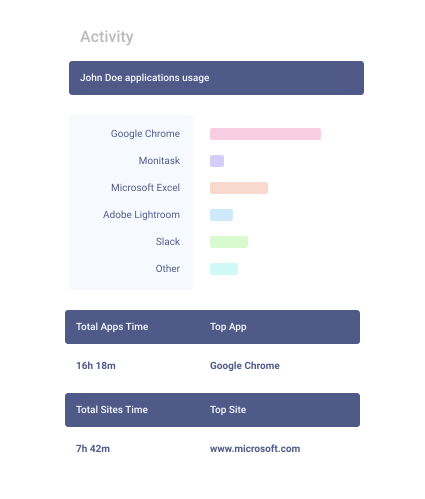
Websites & apps — which sites and applications were used, and for how long.
Time, attendance & idle time — hours worked, who’s online, and stretches with no input, with proof of work behind every entry.
Live dashboard — see who’s working right now and review activity as it happens.
Monitask focuses on the visibility you need for productivity — it does not log keystrokes or read the content of emails and chats.
Transparent by Default
Monitask is built around transparent, consent-based monitoring. The desktop app is installed with the employee’s permission, tracking runs only while they’re clocked in, and it stops the moment tracking is paused — nothing is captured after hours. Employees can see the same data their managers see.
That makes Monitask a fit for teams that want accountability and proof of work without heavy-handed surveillance. For the narrow cases where it’s legally required, Monitask also offers a separate stealth mode — but transparent monitoring is the default.
Keep Your Data Safe
Spot risky patterns — website and app reports surface unusual or non-work activity, with daily email summaries so nothing slips by.
Catch fake activity — Monitask’s mouse-jiggler detection flags idle time, unnatural cursor patterns and USB-device signals that fake presence, keeping your data honest.
Store data securely — captured data is held in encrypted storage, with role-based access so only authorized managers can view it.
Control what’s collected — turn screenshots or internet tracking on or off per employee, and blur sensitive screens.
Who It’s For
Remote & hybrid teams — see who’s working and how, without hovering over shoulders.
Agencies & consultancies — prove billable hours with screenshots and activity reports.
Software & BPO teams — spot bottlenecks and balance workload across distributed staff.
Managers & team leads — replace status-update meetings with objective, real-time data.
Simple Pricing
Start free — Monitask has a free plan and a 10-day trial, no credit card needed. Paid plans with full monitoring, reports and integrations start at $6.49 per user/month (billed annually). See full pricing →
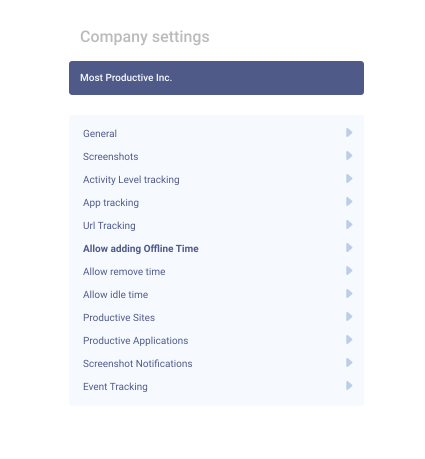
Monitask comes with a variety of settings, which are customizable for the whole organization or a single employee. Set an appropriate number of screenshots per hour, set who has access to view employee data, and turn on/turn off internet usage for employee.
It is crucial to only track what’s needed. If your employees work on sensitive data, you can always turn off screenshots or blur individual screenshots.
Unlike many other tools, Monitask is not spy software. This means that it can only be installed with the user’s permission. Internet, screenshots, time, and activity tracking is only available when an employee is using the desktop application and it is turned off outside of work hours.
We encourage all of our users not to use spy software and hidden tools. Instead, focus on productivity and responsible monitoring.
Use reports as a helpful guide
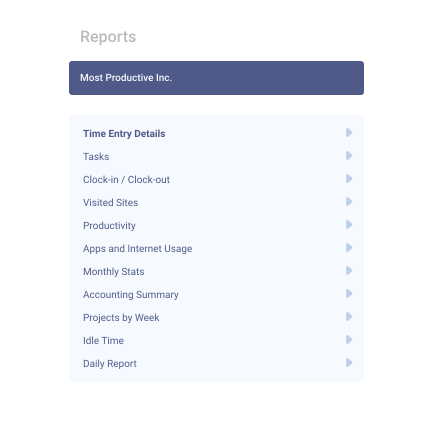
A variety of reporting features in Monitask can help with your day-to-day operations. Our favorite reports to use are:
Daily email report – This report sends summary email reports about the previous workday. They can be sent in the morning or at night, so you have peace of mind and know that all employees spent their day productively.
Time entry report – This is a great report if you want to slice and dice the data on tasks and time entries. Pro tip: Export to CSV to analyze even further and import it into your accounting software.
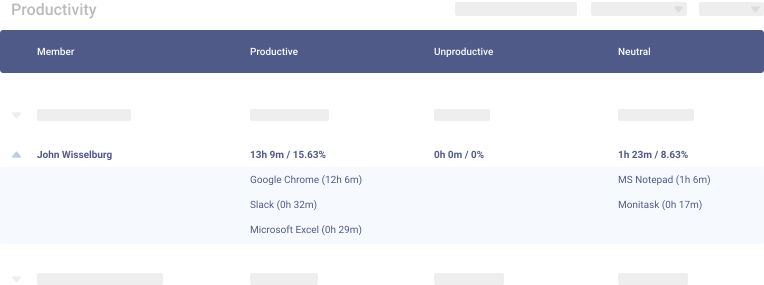
Apps and internet usage – Use this report to review websites visited by your team and view charts of time spent on different applications.
Communicate with your team
Be upfront with your team and explain how you will be utilizing Monitask. Make sure your team understands that Monitask doesn’t record keystrokes or sensitive data and only works when they start tracking time. As soon as time tracking is stopped, Monitask doesn’t transmit any data. Plus, all collected data is securely stored in enterprise-grade encrypted storage.
If you have any particular use cases or questions about implementing Monitask in your organization, you can always contact us so that we can share our best practices.
Monitask tracks time worked, activity levels, the websites and apps used, and captures periodic screenshots — all while an employee is clocked in. It gives managers a real-time view of how work time is spent, without logging keystrokes or reading message content.
By default, no. Monitask is transparent monitoring: it’s installed with the employee’s permission and only tracks during active work sessions. Monitask does offer a separate stealth mode for cases where it’s legally required, but transparent, consent-based monitoring is the default.
In the US, employers can generally monitor activity on company-owned devices, but you should inform employees first. Rules vary by country and state, so check local law and be transparent with your team. (General information, not legal advice.)
Yes. Settings are customizable per employee or for the whole organization: set how many screenshots per hour, blur or disable screenshots, turn internet tracking on or off, and control who can view the data. Data is stored in encrypted storage.
In accordance with our Privacy Policy, we use cookies on our website to give you the most relevant experience by remembering your preferences and repeat visits. By clicking “Accept”, you consent to the use of ALL the cookies.
This website uses cookies to improve your experience while you navigate through the website. Out of these, the cookies that are categorized as necessary are stored on your browser as they are essential for the working of basic functionalities of the website. We also use third-party cookies that help us analyze and understand how you use this website. These cookies will be stored in your browser only with your consent. You also have the option to opt-out of these cookies. But opting out of some of these cookies may affect your browsing experience.
Necessary cookies are absolutely essential for the website to function properly. These cookies ensure basic functionalities and security features of the website, anonymously.
Cookie
Duration
Description
cookielawinfo-checkbox-analytics
11 months
This cookie is set by GDPR Cookie Consent plugin. The cookie is used to store the user consent for the cookies in the category "Analytics".
cookielawinfo-checkbox-functional
11 months
The cookie is set by GDPR cookie consent to record the user consent for the cookies in the category "Functional".
cookielawinfo-checkbox-necessary
11 months
This cookie is set by GDPR Cookie Consent plugin. The cookies is used to store the user consent for the cookies in the category "Necessary".
cookielawinfo-checkbox-others
11 months
This cookie is set by GDPR Cookie Consent plugin. The cookie is used to store the user consent for the cookies in the category "Other.
cookielawinfo-checkbox-performance
11 months
This cookie is set by GDPR Cookie Consent plugin. The cookie is used to store the user consent for the cookies in the category "Performance".
viewed_cookie_policy
11 months
The cookie is set by the GDPR Cookie Consent plugin and is used to store whether or not user has consented to the use of cookies. It does not store any personal data.
Functional cookies help to perform certain functionalities like sharing the content of the website on social media platforms, collect feedbacks, and other third-party features.
Performance cookies are used to understand and analyze the key performance indexes of the website which helps in delivering a better user experience for the visitors.
Analytical cookies are used to understand how visitors interact with the website. These cookies help provide information on metrics the number of visitors, bounce rate, traffic source, etc.
Advertisement cookies are used to provide visitors with relevant ads and marketing campaigns. These cookies track visitors across websites and collect information to provide customized ads.