A work plan sets out what gets done, who owns each piece, by when, and at what cost. It sits below a project plan, which covers how the project is governed, and above an action plan, which drives a single goal. Seven steps below take you from agreed scope to a document your team can work from, with a template you can copy and a filled-in example to check yours against.
Key takeaways
- A work plan answers four questions: what work, whose work, by when, at what cost. If a line cannot answer one of them, it is not finished.
- An objective without a number is a goal. Both belong in the plan, in different fields.
- One named owner per task. Work assigned to a team is work assigned to nobody.
- Write what is out of scope before you write what is in. The exclusions are what you point at in week six.
- A two-week task with one owner does not need a work plan. It needs a deadline.
What a Work Plan Is, and What It Is Not
A work plan is the working document a team executes from once scope is agreed. It holds the goal, the measurable objectives, what is in and out of scope, the tasks, their owners, dates, estimates and the named risks.
Three documents get confused with each other. The difference is how much they cover.
| Document | What it covers | When you write it |
|---|---|---|
| Project plan | The whole project including governance, communication, approvals and change control | At initiation, before work is committed |
| Work plan | The work itself: tasks, owners, dates, estimates, risks | Once scope is agreed |
| Action plan | The steps to reach one specific goal | Whenever a single goal needs driving |
Most people searching for a work plan want the middle one. If you are being asked for something to hand to a team, it is this.
Boost your business productivity
Track performance and streamline teamwork
Three Types of Work Plan
The word covers three different documents, and the template you need depends on which one you are writing.
| Type | Covers | Time frame | Owner |
|---|---|---|---|
| Project work plan | One project from start to delivery | The length of the project | Project lead |
| Team or annual work plan | A department’s objectives and the work behind them | A quarter or a year | Team lead or manager |
| Individual work plan | One person’s priorities and individual development | A month to a quarter | The employee, agreed with their manager |
They share a skeleton — objectives, tasks, owners, dates — and differ in what sits at the top. A project plan starts from a deliverable. An annual plan starts from organisational objectives and works down. An individual plan starts from a role and a development conversation.
The steps below are written for a project work plan, because it is the most demanding of the three. Strip out what you do not need for the other two.
The Seven Steps
1. Write one goal, then the objectives that prove it
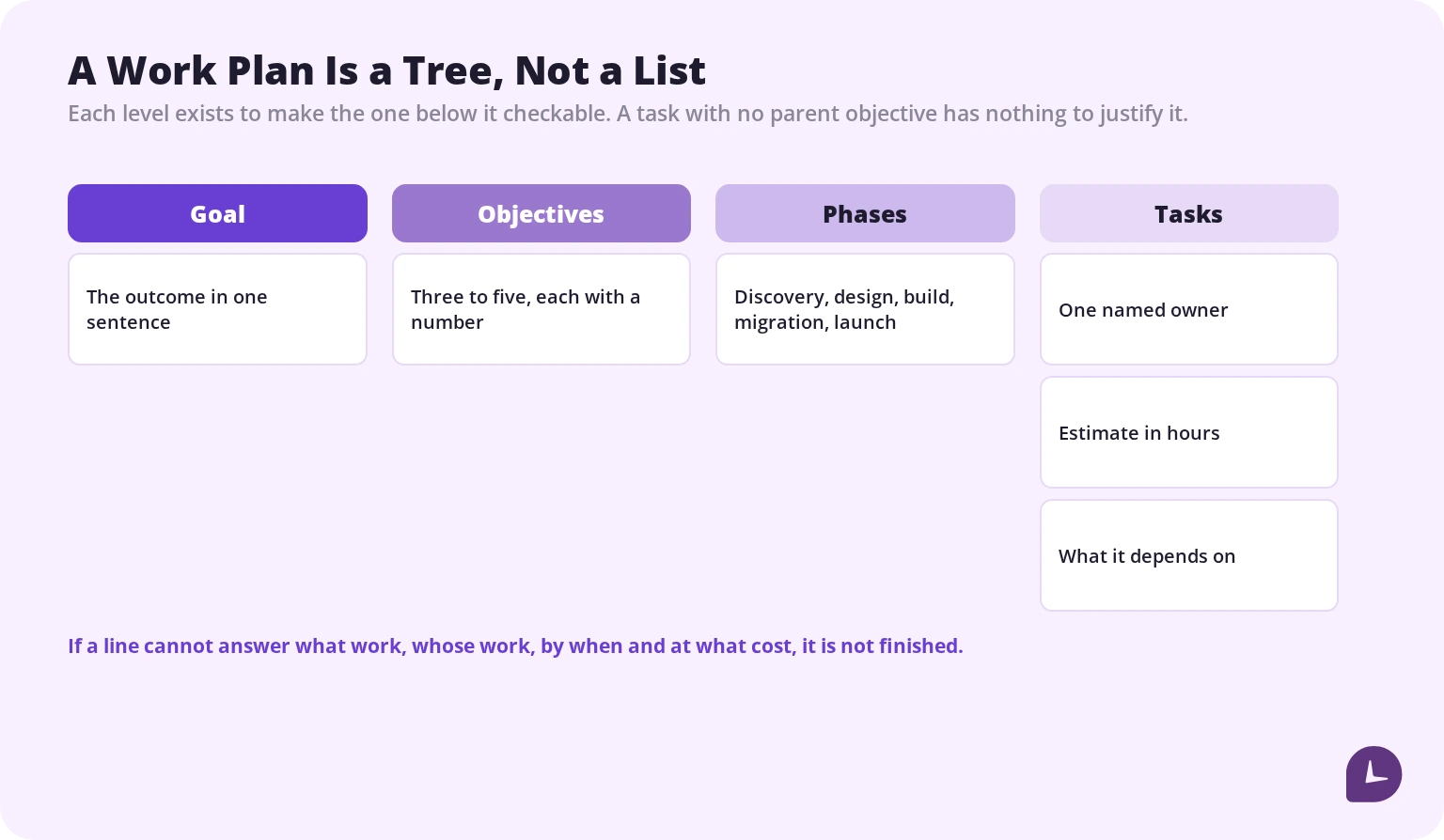
The goal is the outcome in a sentence. The objectives are how you will know you reached it, and each one needs a number — the same discipline behind SMART goals.
“Redesign the client portal” is a goal. “Ship 9 screens and migrate 4,200 user accounts with no data loss by 14 November” is an objective. If a line has no number in it, it belongs in the goal field, not the objectives field. Three to five objectives is the working range — more than that and nobody remembers them.
2. Write what is out of scope first
Counter-intuitive and the single most useful habit in this list. Everyone writes what they are delivering. Almost nobody writes what they are not, which is the list you need in week six when a request arrives that nobody agreed to.
Be specific where the boundary is fuzzy: how many revision rounds are included and what the next one costs, what counts as a bug fix versus a new feature, whether training is included or billed.
3. Break work down until you can estimate it
If you cannot put an hours figure on a task, it is still a phase and needs breaking down further. “Build the reporting module” is a phase. “Build the export-to-CSV function” is a task.
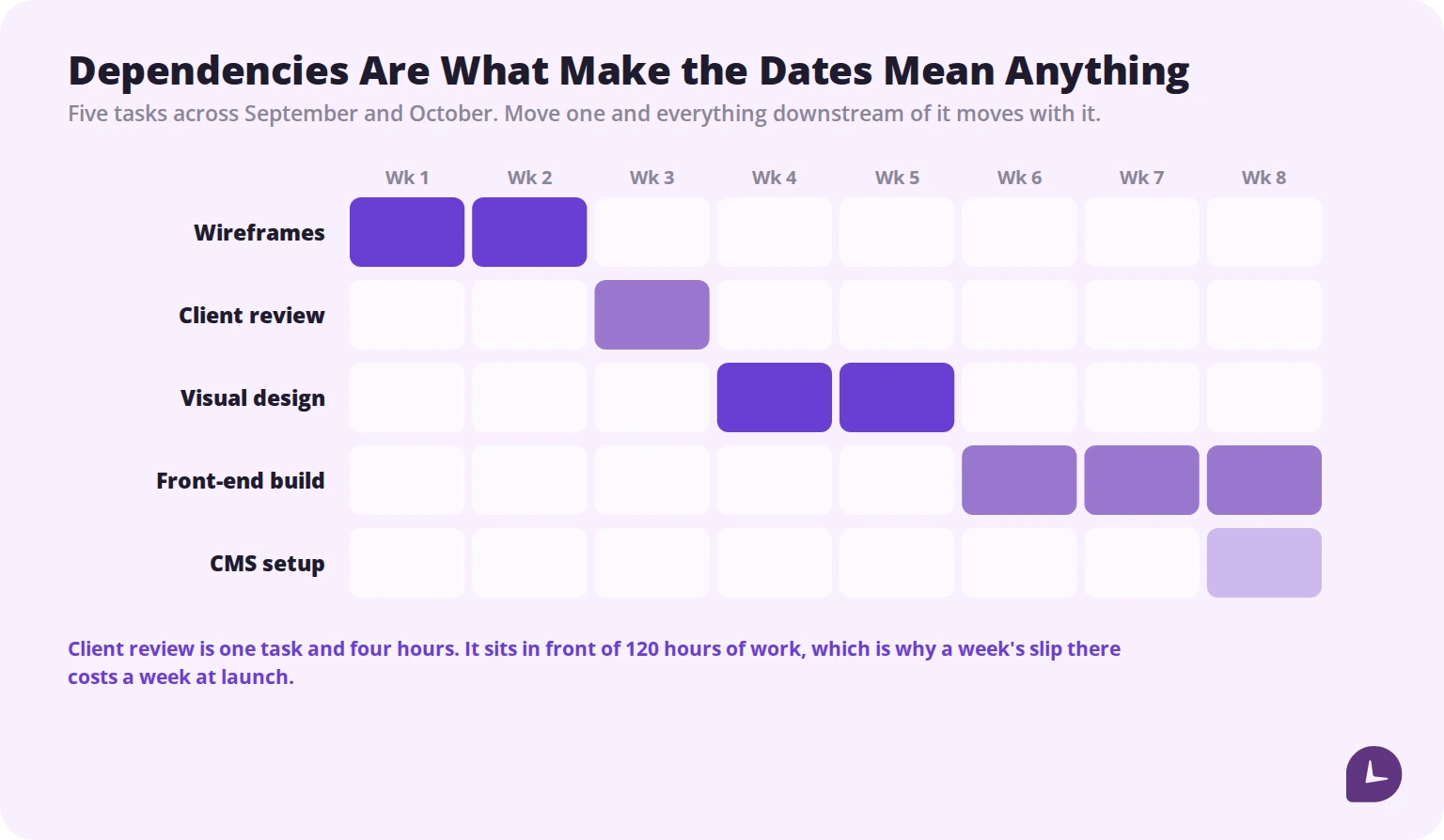
Group tasks into phases, set project milestones at the end of phases rather than on individual tasks, and mark which tasks wait on which. Dependencies are what make the dates mean anything — without them every task looks like it could start on day one, which is what a Gantt chart exists to show.
4. Assign one named owner per task
One person, by name, for every task. Work assigned to “the design team” or “engineering” is work that everybody assumes somebody else picked up.
List approvers separately from owners. Approving and delivering are different jobs, and conflating them is how a plan ends up with a task that has been “in review” for three weeks with no named reviewer.
Before you commit a name, check what else that person is committed to. A plan that assumes full availability from someone already booked is fiction from day one, which makes this a workload management question as much as a planning one.
5. Estimate in hours, against named tasks
Hours rather than days, because a day hides slack and an hour does not. Estimate against tasks rather than phases — a phase-level estimate tells you the total and nothing about where the total goes.
Add the lines that get forgotten: review and revision time, handover, licences and tooling, and a contingency of roughly ten to fifteen percent. If contingency feels like padding, look at the last three projects and check what the overrun actually was.
6. Write each risk as a sentence you could be wrong about
A risk needs three parts: a trigger, an impact and a response. “Delays are possible” has none of them and belongs nowhere.
“If client sign-off slips past 12 March, the build starts a week late and launch moves to April. Response: hold a provisional review on 8 March.” That is a risk, and the response is what makes it worth writing. Two real risks are worth more than twenty generic ones.
7. Set the review cadence before you need it
Pick the day and time at kickoff, not when something goes wrong. At each review compare planned against actual on both dates and hours — that comparison is the review. Collecting status updates is not.
The Work Plan Template
Copy both tables into a document or a spreadsheet and replace the example text. The structure survives a paste into Google Docs, Word or Sheets.
| Field | What goes in it |
|---|---|
| Project and dates | The client or team, the piece of work, start and end dates |
| Goal | The outcome in one sentence |
| Objectives | Three to five measurable outcomes, each with a number |
| In scope | Everything you are delivering |
| Out of scope | Everything you are not, especially where the boundary is fuzzy |
| Owner | One name, accountable for delivery |
| Approver | One name, usually client or stakeholder side |
| Budget | Total hours or fee, whichever you bill on |
| Review cadence | Day, time and who attends |
One row per task. The example row shows what belongs in each column.
| Phase | Task | Owner | Start | Due | Depends on | Est. hrs | Status |
|---|---|---|---|---|---|---|---|
| Design | Client review round 1 | Sarah Whitfield | 15 Sep | 19 Sep | Page layouts | 4 | In progress |
Get more out of your business.
Start Your 10-Day Trial
A Filled-In Example
The same project, written as a work plan. Fictional, but the level of detail is the point.
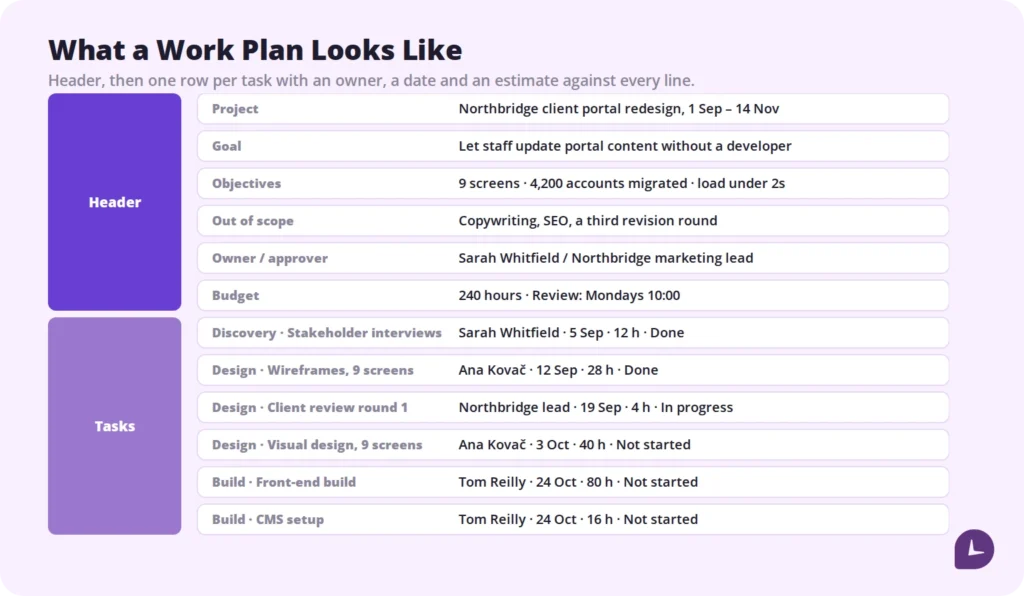
Project: Northbridge client portal redesign, 1 September to 14 November
Goal: Let Northbridge staff update portal content without a developer
Objectives: 9 screens shipped; 4,200 accounts migrated with no data loss; page load under 2 seconds on the three highest-traffic screens
In scope: UX, visual design, front-end build, CMS setup, account migration, two revision rounds, one training session
Out of scope: Copywriting, ongoing SEO, a third revision round, support after 14 November
Owner: Sarah Whitfield · Approver: Northbridge marketing lead
Budget: 240 hours · Review: Mondays 10:00, Sarah and the Northbridge lead
| Phase | Task | Owner | Start | Due | Depends on | Est. hrs | Status |
|---|---|---|---|---|---|---|---|
| Discovery | Stakeholder interviews | Sarah Whitfield | 1 Sep | 5 Sep | None | 12 | Done |
| Design | Wireframes, 9 screens | Ana Kovač | 8 Sep | 12 Sep | Stakeholder interviews | 28 | Done |
| Design | Client review round 1 | Northbridge lead | 15 Sep | 19 Sep | Wireframes | 4 | In progress |
| Design | Visual design, 9 screens | Ana Kovač | 22 Sep | 3 Oct | Review round 1 | 40 | Not started |
| Build | Front-end build | Tom Reilly | 6 Oct | 24 Oct | Visual design | 80 | Not started |
| Build | CMS setup | Tom Reilly | 20 Oct | 24 Oct | None | 16 | Not started |
| Migration | Account migration, 4,200 records | Tom Reilly | 27 Oct | 31 Oct | CMS setup | 24 | Not started |
| Launch | Training session | Sarah Whitfield | 10 Nov | 10 Nov | Migration | 4 | Not started |
Risk: If review round 1 slips past 19 September, visual design starts late and launch moves. Response: provisional review booked for 17 September.
Audit Your Draft
Seven failure modes account for most work plans that look complete and do not survive contact with the project. Check yours against them.
| In the draft | Why it fails | Fix |
|---|---|---|
| “Deliver a great new portal” | Cannot be tested at handover, and cannot be argued with either | State an outcome someone can verify |
| “Fast, modern, easy to update” as objectives | Opinions, not measurements | Put a number on each, or move them to the goal |
| Out of scope: “anything not in the proposal” | The proposal has the same gap | List the specific exclusions |
| Owner: “Design team” | Shared responsibility is nobody’s responsibility | One name per task |
| Depends on: “Kickoff” | Names a phase, so you cannot tell what is blocking | Name the specific task |
| Est.: “2 weeks” | A week hides forty hours of slack | Hours, against a task small enough to estimate |
| Every status reads “On track” | Stays that way until the week it does not | Use four states: Not started, In progress, Blocked, Done |
The last one is worth dwelling on. “On track” is the status people use when they have not checked. A “Blocked” state that somebody has to actively choose surfaces problems a fortnight earlier than a traffic-light system does.
How to Estimate When You Have Nothing to Estimate From
Every guide says estimate in hours. None of them says what to do the first time, when you have no idea. Three methods, in order of preference.
Look at what a similar task actually took. Not what it was estimated at — what it took. This is the best method available and it requires having recorded the hours, which is why it is unavailable to most teams.
Ask the person who will do the work, then ask for the worst case. The gap between their estimate and their worst case is your real uncertainty. If the worst case is triple the estimate, the task is not understood well enough to plan yet.
Estimate three points and weight them. Best case, likely case, worst case, then weight the likely case most heavily. Crude, and considerably better than a single guess.
Whichever you use, record the estimate and the actual. After three projects you will have the first method available, and the first method is worth more than any technique.
When the Plan Starts Drifting
Every plan diverges from reality. The plan’s job is to make the divergence visible early enough to choose a response, and there are only three.
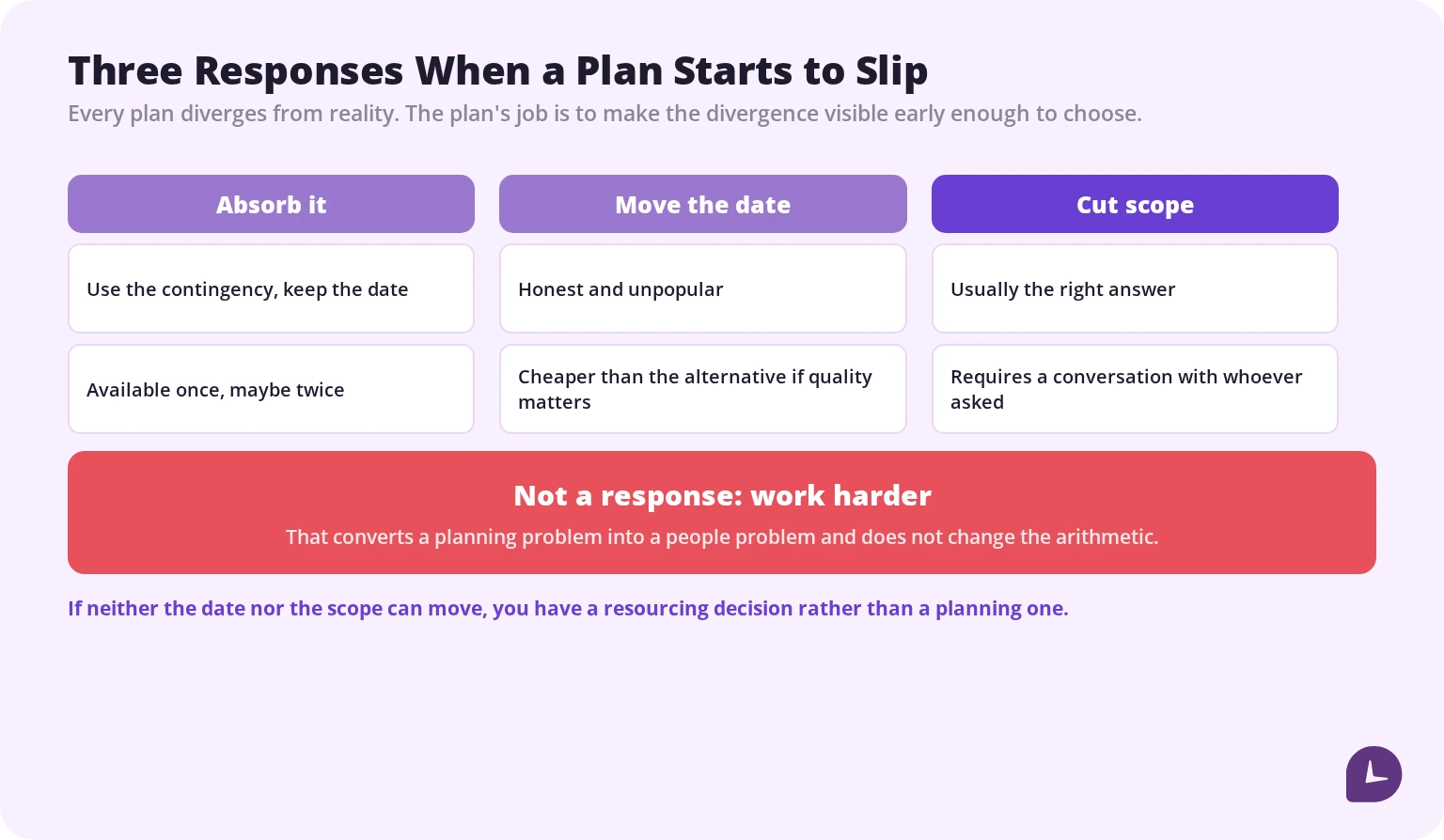
- Absorb it. Use the contingency, keep the date. Available once, maybe twice.
- Move the date. Honest, unpopular, and cheaper than the alternative if quality matters. Where the date is what has to give, it usually means you need to prioritise tasks rather than reschedule all of them.
- Cut scope. Usually the right answer and the least used, because it requires a conversation with whoever asked for the work.
What is not a response: telling the team to work harder. That converts a planning problem into a people problem and does not change the arithmetic.
The choice depends on what is fixed. If the date is immovable, cut scope. If the scope is contractual, move the date. If neither can move, you have a resourcing decision rather than a planning one, and it needs to go up rather than sideways.
Comparing the Plan to What Actually Happened
A work plan is a set of predictions. Without a record of what actually happened, every project starts estimating from scratch — which is what productivity reporting is for at the project level rather than the person level.
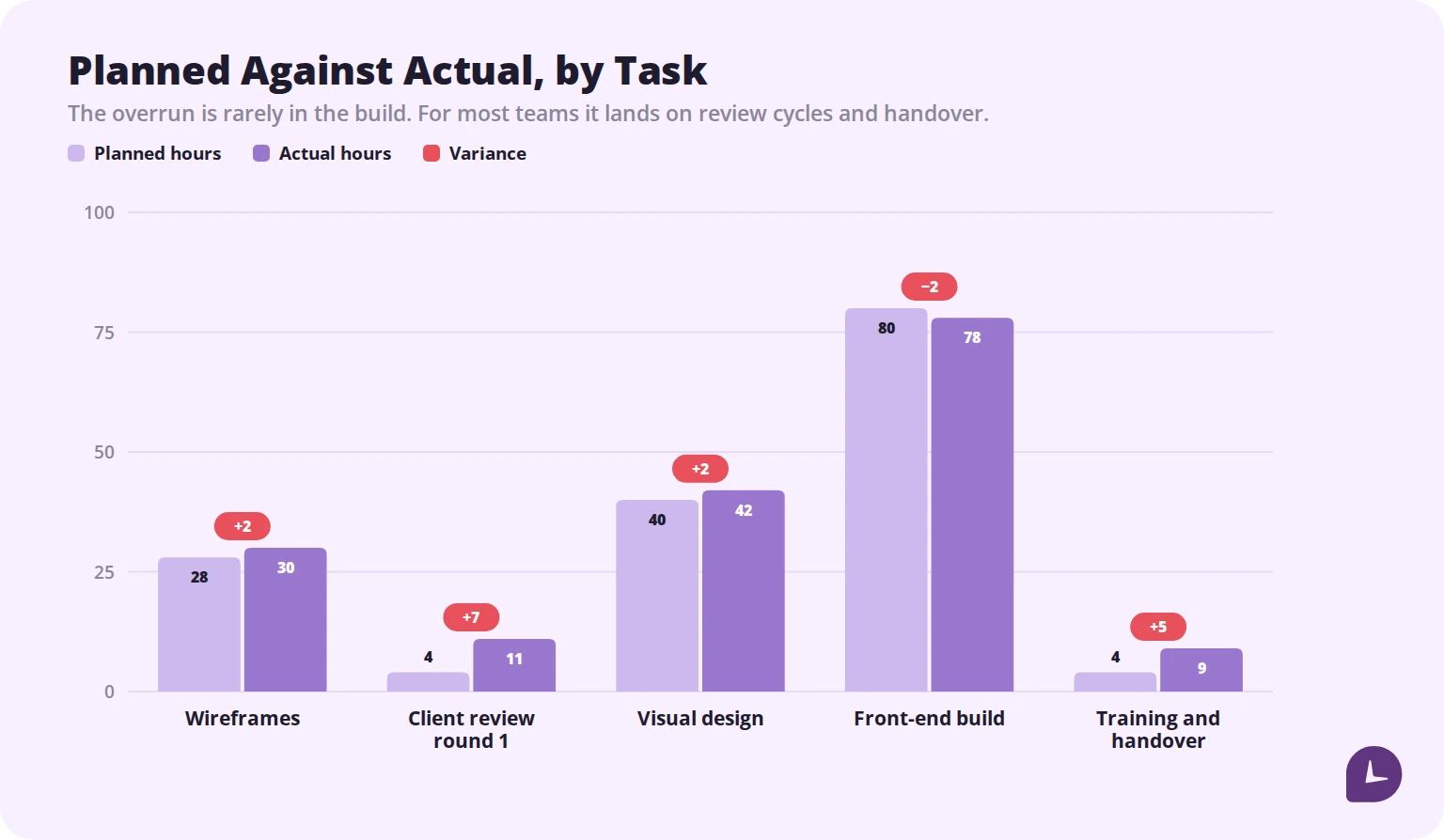
At each review, put planned hours next to actual hours per task. Three things come out of that comparison. You find out which tasks you systematically underestimate — for most teams it is review cycles and handover, not the work itself. You see overruns while they are still small. And you build the reference data that makes the next plan’s estimates real rather than hopeful.
This only works if hours are recorded as the work happens. Reconstructed at month end, they tell you what people remember, which is not the same thing. Automatic time tracking by project and task produces the comparison without anyone maintaining a spreadsheet.
When You Do Not Need a Work Plan
Worth saying, because planning overhead is real. A two-week piece of work with one owner and one deliverable does not need a plan. It needs a deadline and a note of what “done” means.
The threshold is roughly this: more than one person, more than a month, or money attached. Below that, a work plan is a document you write and nobody opens.
Key Takeaways
Write the plan so every line can be checked. Numbered objectives, one named owner per task, estimates in hours against tasks small enough to estimate, dependencies that make the dates mean something, and a written response beside each risk.
Then compare it to what happened. The plan makes the project visible; the comparison is what makes the next plan accurate. Monitask records hours by project and task automatically, so planned against actual is a report rather than an exercise. Try it on a 10-day free trial, no card required.
Reliable employee tracking software. Clear visibility and insights into how employees work. Even remotely.
Try Monitask free for 10 days
FAQ
What is the difference between a work plan and a project plan?
A project plan covers the whole project including governance, communication and change control. A work plan covers the work itself — tasks, owners, dates, estimates and risks. The project plan is written at initiation; the work plan once scope is agreed.
What should a work plan include?
Project name and dates, one goal, three to five measurable objectives, what is in scope, what is out of scope, a task table with owners and dependencies, estimates in hours, a budget, named risks with responses, and a review cadence.
How long should a work plan be?
Short enough that people read it. One page for the header and one screen of tasks per phase is a workable limit. A plan nobody opens after week one has failed regardless of how complete it is.
What is the difference between goals and objectives in a work plan?
The goal is the outcome stated in a sentence. Objectives are how you will know you reached it, and each one carries a number. “Redesign the portal” is a goal; “ship 9 screens by 14 November” is an objective.
How do I estimate tasks I have never done before?
Ask the person who will do the work for both an estimate and a worst case — the gap between them is your real uncertainty. Then record the estimate and the actual, so the next plan has reference data instead of guesses.
What do I do when the plan slips?
Choose one of three: absorb it using contingency, move the date, or cut scope. Which one depends on what is genuinely fixed. Telling the team to work harder is not one of the three.
Do small projects need a work plan?
Not usually. A two-week piece of work with one owner needs a deadline and a definition of done. Plans earn their overhead at roughly more than one person, more than a month, or where money is attached.